1OM-1064-002.pdf - 第170页
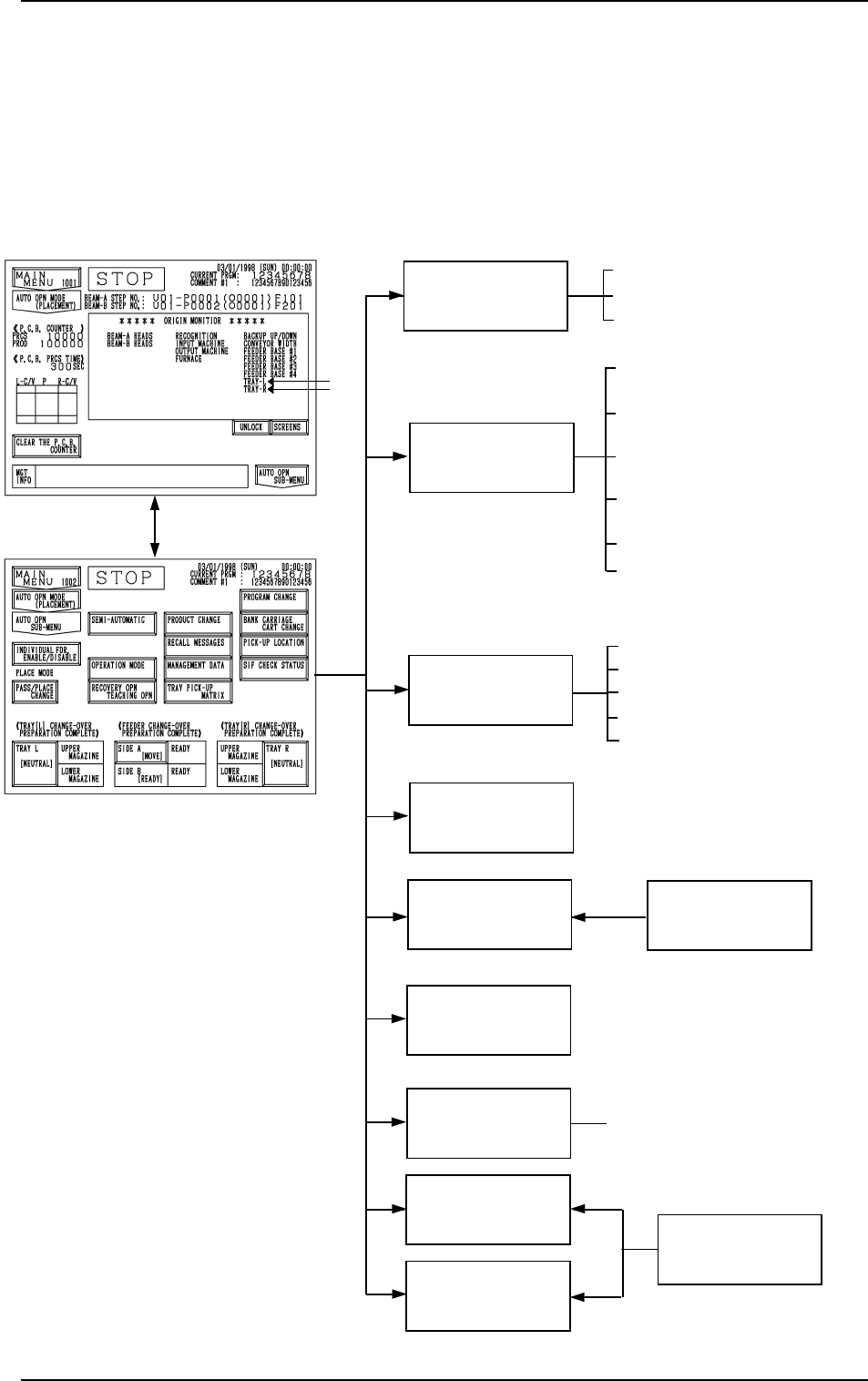
1. Hierarchical Structure of Automatic Operation Dis- plays Automatic operation menus are described in the following hierarchical struc- ture. The number in ( ) shows item Nos. to be referred to in the instruction manual…

Section 3
Automatic Operation Menus
9910-001 3-1 Tg0246-PM-OP
1. Hierarchical Structure of Automatic Operation Dis-
plays
Automatic operation menus are described in the following hierarchical struc-
ture.
The number in ( ) shows item Nos. to be referred to in the instruction manual.
RECALL
MESSAGES
MANAGEMENT
DATA
PRODUCT
CHANGE
TEACH OFFSET
RECOVERY OPN.
TEACHING OPN.
OPERATION MODE
SEMI-AUTOMATIC
OPERATION
(4. in Section 3)
(5. in Section 3)
(6. in Section 3)
(4. in Section 4)
[AUTO OPN. SUB-MENU]
Key
SPECIAL SEL.
(Section 3 in Volume 4)
• FULL AUTO CONT [STRAT]
• FULL AUTO STEP [MOVE]
• 1 CMPNT PLACE [MOVE]
• ALTERNATE MODE
• CONVEYOR WIDTH
: Options
TRAY PICK-UP
MATRIX (Option)
(7. in Section 3)
PICK-UP
LOCATION
• CURRENT PROGRAM
• COMPONENT LIBRARY EDIT
• COMP. CARRIAGE DATA EDIT
• FEEDER (B) OFFSET
• CURRENT PROGRAM PLACE-
MENT DATA SORTING
(Item 6. of Section 3 in Volume 4)
PROGRAM
CHANGE
(3. in Section 4)
• COMPONENT MISSING CHECK
MODE
• AUTOMATIC FEEDER AXIS
ADJ. MODE
• OVERALL TACT TIME REDUC
TION
• RECOG MONITOR DISPLAY
MODE
• P.E.C. MANUAL ALIGNMENT
MODE
1. Hierarchical Structure of Automatic Operation Displays
0103-003 3-2 Tg0246-PM-OP
2. AUTO OPN MODE (PLACEMENT) Display
2. AUTO OPN MODE (PLACEMENT) Display
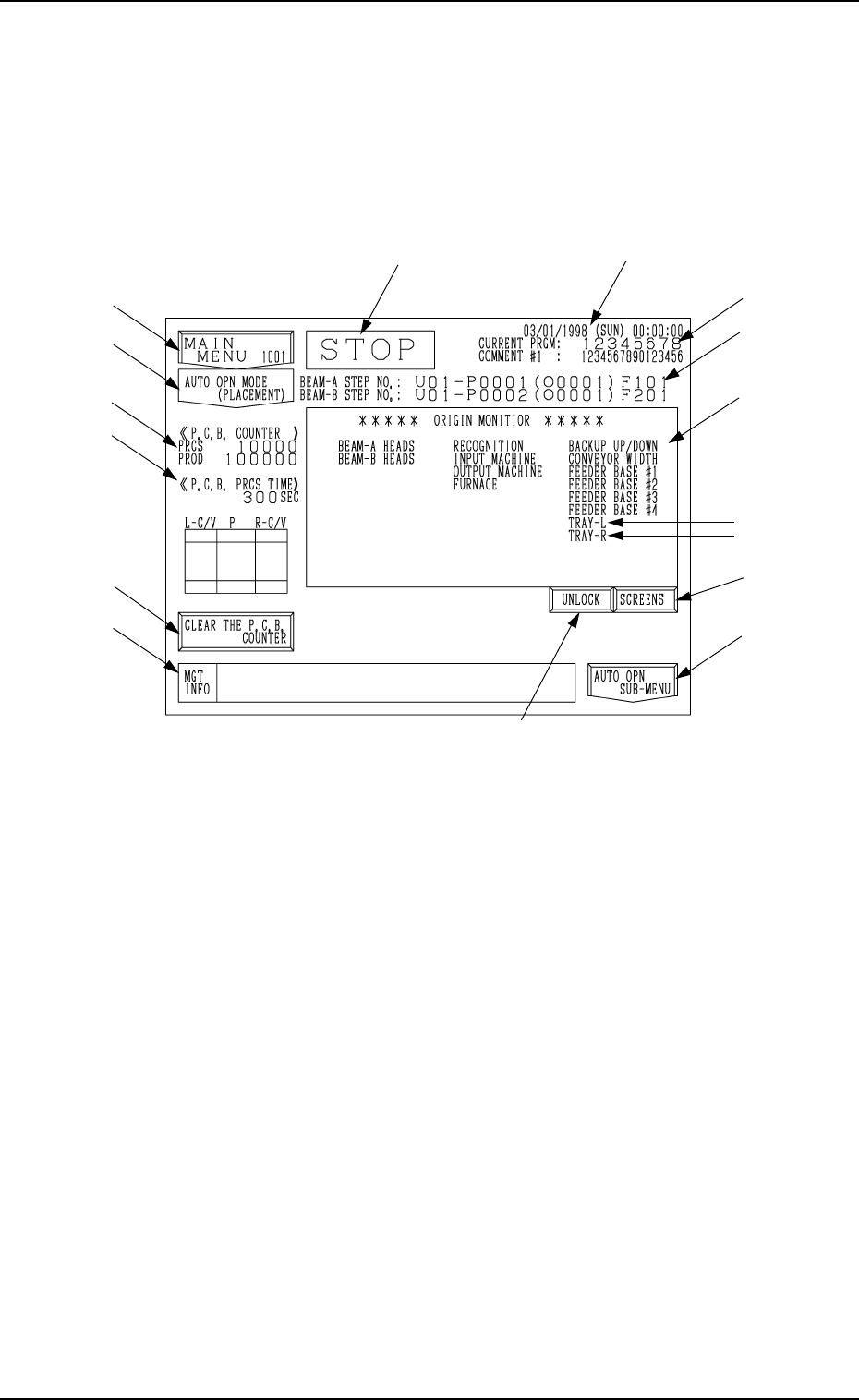
When the [AUTO OPN MODE] key is pressed at the “MAIN MENU” display,
the following display appears on the screen.
Automatic operation of the machine can only be started while this dis-
play is active.
Note: The -marked items are optional.
Fig. 3.1
*1 Current Date and Time
*2 Current Program Name and Comment #1
*3 Step and Feeder Nos. of Placed Component
Indicated are the placement step Nos. for the heads on Beams A and B.
“U01” represents the U-No. (block No.) of the current pattern program
(program being executed).
“O0001” is a repetitive pattern No. and appears only when repetitive pat-
terns are set.
*4 Current Operation Mode
(RUN, PAUSE, STOP, or WAIT)
*5 [MAIN MENU] Key
When this key is pressed, the “MAIN MENU” display appears on the
screen.
0103-003 3-3 Tg0246-PM-OP
*1
*4
*14
*3
*11
*9
*10
*8
*7
*6
*5
*2
*12
*13