1OM-1064-002.pdf - 第202页
6. RECOVERY OPN. TEACHING OPN. Display 9910-001 3-33 Tg0246-PM-OP *5 [CURRENT PROGRAM PL. DA T A SORTING] Key When this key is pressed, the “PLACEMENT DA T A SOR TING” display appears on the screen, enabling the sort…
6. RECOVERY OPN. TEACHING OPN. Display
9910-001 3-32 Tg0246-PM-OP
6. RECOVERY OPN. TEACHING OPN. Display
Menus are provided to edit or correct pattern program data, edit component
library data, change the feeding angle of a packaged component, and check
feeder (B) offset data.
When the [RECOVERY OPN TEACHING OPN] key is pressed at the “AUTO
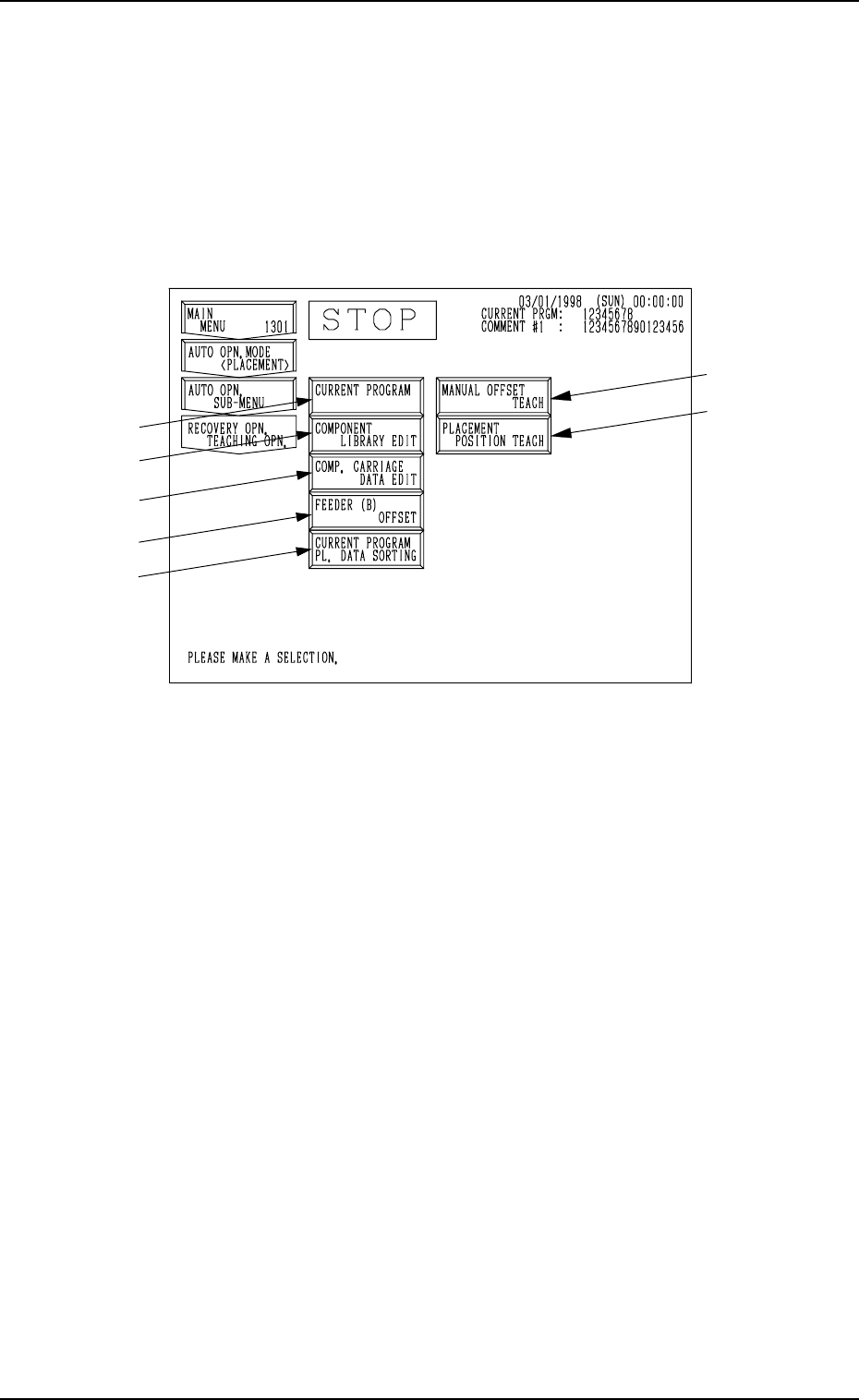
OPN. SUB-MENU” display, the following display appears on the screen.
Note: The -marked items are optional.
Fig. 3.16
*1 [CURRENT PROGRAM] Key
When this key is pressed, the “PATTERN PROGRAM EDIT” display ap-
pears on the screen, enabling the correction and editing of the current pat-
tern program data.
*2 [COMPONENT LIBRARY EDIT] Key
When this key is pressed, the “COMPONENT LIBRARY” display ap-
pears on the screen, enabling the correction of the component library data.
*3 [COMP. CARRIAGE DATA EDIT] Key
When this key is pressed, the “COMPONENT CARRIAGE DATA EDIT”
display appears, enabling the alteration of the component carriage data. When
component packaged equally cannot be prepared for component replenish-
ment and components of the same type but packaged differently in direction
or packaging type (Example: a packaging type changed from a paper to an
embossed tape) must be supplied, this function enables the continuous op-
eration temporarily after replenishment of such components.
*4 [FEEDER (B) OFFSET] Key
When this key is pressed, the “FEEDER (B) OFFSET” display appears on
the screen, enabling the confirmation and editing of the feeder (B) offset
data. This is the same display which appears when the [FEEDER (B) OFF-
SET] key is selected at the “OFFSET DATA” display (the display located
hierarchically below the “DATA EDIT” display).
*1
*2
*3
*4
*5
6. RECOVERY OPN. TEACHING OPN. Display
9910-001 3-33 Tg0246-PM-OP
*5 [CURRENT PROGRAM PL. DATA SORTING] Key
When this key is pressed, the “PLACEMENT DATA SORTING” display
appears on the screen, enabling the sorting of placement order.
Refer to “2.1.4 PLACEMENT DATA SORTING Display and 4.1.3 PLACE-
MENT DATA SORTING Display of Section 2 in Volume 2” for details.
6.1 PATTERN PROGRAM EDIT Display
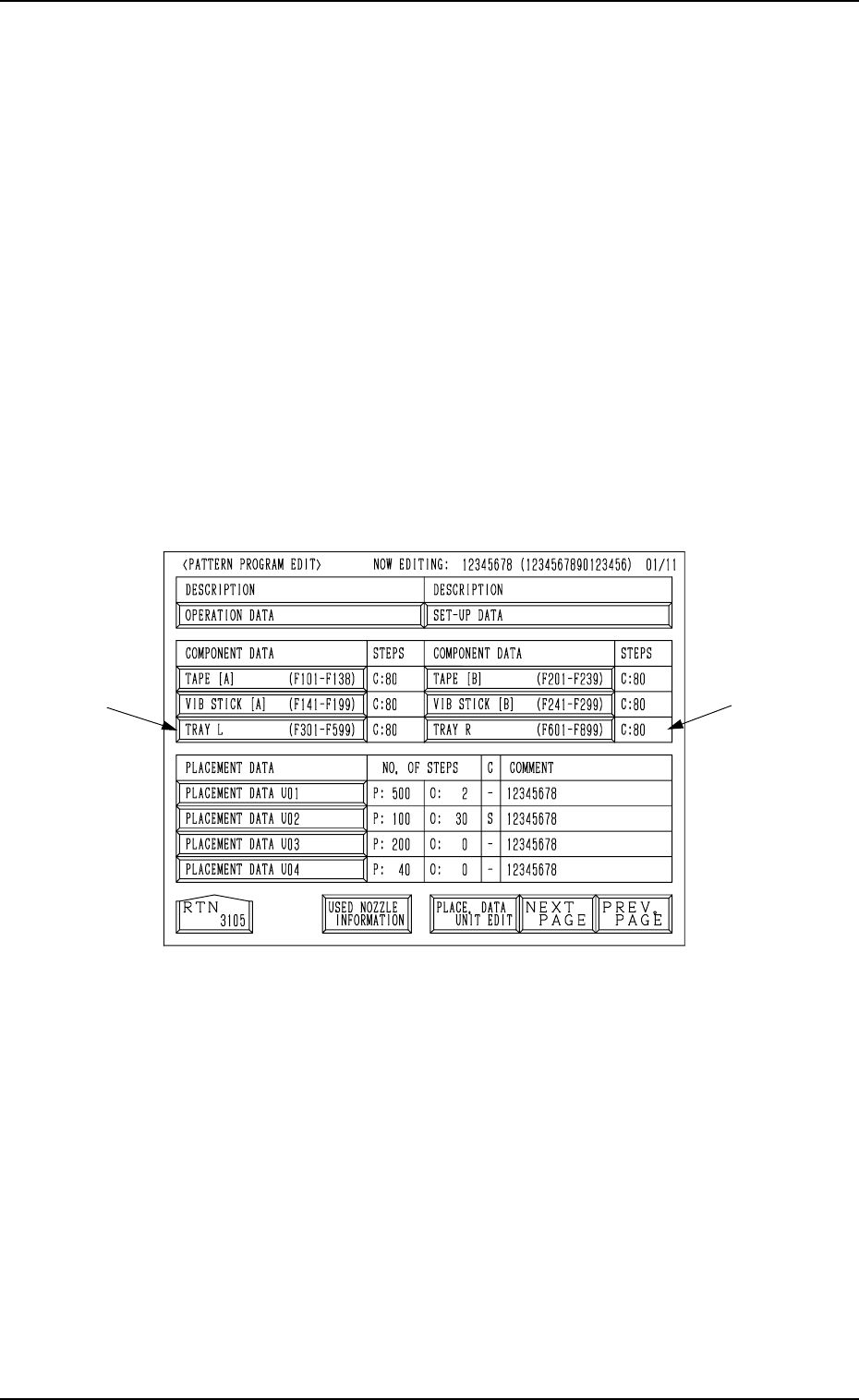
When the [CURRENT PROGRAM] key is pressed at the “RECOVERY OPN.
TEACHING OPN.” display, the following display appears on the screen.
Notes: (a) When the machine is set in the “RUN”, “WAIT”, or “PAUSE”
mode, the data save operation (saving of changed setting) can-
not be performed. The displayed parameters can only be referred
to.
(b) The -marked functions are optional.
Fig. 3.17
Refer to “4. PATTERN PROGRAM Display of Section 2 in Volume 2” for
details.
6. RECOVERY OPN. TEACHING OPN. Display
9910-001 3-34 Tg0246-PM-OP
6.2 COMPONENT LIBRARY Display
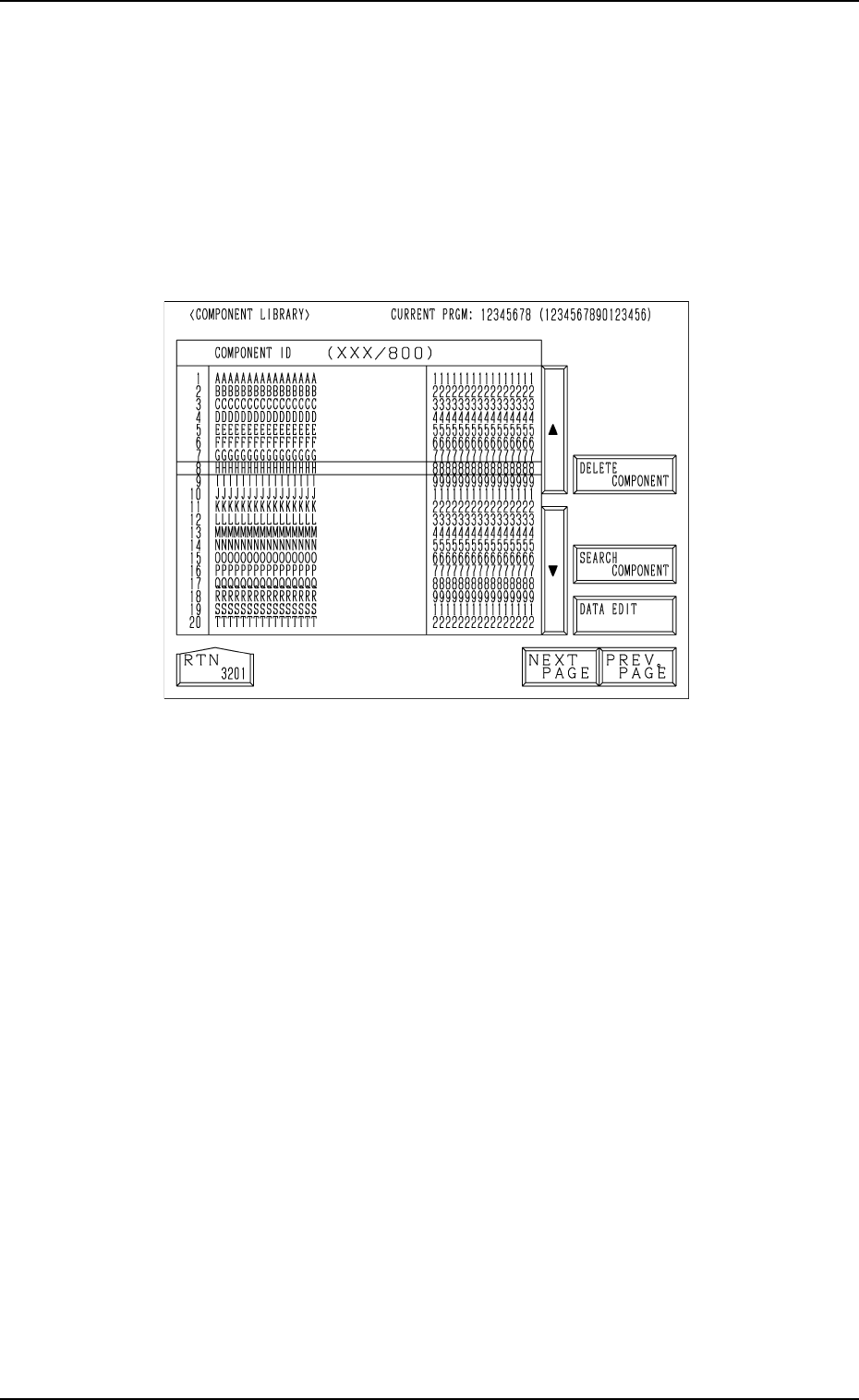
When the [COMPONENT LIBRARY EDIT] key is pressed at the “RECOV-
ERY OPN. TEACHING OPN.” display, the following display appears on the
screen.
Note: When the machine is set in the “RUN”, “WAIT”, or “PAUSE” mode,
the data save operation (saving of changed setting) cannot be performed.
The displayed parameters can only be referred to.
Fig. 3.18
Move the line cursor to the component ID to be corrected and press the [DATA
EDIT] key. The “COMPONENT LIBRARY EDIT” display appears on the
screen.
Refer to “Chapter 3 “Component Library” Displays in COMPONENT LI-
BRARY” for details.