1OM-1064-002.pdf - 第236页
[BACKUP UP/DOWN AXIS ZERO POSITION MOVE] Key When this key is selected and the [MOVE] button is pressed, the backup base moves to the origin position. [P .C.B. LOCA TING SIDE CLAMP] Key When this key is selected and the …
First Page
A P.C.B. can be transferred manually and the backup base can be cycle-oper-
ated.
[TRANSFER] Key
When this key is selected and the [MOVE] button is pressed, a P.C.B. can
be transferred or discharged.
When there is a P.C.B. on the input conveyor, it is transferred onto the P
conveyor. When a P.C.B. is located on the P conveyor, it is discharged to
the output conveyor.
When there are P.C.B.’s on both the input and P conveyors, both transfer
and discharge actions take place in succession.
[BACKUP UP/DOWN AXIS LOCATE POSITION MOVE] Key
When this key is selected and the [MOVE] button is pressed, the backup
base moves to the positioning place.
[BACKUP UP/DOWN AXIS WAIT POSITION MOVE] Key
When this key is selected and the [MOVE] button is pressed, the backup
base moves to the standby position.
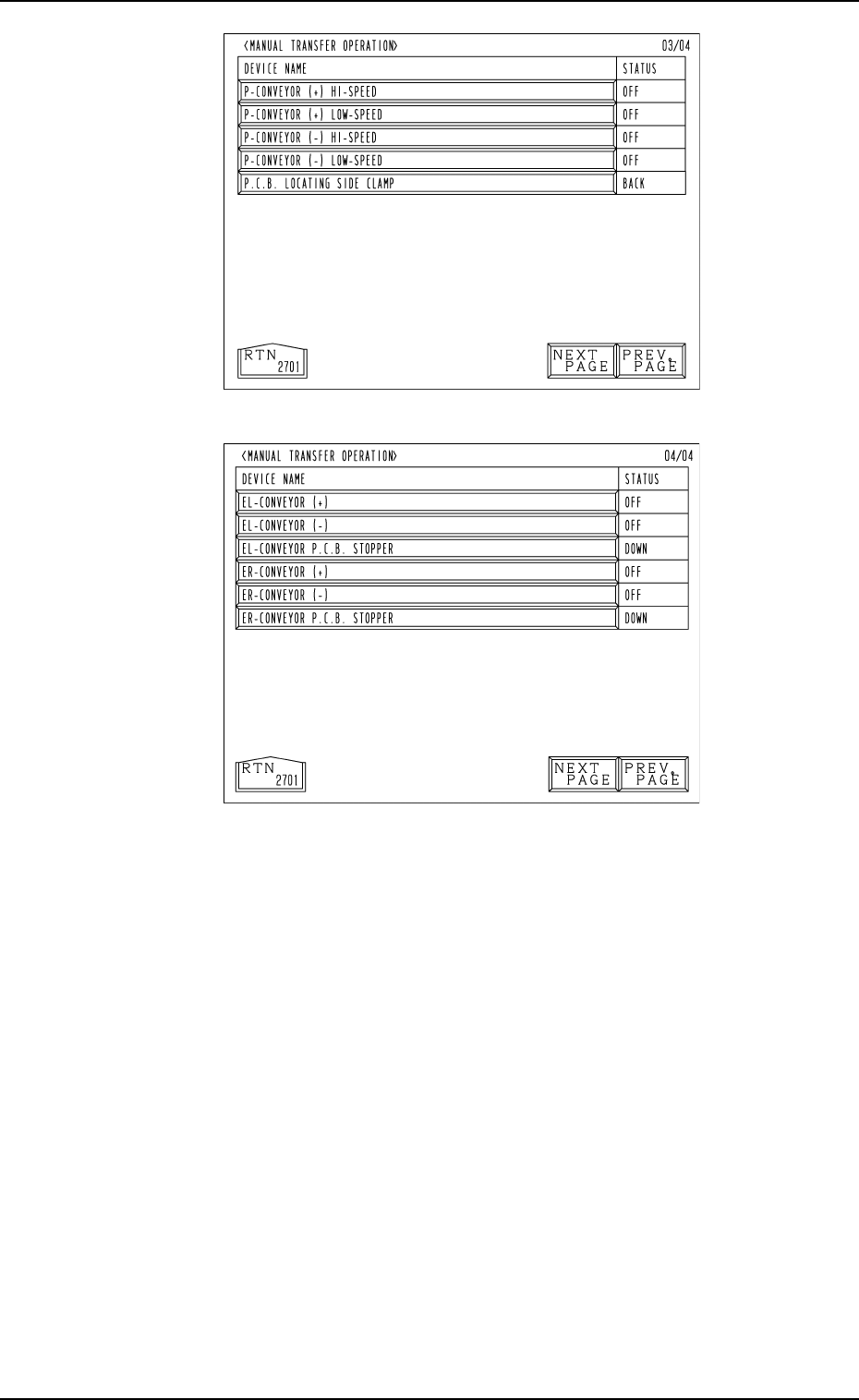
Fig. 4.11-3
Fig. 4.11-4
Fourth Page
(Option)
Third Page
8. Manual Transfer Operation
9910-001 4-19 Tg0246-PM-OP

[BACKUP UP/DOWN AXIS ZERO POSITION MOVE] Key
When this key is selected and the [MOVE] button is pressed, the backup
base moves to the origin position.
[P.C.B. LOCATING SIDE CLAMP] Key
When this key is selected and the [MOVE] button is pressed, the P.C.B.
locating side clamp is activated.
P.C.B.-T [ ], [ ] key
The value for the positioning location can be set when a P.C.B. is trans-
ferred manually. Every time the [ ] or the [ ] key is pressed, the parameter
increases or decreases in the increment or the decrement of 0.01 mm.
This value is not reflected on the automatic operation.
P.C.B. WAIT POSITION [ ], [ ] key
A parameter representing the standby position can be set when a P.C.B. is
transferred manually.
Press the [ ] or the [ ] key to select “WAIT POS. 1”, “WAIT POS. 2”, or
“WAIT POS. 3”.
This setting is not reflected on the automatic operation.
Second Page
Cycle operations related to the L and R conveyors can be performed.
[L-CONVEYOR (+) HI-SPEED] Key
When this key is selected and the [MOVE] button is pressed, the L con-
veyor moves forward at high speed.
[L-CONVEYOR (+) LOW-SPEED] Key
When this key is selected and the [MOVE] button is pressed, the L con-
veyor moves forward at low speed.
[L-CONVEYOR (-) HI-SPEED] Key
When this key is selected and the [MOVE] button is pressed, the L con-
veyor moves backward at high speed.
[L-CONVEYOR (-) LOW-SPEED] Key
When this key is selected and the [MOVE] button is pressed, the L con-
veyor moves backward at low speed.
[L-CONVEYOR P.C.B. STOPPER] Key
When this key is selected and the [MOVE] button is pressed, the P.C.B.
stopper of the L conveyor moves up or down.
[R-CONVEYOR (+) HI-SPEED] Key
When this key is selected and the [MOVE] button is pressed, the R con-
veyor moves forward at high speed.
[R-CONVEYOR (+) LOW-SPEED] Key
When this key is selected and the [MOVE] button is pressed, the R con-
veyor moves forward at low speed.
[R-CONVEYOR (-) HI-SPEED] Key
When this key is selected and the [MOVE] button is pressed, the R con-
veyor moves backward at high speed.
[R-CONVEYOR (-) LOW-SPEED] Key
When this key is selected and the [MOVE] button is pressed, the R con-
veyor moves backward at low speed.
[R-CONVEYOR P.C.B. STOPPER] Key
When this key is selected and the [MOVE] button is pressed, the P.C.B.
stopper of the R conveyor moves up or down.
8. Manual Transfer Operation
9910-001 4-20 Tg0246-PM-OP

Third Page
Cycle operations related to the P conveyor can be performed.
[P-CONVEYOR (+) HI-SPEED] Key
When this key is selected and the [MOVE] button is pressed, the P con-
veyor moves forward at high speed.
[P-CONVEYOR (+) LOW-SPEED] Key
When this key is selected and the [MOVE] button is pressed, the P con-
veyor moves forward at low speed.
[P-CONVEYOR (-) HI-SPEED] Key
When this key is selected and the [MOVE] button is pressed, the P con-
veyor moves backward at high speed.
[P-CONVEYOR (-) LOW-SPEED] Key
When this key is selected and the [MOVE] button is pressed, the P con-
veyor moves backward at low speed.
[P.C.B. LOCATING SIDE CLAMP] Key
When this key is selected and the [MOVE] button is pressed, the P.C.B.
locating side clamp is activated.
Fourth Page: Optional
Cycle operations related to EL/ER conveyor (option) can be performed.
Note: When the extended conveyor is not connected to the machine, this
display does not appear on the screen.
[EL-CONVEYOR (+)] Key
When this key is selected and the [MOVE] button is pressed, the EL con-
veyor moves forward.
[EL-CONVEYOR (-)] Key
When this key is selected and the [MOVE] button is pressed, the EL con-
veyor moves backward.
[EL-CONVEYOR P.C.B. STOPPER] Key
When this key is selected and the [MOVE] button is pressed, the P.C.B.
stopper of the EL conveyor moves up or down.
[ER-CONVEYOR (+)] Key
When this key is selected and the [MOVE] button is pressed, the ER con-
veyor moves forward.
[ER-CONVEYOR (-)] Key
When this key is selected and the [MOVE] button is pressed, the ER con-
veyor moves backward.
[ER-CONVEYOR P.C.B. STOPPER] Key
When this key is selected and the [MOVE] button is pressed, the P.C.B.
stopper of the ER conveyor moves up or down.
8. Manual Transfer Operation
0103-002 4-21 Tg0246-PM-OP