1OM-1064-002.pdf - 第158页
6. Starting, Emergency Stop, and T emporary Stop (Pause) Operations for Automatic Operation (“PLACE” Mode) 6.6 Interruption of Automatic Operation 6.6.1 How to Interrupt the Automatic Operation (1) Immediately after it i…

6. Starting, Emergency Stop, and Temporary Stop (Pause) Operations for Automatic Operation (“PLACE” Mode)
Machine Set-Up
RUN/WAIT PAUSE
Possible
Operations
•
Setting of Password
•
Setting of Light Tower and Alarm Data
•
Setting of Date and Time Data
•
Setting of Error Display Color
•
Setting of Screen Mode
•
Customization
Impossible
Operations
•
Setting of Password
•
Setting of Light Tower and Alarm Data
•
Setting of Date and Time Data
•
Setting of Error Display Color
•
Setting of Screen Mode
•
Customization
9910-001 2-59 Tg0246-PM-OP
Note: Some other operations may be possible or not, depending on whether
or not the operational requirements are fulfilled. Consult our sales per-
sonnel for details.
6. Starting, Emergency Stop, and Temporary Stop (Pause) Operations for Automatic Operation (“PLACE” Mode)
6.6 Interruption of Automatic Operation
6.6.1 How to Interrupt the Automatic Operation
(1) Immediately after it is found that a wrong pattern program (due to wrong
selection of pattern program data or wrong program change operation) is
used as a current one after the machine starts automatic operation, press
the [PAUSE] button to stop the automatic operation temporarily.
(2) After the machine has stopped, press the [SYS CLR] button to interrupt
the operation in progress and reset the machine to the normal condition.
The automatic operation is interrupted.
6.6.2 Function of [SYS CLR] Button
The [SYS CLR] button has the following functions.
• When the [SYS CLR] button is pressed, the software is reset to the same
condition as that set at power-up (when power is supplied).
The hardware is not reset.
• When the [SYS CLR] button is pressed with the machine in the “PAUSE”
mode, the “PAUSE” mode is canceled and the machine is set to the “STOP”
mode.
Note: When the [SYS CLR] button is pressed, an error condition is released
simultaneously with cancellation of the “PAUSE” mode as described
above. To relieve an error condition, it is recommended that the [RE-
SET] button be pressed.
While data is being exchanged between the machine and the program-
ming device (option), the communication is not interrupted.
When the [OPERATION/SET UP] switch is set to the “SET UP” side,
the system clear operation cannot be performed.
CAUTION
When the [SYS CLR] button is pressed, the
recovery function (automatic repair of compo-
nent handling error) is also canceled.
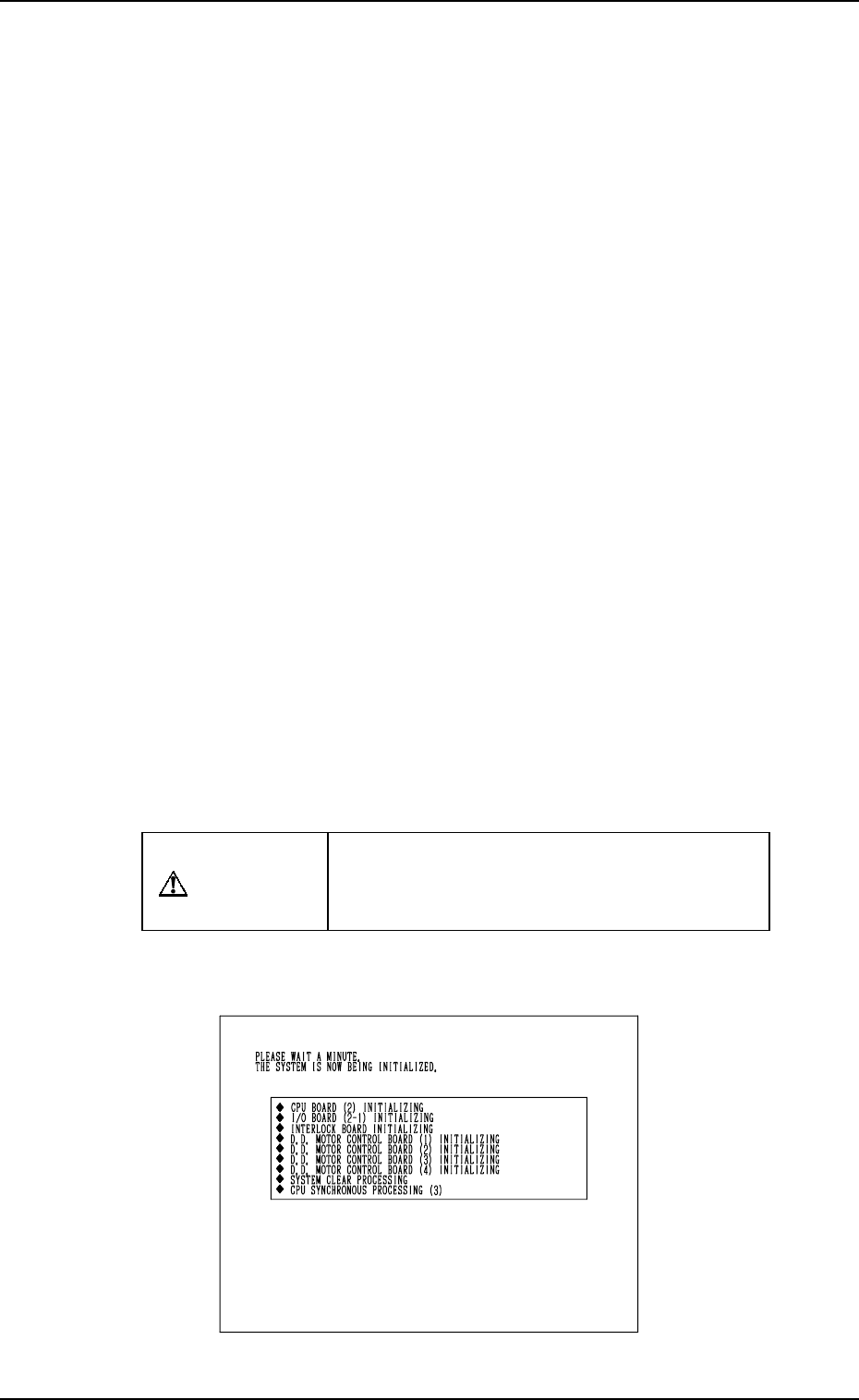
When the [SYS CLR] button is pressed, only initialization of each P.C.B. is
performed.
Fig. 2.40
9910-001 2-60 Tg0246-PM-OP
6. Starting, Emergency Stop, and Temporary Stop (Pause) Operations for Automatic Operation (“PLACE” Mode)
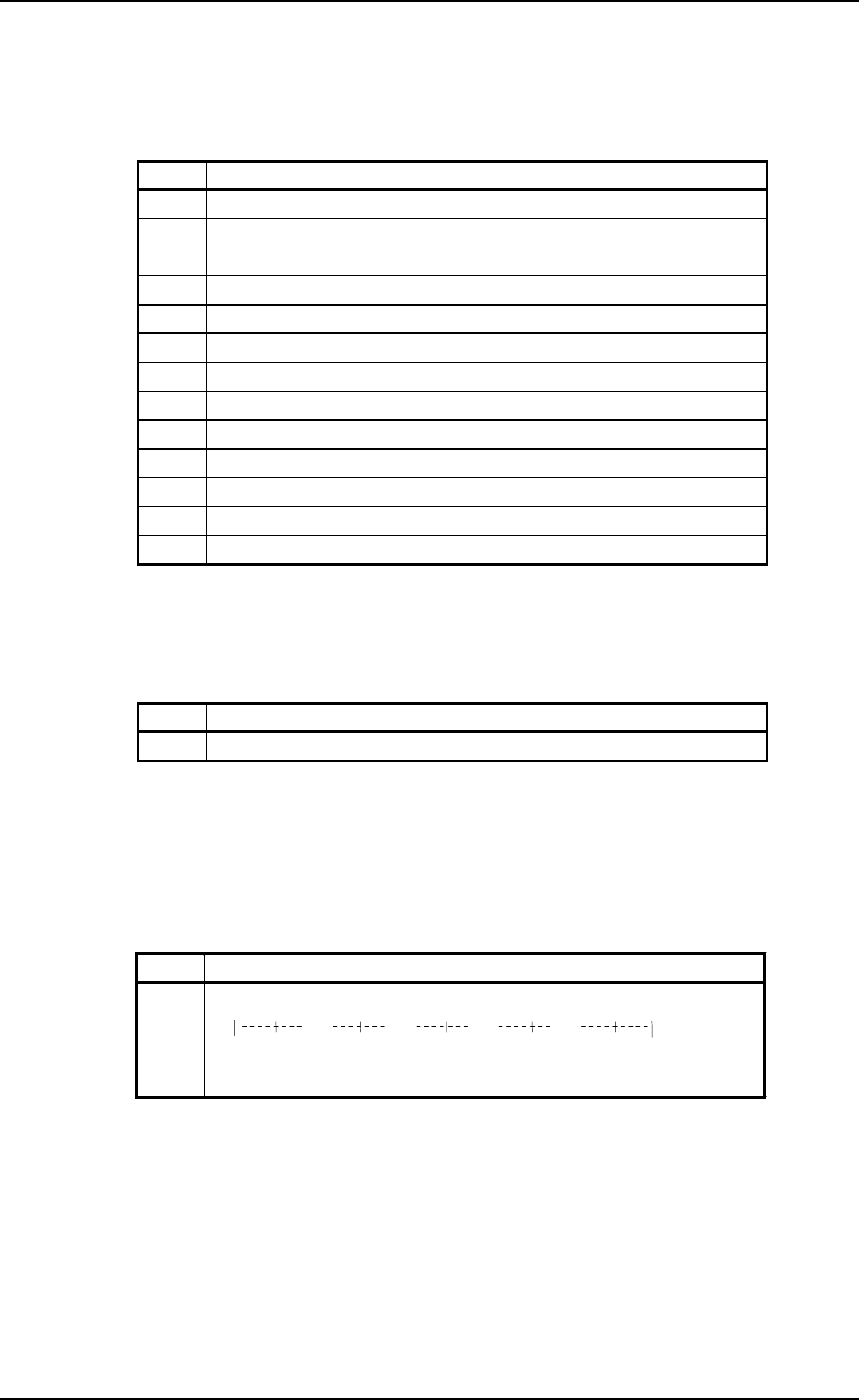
• While the machine is exchanging data with an external device such as a
programming device, the following message is issued after No. 8 (sequence
# described in the above table).
Table 2.7
After the processing is over, the subsequent processing starts with No. 9.
• When the recognition device has an abnormal element, the message and the
progress bar described in the table below appear while the sequence No. 12
is in progress and the recognition device is restarted.
Table 2.8
[Process Messages at System Clear]
The following messages are displayed (scrolled up) in the order described in
the table below.
Table 2.6
9910-001 2-61 Tg0246-PM-OP
No. Messa
g
e
8-1 WAITING FOR END OF COMM. WITH EXTERNAL DEVICE
No. Message
1 CPU P.C.B. (2) INITIALIZING
2 I/O BOARD (2-1) INITIALIZING
3 INTERLOCK BOARD INITIALIZING
4 D.D. MOTOR CONTROL BOARD (1) INITIALIZING
5 D.D. MOTOR CONTROL BOARD (2) INITIALIZING
6 D.D. MOTOR CONTROL BOARD (3) INITIALIZING
7 D.D. MOTOR CONTROL BOARD (4) INITIALIZING
8 SYSTEM CLEAR PROCESSING
9 CPU SYNCHRONOUS PROCESSING (3)
10 MOTOR CONTROL BOARD (5) INITIALIZING
11 CPU SYNCHRONOUS PROCESSING (4)
12 RECOGNITION BOARD INITIALIZING
13 CPU SYNCHRONOUS PROCESSING (5)
No. Message
12 RECOGNITION BOARD INITIALIZING
0%
20% 40% 60% 80%
100%
*****************************
XXXX KBytes written