1OM-1064-002.pdf - 第237页
Third Page Cycle operations related to the P conveyor can be performed. [P-CONVEYOR (+) HI-SPEED] Key When this key is selected and the [MOVE] button is pressed, the P con- veyor moves forward at high speed. [P-CONVEYOR …

[BACKUP UP/DOWN AXIS ZERO POSITION MOVE] Key
When this key is selected and the [MOVE] button is pressed, the backup
base moves to the origin position.
[P.C.B. LOCATING SIDE CLAMP] Key
When this key is selected and the [MOVE] button is pressed, the P.C.B.
locating side clamp is activated.
P.C.B.-T [ ], [ ] key
The value for the positioning location can be set when a P.C.B. is trans-
ferred manually. Every time the [ ] or the [ ] key is pressed, the parameter
increases or decreases in the increment or the decrement of 0.01 mm.
This value is not reflected on the automatic operation.
P.C.B. WAIT POSITION [ ], [ ] key
A parameter representing the standby position can be set when a P.C.B. is
transferred manually.
Press the [ ] or the [ ] key to select “WAIT POS. 1”, “WAIT POS. 2”, or
“WAIT POS. 3”.
This setting is not reflected on the automatic operation.
Second Page
Cycle operations related to the L and R conveyors can be performed.
[L-CONVEYOR (+) HI-SPEED] Key
When this key is selected and the [MOVE] button is pressed, the L con-
veyor moves forward at high speed.
[L-CONVEYOR (+) LOW-SPEED] Key
When this key is selected and the [MOVE] button is pressed, the L con-
veyor moves forward at low speed.
[L-CONVEYOR (-) HI-SPEED] Key
When this key is selected and the [MOVE] button is pressed, the L con-
veyor moves backward at high speed.
[L-CONVEYOR (-) LOW-SPEED] Key
When this key is selected and the [MOVE] button is pressed, the L con-
veyor moves backward at low speed.
[L-CONVEYOR P.C.B. STOPPER] Key
When this key is selected and the [MOVE] button is pressed, the P.C.B.
stopper of the L conveyor moves up or down.
[R-CONVEYOR (+) HI-SPEED] Key
When this key is selected and the [MOVE] button is pressed, the R con-
veyor moves forward at high speed.
[R-CONVEYOR (+) LOW-SPEED] Key
When this key is selected and the [MOVE] button is pressed, the R con-
veyor moves forward at low speed.
[R-CONVEYOR (-) HI-SPEED] Key
When this key is selected and the [MOVE] button is pressed, the R con-
veyor moves backward at high speed.
[R-CONVEYOR (-) LOW-SPEED] Key
When this key is selected and the [MOVE] button is pressed, the R con-
veyor moves backward at low speed.
[R-CONVEYOR P.C.B. STOPPER] Key
When this key is selected and the [MOVE] button is pressed, the P.C.B.
stopper of the R conveyor moves up or down.
8. Manual Transfer Operation
9910-001 4-20 Tg0246-PM-OP

Third Page
Cycle operations related to the P conveyor can be performed.
[P-CONVEYOR (+) HI-SPEED] Key
When this key is selected and the [MOVE] button is pressed, the P con-
veyor moves forward at high speed.
[P-CONVEYOR (+) LOW-SPEED] Key
When this key is selected and the [MOVE] button is pressed, the P con-
veyor moves forward at low speed.
[P-CONVEYOR (-) HI-SPEED] Key
When this key is selected and the [MOVE] button is pressed, the P con-
veyor moves backward at high speed.
[P-CONVEYOR (-) LOW-SPEED] Key
When this key is selected and the [MOVE] button is pressed, the P con-
veyor moves backward at low speed.
[P.C.B. LOCATING SIDE CLAMP] Key
When this key is selected and the [MOVE] button is pressed, the P.C.B.
locating side clamp is activated.
Fourth Page: Optional
Cycle operations related to EL/ER conveyor (option) can be performed.
Note: When the extended conveyor is not connected to the machine, this
display does not appear on the screen.
[EL-CONVEYOR (+)] Key
When this key is selected and the [MOVE] button is pressed, the EL con-
veyor moves forward.
[EL-CONVEYOR (-)] Key
When this key is selected and the [MOVE] button is pressed, the EL con-
veyor moves backward.
[EL-CONVEYOR P.C.B. STOPPER] Key
When this key is selected and the [MOVE] button is pressed, the P.C.B.
stopper of the EL conveyor moves up or down.
[ER-CONVEYOR (+)] Key
When this key is selected and the [MOVE] button is pressed, the ER con-
veyor moves forward.
[ER-CONVEYOR (-)] Key
When this key is selected and the [MOVE] button is pressed, the ER con-
veyor moves backward.
[ER-CONVEYOR P.C.B. STOPPER] Key
When this key is selected and the [MOVE] button is pressed, the P.C.B.
stopper of the ER conveyor moves up or down.
8. Manual Transfer Operation
0103-002 4-21 Tg0246-PM-OP
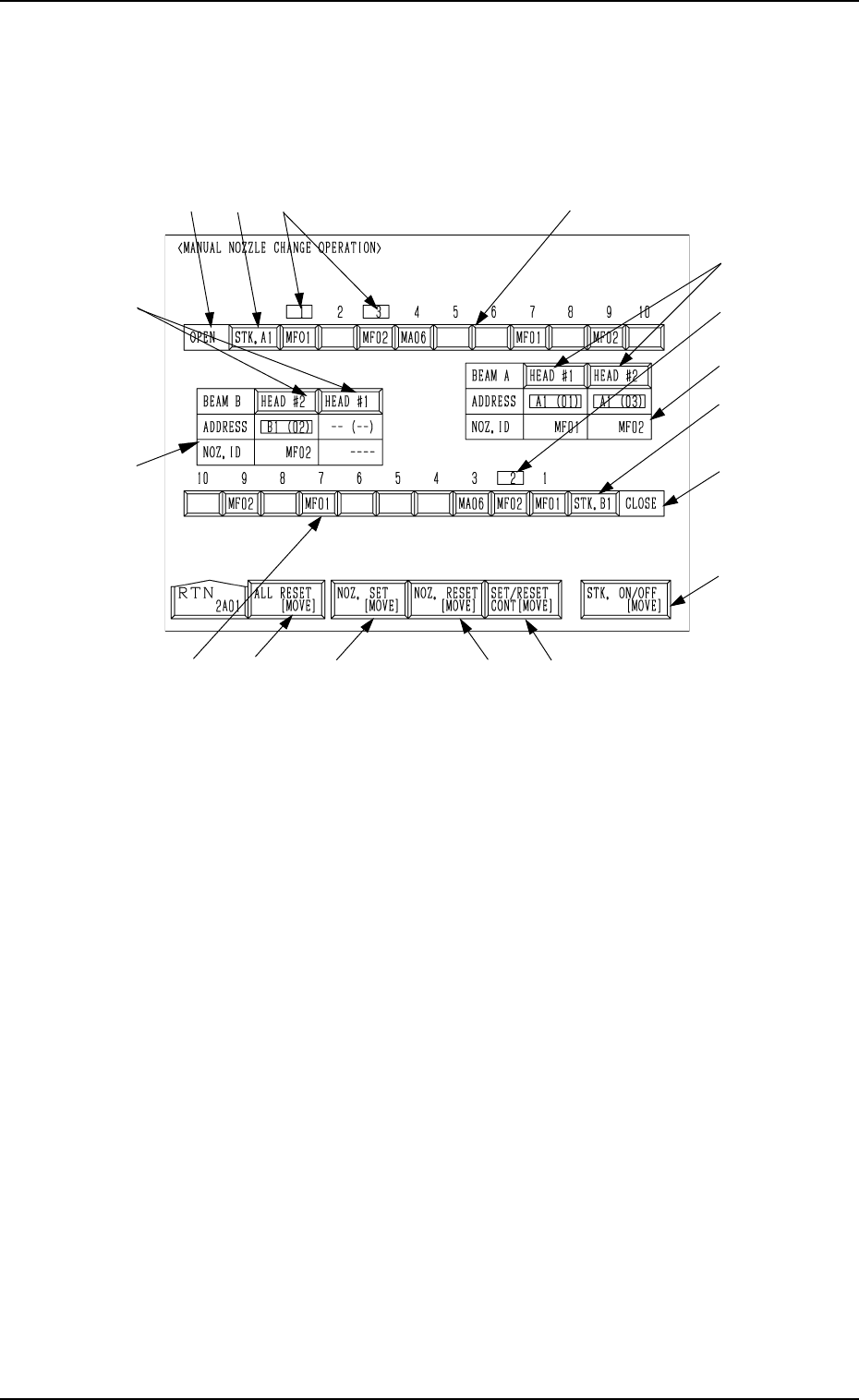
9. Manual Nozzle Change Operation
When the [MANUAL NOZZLE CHANGE OPERATION] key is pressed at
the “MANUAL MODE” display, the following display appears on the screen.
This display enables the cycle movement for opening or closing the nozzle
stocker and attaching or storing a vacuum nozzle through manual operations.
0103-003 4-22 Tg0246-PM-OP
9. Manual Nozzle Change Operation
Fig. 4.12
When the colour of Nozzle ID is white and the background color is red, it
means that the nozzle stocker is set to be bypassed.
Note: When set to be bypassed, the nozzle stocker cannot be used.
9.1 Procedure for Nozzle Stocker Opening/Closing
Operation
(1) Select the [STK. ON/OFF [MOVE]] key A .
(2) Press the [STK. A1] or the [STK. B1] key E to select the desired stocker.
(3) When the [MOVE] button is pressed, the specified nozzle stocker is opened
or closed.
It is indicated in F of the selected stocker whether the selected stocker is
open or closed.
9.2 Procedure for Nozzle Attachment
(1) Select the [NOZ. SET [MOVE]] key B.
(2) Press the [HEAD #1] or the [HEAD #2] key G beside the label “BEAM
A” or “BEAM B” to select a head.
(3) Press one of the nozzle ID keys H to select a nozzle to be taken out of the
nozzle stocker and attached.
(4) Press the [MOVE] button. The machine starts to attach the specified
nozzle.
(5) Shown in I are the IDs and the nozzle stocker addresses of the attached
nozzles.
Note: When the nozzle has already been attached to the head, this operation
cannot be performed.
I
G
D
B
C
F
E
A
J
I
G
H
HFEJ
K