1OM-1064-002.pdf - 第225页
Operation Procedure (1) Select the [DESIGNA TED WIDTH] key and press the [MOVE] button. Activate the conveyor automatically to check that no P .C.B. is located at any irregular position and then set up the conveyor width…
4.2 Manual Set-Up at Each Display (Display for Each
Device)
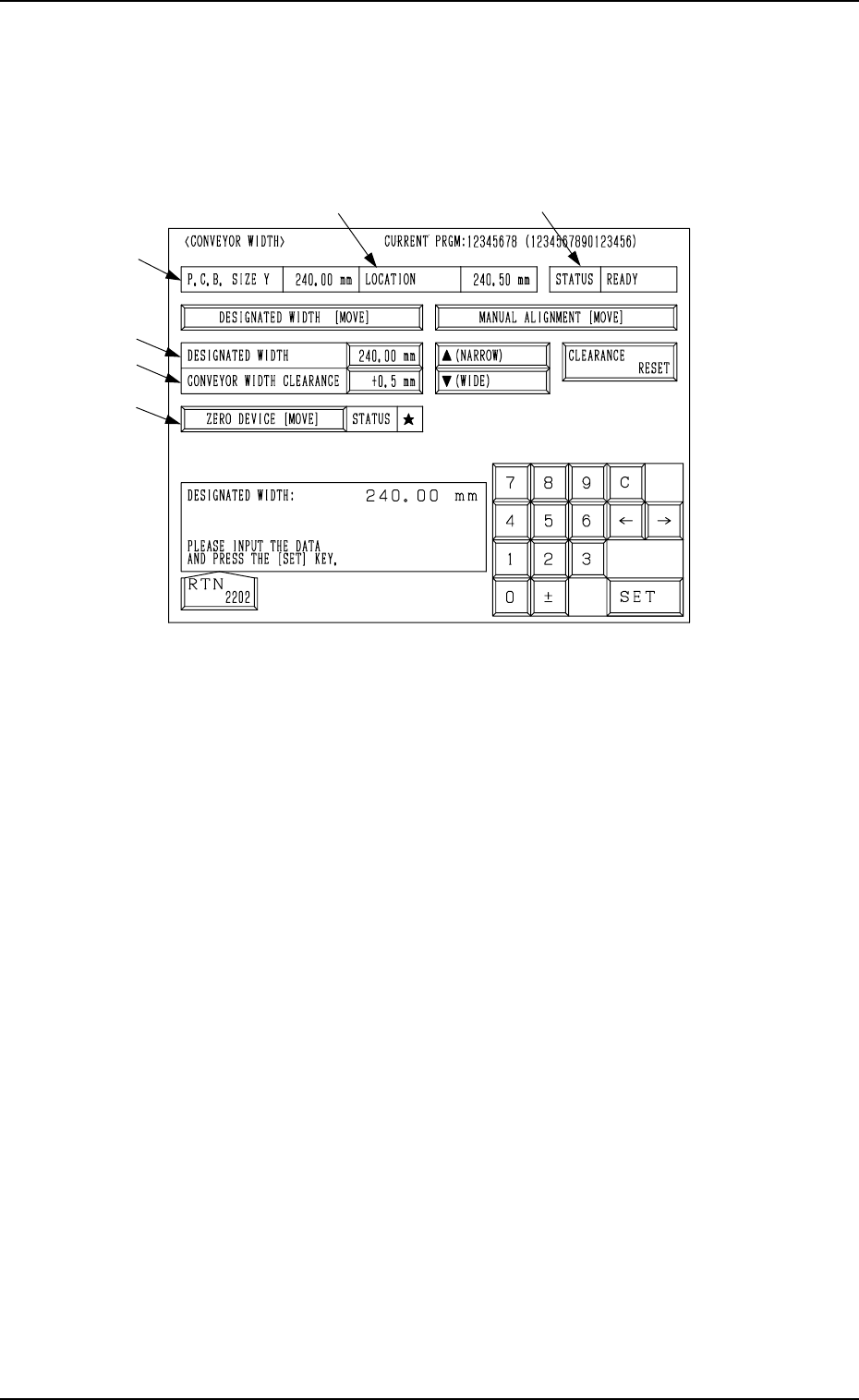
When the [CONVEYOR WIDTH] key is pressed at the “PRODUCT
CHANGE” display, the following display appears on the screen.
*2
*6
*5
*4
*1
*3
9910-001 4-8 Tg0246-PM-OP
4. Product Change
Fig. 4.4
*1 P.C.B. SIZE Y
Shown is the parameter set in the current pattern program data.
“--------” appears when the current program is indefinite.
*2 LOCATION
The currently managed width appears in this text box.
“--------” appears when the current location is indefinite or is not managed.
*3 STATUS
“RUN” : The machine is performing the set-up operation.
“READY” : The set-up operation is completed.
“NOT READY” : The set-up operation is completed but the current posi-
tion is not located (managed).
“---” : The current position or program is indefinite.
“---” (Red) : “OFF” is set as set-up data.
*4 DESIGNATED WIDTH
The same parameter as that in the “P.C.B. SIZE Y” text box appears in this
data box.
When the current program is indefinite, “0.0 mm” appears instead.
*5 CONVEYOR WIDTH CLEARANCE
Shown is the backup value of the clearance data.
*6 [ZERO DEVICE [MOVE]] Key
When the [ZERO DEVICE [MOVE]] key is selected and the [MOVE] but-
ton is pressed, the conveyor width is zeroed.
It is displayed whether or not the conveyor width is zeroed in the “STA-
TUS” text box.
: This indicates that the conveyor width is zeroed completely.

Operation Procedure
(1) Select the [DESIGNATED WIDTH] key and press the [MOVE] button.
Activate the conveyor automatically to check that no P.C.B. is located at
any irregular position and then set up the conveyor width to “DESIG-
NATED WIDTH + CLEARANCE”.
Ref.: When the [DESIGNATED WIDTH] key is selected and a parameter
is entered, using the ten-key pad, the designated width data can be
changed.
• When “P.C.B. Width + Clearance” must be adjusted as a result after P.C.B.
transfer action is checked, select the [ (NARROW)] or the [ (WIDE)]
key and press the [MANUAL ALIGNMENT [MOVE]] key. Then, press the
[MOVE] button.
While the [MOVE] button is being pressed, the conveyor will inch to be
wider or narrower.
• To update the clearance data after the adjustment, press the [CLEARANCE
RESET] key.
The clearance data is changed to “Current Width - P.C.B. Size Y”.
Note: When the parameter exceeds ±5.0 mm, this operation cannot be per-
formed.
Ref.: The clearance data can be changed by selecting the [CONVEYOR
WIDTH CLEARANCE] key and entering a parameter with the ten-
key pad.
4. Product Change
0004-002 4-9 Tg0246-PM-OP
4.3 Overall Automatic Set-Up Function Interlinked
with Program Change
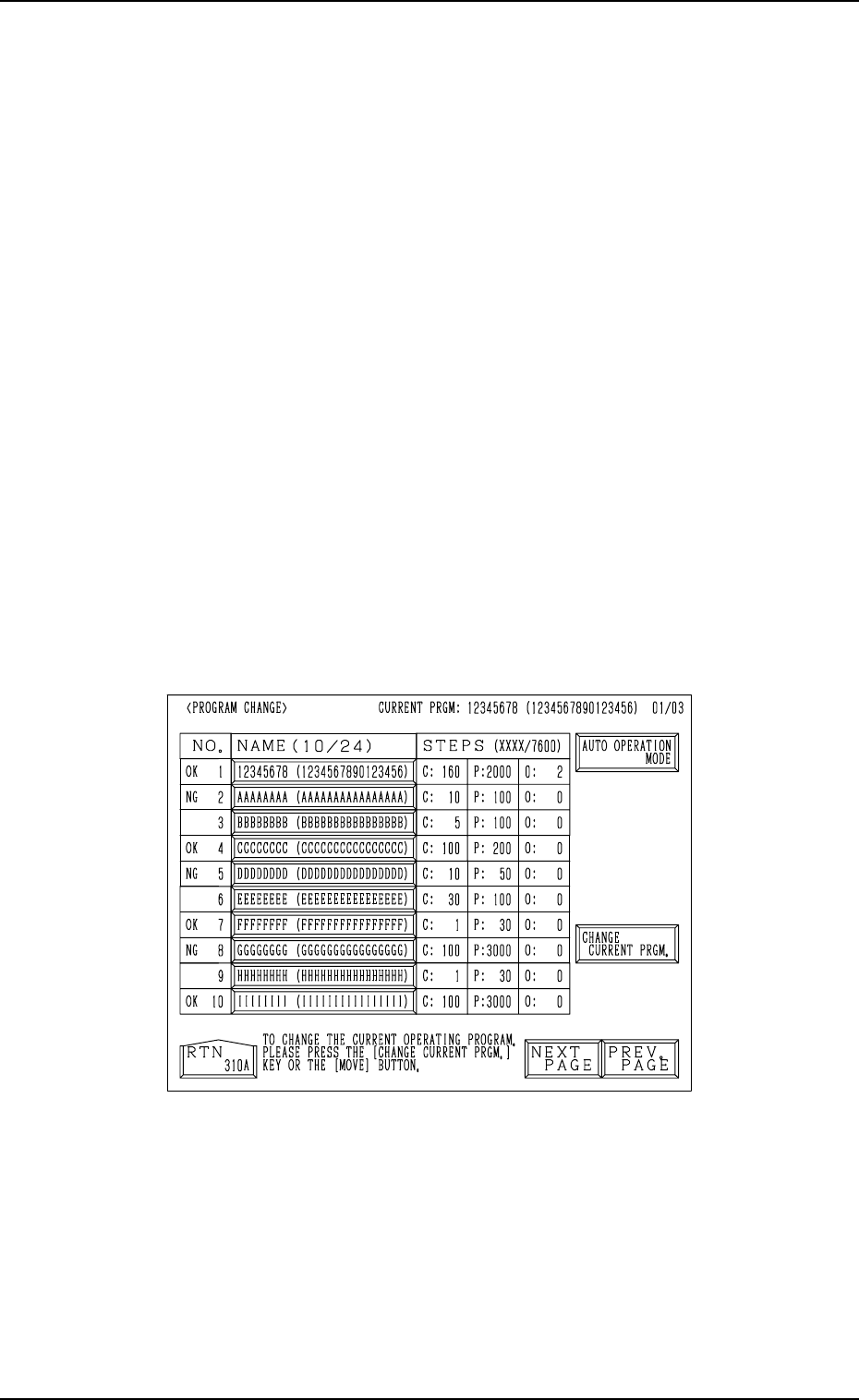
When the [MOVE] button is pressed at the “PROGRAM CHANGE” display
(Fig. 4.5), the devices for which “ON” is set in the “MODE” text boxes at the
“SET-UP DATA” display are all set up automatically right after the program
change is made. (Hierarchical Sequence: “DATA EDIT” Display → “PAT-
TERN PROGRAM” Display → “SET-UP DATA” Display)
The “PROGRAM CHANGE” display can be opened in the following
hierarchical sequences.
• “AUTO OPN MODE (PLACEMENT)” Display → “AUTO OPN. SUB-
MENU” Display →
• “MANUAL MODE” Display →
• “DATA EDIT” Display → “PATTERN PROGRAM” Display →
Note: When the [OPERATION/SET UP] switch is set to the “SET UP” side,
the set-up operation cannot be started.
Close the maintenance cover, the supply cover, and the safety bars and
set the [OPERATION/SET UP] switch to the “OPERATION” side for
safety purposes. Then, perform the program change operation.
Refer to “3. Program Change of Section 4” for details.
4. Product Change
Fig. 4.5
0004-002 4-10 Tg0246-PM-OP