1OM-1064-002.pdf - 第151页
6. Starting, Emergency Stop, and T emporary Stop (Pause) Operations for Automatic Operation (“PLACE” Mode) 6.4.2 Vibratory Stick Feeders T wo methods are provided for component replenishment. • How to detach the empty ca…

6. Starting, Emergency Stop, and Temporary Stop (Pause) Operations for Automatic Operation (“PLACE” Mode)
6.4 Component Supply during Automatic Operation
Feeders can be replaced or components can be supplied during automatic op-
eration with the machine in the “Component Shortage” mode or with the ma-
chine being stopped temporarily.
6.4.1 Tape Feeders
To supply components whenever necessary
(1) Press the [READY] button on the side where the tape feeder must be
replaced while the machine is running automatically or set in the “PAUSE”
mode.
The X/Y beam on the pertinent side moves to the standby position.
When the machine is in the middle of component placement, the X/Y
beam moves to the standby position after the component is placed.
(2) After the XY beam on the pertinent side arrives at the standby position,
the LED of the [READY ] button on the pertinent side extinguishes.
At this time, the supply cover on the pertinent side is unlocked.
While the X/Y beam is moving to its standby position, the supply cover
on the pertinent side is kept locked and the LED of the [READY] button
keeps on flickering.
(3) Open the supply cover and detach the tape feeder.
(4) Set a new tape in the tape feeder and install the feeder on the feeder base.
(5) Close the supply cover and press the [READY] button.
The supply cover is locked, making it possible to start the operation of
the machine.
(6) Re-start the operation.
• When the machine is in the automatic operation mode, it re-starts the
operation automatically.
• When the machine is in the “PAUSE” mode, press the [START] button
to re-start the operation.
To supply components when a material shortage error has occurred
(1) When all components are used up during automatic operation, the X/Y
beam on the pertinent side moves automatically to its standby position.
(2) Follow the procedure similar to the steps described in “To supply compo-
nents whenever necessary”.
Ref.: • Refer to “1.5 Opening and Closing of Supply Cover of Section 2”
for the detailed information on how to open or close the supply
cover.
• Refer to the instruction manual of the tape feeder for the detailed
information on how to attach or detach the tape feeder.
0004-002 2-52 Tg0246-PM-OP
6. Starting, Emergency Stop, and Temporary Stop (Pause) Operations for Automatic Operation (“PLACE” Mode)
6.4.2 Vibratory Stick Feeders
Two methods are provided for component replenishment.
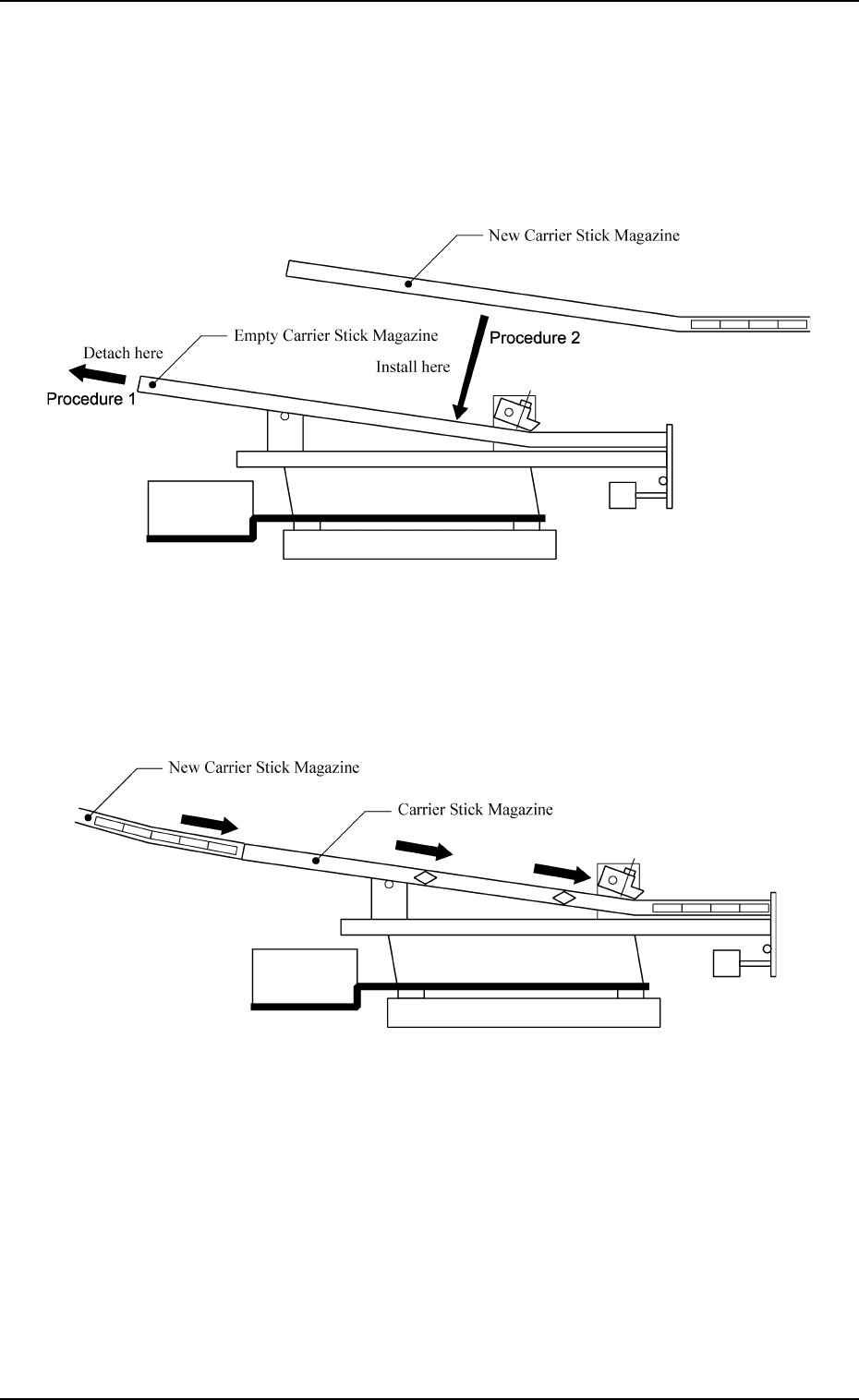
• How to detach the empty carrier stick magazine and set a new one after
opening the supply cover
The machine operation can be re-started through the same procedure as that
for the tape feeder.
0004-002 2-53 Tg0246-PM-OP
Fig. 2.31
• How to insert components into the stick by sliding them from the rear hole
of the installed carrier stick magazine
This method can be used even while the machine is running.
Fig. 2.32
Refer to the instruction manual of the vibratory stick feeders for details.
6. Starting, Emergency Stop, and Temporary Stop (Pause) Operations for Automatic Operation (“PLACE” Mode)
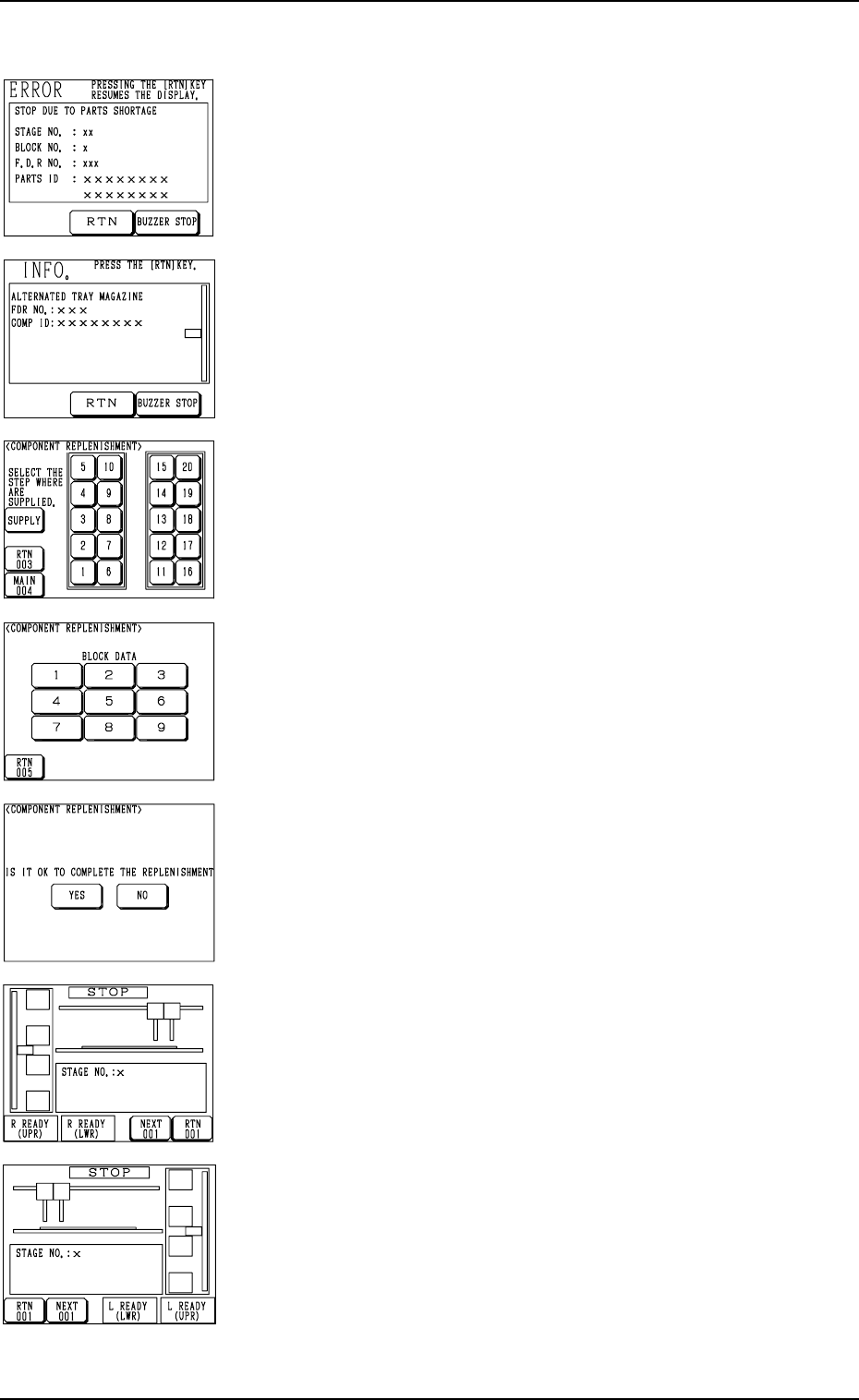
Fig. 2.33
Fig. 2.34
Fig. 2.35
Fig. 2.36
Fig. 2.37
Fig. 2.38
Fig. 2.39
6.4.3 Multi-Layer Tray Feeders (Option)
To supply components when a component shortage error has occurred
(1) When a component shortage error occurs, or the magazine alternate
function is activated, the magazine in short of components moves to
the set-up position and is separated from the elevator shaft. In this
case, the “ERROR” display (Fig. 2.33) or the “INFO.” display (Fig.
2.34) appears on the operation monitor.
Check the contents of the described items.
(2) Press the [BUZZER STOP] key.
The buzzer stops.
(3) Press the [RTN] key. The display (Fig. 2.35) appears on the screen.
(4) Check the stage (pallet) and the block which caused a component
shortage error.
When a block is specified, press the No. key of the stage where a
component shortage error has occurred. The display (Fig. 2.36) ap-
pears on the screen, enabling you to check the block data.
(5) Open the upper or the lower door and then the magazine door.
(6) Pull out the pallet on the stage in short of components and load it
with components.
When several stages and blocks are short of components, load all
pallets with components.
(7) Press the No. key of the stage in red (ON or flickering) at the display
(Fig. 2.35) and the No. key of the block in red (ON or flickering) at
the display (Fig. 2.36). The keys turn violet.
(8) Confirm that all components are supplied completely and close all
doors (magazine, upper and lower doors).
(9) Press the [SUPPLY] key at the display (Fig. 2.35).
The display (Fig. 2.37) appears on the screen.
(10) Confirm that components are supplied completely and press the [YES]
key to declare the completion of component replenishment.
Pressing the [NO] key resumes the display (Fig. 2.35).
(11) Press the [U READY] or [L READY] button on the side of the multi-
layer tray feeder. The door is locked and the machine can be operated
with the feeder connected.
(12) Re-start the operation.
• When the machine is in the automatic operation mode, the opera-
tion re-starts automatically.
• When the machine is in the “PAUSE” mode, press the [START]
button on the main body side to re-start the operation.
Ref.: (a) When several pallets are short of components, follow Step
(7) every time components are supplied or another step (col-
lective operation) after all components are supplied.
(b) It is also possible to replenish the tray in the middle of pro-
cessing with components or replace it with another one. In
this case, it is required to update the tray matrix.
Refer to “7. Tray Pick-Up Matrix of Section 3” or “ 6.4 Ma-
trix Change Operations of Section 2” in the instruction manual
of the multi-layer tray feeders for details.
0103-003 2-54 Tg0246-PM-OP