1OM-1064-002.pdf - 第196页
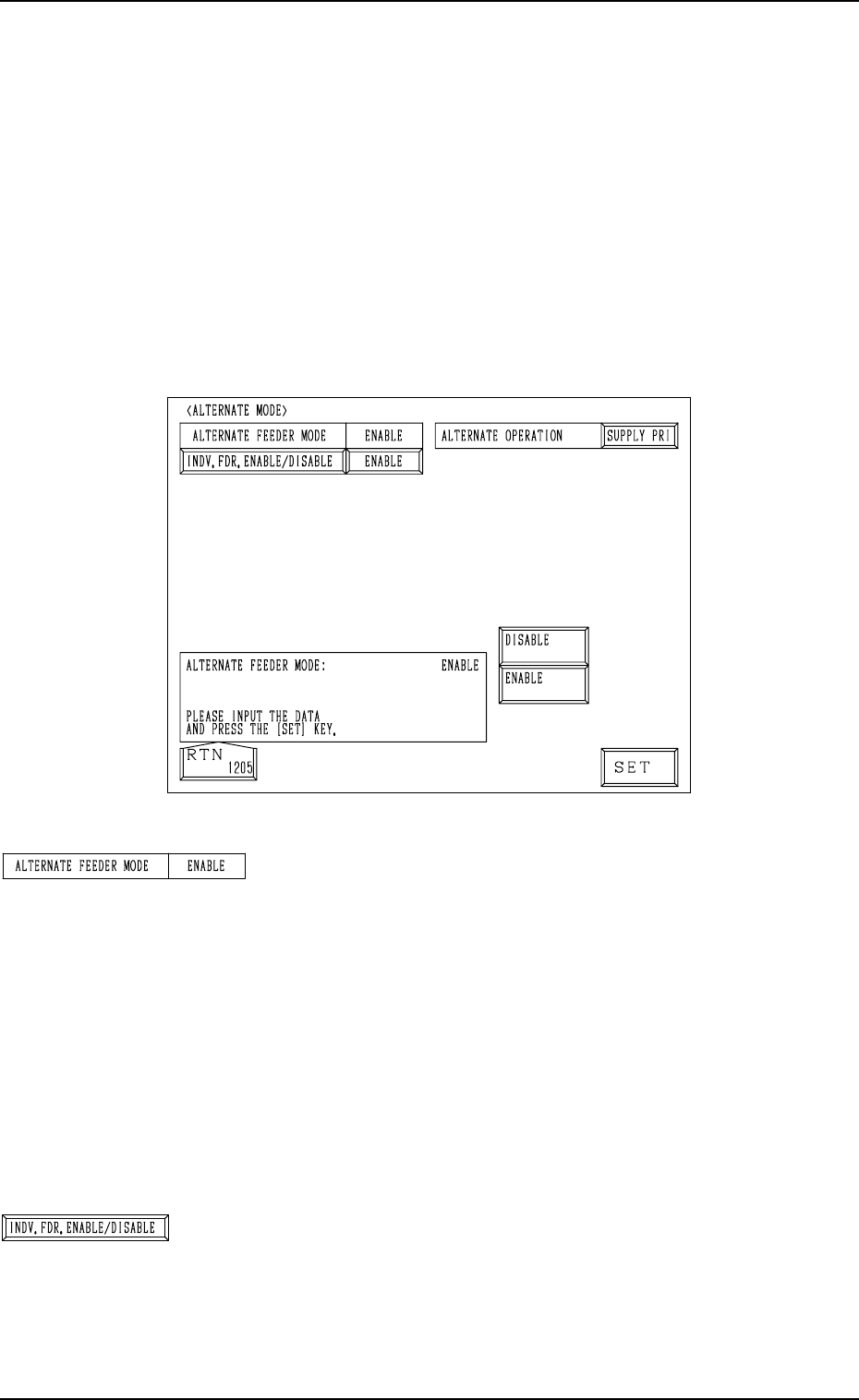
5. Operation Mode [ENABLE] or [DISABLE] Key [ENABLE] Key Select this key to use the alternate feeder mode. [DISABLE] Key Select this key not to use the alternate feeder mode. Note: When “DISABLE” is set, the subsequent a…
5. Operation Mode
Fig. 3.12
“ALTERNATE FEEDER MODE”
“ENABLE”
This appears in the text box when “ON” is set in the “MODE”
data field of the label “ALTERNATE FDR.” at the “COM-
PONENT DATA” display. (Hierarchical Sequence: “DATA
EDIT” Display → “PATTERN PROGRAM” Display →
“PATTERN PROGRAM EDIT” Display → “COMPONENT
DATA” Display → “COMPONENT DATA EDIT” Display)
“DISABLE”
This appears in the text box when “OFF” is set in the
“MODE” data field of the label “ALTERNATE FDR.” at
the “COMPONENT DATA” display.
[INDV. FDR. ENABLE/DISABLE] Key
When this key is pressed, the “INDIVIDUAL FDR EN-
ABLE/DISABLE” display (Fig. 3.13) appears on the screen.
5.5 ALTERNATE MODE Display
• This display allows the operator to determine whether or not the alternate
feeder mode should be used.
Every time a component shortage error occurs at a feeder, the alternate feeder
mode enables the component pick-up position to be shifted automatically to
another alternative one (specified as the substitute), making it possible for
the machine to perform the operation continuously.
When the [ALTERNATE MODE] key is pressed at the “OPERATION MODE”
display, the following display appears on the screen. (Hierarchical Sequence:
“AUTO OPN. MODE <PLACEMENT>” Display → “AUTO OPN. SUB-
MENU” Display → “OPERATION MODE” Display)
9910-001 3-26 Tg0246-PM-OP
5. Operation Mode
[ENABLE] or [DISABLE] Key
[ENABLE] Key
Select this key to use the alternate feeder mode.
[DISABLE] Key
Select this key not to use the alternate feeder mode.
Note: When “DISABLE” is set, the subsequent alternate
feeder operation is prohibited.
“ALTERNATE OPERATION”
[SUPPLY PRI] Key
Select this key to immediately alternate the feeder to the
one for component replenishment.
[EP DATA]
Select this key to pick up components continuously from
the currently selected feeder.
9910-001 3-27 Tg0246-PM-OP
5. Operation Mode
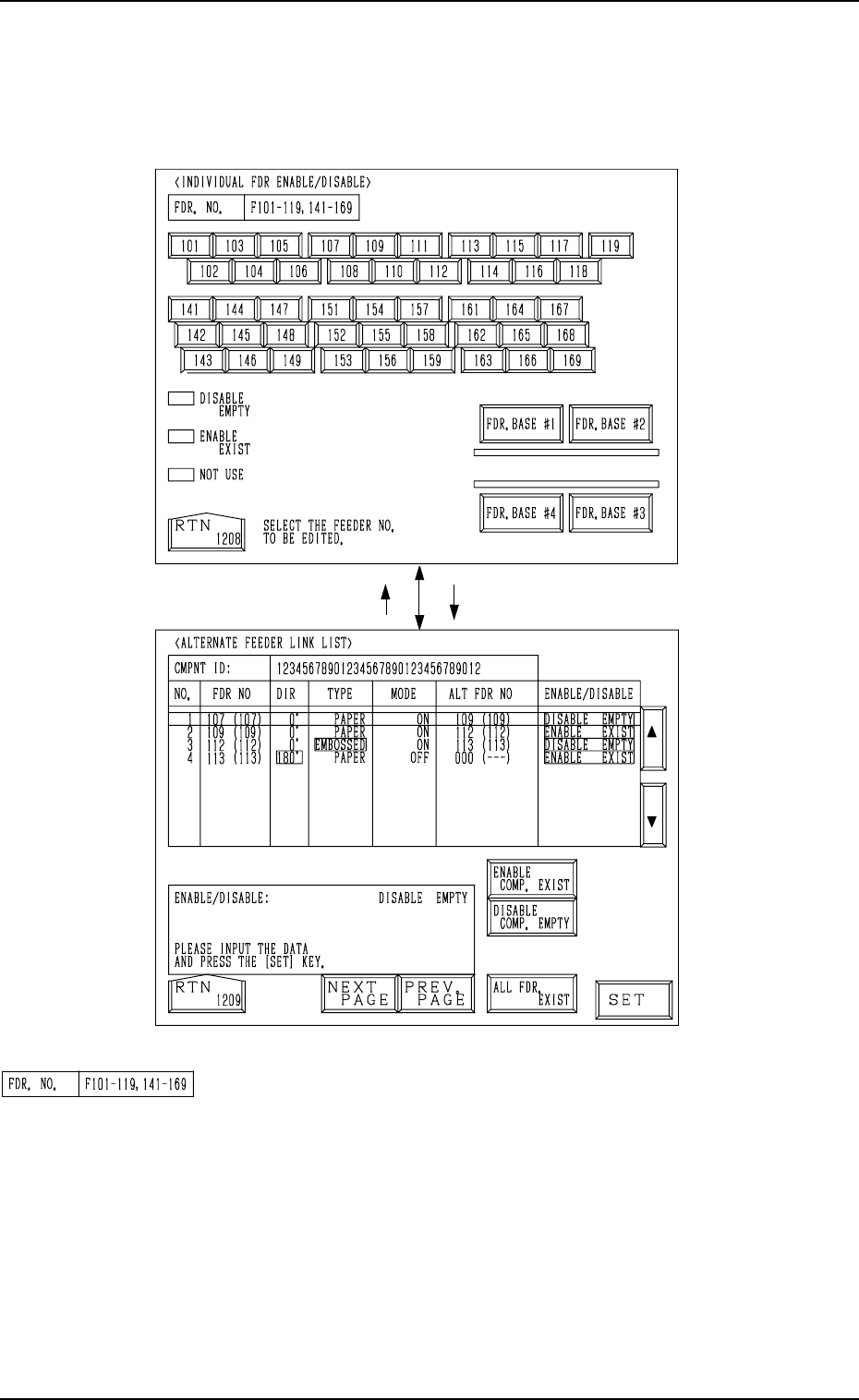
When the [INDV. FDR. ENABLE/DISABLE] key is pressed at the “ALTER-
NATE MODE” display, the display (Fig. 3.13) appears on the screen.
• This display allows the operator to check how the alternate feeder function
is working (feeder status) and the completed feeder replenishment can be
inputted.
[107][RTN]
Fig. 3.13
Fig. 3.14
9910-001 3-28 Tg0246-PM-OP
“FDR NO.”
Displayed are the Nos. of the feeders which can be selected.
The feeder Nos. change, depending on which key ([FDR.
BASE #1], [FDR. BASE #2], [FDR. BASE #3], or [FDR.
BASE #4] key) is selected.