1OM-1064-002.pdf - 第149页
6. Starting, Emergency Stop, and T emporary Stop (Pause) Operations for Automatic Operation (“PLACE” Mode) 6.2 T emporary Stop Procedure Press the [P AUSE] button. After the machine runs in its minimum cycle (single oper…
6. Starting, Emergency Stop, and Temporary Stop (Pause) Operations for Automatic Operation (“PLACE” Mode)
(6) Open the “AUTO OPN. MODE <PLACEMENT>” display and check
the origin marks “”.
Note: When “” marks do not appear before the devices other than
“INPUT MACHINE”, the automatic operation cannot be started.
• When “” marks appear before the devices other than “INPUT MA-
CHINE”, proceed to Step (8).
• When “” marks do not appear before some devices other than “IN-
PUT MACHINE”, proceed to Step (7).
(7) Press the [ZERO] button.
• The “” marks appear before all devices except for “INPUT MA-
CHINE”.
(8) Press the [START] button.
• Work requirement and ready signals are sent to the input machine side.
• When the input machine is set ready for operation, it receives the work
requirement signal from the main machine and right after that, P.C.B.’s
start flowing into the input machine and the automatic operation (place-
ment operation) starts.
When the input machine is not set ready, the machine is set in the
“WAIT” mode.
Reference
z
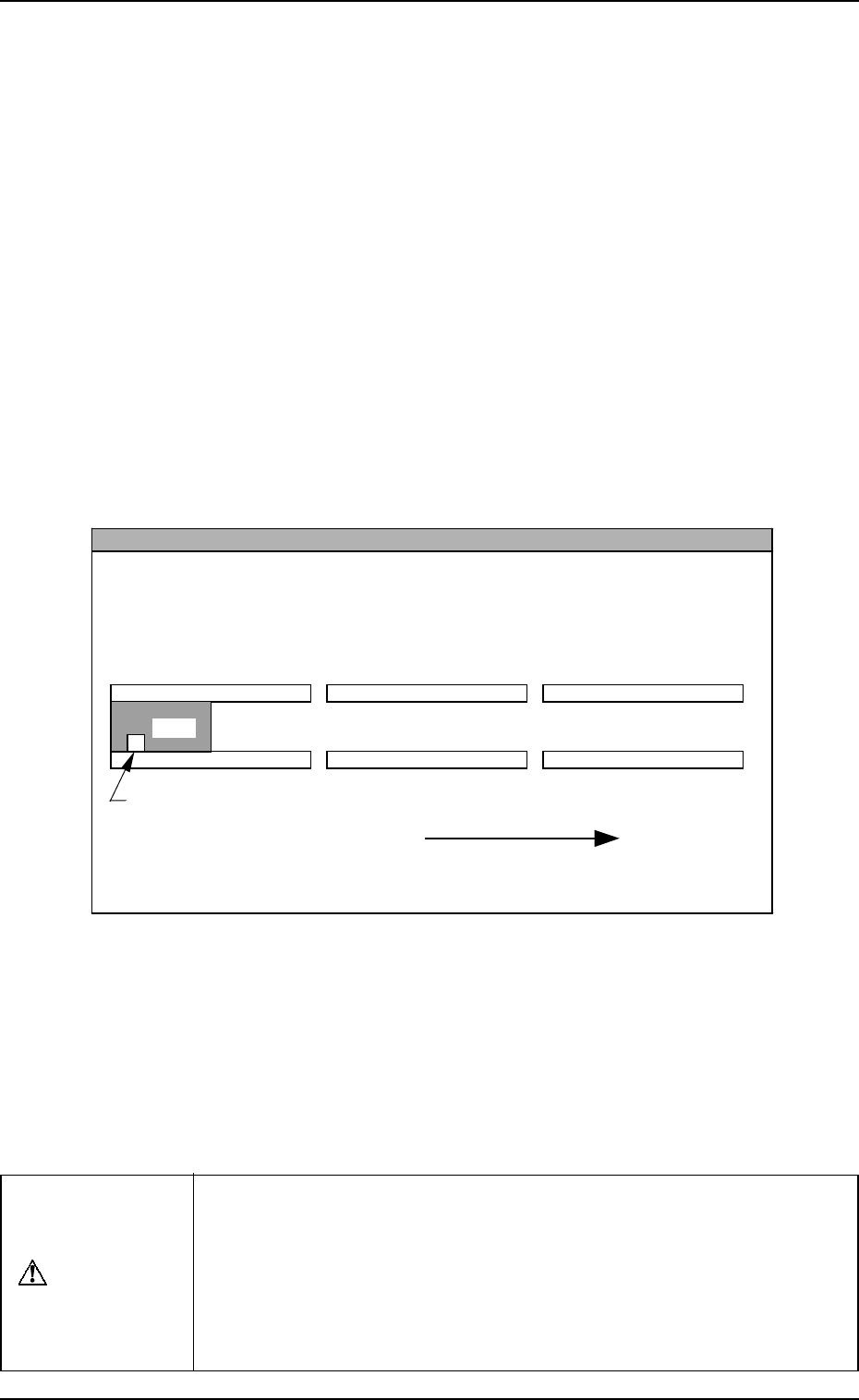
When the machine is operated singly (isolated operation such as an actual component
placement test), a P.C.B. must be put on the input conveyor as shown in the figure
such that the P.C.B. detection sensor is turned ON.
L Conveyer P.C.B. Detection L Sensor (-BPH141)
L Conveyor
(Input Conveyor)
R Conveyor
(Output Conveyor)
P.C.B. Flow Direction
P.C.B.
P Conveyor
(P.C.B. Positioning Section)
The figure shows that a P.C.B. is transferred from left to right when viewed from the
front side of the machine.
• When the automatic operation (component placement operation)
starts, all “” marks (origin marks) disappear and the LED (-HD01)
of the [START] button and the tower light (green) illuminate.
Notes: (a) The machine cannot be started unless the “AUTO OPN.
MODE <PLACEMENT>” display is active.
(b) When a P.C.B. already exists in the P.C.B. positioning sec-
tion, the machine does not place any components on the
P.C.B. and discharges the P.C.B.
CAUTION
To stop the machine immediately in an emergency, press one of the
[EMERGENCY STOP] buttons.
Refer to “6.8.3 Emergency Stop Procedure of Section 2” for details.
Refer to “6.7.2 Reset and Start Procedure from Emergency Stop of
Section 2” for details on how to reset the machine from emergency
stop.
9910-001 2-50 Tg0246-PM-OP

6. Starting, Emergency Stop, and Temporary Stop (Pause) Operations for Automatic Operation (“PLACE” Mode)
6.2 Temporary Stop Procedure
Press the [PAUSE] button.
After the machine runs in its minimum cycle (single operating unit), it stops
running.
Note: “PAUSE” mode does not mean that the machine is completely stopped.
Take ample care when the machine is set in the “PAUSE” mode.
The machine starts running all of a sudden right after it receives a start
signal (a start signal is sent out when the [START] or the [MOVE]
button is pressed).
6.3 Start Procedure from “PAUSE” Mode
Press the [START] or the [MOVE] button while the “AUTO OPN. MODE
<PLACEMENT>” display is active.
• When the [START] button is pressed, the machine starts automatic opera-
tion (“PLACE” Mode) from the step No. which is displayed on the screen.
When the automatic operation (component placement) starts, all origin marks
“” disappear and the LED (-HD01) of the [START] button and the tower
light (green) illuminate.
• When the [MOVE] button is pressed, the machine places the components
related to the step Nos. in the display and is set again in the “PAUSE” mode.
Every time the [MOVE] button is pressed, the machine places components
one by one in the order of step Nos.
While the machine is activated, the LED (-HD02) of the [MOVE] button
illuminates.
9910-001 2-51 Tg0246-PM-OP

6. Starting, Emergency Stop, and Temporary Stop (Pause) Operations for Automatic Operation (“PLACE” Mode)
6.4 Component Supply during Automatic Operation
Feeders can be replaced or components can be supplied during automatic op-
eration with the machine in the “Component Shortage” mode or with the ma-
chine being stopped temporarily.
6.4.1 Tape Feeders
To supply components whenever necessary
(1) Press the [READY] button on the side where the tape feeder must be
replaced while the machine is running automatically or set in the “PAUSE”
mode.
The X/Y beam on the pertinent side moves to the standby position.
When the machine is in the middle of component placement, the X/Y
beam moves to the standby position after the component is placed.
(2) After the XY beam on the pertinent side arrives at the standby position,
the LED of the [READY ] button on the pertinent side extinguishes.
At this time, the supply cover on the pertinent side is unlocked.
While the X/Y beam is moving to its standby position, the supply cover
on the pertinent side is kept locked and the LED of the [READY] button
keeps on flickering.
(3) Open the supply cover and detach the tape feeder.
(4) Set a new tape in the tape feeder and install the feeder on the feeder base.
(5) Close the supply cover and press the [READY] button.
The supply cover is locked, making it possible to start the operation of
the machine.
(6) Re-start the operation.
• When the machine is in the automatic operation mode, it re-starts the
operation automatically.
• When the machine is in the “PAUSE” mode, press the [START] button
to re-start the operation.
To supply components when a material shortage error has occurred
(1) When all components are used up during automatic operation, the X/Y
beam on the pertinent side moves automatically to its standby position.
(2) Follow the procedure similar to the steps described in “To supply compo-
nents whenever necessary”.
Ref.: • Refer to “1.5 Opening and Closing of Supply Cover of Section 2”
for the detailed information on how to open or close the supply
cover.
• Refer to the instruction manual of the tape feeder for the detailed
information on how to attach or detach the tape feeder.
0004-002 2-52 Tg0246-PM-OP