Programming_mail.pdf - 第105页
III- 31 Programming Manual Part III Inspection Algorithm 1.11.5 BrightLe vel Setting Procedure Step1: Select the inspection window which the BrightLevel result needs to be applied ( Black/ White is taken as an example in…
III-30
Programming Manual
Part III Inspection Algorithm
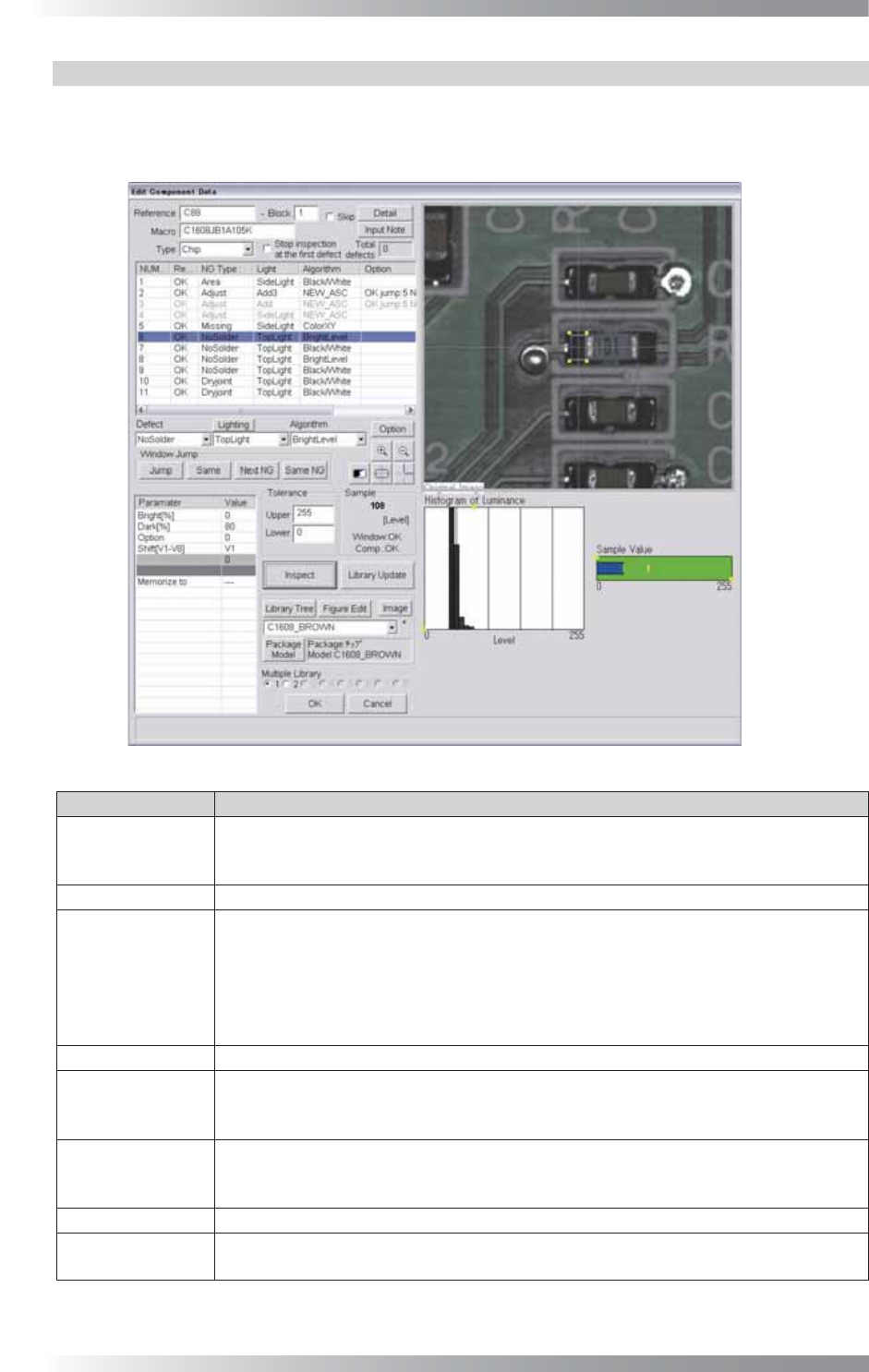
1.11.4 Algorithm BrightLevel
BrightLevel algorithm is available for components which brightness level are quite-variable.
Black/White algorithm calculates the percentage of the specifi ed brightness level in the inspection window.
BrightLevel algorithm inspects the brightness level which accounts for the specifi ed percentage.
Figure 1-34 BrightLevel
Parameter Description
Lighting
Select an appropriate lighting according to the algorithm which the bright level is used.
(e.g., Select TopLight if the threshold of BrightLevel is used with Black/White for
solder inspection.)
Algorithm Select BrightLevel.
Bright[%],
Dark[%]
Enter an arbitrarily value in Bright and 0 in Dark to specify percentage of a brighter
area in an inspection window. Enter 0 in Bright and an arbitrarily value in Dark to
specify percentage of a darker area in an inspection window.
(e.g., If using Black/White in an inspection window and percentage of a bright area is
70% and percentage of a dark area is 30%, enter 70 to Bright and 0 to Dark, or enter
0 to Bright and 30 to Dark.)
Option Enter 0.
Shift[V1-V8]
Enter the appropriate vector by selecting from V1 to V8 according to the vector used
in the Memorize to fi eld in the Adjust window. Enter 0 in Shift if the threshold of
BrightLevel is used for misalignment correction.
Memorize to
Register the threshold of BrightLevel in Memorize to as M1. Enter M1 in the
appropriate parameter if other algorithms use the threshold of BrightLevel (any
values from M1 to M8 can be used to register values).
Upper, Lower
Enter 255 in Upper and 0 in Lower.
Sample
Shows a brightness level which takes a specifi ed percentage of an area if
Black/
White is used.
Table 1-13 Parameter of BrightLevel
III-31
Programming Manual
Part III Inspection Algorithm
1.11.5 BrightLevel Setting Procedure
Step1: Select the inspection window which the BrightLevel result needs to be applied (Black/
White is taken as an example in this section). Right-click the window, select Copy and
change the Algorithm to BrightLevel.
Step2: Enter an arbitrarily value in Bright and 0 in Dark to specify the percentage of the brighter
area in the inspection window. Enter 0 in Bright and an arbitrarily value in Dark to specify
the percentage of the darker area in the inspection window.
NOTE
Display the brightness level which accounts for the specifi ed percentage of an area
when Black/White is used as a sample value.
NOTE
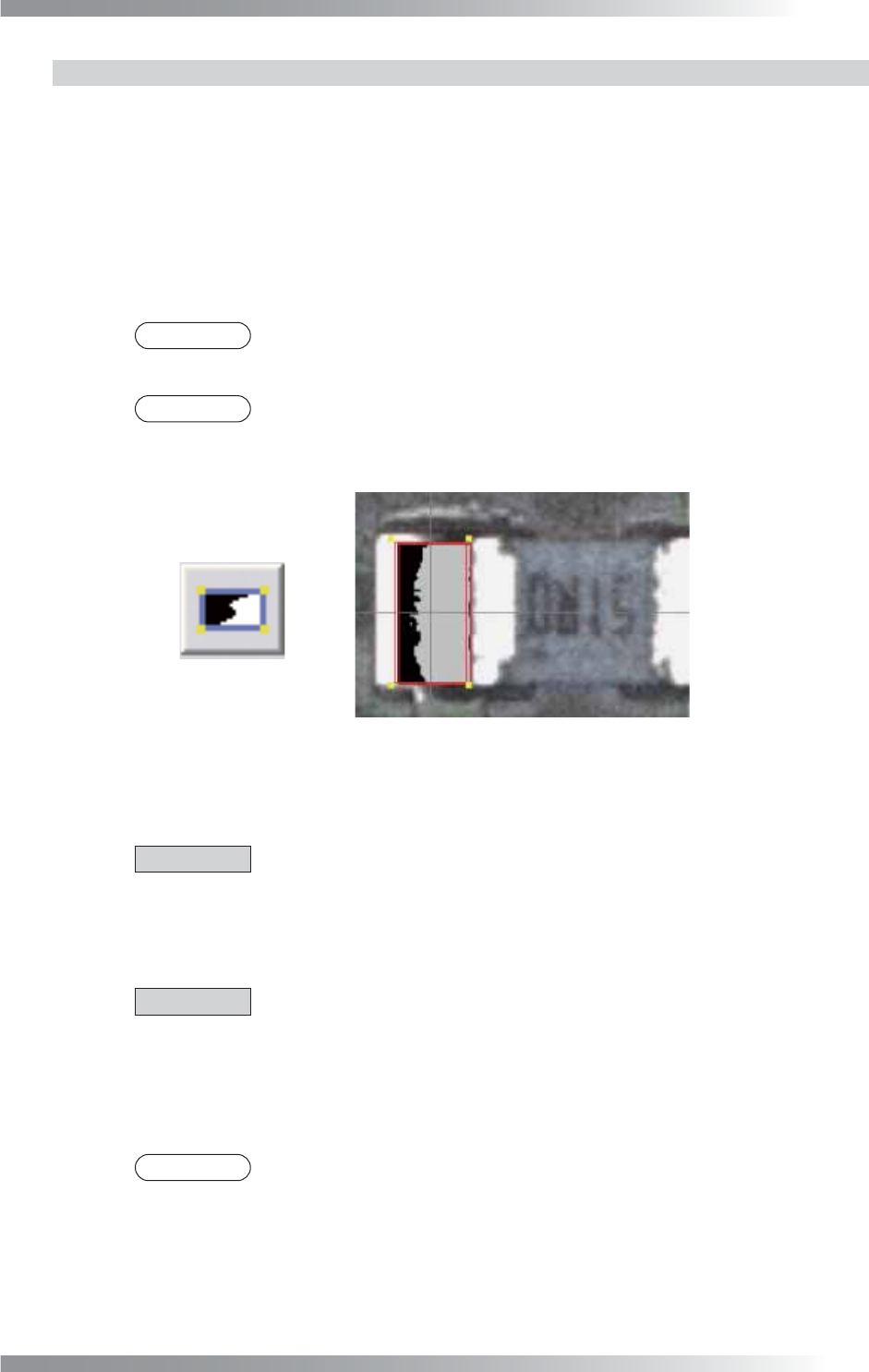
Select Black/White as Algorithm and press the black-white button in the right side
of Sample. The brightness level in OK range will be colored in gray. Use the image
as a rough guide.
Figure 1-35 OK Range
Step3: Enter the appropriate vector into the Shift fi eld by selecting from V1 to V8 according to the
vector used in the Memorize to fi eld in the Adjust window.
CAUTION
Do not enter any value into the Shift fi eld when using the result of BrightLevel for
misalignment correction.
Step4: Enter M1 into the Memorize to fi eld.
CAUTION
Register the inspection result of BrightLevel in the Memorize to fi eld.
Any value from M1 to M8 is available. Enter it in the appropriate fi eld to refl ect the
result to other algorithms.
Step5: Enter M1 into the appropriate fi eld of an algorithm which requires the BrightLevel result.
NOTE
In case the inspection result of BrightLevel is used for the solder paste inspection of
a chip component, enter M1 in Upper Level or Lower Level depending on the
brightness level.
Step6: Press Inspect. Make sure that the inspection is completed properly.
III-32
Programming Manual
Part III Inspection Algorithm
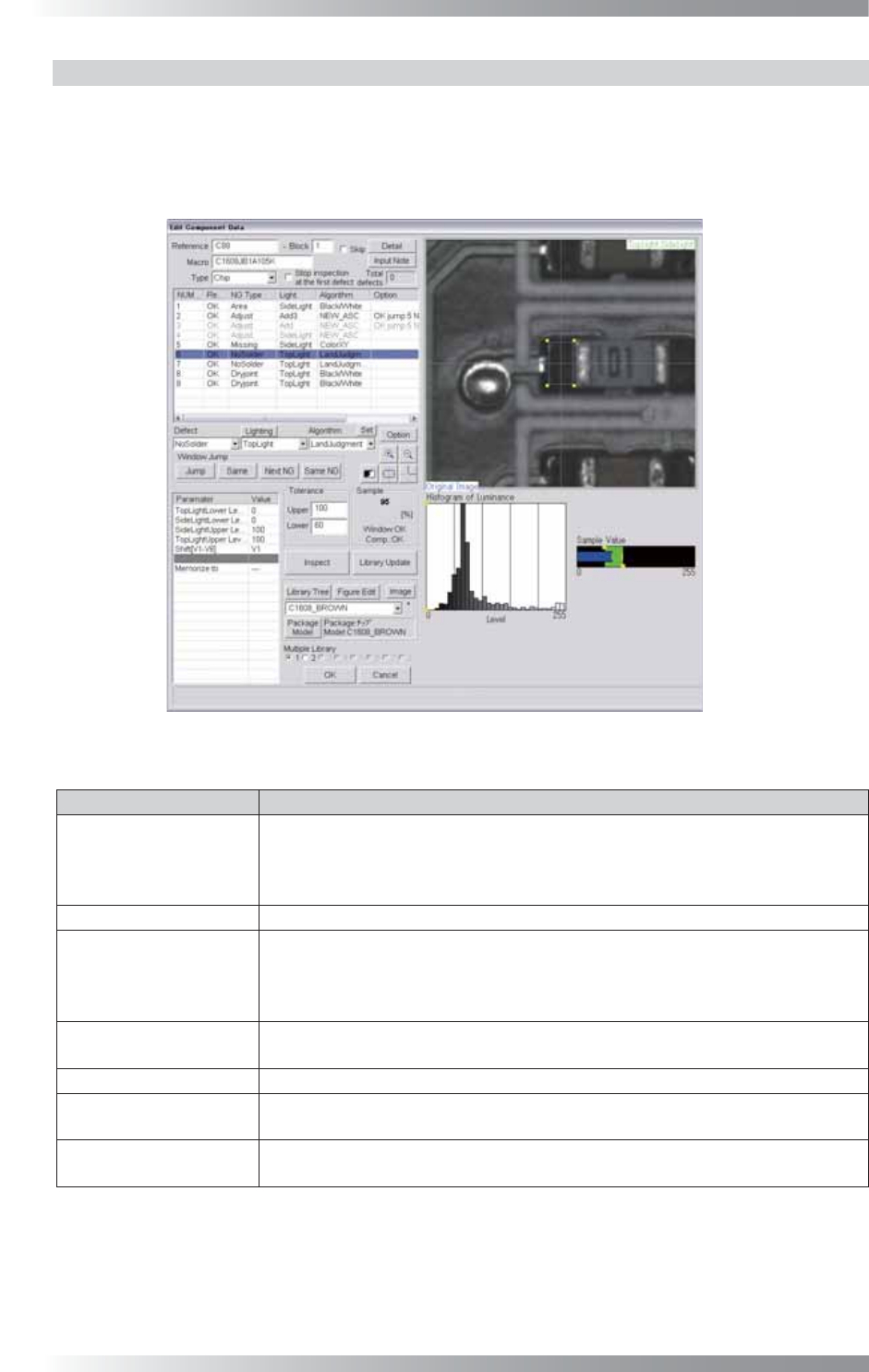
1.11.6 Algorithm LandJudgement
LandJudgement is the algorithm to perform Black/White with two lightings.
Specify the brightness level for each lighting. The algorithm calculates the percentage of the area
where the two brightness levels overlap, and displays the percentage as Sample.
LandJudgement is suitable for solder paste inspections of chip components.
Figure 1-36 LandJudgement
Parameter Description
Lighting
The selected lighting in this fi eld does not infl uence the inspection result.
Select two kinds of lightings to use LandJudgment. Press Set in the right side
of Algorithm. Select two lighting in this dialog. Default setting is TopLight and
SideLight.
Algorithm Select LandJudgement.
[Lighting1]Lower Level,
[Lighting2]Lower Level,
[Lighting2]Upper Level,
[Lighting1]Upper Level
Specify brightness level in each lighting. The percentage of the area where the
specifi ed brightness levels in each two lighting overlap in the window is displayed
as Sample.
Shift[V1-V8]
Enter the appropriate vector. Any value from V1 to V8 is available.
Select the vector according to the Memorize to fi eld of the Adjust window.
Memorize to -
Upper, Lower
Set the OK range. The maximum value is 100 in Upper and minimum value is
0 in Lower.
Sample
Calculates the percentage of the area where the two brightness levels overlap,
and displays the percentage as Sample.
Table 1-14 Parameter of LandJudgement