Programming_mail.pdf - 第9页
I- 1 Programming Manual Part I Basic Operation Basic Operation

Programming Manual
Manual
3 THD Window Creator ...............................................V-33
3.1 Inspection Overview ................................................................ V-33
3.2 Inspection Procedure .............................................................. V-33
3.3 Advanced ................................................................................ V-38
4 FUJIYAMA ................................................................ V-39
4.1 Inspection Overview ................................................................ V-39
4.2 Settings ................................................................................... V-39
4.2.1 Parameter of FUJIYAMA ................................................ V-40
4.2.2 Setting of Each Inspection Item ...................................... V-41
4.2.3 Setting Procedure of FUJIYAMA .................................... V-41
4.3 Setting of Copper Inspection ................................................... V-42
4.3.1 Parameter of Copper Inspection ..................................... V-42
4.3.2 Setting Procedure of Copper Inspection ......................... V-43
4.4 Setting of Hole Inspection ....................................................... V-44
4.4.1 Parameter of Hole Inspection ......................................... V-44
4.4.2 Setting Procedure of Hole Inspection ............................. V-45
4.5 Setting of Straight Pin Inspection ............................................ V-46
4.5.1 Parameter of Straight Pin Inspection .............................. V-46
4.5.2 Setting Procedure of Straight Pin Inspection .................. V-47
4.6 Setting of Clinch Pin Inspection ............................................... V-48
4.6.1 Parameter of Clinch Pin Inspection ................................. V-48
4.6.2 Setting Procedure of Clinch Pin Inspection ..................... V-49
4.7 Setting of Fillet Inspection ....................................................... V-50
4.7.1 Parameter of Fillet Inspection ......................................... V-50
4.7.2 Setting Procedure of Fillet Inspection ............................. V-51
4.8 Setting of Bridge Inspection .................................................... V-52
4.8.1 Parameter of Bridge Inspection ...................................... V-52
4.8.2 Setting Procedure of Bridge Inspection .......................... V-53
5 Inspection Selection ...............................................V-54
5.1 Inspection Overview ................................................................ V-54
5.2 Type of Inspection Selection ................................................... V-54
5.2.1 Skip Inspection ................................................................ V-54
5.2.2 Do Inspection for Not Placed .......................................... V-54
5.2.3 Exchange Macro ............................................................. V-54
5.3 Setting Procedure .................................................................... V-55
5.3.1 Skip Inspection ................................................................ V-57
5.3.2 Do Inspection for Not Placed .......................................... V-58
5.3.3 Exchange Macro ............................................................. V-59
5.4 Save Inspection Data .............................................................. V-60
5.5 Select Inspection Selection ..................................................... V-62
5.6 Output Setting File for Inspection Selection ............................ V-64
5.6.1 Output Setting File for Inspection Selection .................... V-64
5.6.2 Read Setting File for Inspection Selection ...................... V-65
5.7 Group Edit ............................................................................... V-66

I-
1
Programming Manual
Part I Basic Operation
Basic Operation
I-2
Programming Manual
Part I Basic Operation
1 Basic Operation of Inspection Software
1.1 Basic Operation
This section describes basic operations of the inspection software.
1.1.1 Window Details
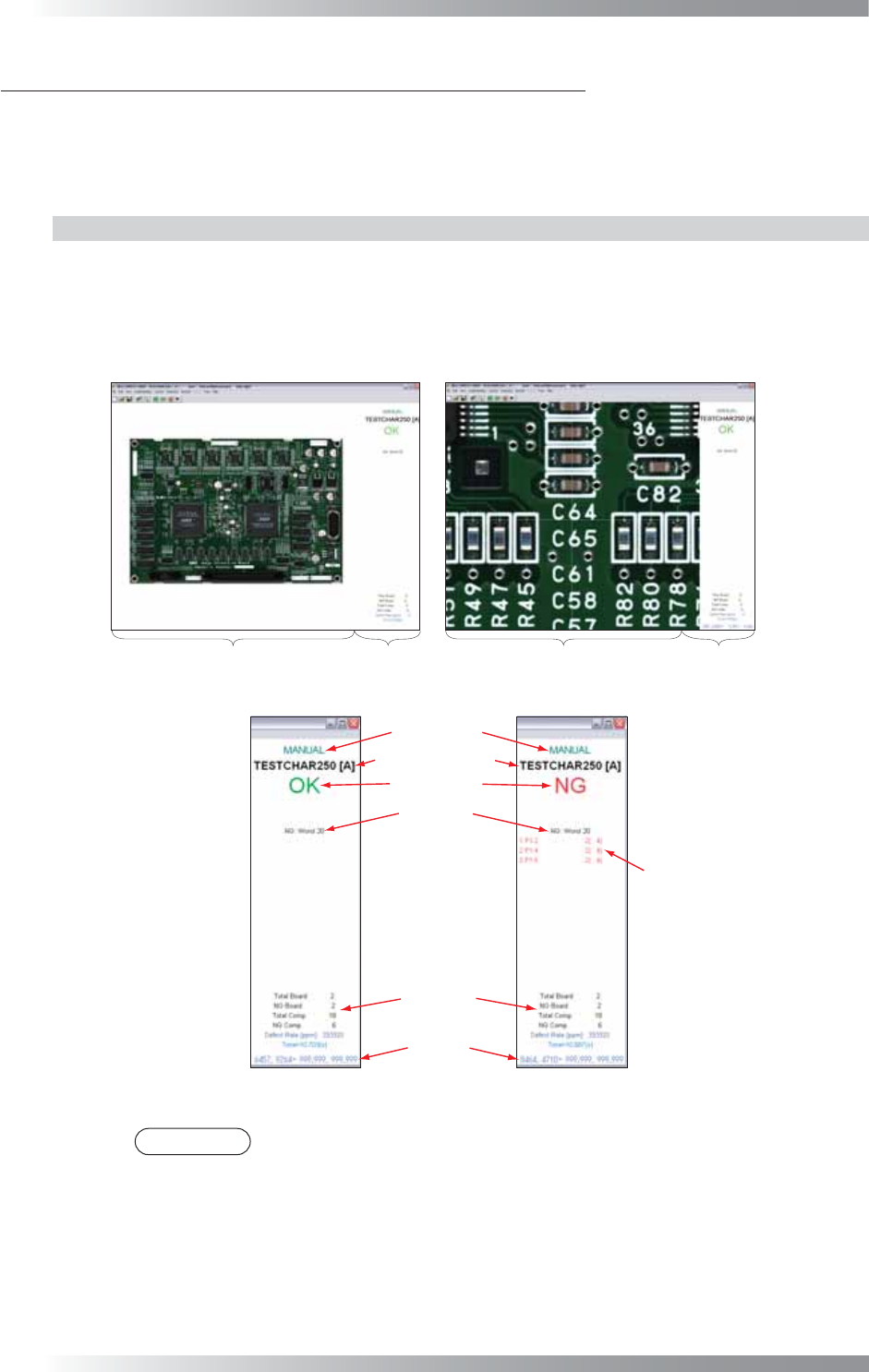
The main window consists of the following two frames.
Image Frame Displays the scanned image or inspection data.
Index Frame Displays the operation mode, inspection data name, inspection result, and cursor
position coordinate.
Full View Screen
Enlarged View Screen
Image Frame
Index Frame
Image Frame
Index Frame
Figure 1-1 Window Names
Component Data
Inspection Data Name
All Inspection
Results
Position
Coordinate
Index Display
Inspection Result
Operation Mode
Figure 1-2 Explanation of Index Frame
NOTE
Index Display can be selected from the following formats. Select View > Results
from the menu-bar. Displays the corresponding components in Component Data.
Worst 20 Ranks the components in which defects are found by the number of occurrences,
and display the worst 20 components.
False 20 Ranks the components in which false calls are found by the number of false call
occurrences, and displays the worst 20 components.
NG Displays the components that produced NG inspection results.
OK Displays the components that produced OK inspection results.