Programming_mail.pdf - 第190页
IV - 26 Programming Manual Part IV Option Setting 4.3 Inspection Image Combining three different LED lighting, T opLight (Coaxial Overhead illumination), SideLight, and LowLight, create the most appropriate image for the…
IV-25
Programming Manual
Part IV Option Setting
4 Appendix
4.1 Folder Structure
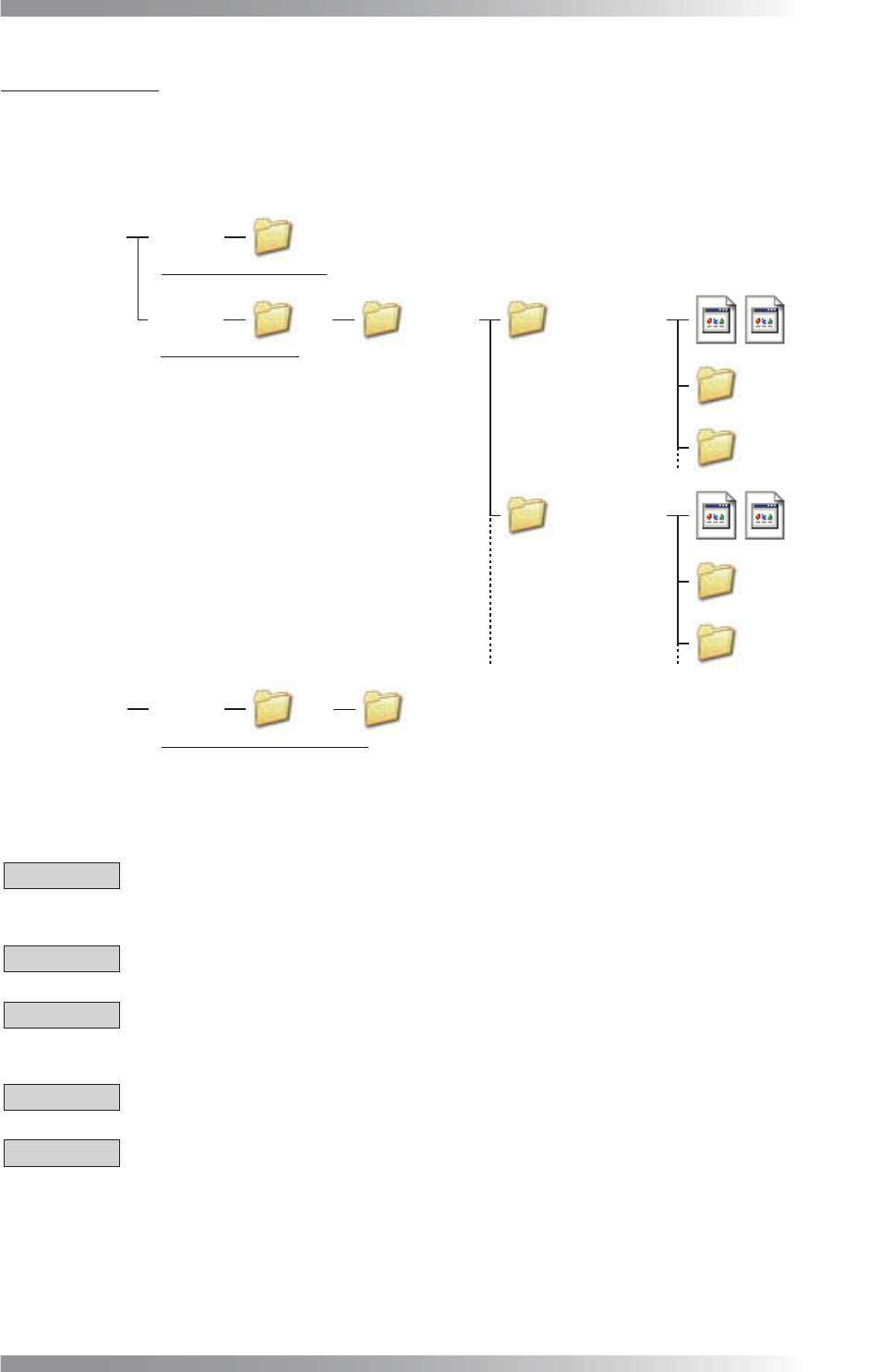
An inspection data is saved in D drive as shown below.
Hard Disk Drive 1 C Drive
D Drive
BF1
BF1
Save inspection software
Save inspection data
Save backup of inspection data
BF1DATA Data Group 1
Library
Board Name 1
Board Name 2
Data Group 2
Board Name 3
Board Name 4
Hard Disk Drive 2 E Drive BF1
BF1DATA
Library
Figure 4-1 Folder Structure
4.2 Precautions When Using the Machine
CAUTION
If connecting an external memory device to the USB port on the machine, be sure to perform a virus-
scan before connecting.
CAUTION
Do not change the fi lename of TOPLIGHT.BMP under D\BF1\BF1DATA.
CAUTION
Do not use two-byte characters, spaces, tabs, or symbolic characters (\ < > : “ / | ? * . , ; & % =) as
these characters may cause unexpected errors.
CAUTION
Do not install any software other than the software already installed into this machine.
CAUTION
If transferring data from the machine to BF-Editor (optional system), be sure to make sure of the fi le name.
If the same name fi le exists in the BF-Editor, the data will be overwritten by the data from the machine.
IV-26
Programming Manual
Part IV Option Setting
4.3 Inspection Image
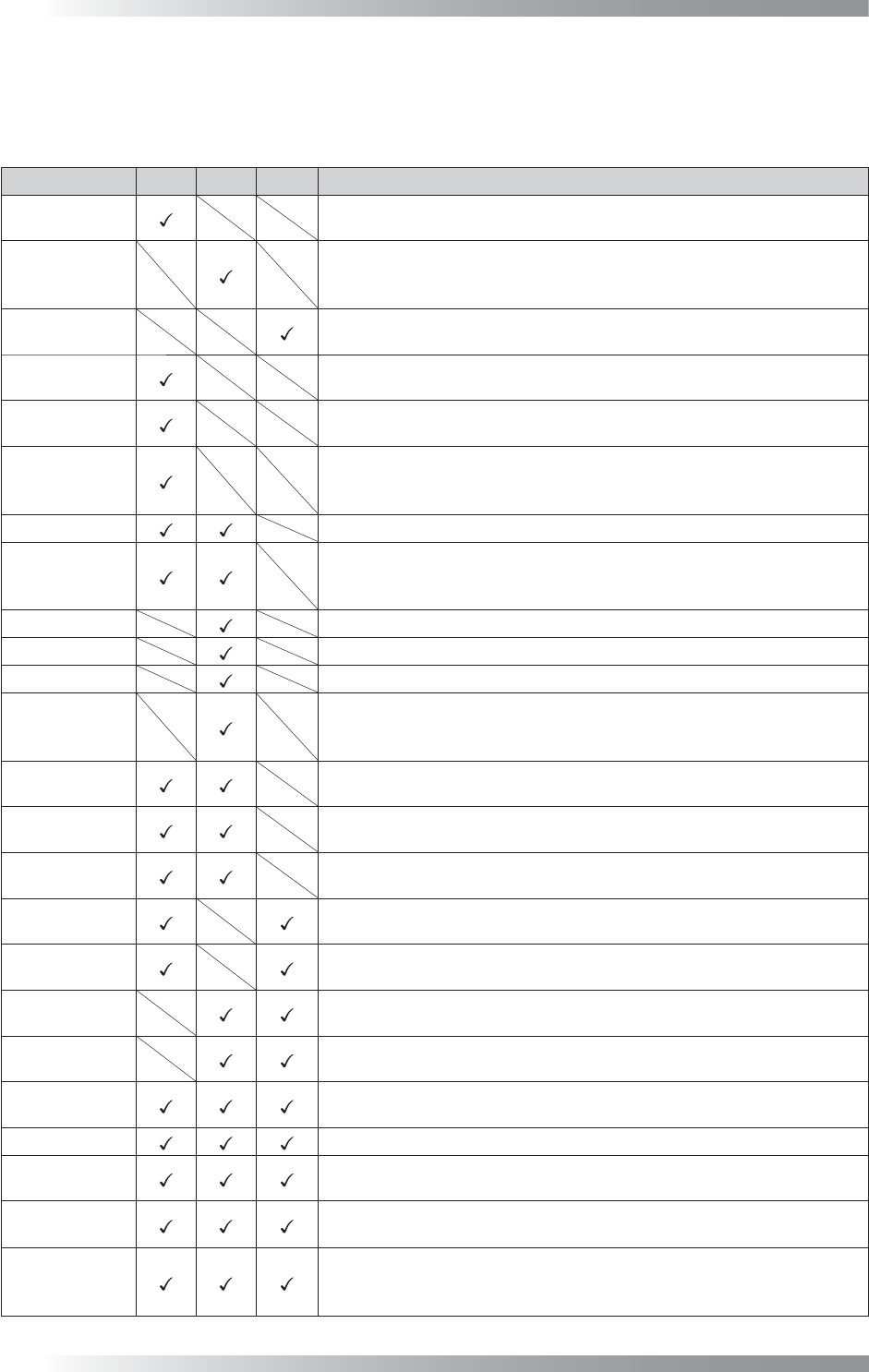
Combining three different LED lighting, TopLight (Coaxial Overhead illumination), SideLight, and LowLight,
create the most appropriate image for the inspection.
Lighting Top
Side
Low Description
TopLight
Image scanned with TopLight. TopLight is suitable for solder inspection
to shed light from the overhead.
SideLight
Image scanned with SideLight. Nearly visual color repeatability lighting
and a dark part becomes bright. SideLight is suitable for inspection
using colors.
LowLight
Image scanned with LowLight. Silk characters or characters on a component
become bright. LowLight is suitable for character inspection.
Density
Image that gamma-corrected TopLight brightness level. Density is suitable
for denoising of TopLight.
Outline
Image that doubled TopLight brightness level. Outline is suitable for contour
extraction of component.
MultiColorEx
Image that converted TopLight brightness into hue information. Bright
part is converted to look like red and dark part is converted to look like
blue. MultiColorEx is suitable for solder inspection.
Add
Image that totaled brightness of TopLight and SideLight.
Add3
Image that totaled brightness of TopLight and SideLight, and in addition
highlighted bright parts and dark parts. Add3 is suitable for inspection of
fi ducial mark or misalignment correction.
RED
Image that outputs constituent of Red at the 256 shades of gray from 0 to 255.
GREEN
Image that outputs constituent of Green at the 256 shades of gray from 0 to 255.
BLUE
Image that outputs constituent of Blue at the 256 shades of gray from 0 to 255.
HSV_Color
Image that converted SideLight brightness to HSV format. It is possible
to highlight the specifi c color information. Each HSV parameter can be
set optionally from Set.
Two Red-TOP
Image that subtracted TopLight brightness from double Red constituent. Two
Red-TOP is suitable for extract of laser-printed characters such as barcode.
TOP-SIDE
Image that subtracted SideLight brightness from TopLight brightness.
TOP-SIDE is suitable for extract (highlight) of plain surface.
SIDE-TOP
Image that subtracted TopLight brightness from SideLight brightness.
SIDE-TOP is suitable for extract (highlight) of inclined surface.
TOP-LOW
Image that subtracted LowLight brightness from TopLight brightness.
TOP-LOW is suitable for solder inspection to appear fi llet part darkly.
LOW-TOP
Image that subtracted TopLight brightness from LowLight brightness.
Silk characters or plain surface becomes brightly.
SIDE-LOW
Image that subtracted LowLight brightness from SideLight brightness.
Silk characters or plain surface becomes brightly.
LOW-SIDE
Image that subtracted SideLight brightness from LowLight brightness.
LOW-SIDE is suitable for extract (highlight) of inclined surface.
Multi-Lighting
Image that can clearly display fi llet shape by color. Outputting red in
case of TopLight, green in case of SideLight, or blue in case of LowLight.
TOPSIDELOW
Brightness of TopLight, SideLight, and LowLight can be set freely.
UserDefi ne
Brightness of TopLight, SideLight, and LowLight can be set freely.
UserDefi ne can set more fl exible than TopSideLow.
SPECT
Image that converted brightness into hue information. SPECT is used
in Algorithm IC_Solder2 and IC_Solder3.
OKNGColors
OKNGColors separates between OK color as white and NG color as
black. It is possible to detect the difference of similar colors. OKNGColors
can be used in fare-paying software.
Table 4-1 Description of Each Image

Programming Manual
Part V Other Function
V-
1
Other Function