Programming_mail.pdf - 第127页
III- 53 Programming Manual Part III Inspection Algorithm Step9: This is the parameter setting for copper exposure inspection. Select Copper exposure from the Inspection parameter drop-down list. It is useful to detect co…
III-52
Programming Manual
Part III Inspection Algorithm
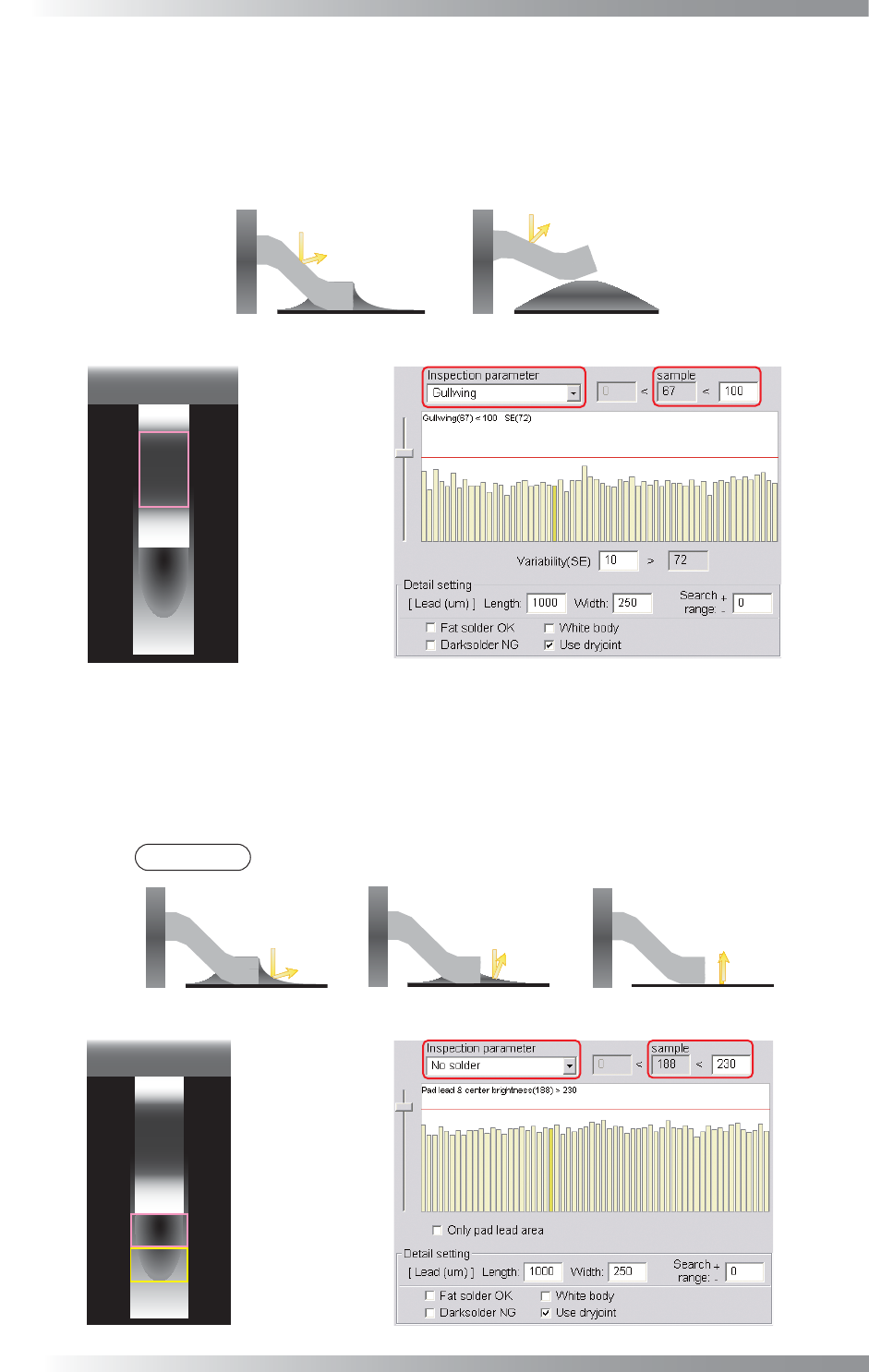
Step7: This is the parameter setting for lead bend inspection. Select Gullwing from the Inspection
parameter drop-down list. It calculates the average brightness value of gull wing area in the
same side of the component. The difference in amount between average brightness and actual
brightness is shown as the sample value. If the sample value is lower than OK range, the result
will be OK. Default is 100. If necessary, change the value according to inspection accuracy.
(a) Normal
(b) LiftedLead
High Brightness Low Brightness
Gull Wing Area
Figure 1-64 Lead Bend Inspection
Step8: This is the parameter setting for solder inspection. Select No solder from the Inspection
parameter drop-down list. It calculates average brightness level in pad lead area and pad
center area as sample value. If the sample value is lower than OK range, the result will be
OK. Default is 230. If necessary, change the value depends on inspection accuracy.
NOTE
The average brightness level is lower in case of no solder or insuffi cient solder.
(a) Normal
(b) Insufficient Solder
Low Brightness High Brightness
(c) No Solder
High Brightness
Pad Center Area
Pad Lead Area
Figure 1-65 Solder Inspection
III-53
Programming Manual
Part III Inspection Algorithm
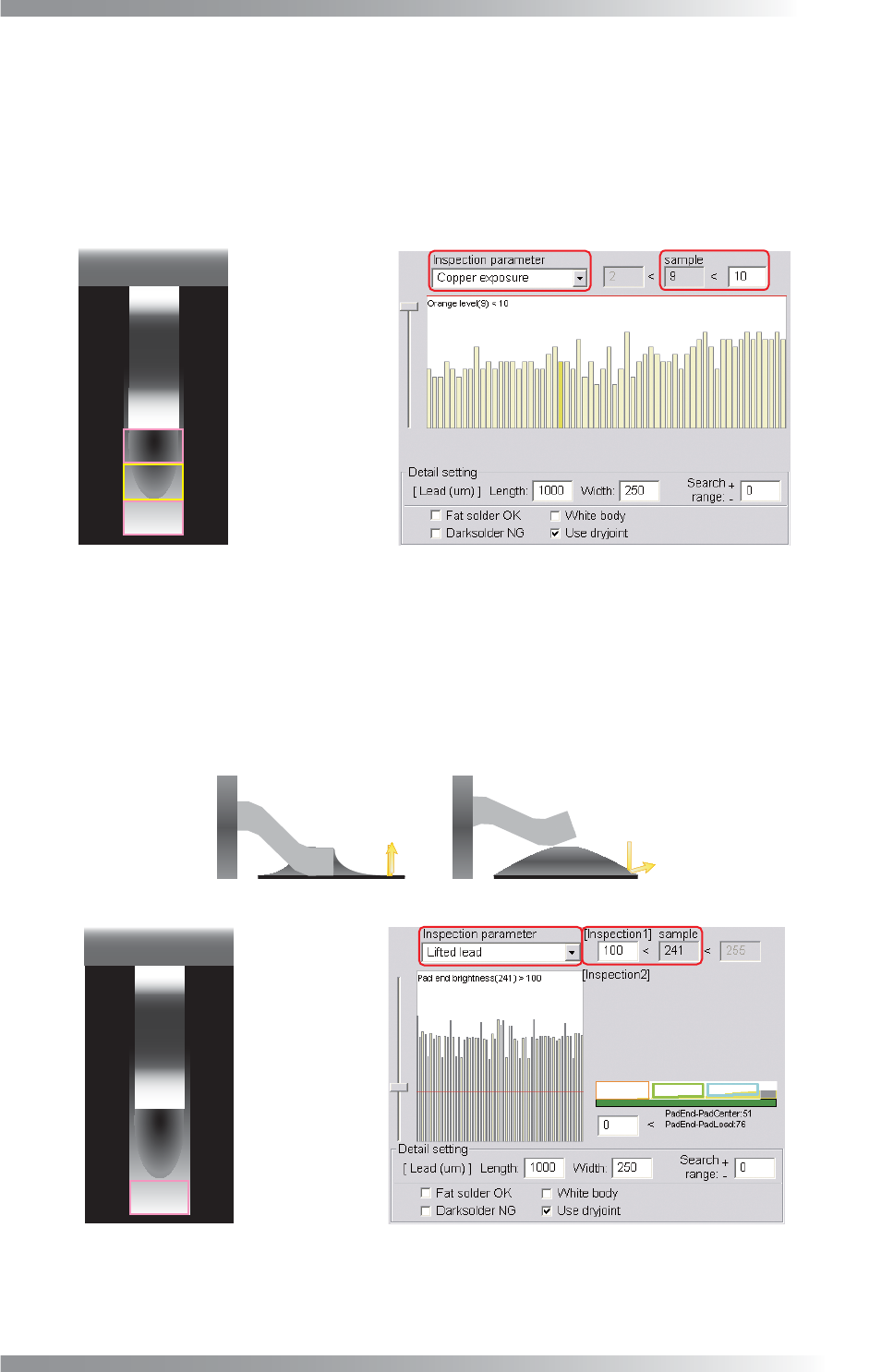
Step9: This is the parameter setting for copper exposure inspection. Select Copper exposure
from the Inspection parameter drop-down list. It is useful to detect copper area due to
insuffi cient solder. It calculate the percentage of copper color defi ned as more than 80% of
hue and color saturation and more than 60% of brightness in pad lead, pad center, and pad
end area. If the sample value is lower than OK range, the result will be OK. The default is
10%. If necessary, change the value depends on the solder condition.
Pad Center Area
Pad Lead Area
Pad End Area
Figure 1-66 Copper Inspection
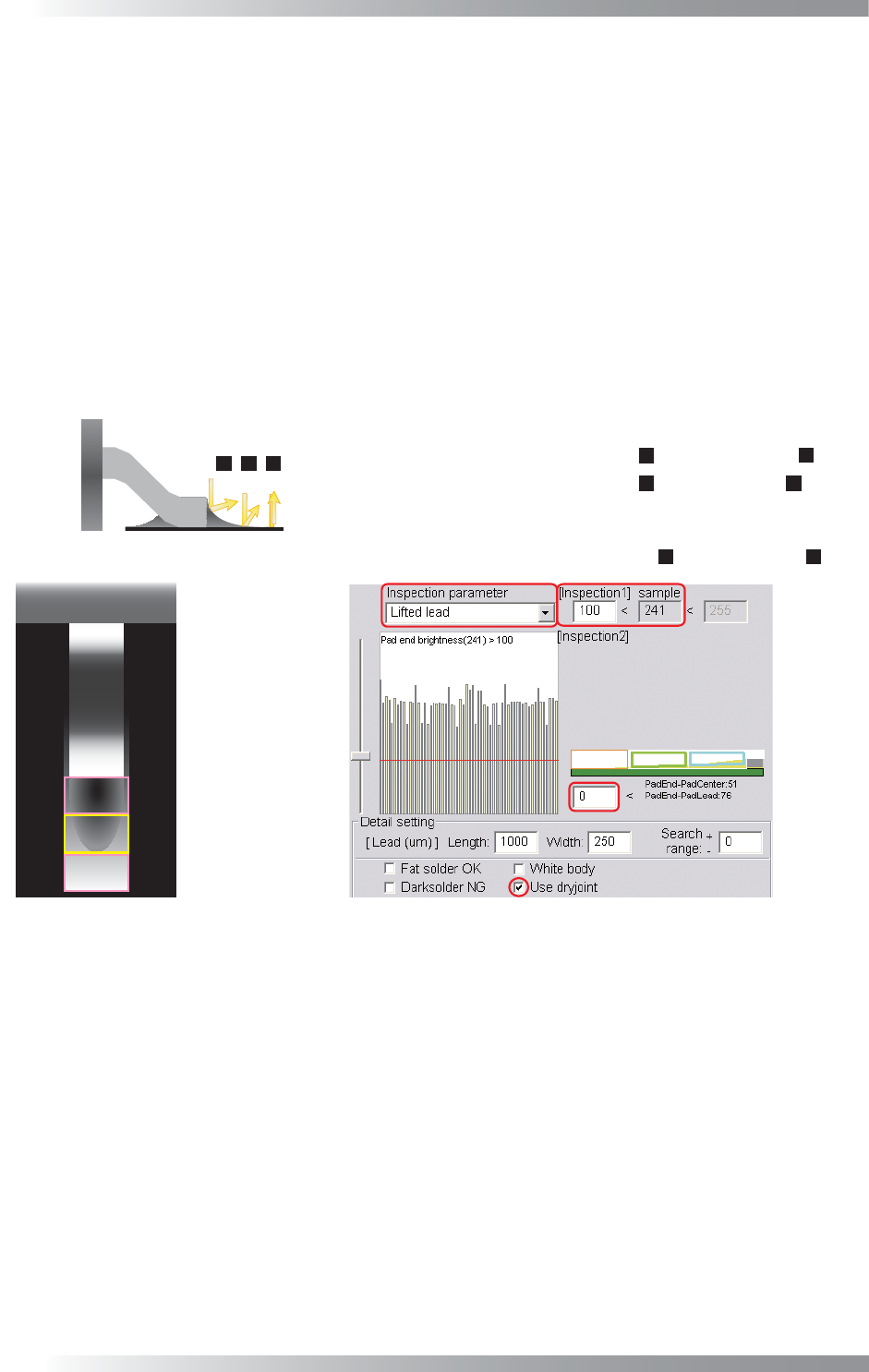
Step10: This is the parameter setting for lifted lead inspection. Select Lifted lead from the Inspection
parameter drop-down list. Lifted lead inspection has two steps. First inspection calculates
average brightness level in pad end area. If the sample value is higher than OK range, the
result will be OK. Default is 100. If necessary, change the value according to the inspection
accuracy. If the fi rst inspection is NG, the second inspection shown in Step11 will be done.
(a) Normal
(b) LiftedLead
High Brightness
Low Brightness
Pad End Area
Figure 1-67 Lifted Lead Inspection 1
III-54
Programming Manual
Part III Inspection Algorithm
Step11: If the fi rst inspection shown in Step9 is NG, the second inspection will be done. The
comparison brightness level in pad lead, pad center, and pad end area will be shown as
sample value. If solder is in good condition, the brightness level is darker in pad lead area
and brighter in pad end area. This inspection is separated into two steps. The comparison
of brightness level, the brightness level in pad end area minus pad center area and the
brightness level in pad end area minus pad lead area, is shown as sample value in fi rst
inspection. If the sample value is larger than Threshold, the result will be OK (Default is 0).
If either the brightness level in pad end area minus pad center area or the brightness level
in pad end area minus pad lead area is NG, the second inspection, the brightness level in
pad center area minus pad lead area, will be done. If the sample value is larger than
Threshold, the result will be NG. If necessary, change the value depends on the solder
condition. If Use dryjoint is checked, inspection procedure is changed. Refer to Step14.
㻝
㻞
㻟
Pad Center Area
Pad Lead Area
Pad End Area
Setting Value(Default is 0) < Pad End Area( ) - Pad Center Area( )
㻟
㻞
Setting Value(Default is 0) < Pad End Area( ) - Pad Lead Area( )
㻟
㻝
㻔㻝㻕㻌Calculate following equation. If the result will be NG, proceed to (2).
㻔㻞㻕㻌Calculate following equation. If the result will be NG, judged as lifted lead.
Setting Value(Default is 0) < Pad Center Area( ) - Pad Lead Area( )
㻞
㻝
Figure 1-68 Lifted Lead Inspection 2