Programming_mail.pdf - 第134页
III- 60 Programming Manual Part III Inspection Algorithm 1.16 Distribution 1.16.1 Inspection Ov er view Distribution is the algorithm to detect a solder bridge between leads of IC components. Set the inspection window be…

III-59
Programming Manual
Part III Inspection Algorithm
1.15.3 Setting Procedure
Step1: Select SideLight from the Lighting drop-down list.
Step2: Extract colors from two places.
Component RGB values are displayed in the graph.
By left-clicking with pressing
, it is displayed on the left of the graph.
By left-clicking with pressing , it is displayed on the right of the graph.
NOTE
Extract colors two places to put fl exibility into OK range. One should be extracted
from dark color and another should be extracted from light color.
Step3: If the specifi ed color is registered as OK color, enter 100 in Upper and arbitrarily value in Lower.
If the specifi ed color is registered as NG color, enter arbitrarily value in Upper and 0 in Lower.
Step4: Enter the appropriate vector into the Shift fi eld. Any value from V1 to V8 is available.
Select the vector according to the Memorize to fi eld of the Adjust window.
Step5: Press Inspect. Make sure that the inspection is completed properly.
III-60
Programming Manual
Part III Inspection Algorithm
1.16 Distribution
1.16.1 Inspection Overview
Distribution is the algorithm to detect a solder bridge between leads of IC components.
Set the inspection window between leads of IC components. If a solder bridge exists between leads,
a bright line is laid across the inspection window because the solder is brighter than PCB.
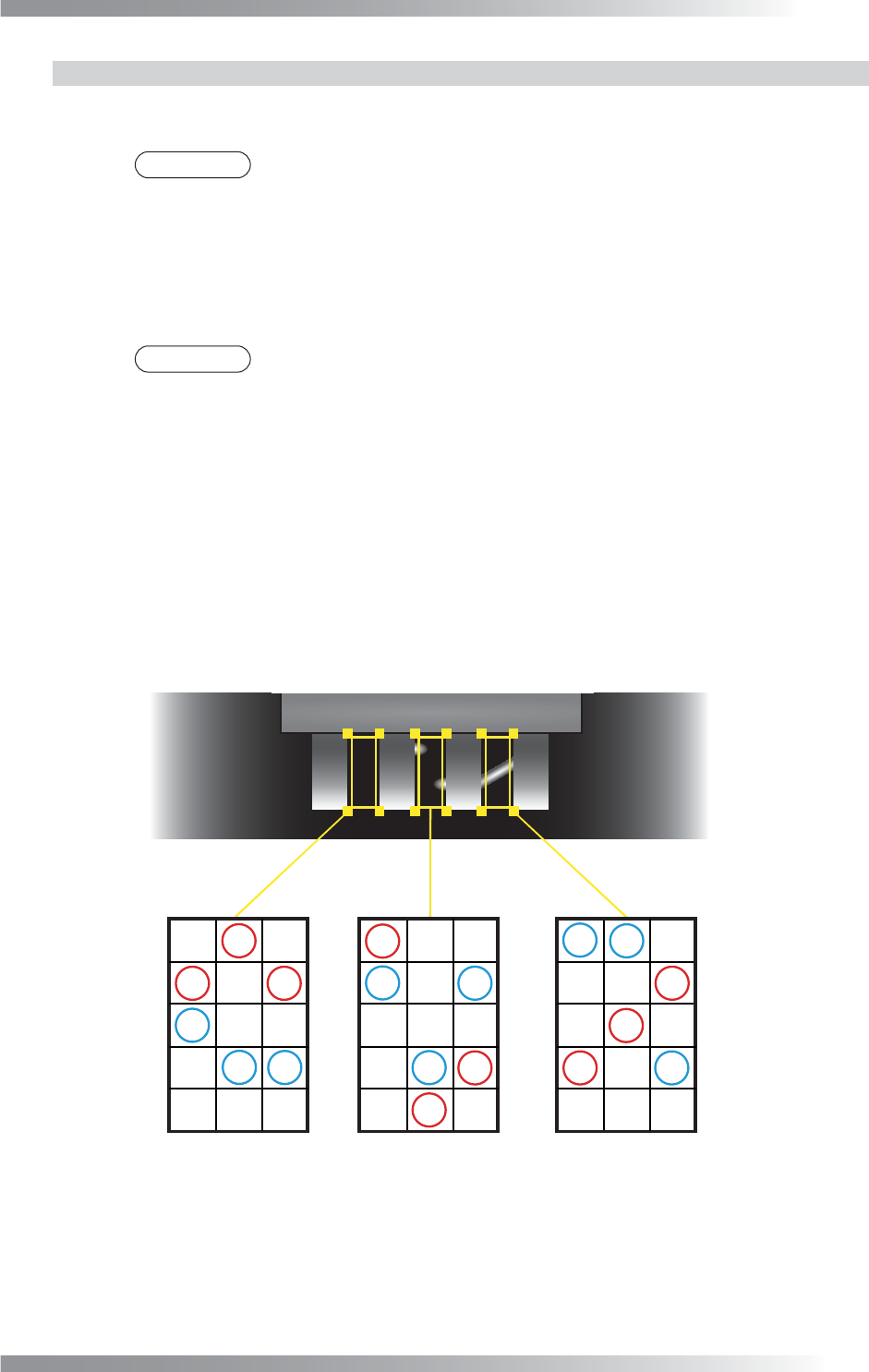
The inspection window will be separated to several windows in longitudinal direction. The differences
between maximum minus minimum brightness level in each separated windows are calculated.
The sample value is the minimum value calculated among separated window (refer to Figure 1-76).
1.16.2 Parameter Setting
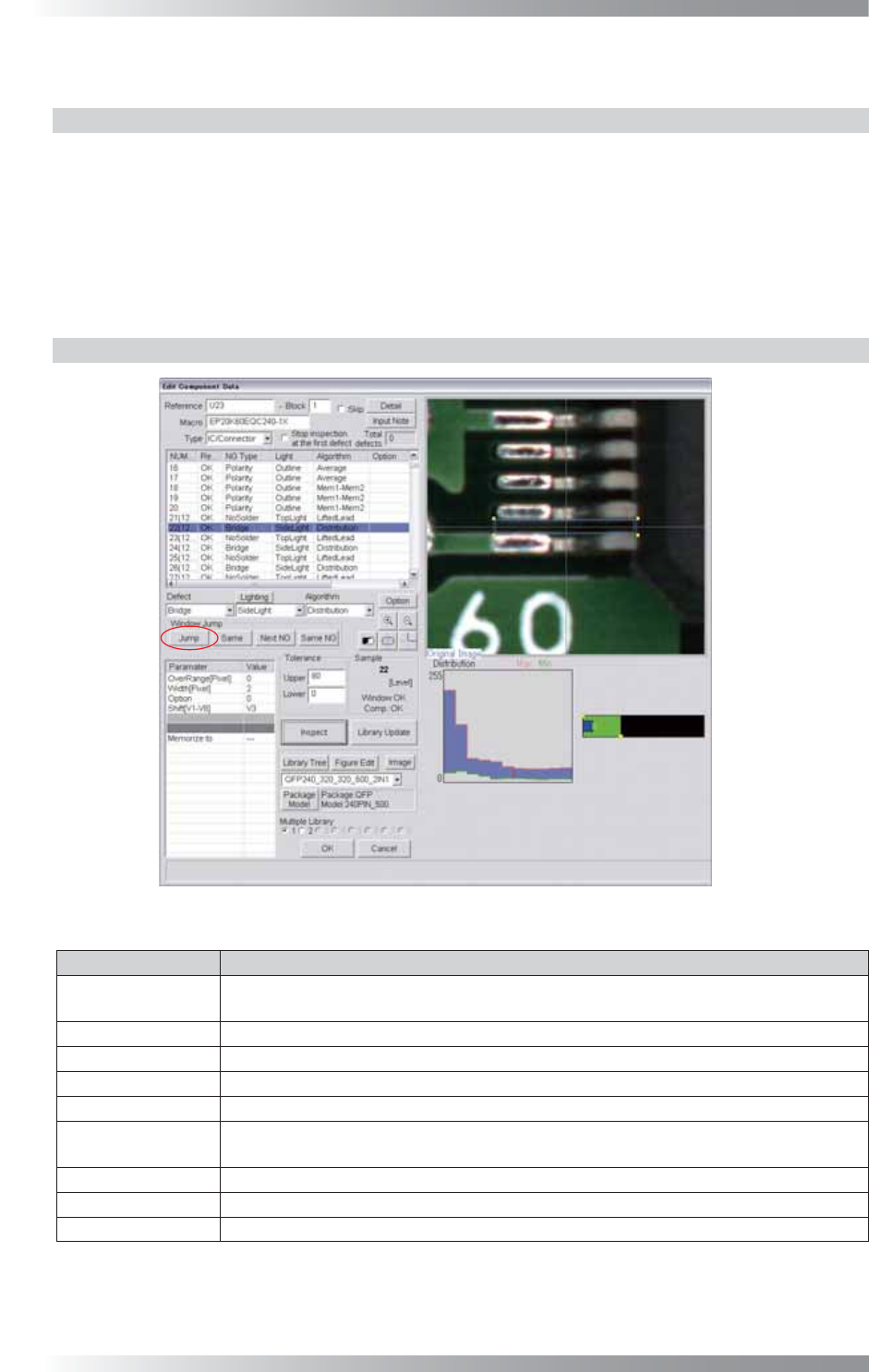
Figure 1-75 Distribution
Parameter Description
Lighting
Select SideLight. Change the lighting to LowLight, if fl ux is detected as bridge with
SideLight.
Algorithm Select Distribution.
OverRange[Pixel] Enter 0.
Width[Pixel] Default is 2. Set the bigger value to reduce noise.
Option Enter 0.
Shift[V1-V8]
Enter the appropriate vector. Any value from V1 to V8 is available.
Select the vector according to the Memorize to fi eld of the Adjust window.
Memorize to -
Upper, Lower Set upper and lower limit of the OK range.
Sample Refer to Figure 1-76.
Table 1-26 Parameter of Distribution
III-61
Programming Manual
Part III Inspection Algorithm
1.16.3 Setting Procedure
Step1: Select SideLight from the Lighting drop-down list.
NOTE
Change the lighting to LowLight, if fl ux is detected as bridge with SideLight.
Step2: Change the inspection window size to surround the area from the lead base to the pad end.
Align its width to the lead pitch.
Step3: Enter values in the Upper fi eld and the Lower fi eld.
NOTE
Standard values are 80 (Upper) and 0 (Lower).
Step4: Enter the appropriate vector into the Shift fi eld by selecting from V1 to V8 according to the
vector used in the Memorize to fi eld in the Adjust window.
Step5: Right-click on Distribution in the inspection item list and select Parameter Copy to copy
parameter to the other leads.
Step6: Lead pitch is adjusted automatically by pressing Jump in the upper left side of the dialog.
Step7: Press Inspect. Make sure that the inspection is completed properly.
㪉㪇
㪋㪇㪊㪇
㪌㪇 㪊㪇
㪋㪇
㪍㪇㪋㪇
㪌㪇㪌㪇
㪊㪇
㪋㪇
㪎㪇
㪌㪇
㪍㪇
㪌㪇
㪉㪊㪇㪍㪇
㪋㪇 㪍㪇
㪉㪉㪇
㪉㪇㪊㪇
㪊㪇㪌㪇
㪊㪇
㪎㪇
㪉㪈㪇
㪌㪇
㪋㪇
㪉㪇
㪊㪇㪍㪇
㪊㪇 㪋㪇
㪌㪇
㪌㪇㪉㪇㪇
㪍㪇㪋㪇
㪉㪉㪇
㪎㪇
㪊㪇
㪍㪇
㪌㪇
㪉㪇
㪋㪇 㪋㪇 㪈㪎㪇 㪋㪇 㪈㪐㪇 㪈㪐㪇 㪈㪐㪇 㪈㪏㪇
(a) Normal (c) Bridge
(b) Bleeding
(It is not bridge)
Divide inspection window into several blocks.
Calculate maximum brightness level minus minimum brightness level in each column.
Minimum value is sample value.
(Sample Value is higher)
Figure 1-76 Bridge Inspection by Distribution