Programming_mail.pdf - 第96页
III- 22 Programming Manual Part III Inspection Algorithm 1.9.4 Setting Procedur e of Polarity Inspection Step1: Select a lighting that a polarity is visually clear from the Lighting drop-down list. Step2: Adjust the Rang…
III-21
Programming Manual
Part III Inspection Algorithm
1.9.3 Setting Procedure of Shift Inspection
Step1: Select a lighting that displays the brightness level difference between OK and NG visually
clear from the Lighting drop-down list.
Step2: Make sure of the OK brightness level.
NOTE
Sample value is the brightness level range of the inspection window.
㪏㪇
㪐㪇
㪎㪇
㪏㪇 㪏㪇
㪏㪇
㪎㪇㪎㪇
㪍㪇
㪎㪇
㪉㪉㪇
㪉㪋㪇㪐㪇
㪏㪇 㪉㪈㪇
㪏㪇
㪉㪊㪇㪎㪇
㪉㪈㪇㪍㪇
IC
Lead
OK Inspection Window
NG Inspection Window
Max Brightness
Level[90]
-
Minimum Brightness
Level[60]
Value[30]
=
Sample
Max Brightness
Level[240]
-
Minimum Brightness
Level[60]
Value[180]
=
Sample
Figure 1-24 Calculation of Sample Value
Step3: Make sure of the NG brightness level. Set the value in between the OK sample value and
the NG sample value as OK range.
Step4: Calculate a value intermediate between OK sample value and NG sample value.
CAUTION
Change the lighting if there is no difference between OK sample value and NG sample
value with default lighting.
0 255
OK
㪈㪏㪇㪊㪇
Intermediate Value
OK Sample Value NG Sample Value
㪈㪇㪌
Figure 1-25 Calculation of Intermediate Value
Step5: If OK sample value is smaller than NG sample value, enter intermediate value in the
Upper fi eld and 0 in the Lower fi eld. If NG sample value is smaller than OK sample value,
enter 255 in the Upper fi eld and intermediate value in the Lower fi eld.
Step6: Enter the appropriate vector into the Shift fi eld by selecting from V1 to V8 according to the
vector used in the Memorize to fi eld in the Adjust window.
Step7: Press Inspect. Make sure that the inspection is completed properly.
III-22
Programming Manual
Part III Inspection Algorithm
1.9.4 Setting Procedure of Polarity Inspection
Step1: Select a lighting that a polarity is visually clear from the Lighting drop-down list.
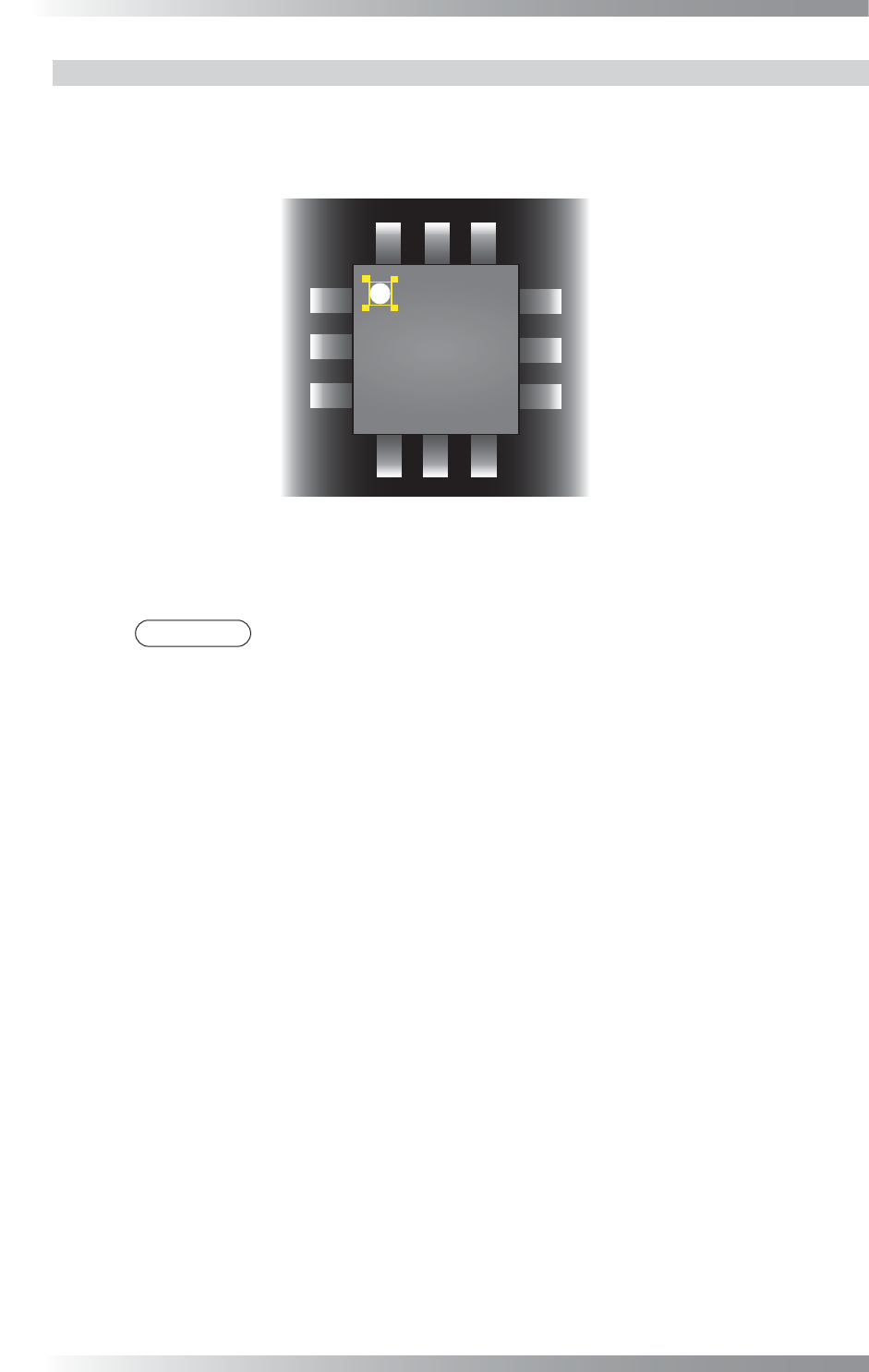
Step2: Adjust the Range inspection window position to surround the polarity mark.
Figure 1-26 Inspection Window for Polarity Inspection
Step3: Make sure that the sample value is in the OK range.
If it is out of OK range, adjust value in the Lower fi eld.
NOTE
Sample value is the subtracted value between maximum and minimum brightness
level inside the inspection window.
Step4: Enter the appropriate vector into the Shift fi eld by selecting from V1 to V8 according to the
vector used in the Memorize to fi eld in the Adjust window.
Step5: Press Inspect. Make sure that the inspection is completed properly.
III-23
Programming Manual
Part III Inspection Algorithm
1.9.5 Use of Average
Polarity inspections by using Average provide higher accuracy.
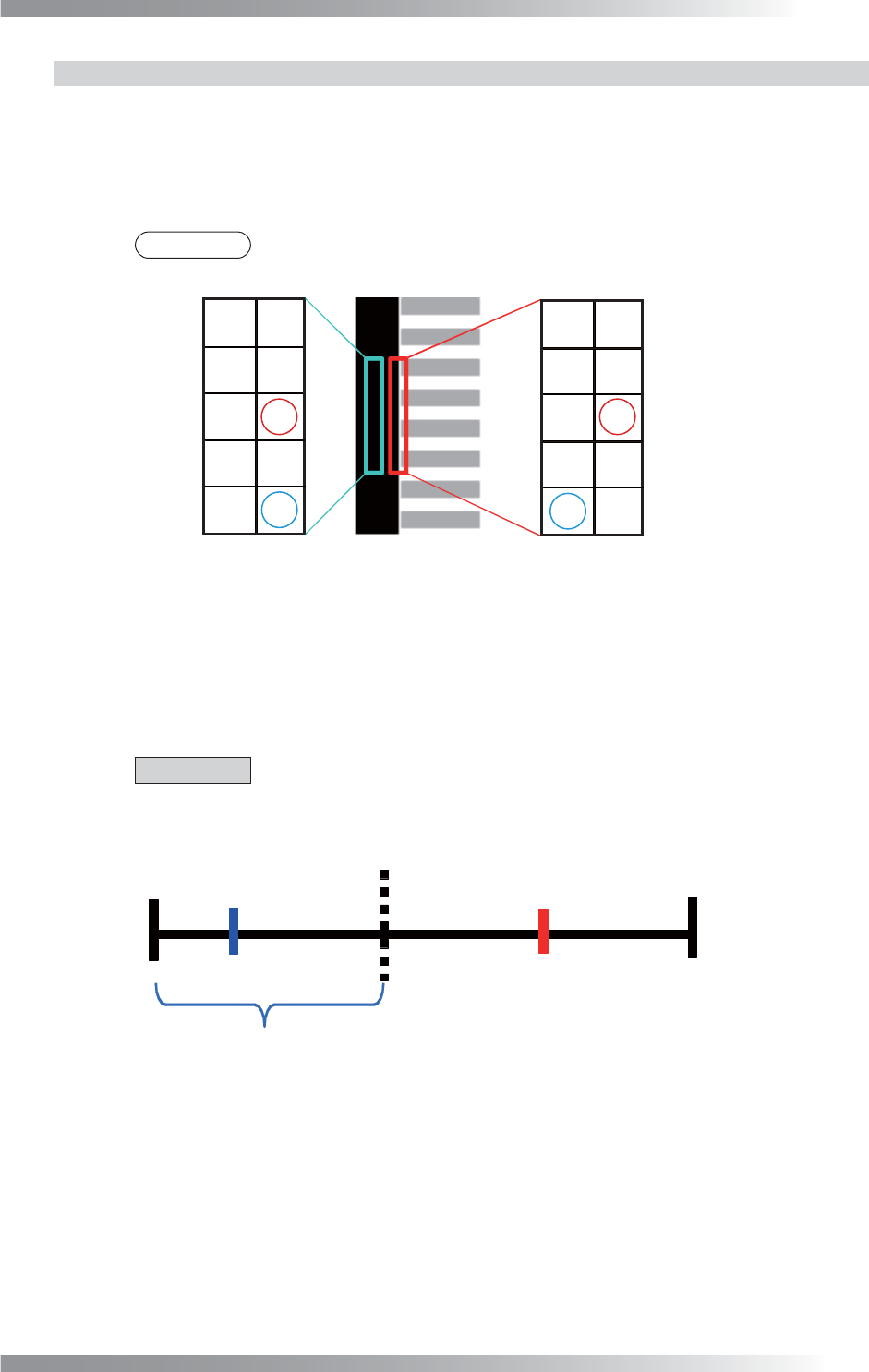
In case of SOP, the algorithm makes an inspection window on a point-symmetric point of a polarity mark.
It calculates brightness level differences between inspection windows to reduce the effect of dusts or
noises.
In case of QFP, the algorithm makes an inspection window on a point-symmetric point and line-symmetric
point of a polarity mark. It calculates brightness level differences between inspection windows.
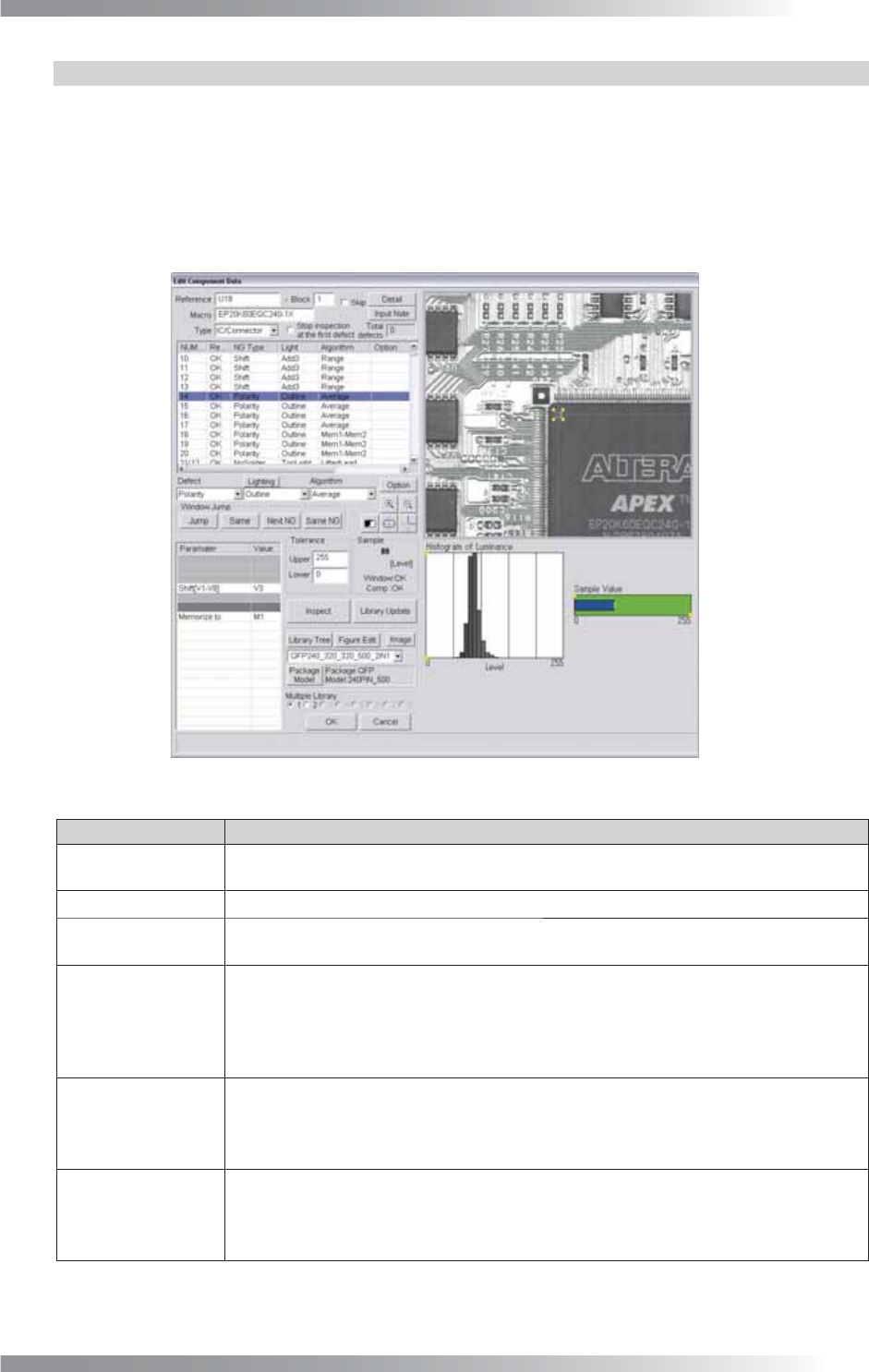
Figure 1-27 Average (Polarity)
Parameter Description
Lighting
Select a lighting that the brightness level difference between the polarity and the
surface is visually clear.
Algorithm This inspection uses Average and Mem1-Mem2.
Shift[V1-V8]
This parameter is displayed only in Average. Enter the appropriate vector. Any value from V1
to V8 is available. Select the vector according to the Memorize to fi eld of the Adjust window.
Memory1[M1-M8],
Memory2[M1-M8]
This parameter is displayed only in Mem1-Mem2. If SOP is inspected, enter M1 in
the Memory1 fi eld and M2 in the Memory2 fi eld. If QFP is inspected, make three
Mem1-Mem2 inspection windows. Enter M1 in the Memory1 fi eld in three inspection
windows. Enter M2 in Memory2 in the fi rst inspection window, M3 in Memory2 in the
second inspection window, and M4 in Memory2 in the third inspection window.
Memorize to
If SOP is inspected, enter M1 or M2 in two Average inspection windows to register the
brightness level. Mem1-Mem2 calculates M1 minus M2. If QFP is inspected, enter M1, M2,
M3, or M4 in four Average inspection windows to register the brightness level. Mem1-
Mem2 calculates M1 minus M2, M1 minus M3, and M1 minus M4.
Upper, Lower
Enter 255 in the Upper fi eld and 0 in the Lower fi eld of Average. If brightness level of
polarity is higher than brightness level of component body, enter 255 in the Upper fi eld and
1 in the Lower fi eld of Mem1-Mem2. If brightness level of polarity is lower than brightness
level of component body, enter -1 in the Upper fi eld and -255 in the Lower fi eld.
Table 1-10 Parameter of Average (Polarity)