Programming_mail.pdf - 第146页
III- 72 Programming Manual Part III Inspection Algorithm 1.21 ASLeadLength 1.21.1 Inspection Ov er view ASLeadLength is the algorithm to inspect leads length of IC components by measuring length from lead base area to le…
III-71
Programming Manual
Part III Inspection Algorithm
1.20.3 Setting Procedure
Step1: Select a lighting that displays the barcode visually clear from the Lighting drop-down list.
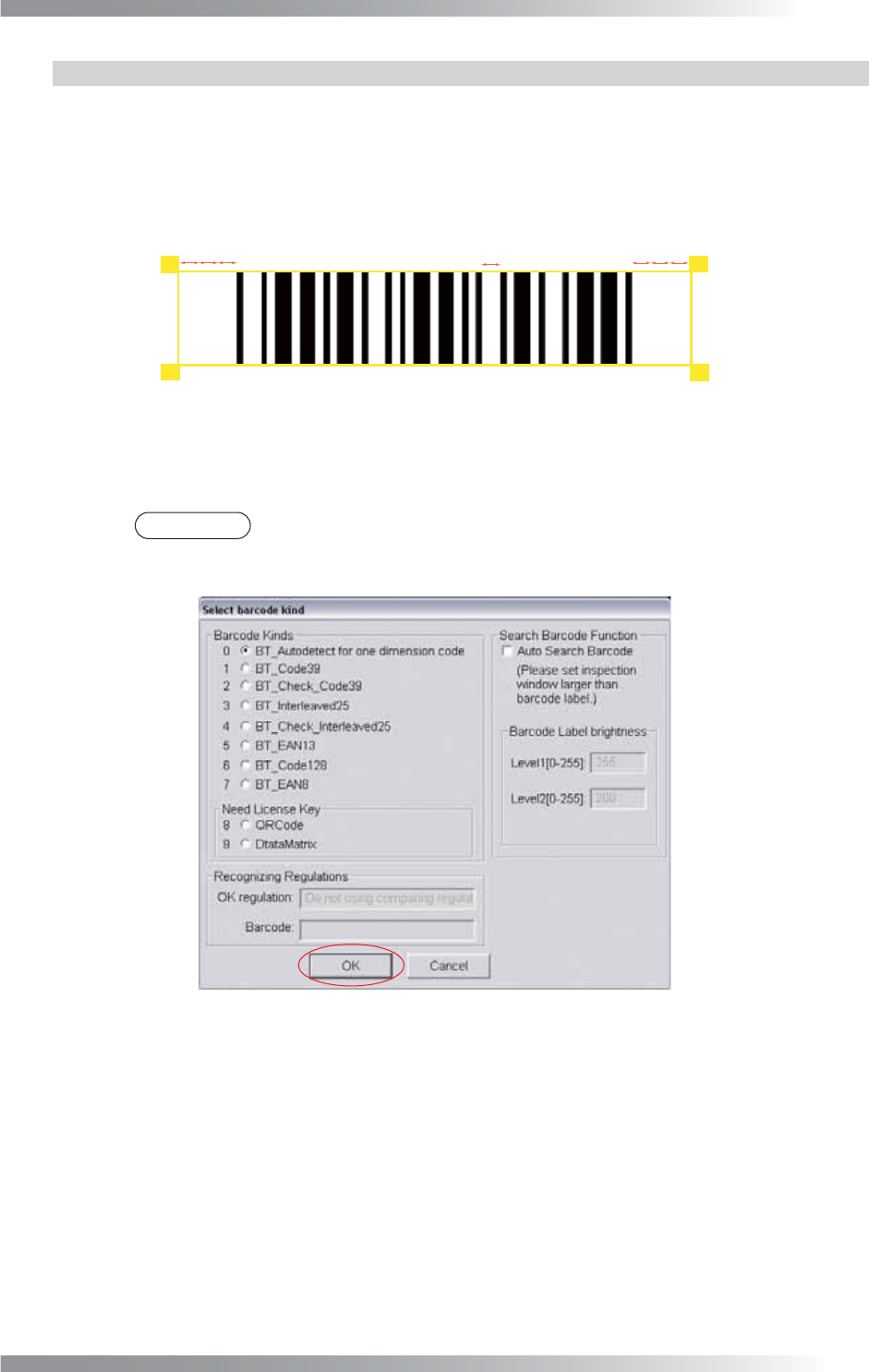
Step2: Adjust the size of the inspection window to surround the barcode. Leave spaces at both
sides of barcode (make spaces three times wider than the widest blank space in the barcode).
㽲
㽲㬍㪊
㽲㬍㪊
Figure 1-86 Inspection Window of Barcode
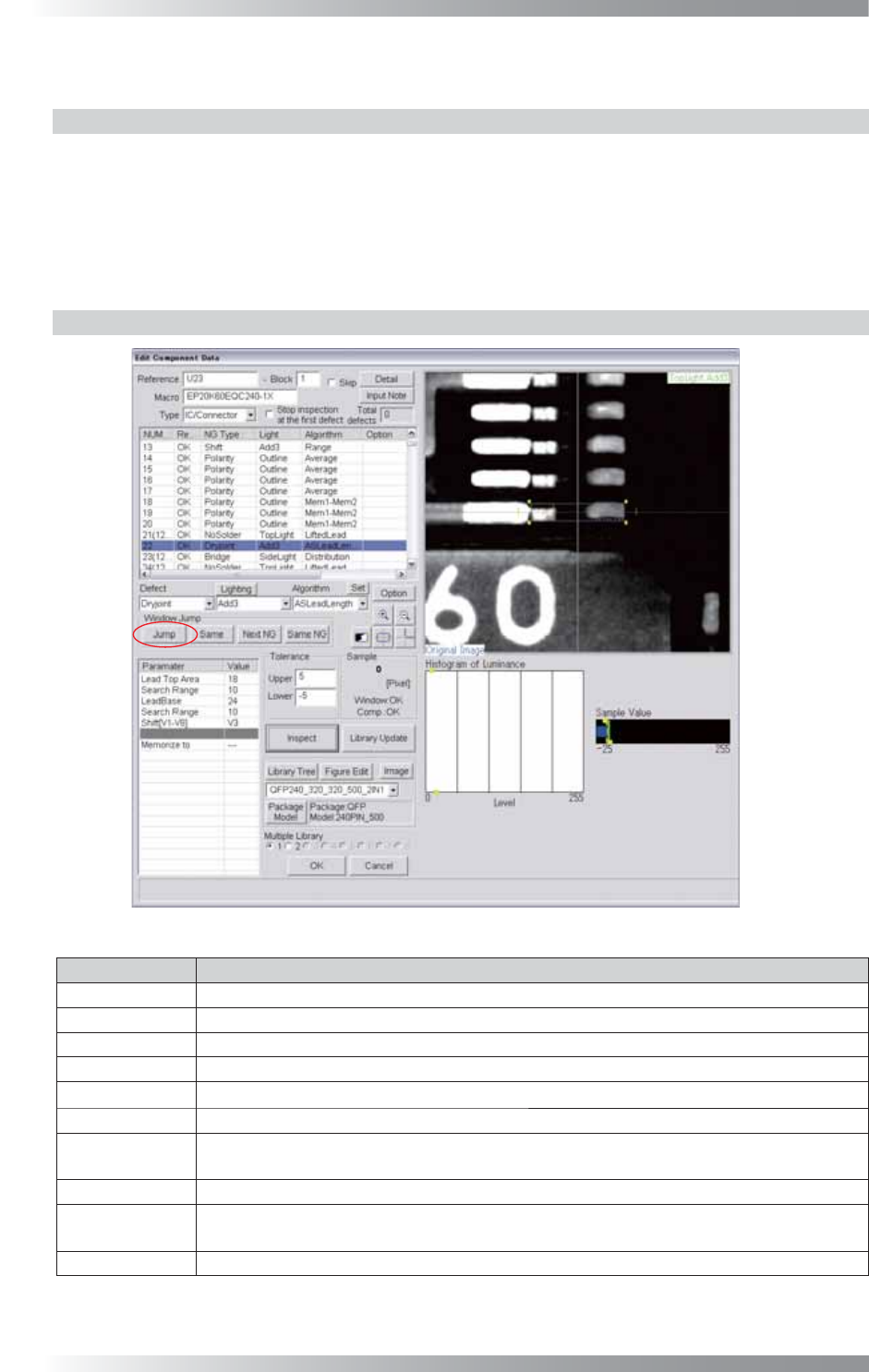
Step3: Press Set in the right side of Algorithm. The dialog shown in Figure 1-87 appears.
Select the barcode kind and press OK.
NOTE
If BT_Autodetect for one dimension code is checked, the barcode type will be
recognized automatically. However, the inspection time will become longer.
Figure 1-87 Barcode kind
Step4: Press Inspect. Make sure that the alphanumeric characters of the barcode are displayed
correctly on the upper right side of the dialog shown in Figure 1-85.
III-72
Programming Manual
Part III Inspection Algorithm
1.21 ASLeadLength
1.21.1 Inspection Overview
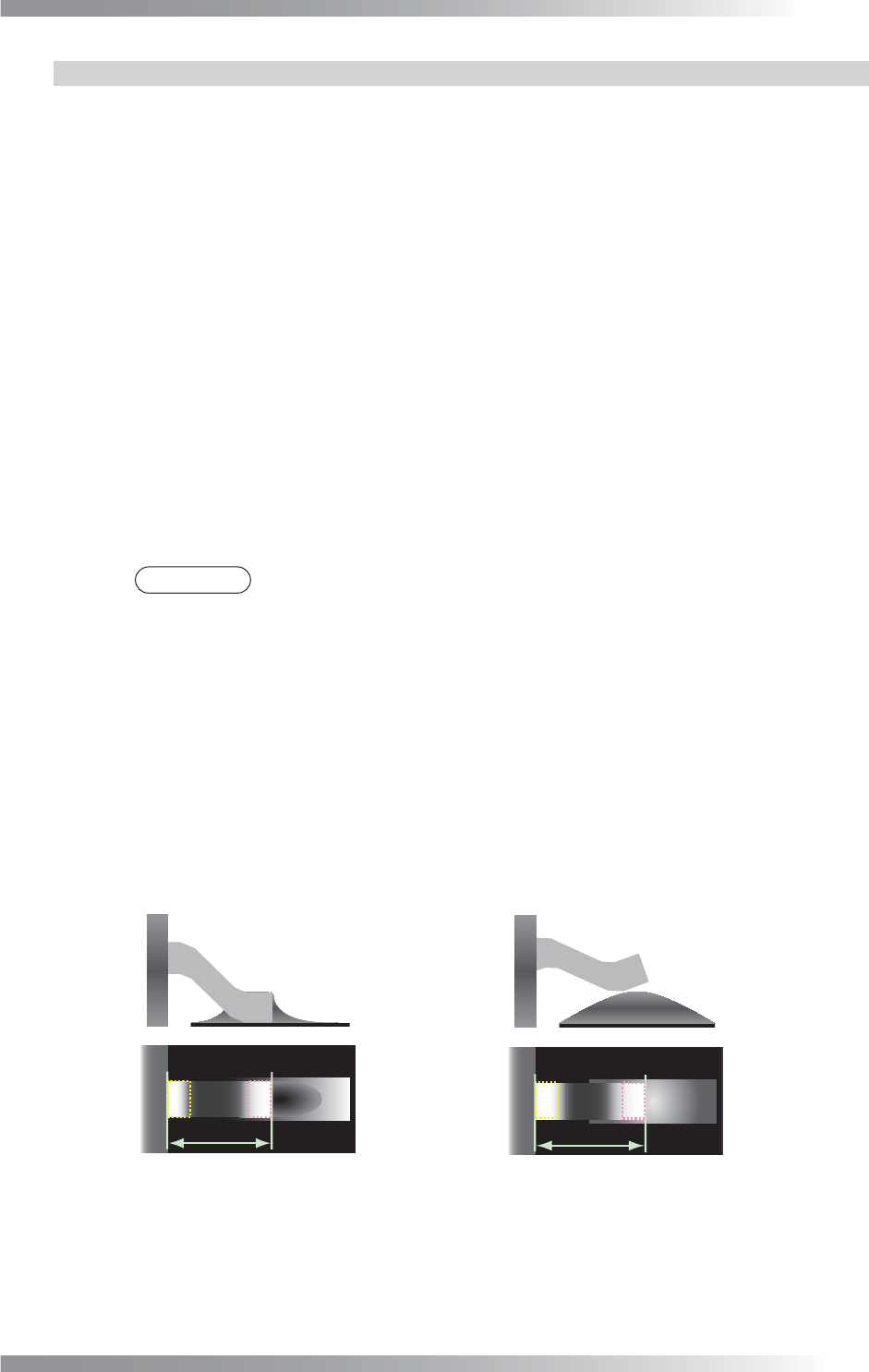
ASLeadLength is the algorithm to inspect leads length of IC components by measuring length from
lead base area to lead end area. Scanning with TopLight, brightness level of lead base area and lead
end area are bright. If lifted lead occurs, lead length is longer compare to normal condition.
If sample value is within OK range, the result will be OK.
ASLeadLength is suitable for lifted lead of IC components.
1.21.2 Parameter Setting
Figure 1-88 ASLeadLength
Parameter Description
Lighting
Select arbitrarily lighting.
Algorithm Select ASLeadLength.
Lead Top Area The inspection window size of lead end area (=yellow dotted line).
Search Range
Default is 10. Enter the bigger value to extend the search range of the lead end area.
LeadBase
The inspection window size of lead base area (=pink dotted line).
Search Range
Default is 10. Enter the bigger value to extend the search range of the lead base area.
Shift[V1-V8]
Enter the appropriate vector. Any value from V1 to V8 is available.
Select the vector according to the Memorize to fi eld of the Adjust window.
Memorize to -
Upper, Lower
Make sure of a sample value of an OK lead. Enter the value (sample value plus 20) in
the Upper fi eld and the value (sample value minus 20) in the Lower fi eld.
Sample
Shows distance of lead end area to lead base area.
Table 1-33 Parameter of ASLeadLength
III-73
Programming Manual
Part III Inspection Algorithm
1.21.3 Setting Procedure
Step1: Set search range for the lead end area. After changing parameter of Search Range below
Lead Top Area, press Inspect. Make sure that the lead end area is surrounded by yellow
dotted line automatically or not.
Step2: Set inspection window size for lead end area. After changing parameter of Lead Top Area,
press Inspect. Adjust the size of the yellow dotted window.
Step3: Set search range for the lead base area. After changing parameter of Search Range below
LeadBase, press Inspect. Make sure that lead base area is surrounded by pink dotted line
automatically or not.
Step4: Set inspection window size for lead base area. After changing parameter of LeadBase,
press Inspect. Adjust the size of the pink dotted window.
Step5: Check Sample Value of OK lead. Enter the value (Sample Value plus 20) in Upper fi eld
and the value (Sample Value minus 20) in Lower fi eld.
NOTE
Sample value is distance of lead end area to lead base area.
Step6: Enter the appropriate vector into the Shift fi eld. Any value from V1 to V8 is available.
Select the vector according to the Memorize to fi eld of the Adjust window.
Step7: Right-click on ASLeadLength in the inspection item list and select Parameter Copy to
copy parameter to the other leads.
Step8: Press Jump and adjust inspection window size of the corner leads in each.
Step9: Press Inspect. Make sure that the inspection is completed properly.
(a) Normal (b) Lifted Lead
The longer than (a)
Figure 1-89 LiftedLead Inspection by ASLeadLength