Programming_mail.pdf - 第94页
III- 20 Programming Manual Part III Inspection Algorithm 1.9 Range 1.9.1 Inspection Ov er view Range is the algorithm to subtract the difference between the maximum brightness level and minimum brightness level within th…
III-19
Programming Manual
Part III Inspection Algorithm
1.8.3 Setting Procedure
Step1: Select a lighting that the brightness level difference between the surface and the back
surface from the Lighting drop-down list.
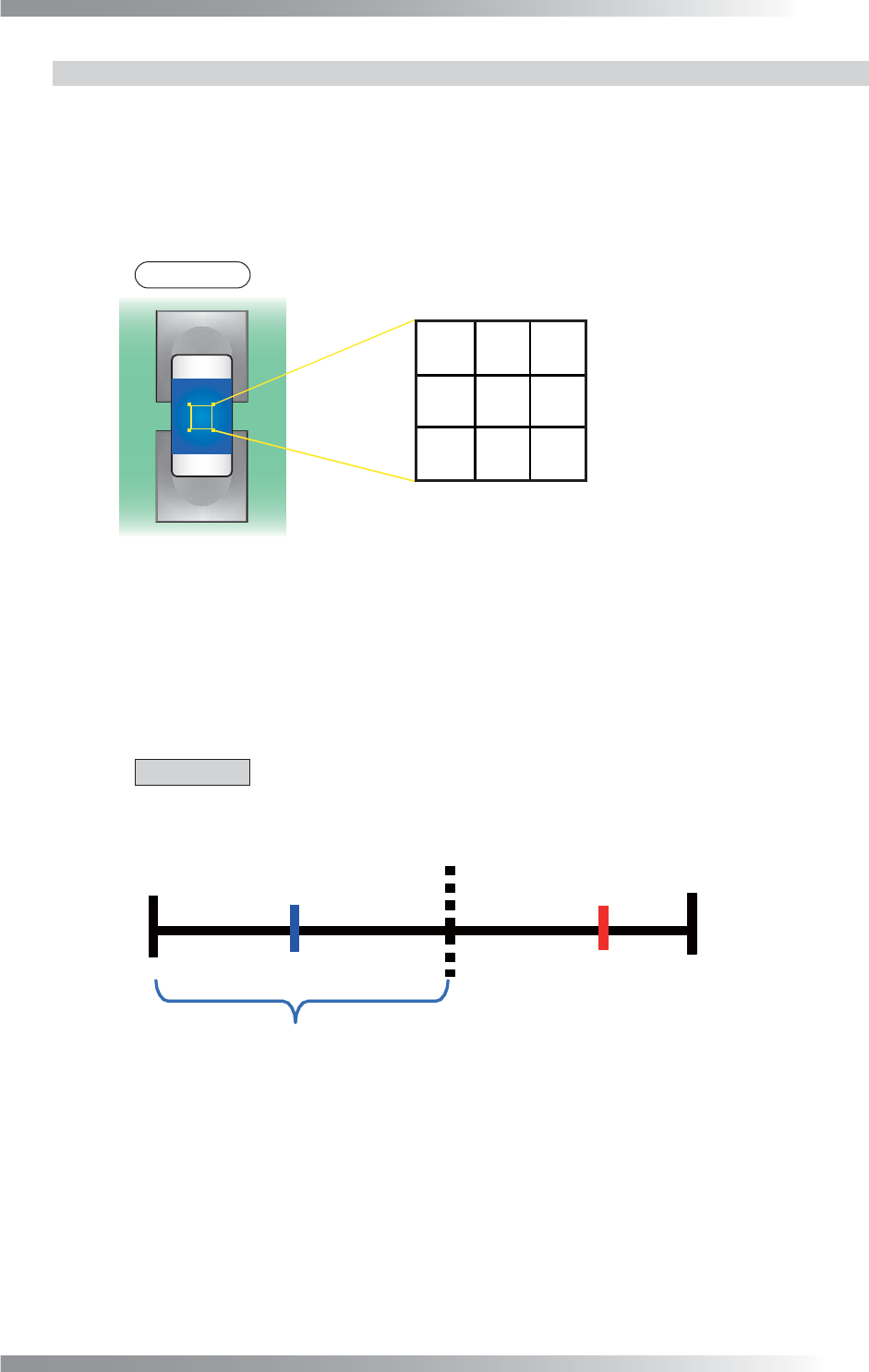
Step2: Make sure of the OK brightness level. Move the inspection window onto the surface of the
component and make sure of the sample value.
NOTE
Sample value is the brightness level average of the inspection window.
㪈㪉㪇
㪈㪇㪇
㪎㪈
㪋㪇 㪍㪌 㪏㪇
㪐㪉㪎㪇㪏㪉
Total of Brightness Level [720] / Pixel [9] = Sample Value [80]
Figure 1-21 Calculation of Sample Value
Step3: Make sure of the NG brightness level. Move the inspection window onto any position which
brightness level is the nearly same as the brightness level of the back side of the component
and make sure of the sample value.
Step4: Calculate the intermediate value between the OK and NG sample values.
CAUTION
Change the lighting if there is no difference between OK sample value and NG
sample value with default lighting.
0
255
OK
㪉㪈㪇㪎㪇
㪈㪋㪇
Intermediate Value
OK Sample Value
NG Sample Value
Figure 1-22 Calculation of Intermediate Value
Step5: If OK sample value is smaller than NG sample value, enter intermediate value in the
Upper fi eld and 0 in the Lower fi eld. If NG sample value is smaller than OK sample value,
enter 255 in the Upper fi eld and intermediate value in the Lower fi eld.
Step6: Enter the appropriate vector into the Shift fi eld by selecting from V1 to V8 according to the
vector used in the Memorize to fi eld in the Adjust window.
Step7: Press Inspect. Make sure that the inspection is completed properly.
III-20
Programming Manual
Part III Inspection Algorithm
1.9 Range
1.9.1 Inspection Overview
Range is the algorithm to subtract the difference between the maximum brightness level and minimum
brightness level within the inspection window. If the range of the brightness level is in the OK range,
the result will be OK. Range is suitable for shift or polarity inspections of IC components.
1.9.2 Parameter Setting
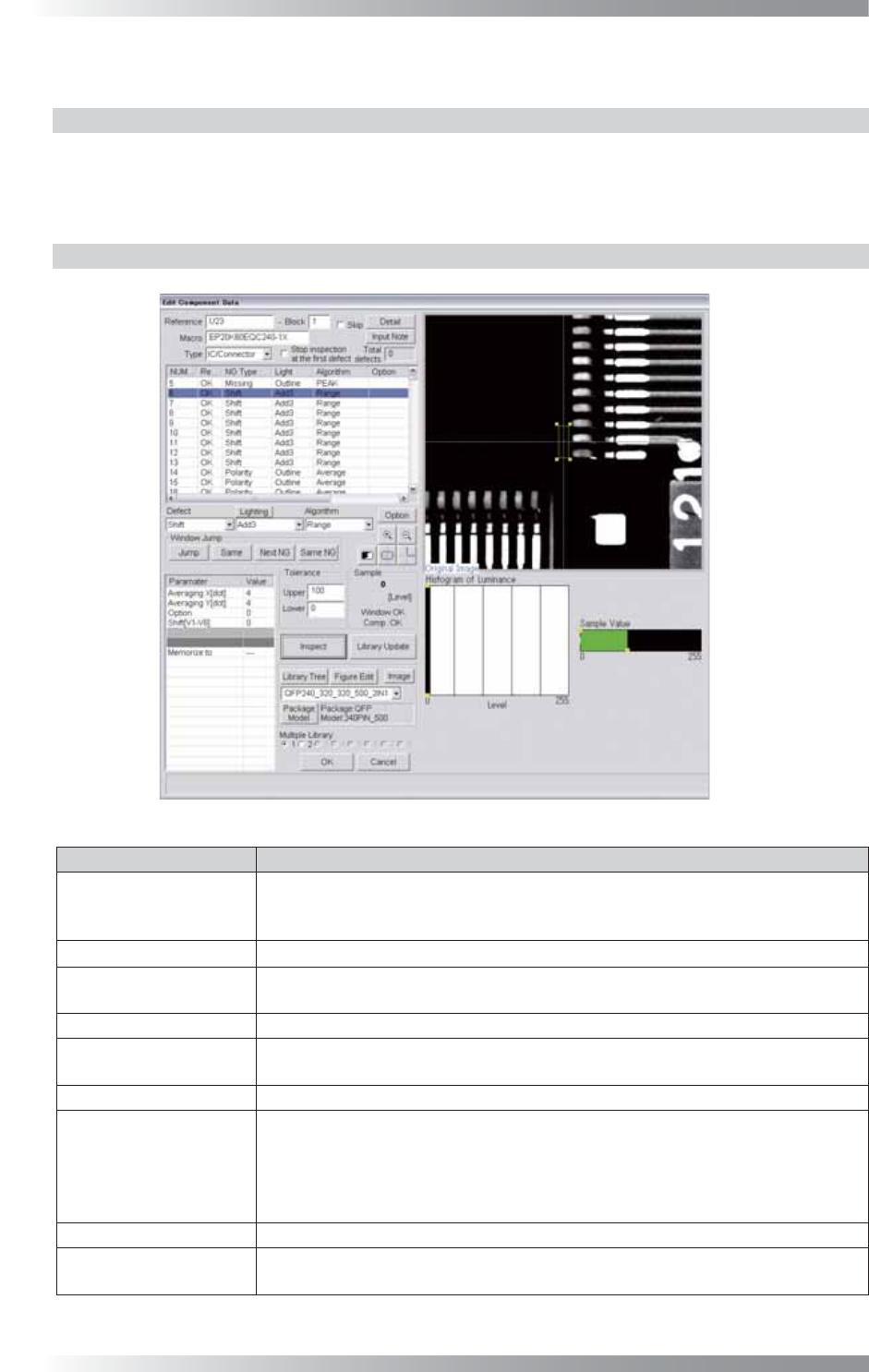
Figure 1-23 Range
Parameter Description
Lighting
For a shift inspection, select a lighting that displays that the brightness level
difference between OK and NG visually clear.
For a polarity inspection, select a lighting that displays a polarity visually clear.
Algorithm Select Range.
Averaging X[dot],
Averaging Y[dot]
Default is 2.
Enlarge a value to reduce effects of dusts or noises.
Option Enter 0.
Shift[V1-V8]
Enter the appropriate vector. Any value from V1 to V8 is available.
Select the vector according to the Memorize to fi eld of the Adjust window.
Memorize to -
Upper, Lower
Calculates a value intermediate between OK sample value and NG sample value.
If OK sample value is smaller than NG sample value, enter intermediate value in
the Upper fi eld and 0 in the Lower fi eld.
If NG sample value is smaller than OK sample value, enter 255 in the Upper fi eld
and intermediate value in the Lower fi eld.
Sample Shows the brightness level range of the inspection window.
The graph in the lower
right side of the dialog
The Histogram of Luminance bar graph shows the number of pixels every
brightness levels.
Table 1-9 Parameter of Range
III-21
Programming Manual
Part III Inspection Algorithm
1.9.3 Setting Procedure of Shift Inspection
Step1: Select a lighting that displays the brightness level difference between OK and NG visually
clear from the Lighting drop-down list.
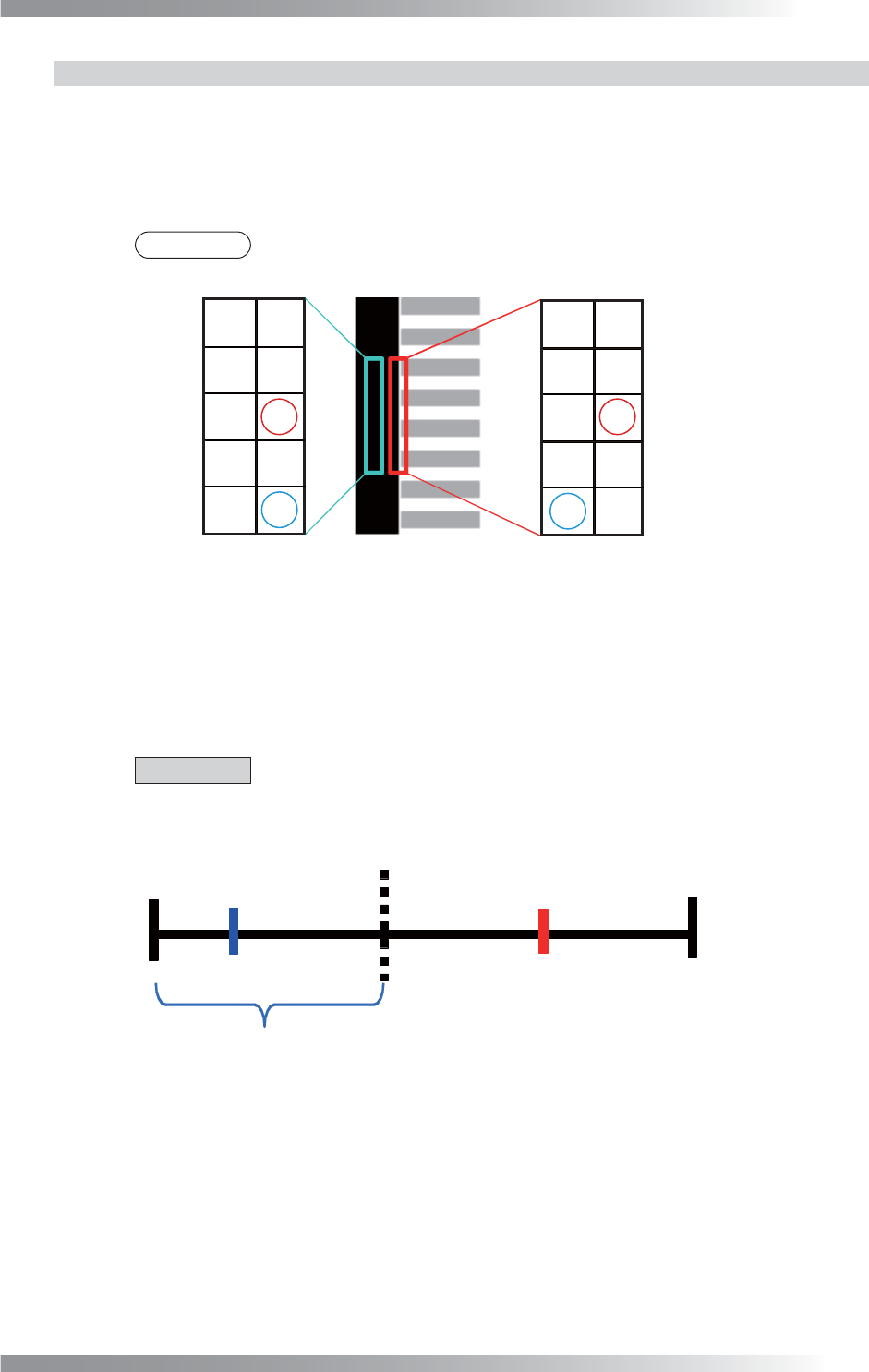
Step2: Make sure of the OK brightness level.
NOTE
Sample value is the brightness level range of the inspection window.
㪏㪇
㪐㪇
㪎㪇
㪏㪇 㪏㪇
㪏㪇
㪎㪇㪎㪇
㪍㪇
㪎㪇
㪉㪉㪇
㪉㪋㪇㪐㪇
㪏㪇 㪉㪈㪇
㪏㪇
㪉㪊㪇㪎㪇
㪉㪈㪇㪍㪇
IC
Lead
OK Inspection Window
NG Inspection Window
Max Brightness
Level[90]
-
Minimum Brightness
Level[60]
Value[30]
=
Sample
Max Brightness
Level[240]
-
Minimum Brightness
Level[60]
Value[180]
=
Sample
Figure 1-24 Calculation of Sample Value
Step3: Make sure of the NG brightness level. Set the value in between the OK sample value and
the NG sample value as OK range.
Step4: Calculate a value intermediate between OK sample value and NG sample value.
CAUTION
Change the lighting if there is no difference between OK sample value and NG sample
value with default lighting.
0 255
OK
㪈㪏㪇㪊㪇
Intermediate Value
OK Sample Value NG Sample Value
㪈㪇㪌
Figure 1-25 Calculation of Intermediate Value
Step5: If OK sample value is smaller than NG sample value, enter intermediate value in the
Upper fi eld and 0 in the Lower fi eld. If NG sample value is smaller than OK sample value,
enter 255 in the Upper fi eld and intermediate value in the Lower fi eld.
Step6: Enter the appropriate vector into the Shift fi eld by selecting from V1 to V8 according to the
vector used in the Memorize to fi eld in the Adjust window.
Step7: Press Inspect. Make sure that the inspection is completed properly.