sh030051g.pdf - 第119页
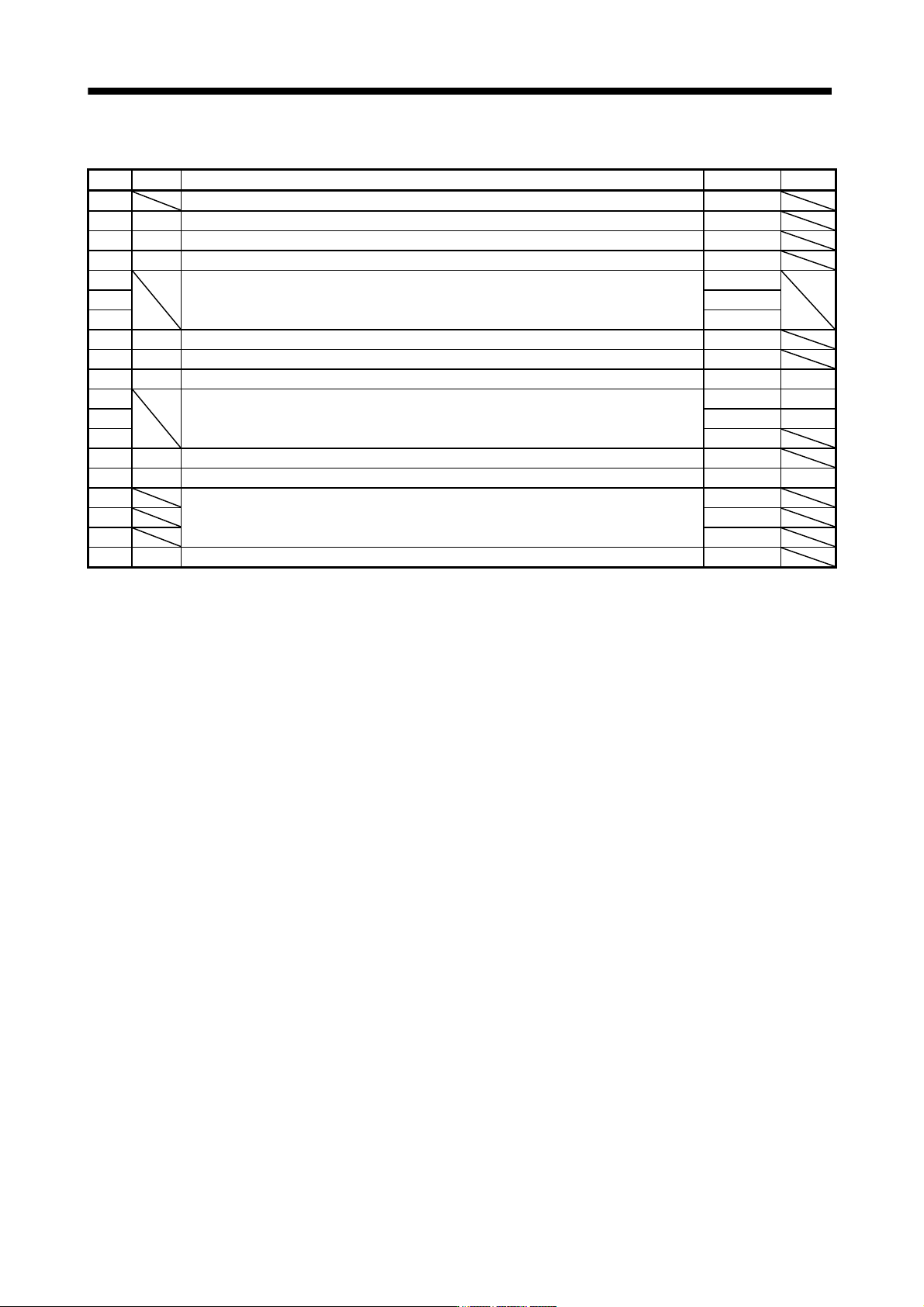
5 - 2 5. PARAMETERS 5.1.1 Parameter list No. Symbol Name Initial value Unit PA01 For manufacturer setting 0000h PA02 **REG Regenerative option 0000h PA03 *ABS Absolute position detection system 0000h PA04 *AOP1 Function …
5 - 1
5. PARAMETERS
5. PARAMETERS
CAUTION
Never adjust or change the parameter values extremely as it will make operation
instable.
POINT
When the servo amplifier is connected with the servo system controller, the
parameters are set to the values of the servo system controller. Switching
power off, then on makes the values set on the MR Configurator (servo
configuration software) invalid and the servo system controller values valid.
Setting may not be made to some parameters and ranges depending on the
model or version of the servo system controller. For details, refer to the servo
system controller user's manual.
In this servo amplifier, the parameters are classified into the following groups on a function basis.
Parameter group Main description
Basic setting parameters
(No.PA
)
Make basic setting with these parameters. Generally, the operation is possible only with these
parameter settings.
Gain/filter parameters
(No.PB
)
Use these parameters when making gain adjustment manually.
Extension setting parameters
(No.PC
)
When changing settings such as analog monitor output signal or encoder electromagnetic brake
sequence output, use these parameters.
I/O setting parameters
(No.PD
)
Use these parameters when changing the I/O signals of the servo amplifier.
Mainly setting the basic setting parameters (No.PA
) allows the setting of the basic parameters at the time
of introduction.
5.1 Basic setting parameters (No.PA
)
POINT
Parameter whose symbol is preceded by * is made valid with the following
conditions.
* : Set the parameter value, switch power off once after setting, and then
switch it on again, or perform the controller reset.
**: Set the parameter value, switch power off once, and then switch it on
again.
Never change parameters for manufacturer setting.
5 - 2
5. PARAMETERS
5.1.1 Parameter list
No. Symbol Name Initial value Unit
PA01 For manufacturer setting 0000h
PA02 **REG Regenerative option 0000h
PA03 *ABS Absolute position detection system 0000h
PA04 *AOP1 Function selection A-1 0000h
PA05
For manufacturer setting 0
PA06 1
PA07 1
PA08 ATU Auto tuning mode 0001h
PA09 RSP Auto tuning response 12
PA10 INP In-position range 100 pulse
PA11
For manufacturer setting 1000.0 %
PA12 1000.0 %
PA13 0000h
PA14 *POL Rotation direction selection 0
PA15 *ENR Encoder output pulses 4000 pulse/rev
PA16 For manufacturer setting 0
PA17 0000h
PA18 0000h
PA19 *BLK Parameter write inhibit 000Bh
5 - 3
5. PARAMETERS
5.1.2 Parameter write inhibit
Parameter
Initial value Unit Setting range
No. Symbol Name
PA19 *BLK Parameter write inhibit 000Bh Refer to the text.
POINT
When setting the parameter values from the servo system controller, the
parameter No.PA19 setting need not be changed.
This parameter is made valid when power is switched off, then on after
setting, or when the controller reset has been performed.
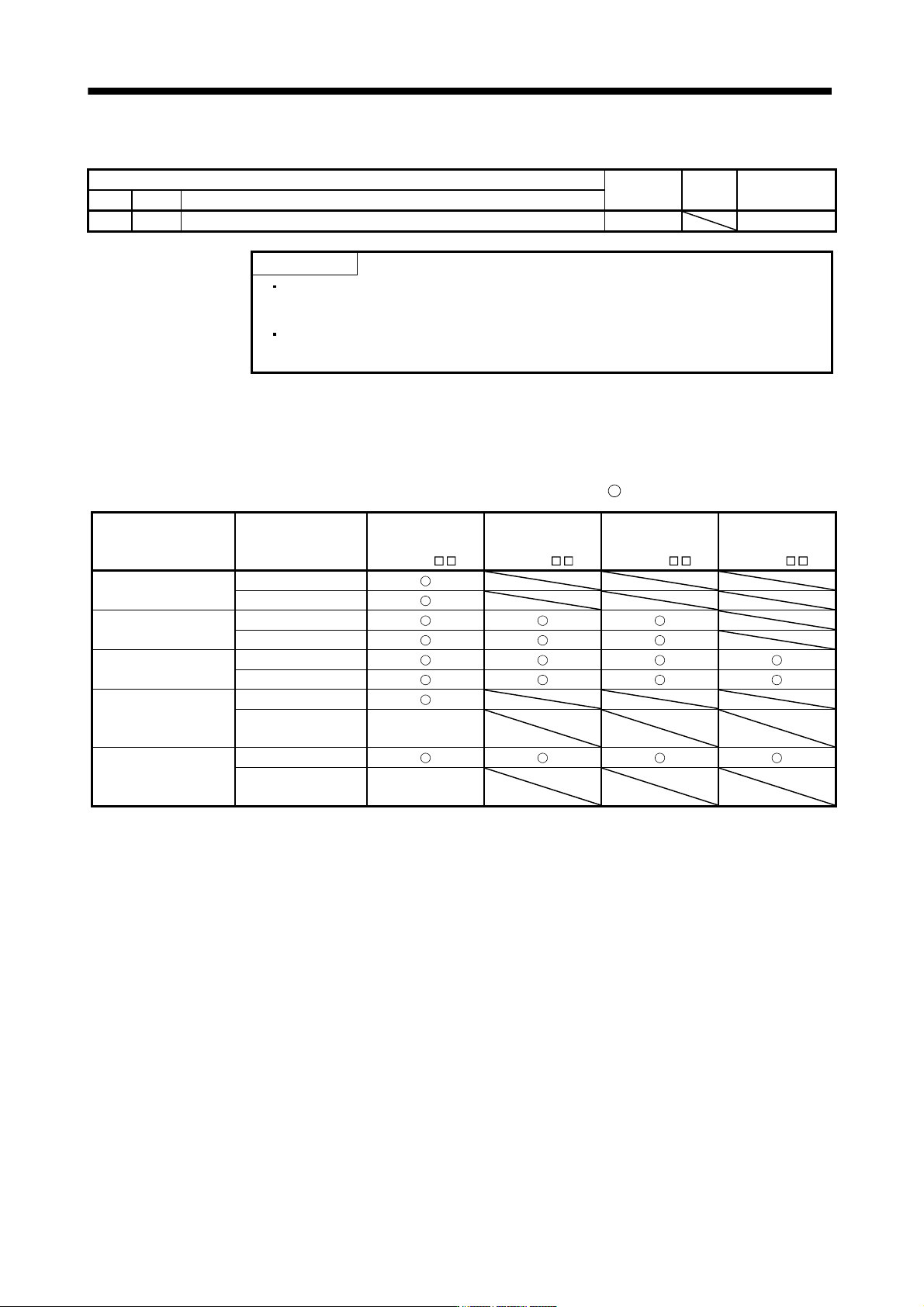
In the factory setting, this servo amplifier allows changes to the basic setting parameter, gain/filter parameter
and extension setting parameter settings. With the setting of parameter No.PA19, write can be disabled to
prevent accidental changes.
The following table indicates the parameters which are enabled for reference and write by the setting of
parameter No.PA19. Operation can be performed for the parameters marked
.
Parameter No.PA19
setting
Setting operation
Basic setting
parameters
No.PA
Gain/filter
parameters
No.PB
Extension setting
parameters
No.PC
I/O setting
parameters
No.PD
0000h
Reference
Write
000Bh
(initial value)
Reference
Write
000Ch
Reference
Write
100Bh
Reference
Write
Parameter
No.PA19 only
100Ch
Reference
Write
Parameter
No.PA19 only