sh030051g.pdf - 第129页
5 - 12 5. PARAMETERS No. Symbol Name and function Initial value Unit Setting range PB02 VRFT Vibration suppression control tuning mode (advanced vibration suppression control) This parameter cannot be used in the speed c…
5 - 11
5. PARAMETERS
No. Symbol Name Initial value Unit
PB40
For manufacturer setting 0.0
PB41 1125
PB42 1125
PB43 0004h
PB44 0.0
PB45 0000h
5.2.2 Detail list
No. Symbol Name and function
Initial
value
Unit
Setting
range
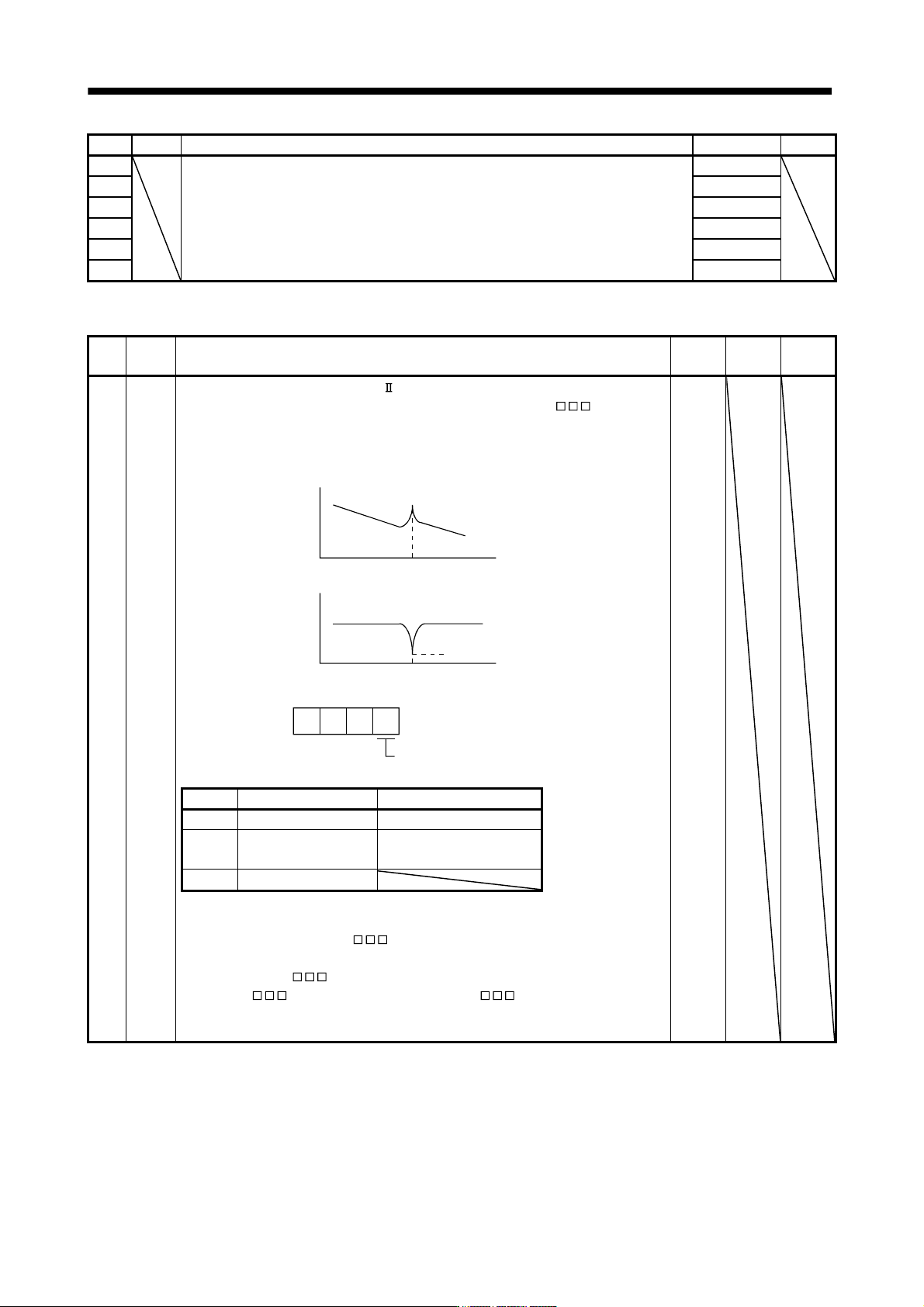
PB01 FILT Adaptive tuning mode (adaptive filter )
Select the setting method for filter tuning. Setting this parameter to "
1" (filter
tuning mode 1) automatically changes the machine resonance suppression filter 1
(parameter No.PB13) and notch shape selection (parameter No.PB14).
Machine resonance point
Notch frequency
Frequency
Frequency
Response of
mechanical system
Notch depth
Filter tuning mode selection
000
0000h
Setting Filter adjustment mode Automatically set parameter
0 Filter OFF (Note)
1 Filter tuning mode
Parameter No.PB13
Parameter No.PB14
2 Manual mode
Note. Parameter No.PB13 and PB14 are fixed to the initial values.
When this parameter is set to "
1", the tuning is completed after positioning is
done the predetermined number or times for the predetermined period of time, and the
setting changes to "
2". When the filter tuning is not necessary, the setting
changes to "
0". When this parameter is set to " 0", the initial values are set
to the machine resonance suppression filter 1 and notch shape selection. However, this
does not occur when the servo off.
5 - 12
5. PARAMETERS
No. Symbol Name and function
Initial
value
Unit
Setting
range
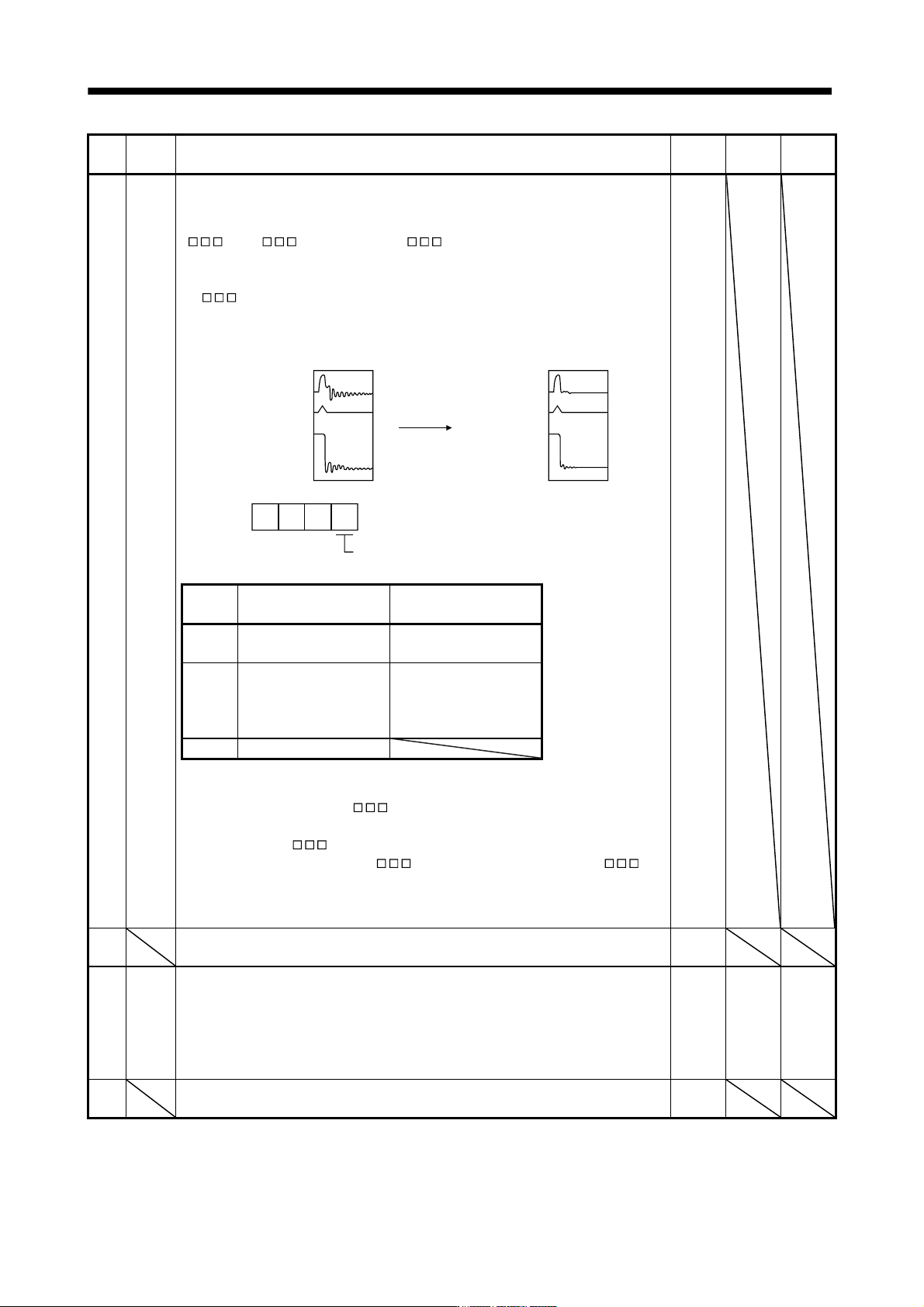
PB02 VRFT Vibration suppression control tuning mode (advanced vibration suppression control)
This parameter cannot be used in the speed control mode.
The vibration suppression is valid when the parameter No.PA08 (auto tuning) setting is
"
2" or " 3". When PA08 is " 1", vibration suppression is always
invalid.
Select the setting method for vibration suppression control tuning. Setting this parameter
to "
1" (vibration suppression control tuning mode) automatically changes the
vibration suppression control vibration frequency (parameter No.PB19) and vibration
suppression control resonance frequency (parameter No.PB20) after positioning is done
the predetermined number of times.
Droop pulse
Command
Machine end
position
Automatic
adjustment
Droop pulse
Command
Machine end
position
Vibration suppression control tuning mode
000
0000h
Setting
Vibration suppression
control tuning mode
Automatically set
parameter
0
Vibration suppression
control OFF
(Note)
1
Vibration suppression
control tuning mode
(Advanced vibration
suppression control)
Parameter No.PB19
Parameter No.PB20
2 Manual mode
Note. Parameter No.PB19 and PB20 are fixed to the initial values.
When this parameter is set to "
1", the tuning is completed after positioning is
done the predetermined number or times for the predetermined period of time, and the
setting changes to "
2". When the vibration suppression control tuning is not
necessary, the setting changes to "
0". When this parameter is set to " 0",
the initial values are set to the vibration suppression control vibration frequency and
vibration suppression control resonance frequency. However, this does not occur when
the servo off.
PB03
For manufacturer setting
Do not change this value by any means.
0
PB04 FFC Feed forward gain
This parameter cannot be used in the speed control mode.
Set the feed forward gain. When the setting is 100%, the droop pulses during operation
at constant speed are nearly zero. However, sudden acceleration/deceleration will
increase the overshoot. As a guideline, when the feed forward gain setting is 100%, set
1s or more as the acceleration/deceleration time constant up to the rated speed.
0 % 0
to
100
PB05
For manufacturer setting
Do not change this value by any means.
500
5 - 13
5. PARAMETERS
No. Symbol Name and function
Initial
value
Unit
Setting
range
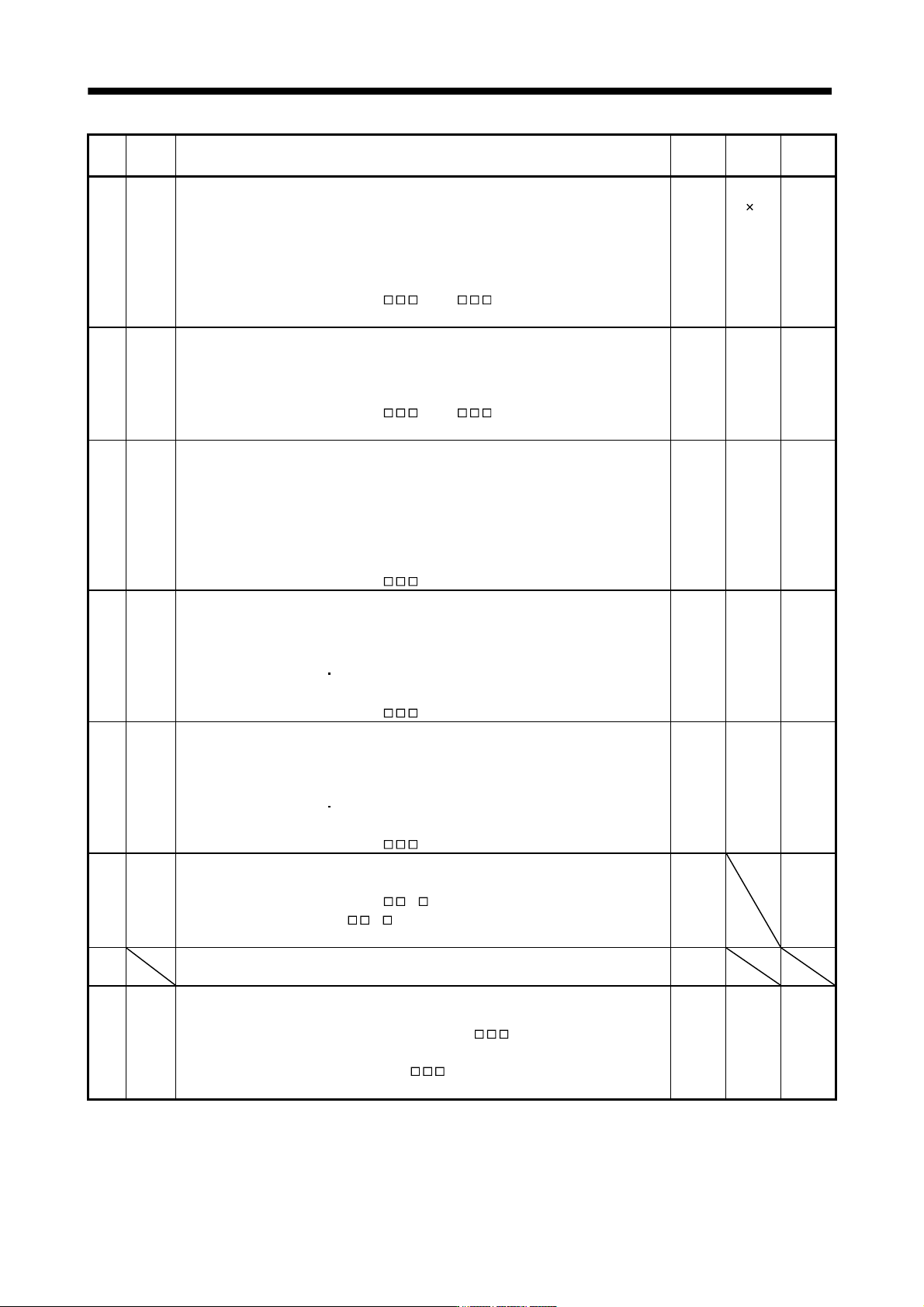
PB06 GD2 Ratio of load inertia moment to servo motor inertia moment
Used to set the ratio of the load inertia moment to the servo motor shaft inertia moment.
When auto tuning mode 1 and interpolation mode is selected, the result of auto tuning is
automatically used.
(Refer to section 6.1.1)
In this case, it varies between 0 and 100.0.
When parameter No.PA08 is set to "
2" or " 3", this parameter can be set
manually.
7.0 Multiplier
(
1)
0
to
300.0
PB07 PG1 Model loop gain
Set the response gain up to the target position.
Increase the gain to improve track ability in response to the command.
When auto turning mode 1,2 is selected, the result of auto turning is automatically used.
When parameter No.PA08 is set to "
1" or " 3", this parameter can be set
manually.
24 rad/s 1
to
2000
PB08 PG2 Position loop gain
This parameter cannot be used in the speed control mode.
Used to set the gain of the position loop.
Set this parameter to increase the position response to level load disturbance. Higher
setting increases the response level but is liable to generate vibration and/or noise.
When auto tuning mode 1,2 and interpolation mode is selected, the result of auto tuning
is automatically used.
When parameter No.PA08 is set to "
3", this parameter can be set manually.
37 rad/s 1
to
1000
PB09 VG2 Speed loop gain
Set this parameter when vibration occurs on machines of low rigidity or large backlash.
Higher setting increases the response level but is liable to generate vibration and/or
noise.
When auto tuning mode 1
2, manual mode and interpolation mode is selected, the
result of auto tuning is automatically used.
When parameter No.PA08 is set to "
3", this parameter can be set manually.
823 rad/s 20
to
50000
PB10 VIC Speed integral compensation
Used to set the integral time constant of the speed loop.
Lower setting increases the response level but is liable to generate vibration and/or
noise.
When auto tuning mode 1
2 and interpolation mode is selected, the result of auto
tuning is automatically used.
When parameter No.PA08 is set to "
3", this parameter can be set manually.
33.7 ms 0.1
to
1000.0
PB11 VDC Speed differential compensation
Used to set the differential compensation.
When parameter No.PB24 is set to "
3 ", this parameter is made valid. When
parameter No.PA08 is set to "
0 ", this parameter is made valid by instructions of
controller.
980 0
to
1000
PB12 For manufacturer setting
Do not change this value by any means.
0
PB13 NH1 Machine resonance suppression filter 1
Set the notch frequency of the machine resonance suppression filter 1.
Setting parameter No.PB01 (filter tuning mode 1) to "
1" automatically changes
this parameter.
When the parameter No.PB01 setting is "
0", the setting of this parameter is
ignored.
4500 Hz 100
to
4500