sh030051g.pdf - 第181页
8 - 8 8. TROUBLESHOOTING Display Name Definition Cause Action (Note) 888 Watchdog CPU, parts faulty Fault of parts in servo amplifier Checking method Alarm ( 888) oc curs if power is switched on aft er discon nection of …
8 - 7
8. TROUBLESHOOTING
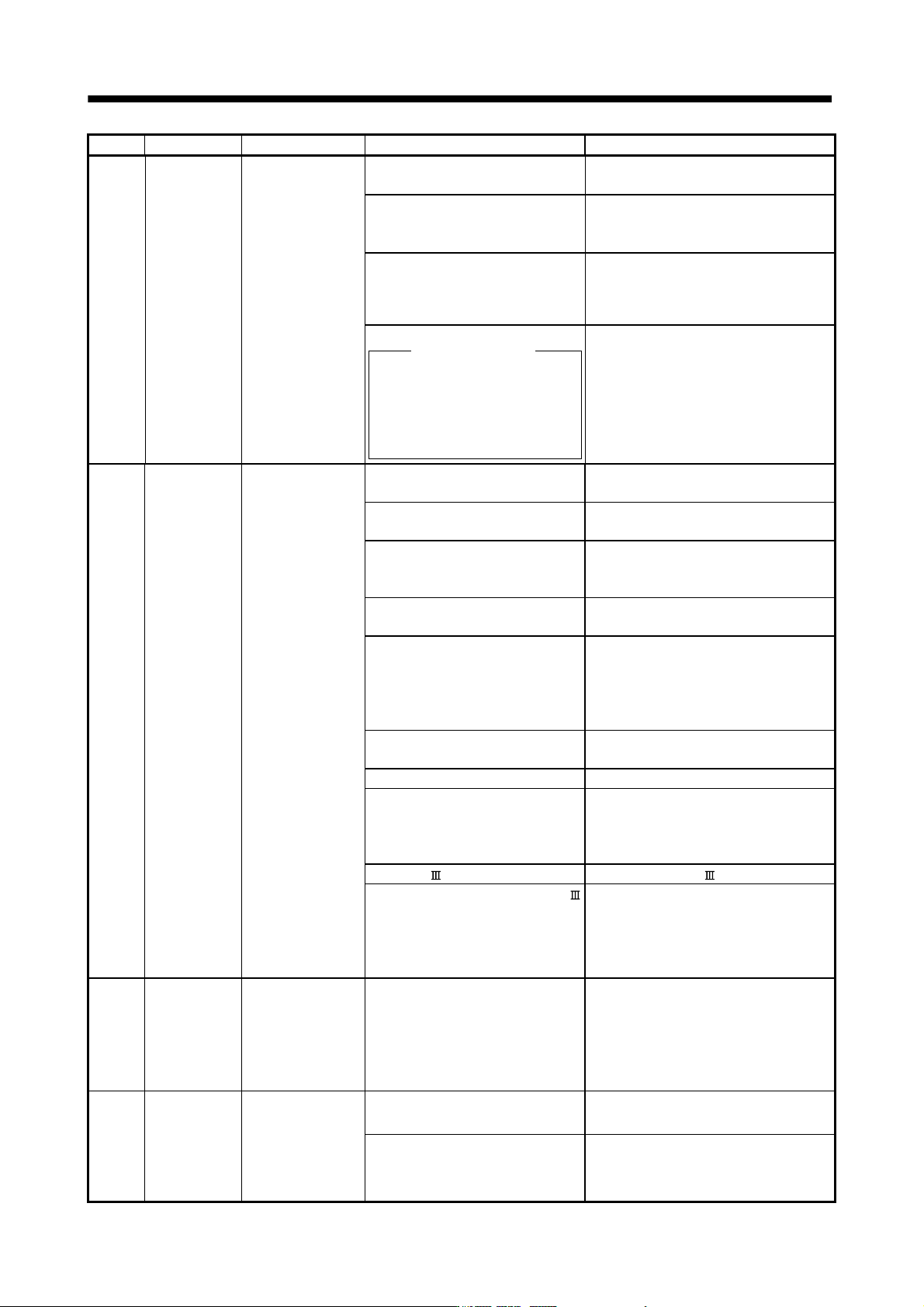
Display Name Definition Cause Action
51 Overload 2 Machine collision or
the like caused max.
For the time of the
alarm occurrence,
refer to the section
10.1.
1. Machine struck something. 1. Check operation pattern.
2. Install limit switches.
2. Wrong connection of servo motor.
Servo amplifier's output terminals U,
V, W do not match servo motor's
input terminals U, V, W.
Connect correctly.
3. Servo system is instable and
hunting.
1. Repeat acceleration/deceleration to
execute auto tuning.
2. Change the auto tuning response setting.
3. Set auto tuning to OFF and make gain
adjustment manually.
4. Encoder faulty.
Checking method
When the servo motor shaft is
rotated with the servo off, the
cumulative feedback pulses do not
vary in proportion to the rotary angle
of the shaft but the indication skips
or returns midway.
Change the servo motor.
52 Error excessive The deviation
between the model
position and the
actual servo motor
position exceeds the
parameter No.PC01
setting value (initial
value: 3 revolutions).
1. Acceleration/deceleration time
constant is too small.
Increase the acceleration/deceleration time
constant.
2. Torque limit value set with controller
is too small.
Increase the torque limit value.
3. Motor cannot be started due to
torque shortage caused by power
supply voltage drop.
1. Check the power supply capacity.
2. Use servo motor which provides larger
output.
4. Position loop gain 1 (parameter
No.PB08) value is small.
Increase set value and adjust to ensure
proper operation.
5. Servo motor shaft was rotated by
external force.
1. When torque is limited, increase the limit
value.
2. Reduce load.
3. Use servo motor that provides larger
output.
6. Machine struck something. 1. Check operation pattern.
2. Install limit switches.
7. Encoder faulty Change the servo motor.
8. Wrong connection of servo motor.
Servo amplifier's output terminals U,
V, W do not match servo motor's
input terminals U, V, W.
Connect correctly.
9. SSCNET cable fault Change the SSCNET cable.
10. Optical characteristic of SSCNET
cable deteriorated because vinyl
tape and/or wire sheath, which
contains migrating plasticizer,
adhered to the cable.
Remove the vinyl tape and/or wire sheath,
which contains migrating plasticizer, and
exchange the cable.
8A USB
communication
time-out error
Communication with
MR Configurator in
test operation mode
stopped for longer
than the specified
time.
1. USB cable breakage. Change the USB cable.
8E USB
communication
error
Serial communication
error occurred
between servo
amplifier and
communication
device (e.g. personal
computer).
1. USB cable fault
(Open cable or short circuit)
Change the USB cable.
2. Communication device (e.g.
personal computer) faulty
Change the communication device (e.g.
personal computer).
8 - 8
8. TROUBLESHOOTING
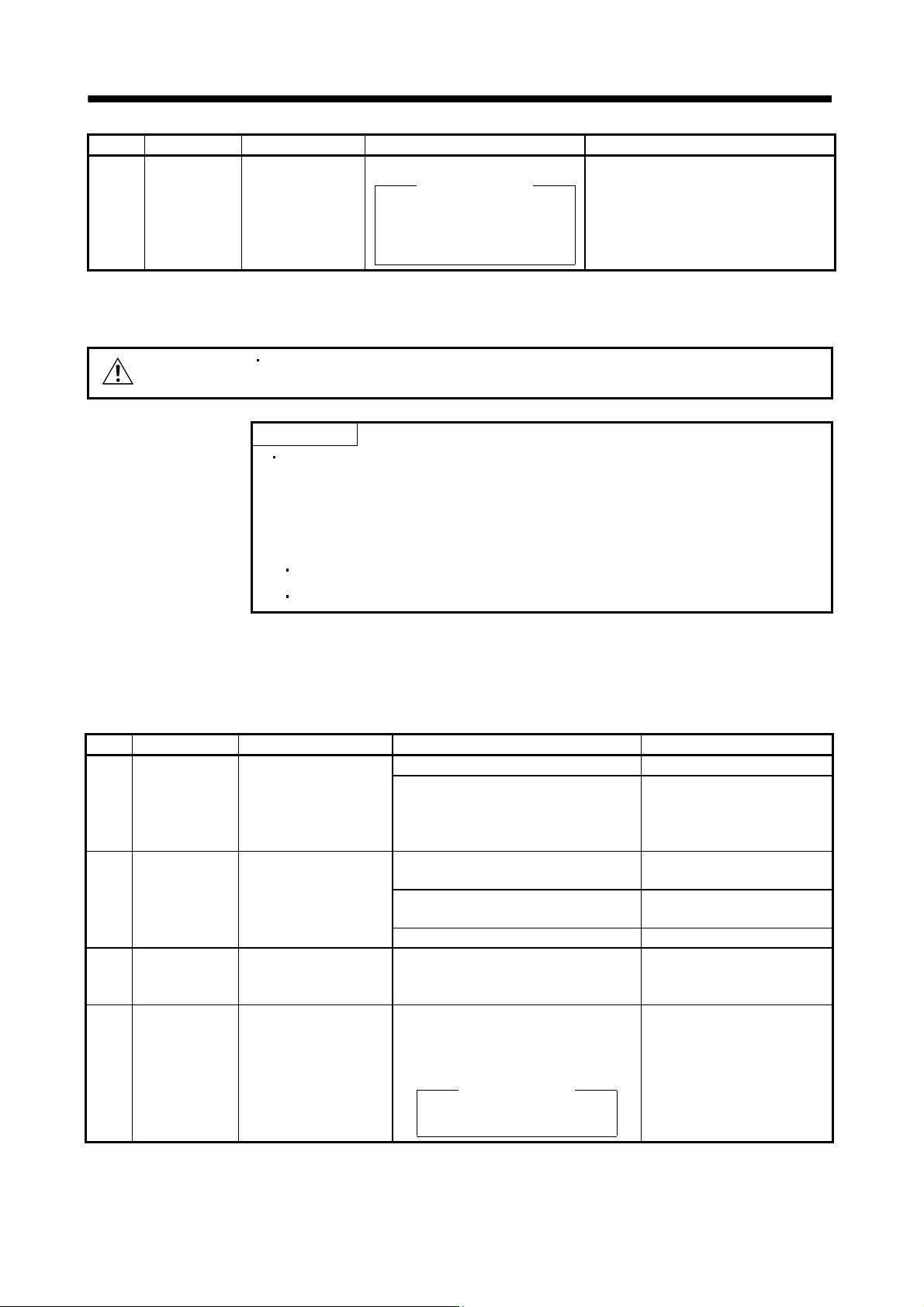
Display Name Definition Cause Action
(Note)
888
Watchdog CPU, parts faulty Fault of parts in servo amplifier
Checking method
Alarm (888) occurs if power is
switched on after disconnection of
all cables but the control circuit
power supply cable.
Change the servo amplifier.
Note. At power-on, "888" appears instantaneously, but it is not an error.
8.3 Remedies for warnings
CAUTION
If an absolute position counter warning (E3) occurred, always make home position
setting again. Not doing so may cause unexpected operation.
POINT
When any of the following alarms has occurred, do not resume operation by
switching power of the servo amplifier OFF/ON repeatedly. The servo amplifier
and servo motor may become faulty. If the power of the servo amplifier is
switched OFF/ON during the alarms, allow more than 30 minutes for cooling
before resuming operation.
Excessive regenerative warning (E0)
Overload warning 1 (E1)
If E6, E7 or E9 occurs, the servo off status is established. If any other warning occurs, operation can be
continued but an alarm may take place or proper operation may not be performed.
Remove the cause of warning according to this section. Use the MR Configurator to refer to a factor of warning
occurrence.
Display Name Definition Cause Action
92 Battery cable
disconnection
warning
Absolute position detection
system battery voltage is
low.
1. Battery cable is open. Repair cable or changed.
2. Battery voltage supplied from the servo
amplifier to the encoder fell to about 3V or
less.
(Detected with the encoder)
Change the battery.
96 Home position
setting warning
Home position setting
could not be made.
1. Droop pulses remaining are greater than
the in-position range setting.
Remove the cause of droop pulse
occurrence
2. Command pulse entered after clearing of
droop pulses.
Do not enter command pulse
after clearing of droop pulses.
3. Creep speed high. Reduce creep speed.
9F Battery warning Voltage of battery for
absolute position detection
system reduced.
Battery voltage fell to 3.2V or less.
(Detected with the servo amplifier)
Change the battery.
E0 Excessive
regeneration
warning
There is a possibility that
regenerative power may
exceed permissible
regenerative power of
built-in regenerative
resistor or regenerative
option.
Regenerative power increased to 85% or
more of permissible regenerative power of
built-in regenerative resistor or regenerative
option.
Checking method
Call the status display and check
regenerative load ratio.
1. Reduce frequency of
positioning.
2. Change the regenerative
option for the one with larger
capacity.
3. Reduce load.
8 - 9
8. TROUBLESHOOTING
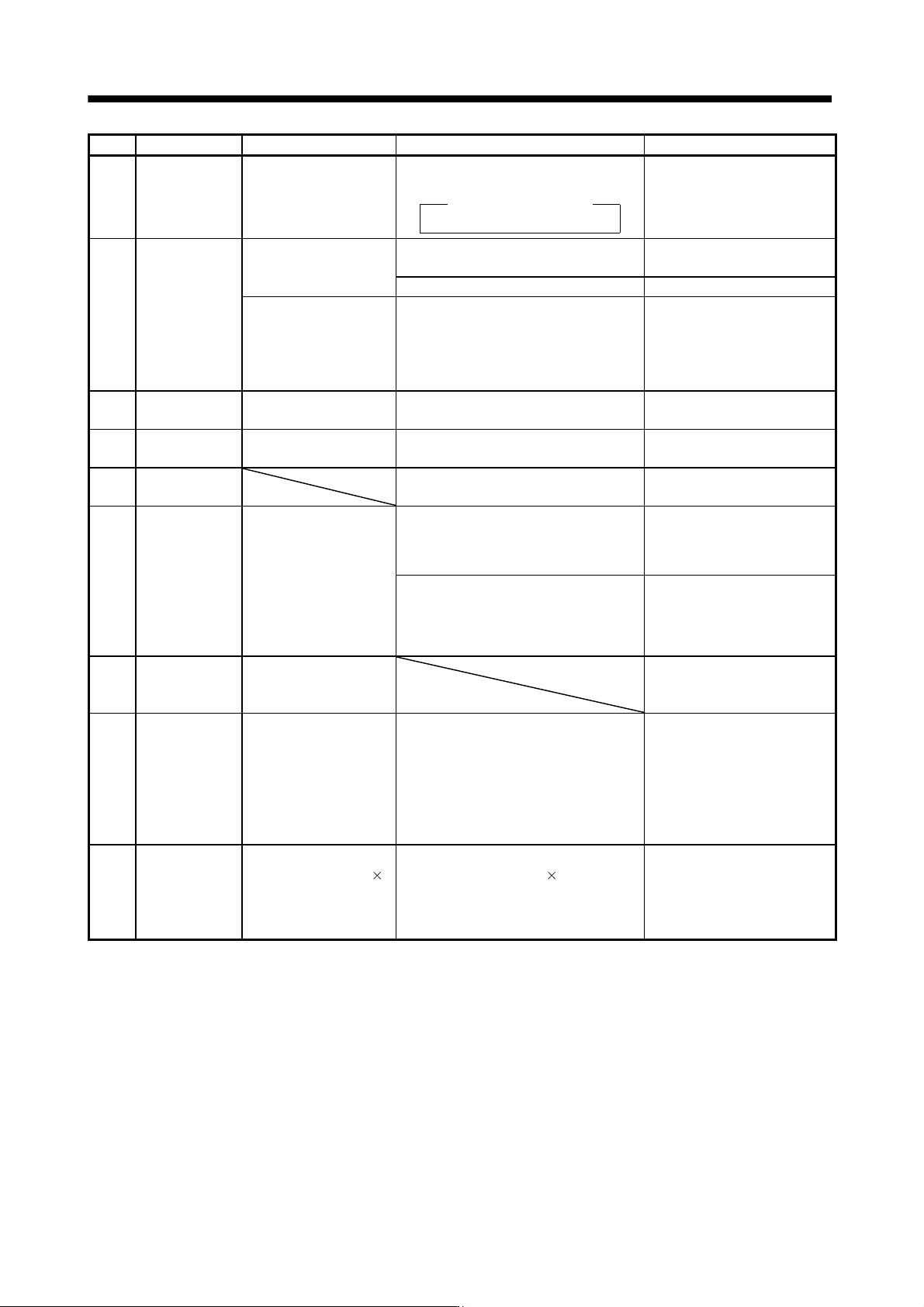
Display Name Definition
Cause
Action
E1 Overload warning
1
There is a possibility that
overload alarm 1 or 2 may
occur.
Load increased to 85% or more of overload
alarm 1 or 2 occurrence level.
Cause, checking method
Refer to 50,51.
Refer to 50, 51.
E3 Absolute position
counter warning
Absolute position encoder
pulses faulty.
1. Noise entered the encoder. Take noise suppression
measures.
2. Encoder faulty. Change the servo motor.
The multi-revolution
counter value of the
absolute position encoder
exceeded the maximum
revolution range.
3. The movement amount from the home
position exceeded a 32767 rotation or
37268 rotation in succession.
Make home position setting
again.
E4 Parameter
warning
Parameter outside setting
range
Parameter value set from servo system
controller is outside setting range
Set it correctly.
E6 Servo forced stop
warning
EM1 is off. External forced stop was made valid. (EM1
was turned off.)
Ensure safety and deactivate
forced stop.
E7 Controller forced
stop warning
Forced stop signal was entered into the
servo system controller.
Ensure safety and deactivate
forced stop.
E8 Cooling fan speed
reduction warning
The speed of the servo
amplifier decreased to or
below the warning level.
This warning is not
displayed with MR-J3-
70B/100B among servo
amplifiers equipped with a
cooling fan.
Cooling fan life expiration (Refer to section
2.5.)
Change the cooling fan of the
servo amplifier.
The power supply of the cooling fan is
broken.
Change the servo amplifier.
E9 Main circuit off
warning
Servo-on command was
issued with main circuit
power off.
Switch on main circuit power.
EC Overload warning
2
Operation, in which a
current exceeding the
rating flew intensively in
any of the U, V and W
phases of the servo motor,
was repeated.
During a stop, the status in which a current
flew intensively in any of the U, V and W
phases of the servo motor occurred
repeatedly, exceeding the warning level.
1. Reduce the positioning
frequency at the specific
positioning address.
2. Reduce the load.
3. Replace the servo amplifier/
servo motor with the one of
larger capacity.
ED Output watt
excess warning
The status, in which the
output wattage (speed
torque) of the servo motor
exceeded the rated output,
continued steadily.
Continuous operation was performed with
the output wattage (speed
torque) of the
servo motor exceeding 150% of the rated
output.
1. Reduce the servo motor
speed.
2. Reduce the load.