SM482PLUS_Admin(Eng_Ver2.8).pdf - 第105页
4-17 Tools Shortcut Menu Head 2/Axis R Indicates the presently rota ted angle from the home position of R axis for head 2. Head 3/Axis Z When the check box for <From home sens or> is not ticked, the height of t…
4-16
Multi-Functional Placer SM482(L) PLUS Administrator’s Guide
4.6. Current Position
Mainly used when the present coordinates of each driving axis need to be referenced for
teaching or calibration.
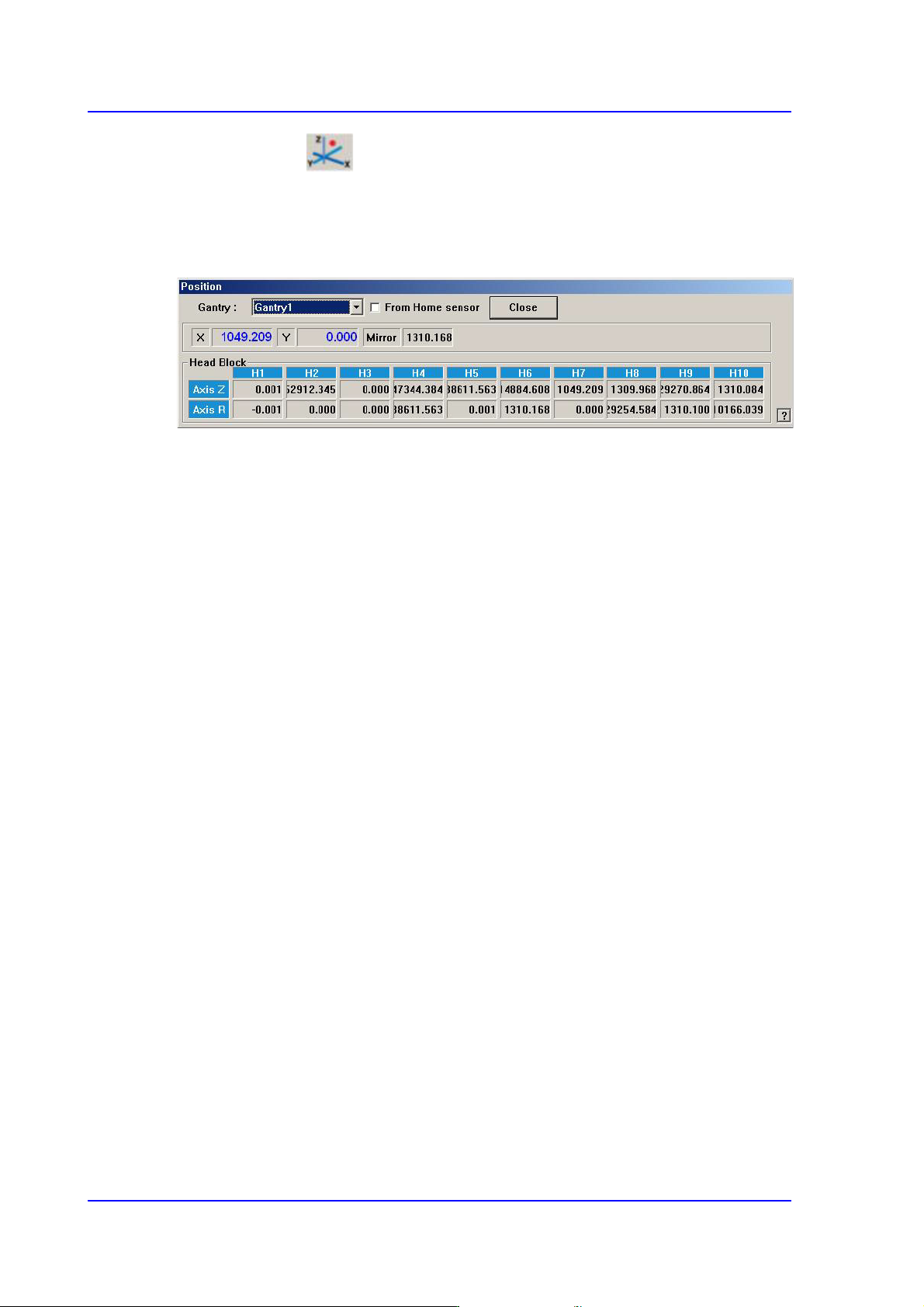
Figure4.6 “Position” dialog box
<Gantry> combo box
Select the gantry for which the coordinate is to be checked.
<From Home sensor> check box
This function is used to see how much the nozzle tip of the head has been lowered
from the position of the home sensor for the Z-axis.
Coordinates
X [When 1F-H1 is selected]
Indicates the present position in X direction of Head 1 at the origin of the
equipment.
Y [When 1F-H1 is selected]
Indicates the present position in Y direction of Head 1 at the origin of the
equipment.
Mirror
Indicates the presently rotated angle from the home position of mirror rotation axis
for fly camera.
Head Block group
Head 1/Axis Z
When the check box for <From home sensor> is not ticked, the height of the
nozzle tip of head 1 on the PCB is indicated.
Head 1/Axis R
Indicates the presently rotated angle from the home position of R axis for head 1.
Head 2/Axis Z
When the check box for <From home sensor> is not ticked, the height of the
nozzle tip of head 2 on the PCB is indicated.

4-17
Tools Shortcut Menu
Head 2/Axis R
Indicates the presently rotated angle from the home position of R axis for head 2.
Head 3/Axis Z
When the check box for <From home sensor> is not ticked, the height of the
nozzle tip of head 3 on the PCB is indicated.
Head 3/Axis R
Indicates the presently rotated angle from the home position of R axis for head 3.
Head 4/Axis Z
When the check box for <From home sensor> is not ticked, the height of the
nozzle tip of head 4 on the PCB is indicated.
Head 4/Axis R
Indicates the presently rotated angle from the home position of R axis for head 4.
Head 5/Axis Z
When the check box for <From home sensor> is not ticked, the height of the
nozzle tip of head 5 on the PCB is indicated.
Head 5/Axis R
Indicates the presently rotated angle from the home position of R axis for head 5.
Head 6/Axis Z
When the check box for <From home sensor> is not ticked, the height of the
nozzle tip of head 6 on the PCB is indicated.
Head 6/Axis R
Indicates the presently rotated angle from the home position of R axis for head 6.
Mirror
Indicates the presently rotated angle from the home position of mirror rotation axis for
fly camera.
<Close> button
Close the <Position> dialog box, End the <Current Position> command.
4-18
Multi-Functional Placer SM482(L) PLUS Administrator’s Guide
4.7. Manual Tool
Execute this menu for manual operation as follows. This menu should only be executed by
a user with the proper service user authorization.
Executed to operate each axis motor of the machine manually and obtain the
coordinates of the corresponding axis
Executed to check the camera status or capture the vision image
Executed to check the light for the camera or to check the head movement
Performs manual operation of the equipment. When this command is selected, the
following dialog box is displayed.
4.7.1. Axis Tab dialog box
Used for moving the selected object by operating the motor for each axis, or for obtaining
the present coordinates of the object.
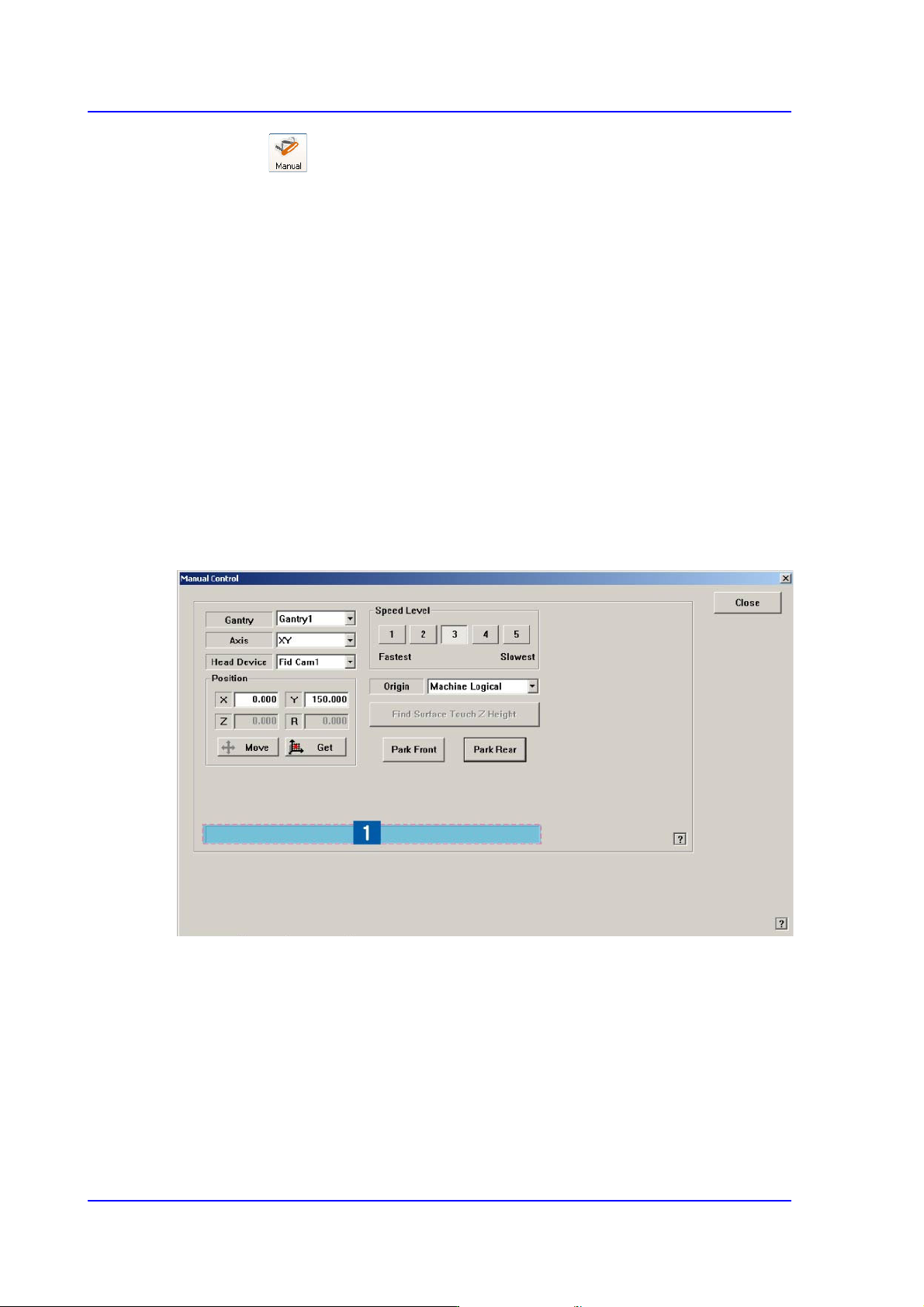
Figure4.7 “Manual Control – Axis” dialog box
1: Status Indication Area
<Gantry> combo box
Select the gantry to be operated manually.
<Axis> combo box
Select the driving motor to be operated. Selectable driving motors are as follows;
XY: Select the driving motor for X-axis and Y-axis.
Z: Select Z-axis driving motor of the head.