SM482PLUS_Admin(Eng_Ver2.8).pdf - 第243页
7-71 Part Registration Memo In the case of the QFP for fine p itch parts, when the Z-axis moves down at high speed to place the part, it may physically collide wi th the PCB. In addition, such impact may shak e the PCB s…
7-70
SM PLUS Administrator’s Guide
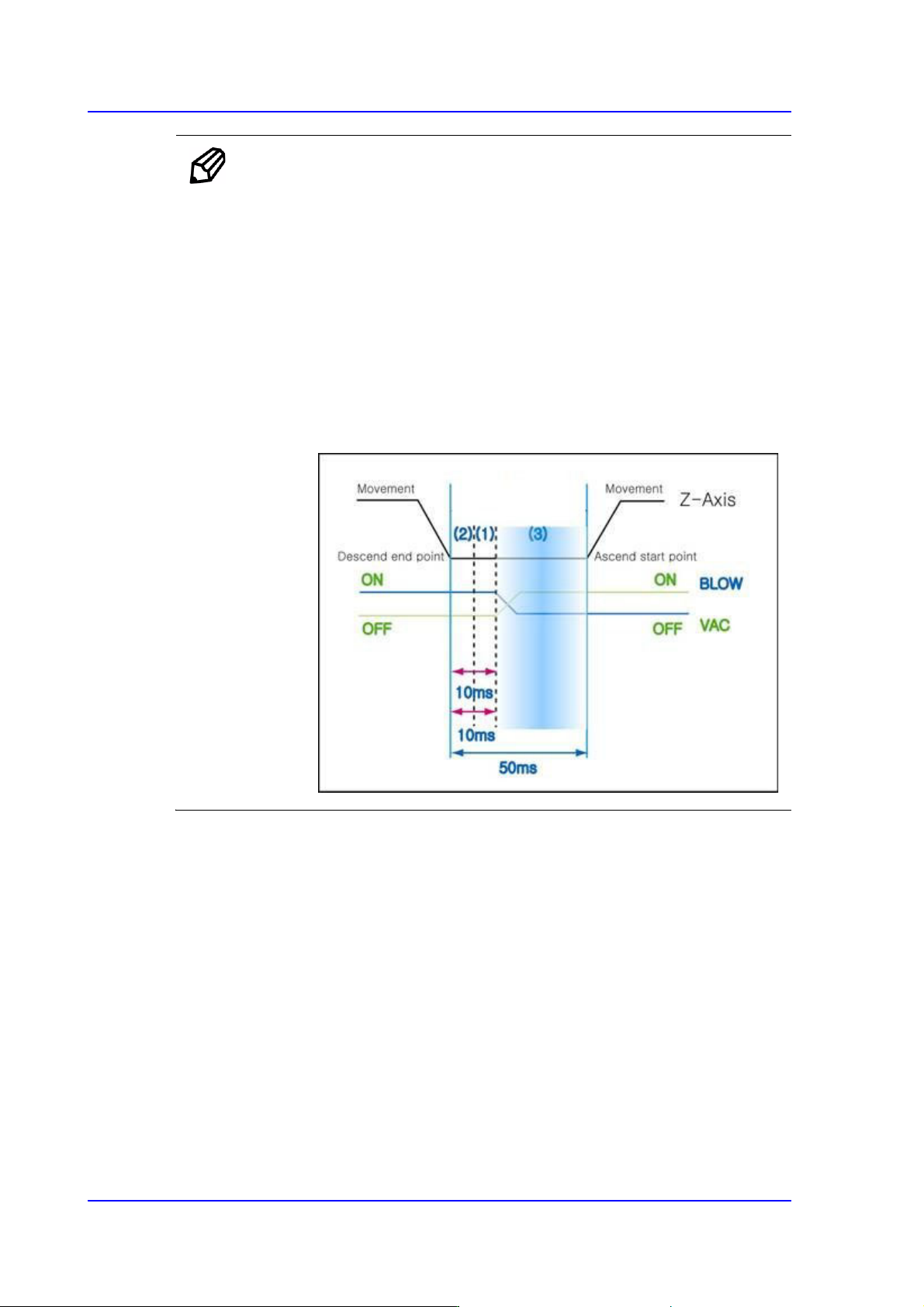
Memo Normally, the type of the time graph becomes different by parts.
For example, in the case of the general rectangular chips greater
than 1608, the parts are very light. Therefore, if the Z-axis moves
up before the vacuum disappears completely, the part may fall to
the PCB when the vacuum disappears while it moves up along
with the head.
In other words, item (3) in the following figure may act as the most
important factor for general rectangular chips.
From many test and experiment results, it was known that the
required time in item (3) was at least 0ms up to 20ms. Since this is
very important, the user must have this in mind.
7-71
Part Registration
Memo In the case of the QFP for fine pitch parts, when the Z-axis moves
down at high speed to place the part, it may physically collide with
the PCB.
In addition, such impact may shake the PCB slightly and cause the
solder paste to be mashed. Therefore, placing the parts in this manner
may cause the reduction of placement accuracy.
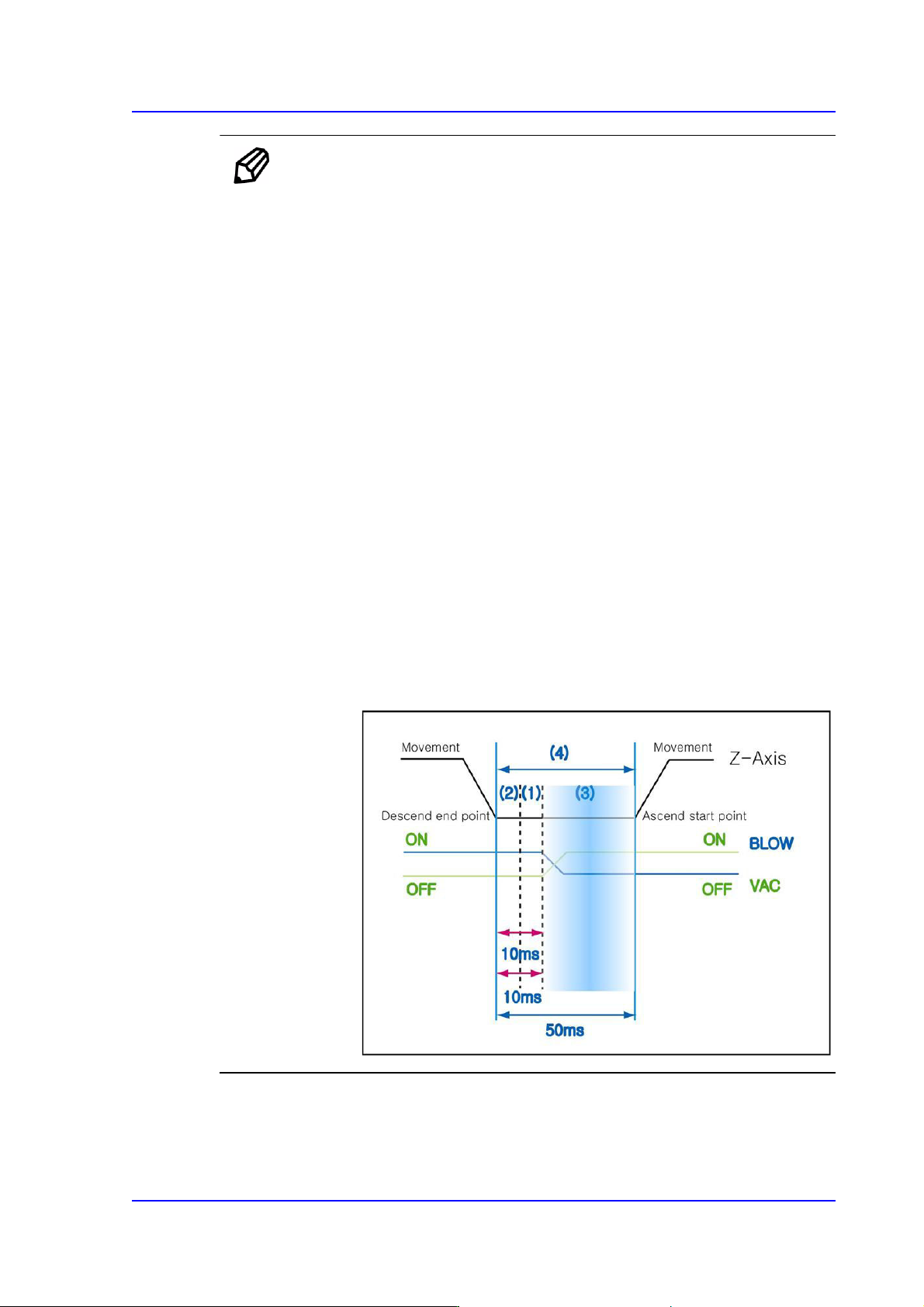
Such situation can be prevented by controlling the Vac off delay time.
That is, the part is held by a vacuum until various external factors are
stabilized, after which the vacuum is turned off after the external
factors disappear to prevent the problem.
The Vac off delay time corresponds to item (1) of the following
figure.
In the case of parts with general pitch, even though the time in the
above item (1) is not considered, it does not have great influence on
the placement accuracy.
However, in the case of parts with fine pitch or those that may cause
the above problem, it may be beneficial to set the time in item (1)
short.
Generally, the Vac off delay time is set to 20~30% of the total delay
time in item (4). Since this is very important, the user must have
this in mind.
<Blow On> edit box
During component placement, The time from vacuum off till blown on once the
head stops upon completion of descent

7-72
SM PLUS Administrator’s Guide
Unit : msec (Possible to setup for 10 msec intervals)
<Dump> edit box
Input the time from when the head spindle has stopped after moving down for part
dumping until it starts to move up.
<Dump Vac Off> edit box
During component dumping, the delay time after the head has come down until
vacuum off.
<Dump Blow On> edit box
During component dumping, The time from vacuum off till blown on once the
head stops upon completion of descent.
Memo For odd shaped parts for the gripper nozzle
Since it takes 300msec to open the gripper, when a part is picked up
using the gripper nozzle, perform time setup as follows:
Place Delay: More than 350 msec
Blow On Delay: More than 350 msec, but less than ‘Place Delay’
Vac. Off Delay: 0 msec
<Angle when dumping> combo box
In the case of large parts such as a connector or large IC, the angle at which parts
are returned to the dump box or tray must be set so that the corresponding parts
can be dumped normally.
Here, select the angle at which a part is dumped. It can be set in units of 45
degrees.