SM482PLUS_Admin(Eng_Ver2.8).pdf - 第359页
13-11 Production Setup <Inhibit Lane> group When it is not used, select the workstatio n. Then the PCB is not loaded on the corresponding workstation. <Progressive Product> Check Box This is a function th…

13-10
Multi-Functional Placer SM482(L) PLUS Administrator’s Guide
<Operation Option> group. This function can be used in the SM411 model.
<Auto Skip Placements> check box
Even when a specific part has run short during automatic production, placement is
continuously performed on the remaining placement points, generating a warning
message.
Caution This function allows the placement to be simply performed
continuously. If interference is expected in the future
between the skipped part and the nearby placed parts while
performing placement, release this function.
<Soft Ground> Check Box
Set when you wish to reduce vibration of the equipment during production. This
function reduces the acceleration of the Y-axis in the equipment to reduce
equipment vibration. However, it may result in a partial decline in equipment
productivity.
<PCB Transfer Speed> combo box
Used to adjust the PCB feeding speed. When the PCB is heavy, if it is selected at too
high speed, the conveyor belt may not feed the PCB sufficiently with the belt rotating
while slipping. The default selection is Middle. Adjust the speed appropriately, if
necessary.
Fast: high speed
Middle: medium
Slow: low speed
<Speed> slide bar
Select the driving speed of the XY axis driving motor.
<Z Axis Mount Delay> slide bar
Works after adding the defined value in the slider bar to the placement delay value
setup in the common data at the time of part registration. This value is applied only to
Z-axis.
13-11
Production Setup
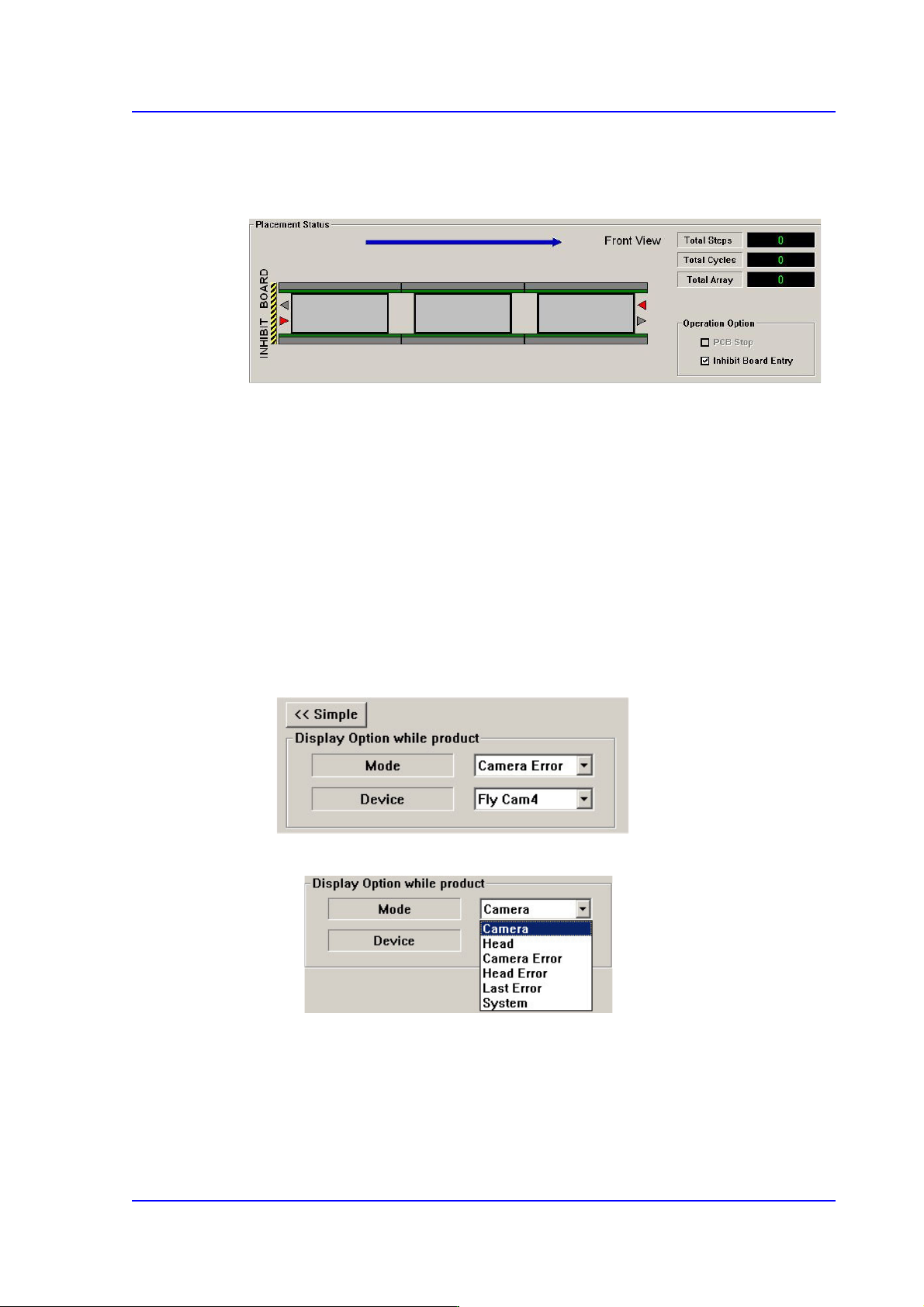
<Inhibit Lane> group
When it is not used, select the workstation. Then the PCB is not loaded on the
corresponding workstation.
<Progressive Product> Check Box
This is a function that uses the docking cart to work on two boards in a sequence if
there isn’t a sufficient number of feeders to produce boards at the optimal productivity.
This function is only supported for the single conveyor option.
Setting this option will first mount at the placement point for JOB A after the board is
loaded and then mount at the placement point for JOB B after replacing the docking
cart. This process is repeated each time a sheet of PCB is being produced.
<Detail> button
<Display Option while product> group
This button is used to select the image viewed in the SMVision window during
PCB production.
<Mode> combo box
Camera
Selected when looking at the image of a specific camera. Select the
corresponding camera from the <Device> combo box.
Head
Selected when looking at the image in which the part picked up by a

13-12
Multi-Functional Placer SM482(L) PLUS Administrator’s Guide
specific head is recognized. Select the corresponding head from the
<Device> combo box.
Camera Error
Selected when looking at the image of part recognition error from a
specific camera.
It shows the recognized part image according to the placement order
during placement. However, if the placement is completed, the camera
selected in the following <Device> combo box shows the part image error
that occurred last.
Head Error
Selected when looking at the recognition error image of part picked up by
a specific head.
It shows the recognized part image according to the placement order
during placement. However, if the placement is completed, it shows the
image of part recognition error that occurred last among the parts placed
by the head selected in the following <Device> combo box.
Last Error
It shows the recognized part image according to the placement order
during placement. However, if the placement is completed, it shows the
image of part recognition error that occurred last during placement.
System
Shows the part recognition image according to the placement order.