SM482PLUS_Admin(Eng_Ver2.8).pdf - 第429页
14-57 Machine Calibration 4. Then the message “Up to A lign Height and Mirror Close. T o Move, Click [Next].” appears. Then move the spindl e to the part recognition height so that the nozzle holder of the head can be se…
14-56
Multi-Functional Placer SM482(L) PLUS Administrator’s Guide
7. Press <Update> button to apply the calibration result to the machine
Memo The reference values for the Z-offset are as follows.
Head1~ Head6 : -1.5 ~ 1.5 mm
If the Z offset value exceeds this range, it means that the head has a
serious problem. Therefore, check for the home location, spindle,
LM, and verify if the motor operates normally.
The following is the procedure to perform the ‘R-Offset Calibration’.
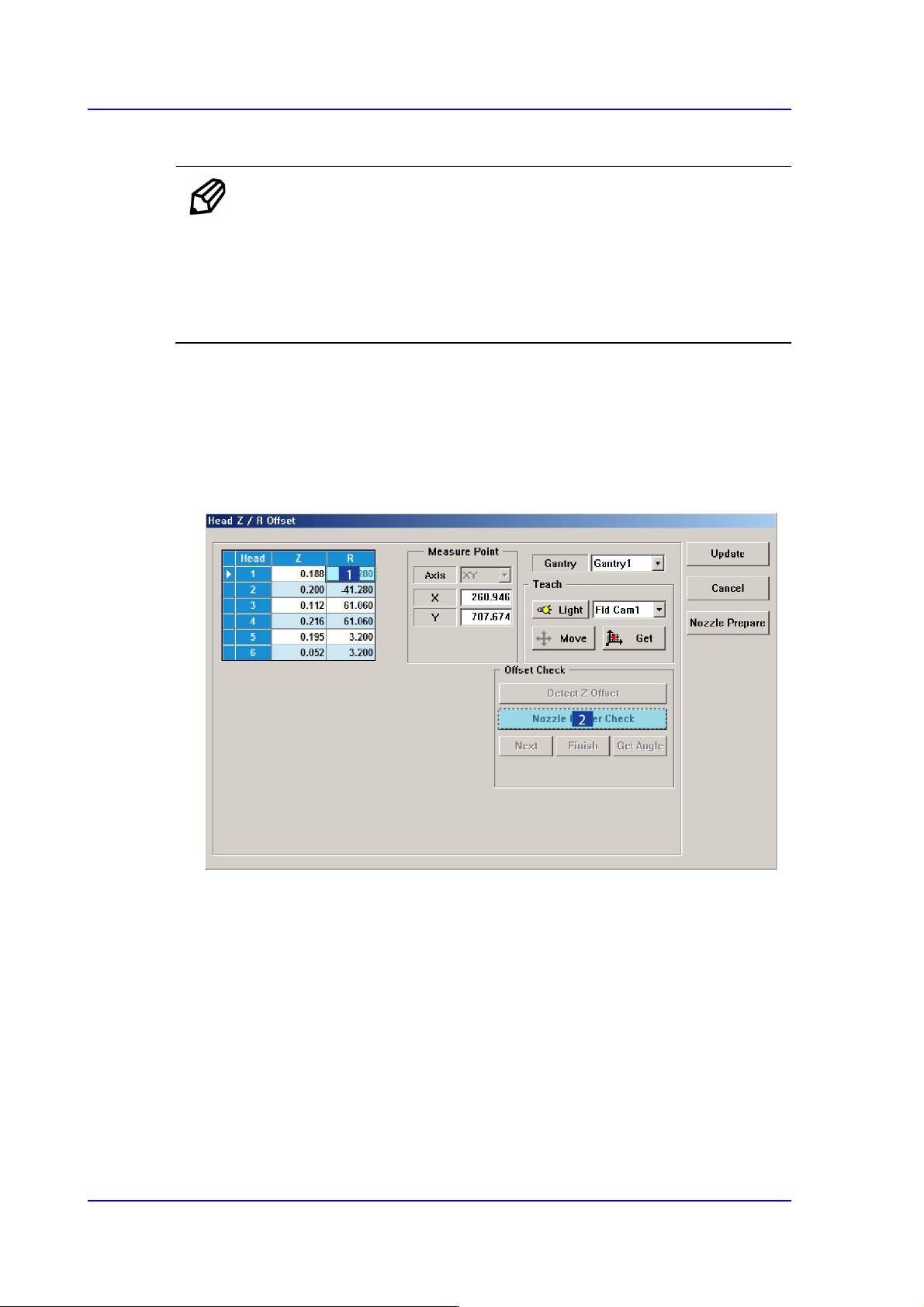
1. In the <Grid> area, input “0” for all R-axis values of the heads for which the
calibration is to be performed.
2. In the <Grid> group, select the R-axis for which the calibration is to be performed and
click the <Nozzle Holder Check> button. (Set value to head 1 by arbitrarily.)
3. Then a message reading, “First, We must Put all Nozzles from Heads manually. To
Moving Down Z Axis, Click [Next].” will be displayed in the message box. Click the
<Next> button to manually remove the nozzles attached to all heads.
At this time, for the ANC, the virtual nozzle CNT0 is set for the No. 1 hole of the ANC
and it is regarded that the corresponding head picked the CNT0 nozzle.
14-57
Machine Calibration
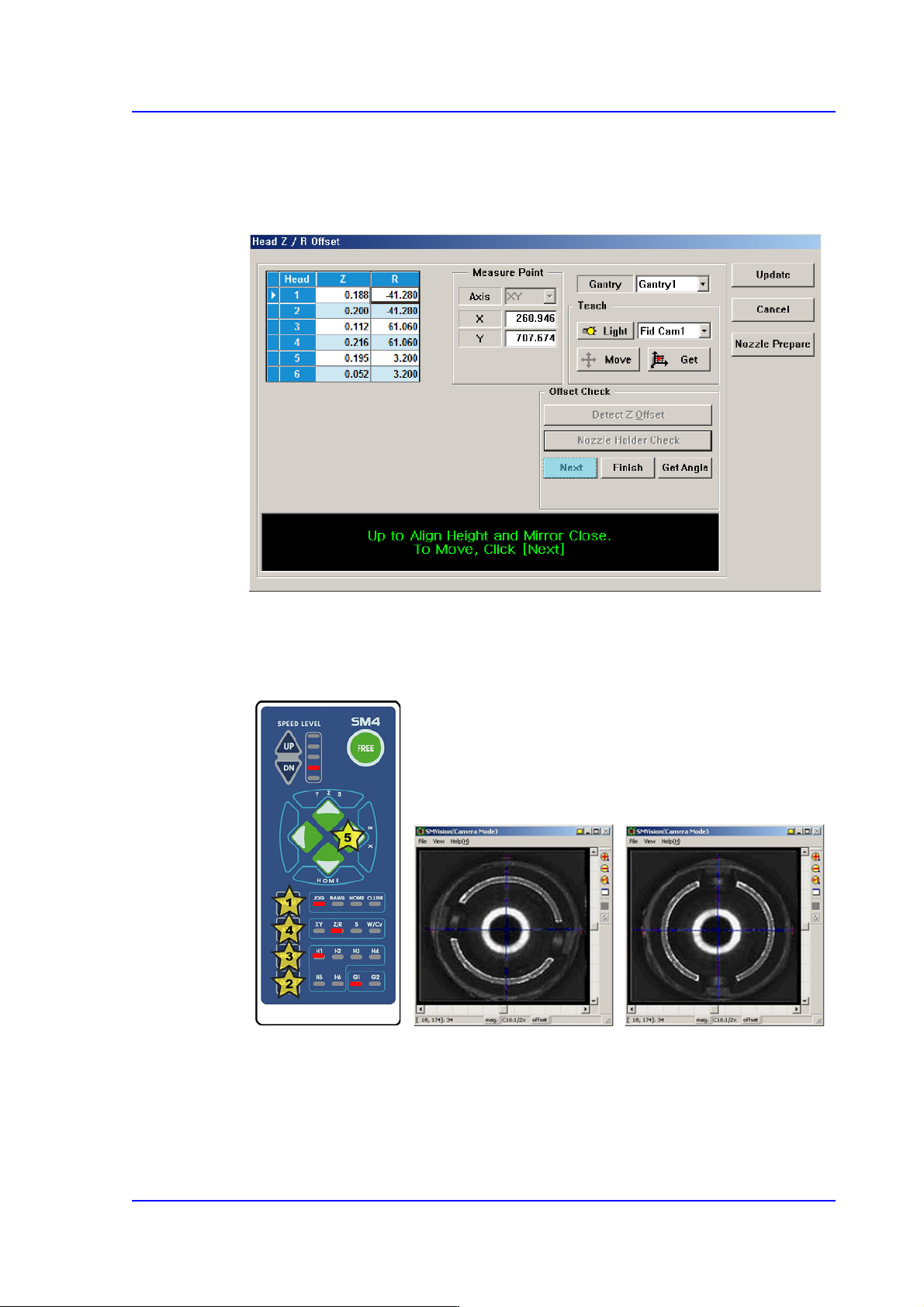
4. Then the message “Up to Align Height and Mirror Close. To Move, Click [Next].”
appears. Then move the spindle to the part recognition height so that the nozzle holder
of the head can be seen from the fly camera and click the <Next> button to close the
mirror.
5. Rotate the spindle in the R-direction by using the teaching box so that the shape of the
nozzle holder becomes ‘( )’. At this time, the nozzle holders of the heads with
interlocked mechanism must be assembled in the same direction.
That is, the mechanisms of the #1~#2 heads and #3~#4 heads, #5~#6 heads must be
assembled first in the same direction by using the jig for a nozzle holder.
6. Click the <Get Angle> button under the <Offset Check> group to enter the R offset
value.
7. Perform the calibration form Head 2 to Head 6 in the same manner.

14-58
Multi-Functional Placer SM482(L) PLUS Administrator’s Guide
8. Click the <Update> button to apply the calibration result to the machine.
14.3.7.5. Light [F8]
Calibrate the brightness of the illumination for the fly camera and fix camera. For more
information please refer to “13.4. Light Mapping”.
Caution Since the nozzle for the SM32x model is not compatible to
the one for the light mapping used for the SM32x model, do
not use it for this machine.
14.3.7.6. Head Offset Calibration
Measure the distance (XY Offset) between the center of the gantry fiducial camera and the
center of each head.
The following is the procedure to calibrate the XY offset of the head;
1. Click the <Nozzle Prepare> button and insert the CNT20 nozzle into the No. 1 hole of
the ANC manually.
2. If the <11. Head Offset> is clicked after selecting the <Automatic Next> check box,
calibration is performed for the selected gantry automatically.
If calibration is performed after selecting the <No Real Motion [Manual]> check box,
the nozzle is inserted into each head manually. Click the <Next> button to move onto
the next step.
If calibration is performed without selecting either the <Automatic Next> check box
or < No Real Motion [Manual]> check box, the nozzle is changed automatically for
the currently selected nozzle. Click the <Next> button to move onto the next step.
If the <11. Head Offset> button is clicked, the message “First, We must Put all
Nozzles From Heads Manually. To Moving Down Z Axis, Click [Next]” appears in
the message box. Click the <Next> button to move down the Z axis of the head in
order to remove all nozzles inserted in the nozzle-holder manually.