SM482PLUS_Admin(Eng_Ver2.8).pdf - 第245页
7-73 Part Registration <Speed> tab Sets the parameters related to the speed at which the head moves when it picks, places and dumps a part. The speed must be s et appropriately accordin g to the corresponding par…

7-72
SM PLUS Administrator’s Guide
Unit : msec (Possible to setup for 10 msec intervals)
<Dump> edit box
Input the time from when the head spindle has stopped after moving down for part
dumping until it starts to move up.
<Dump Vac Off> edit box
During component dumping, the delay time after the head has come down until
vacuum off.
<Dump Blow On> edit box
During component dumping, The time from vacuum off till blown on once the
head stops upon completion of descent.
Memo For odd shaped parts for the gripper nozzle
Since it takes 300msec to open the gripper, when a part is picked up
using the gripper nozzle, perform time setup as follows:
Place Delay: More than 350 msec
Blow On Delay: More than 350 msec, but less than ‘Place Delay’
Vac. Off Delay: 0 msec
<Angle when dumping> combo box
In the case of large parts such as a connector or large IC, the angle at which parts
are returned to the dump box or tray must be set so that the corresponding parts
can be dumped normally.
Here, select the angle at which a part is dumped. It can be set in units of 45
degrees.
7-73
Part Registration
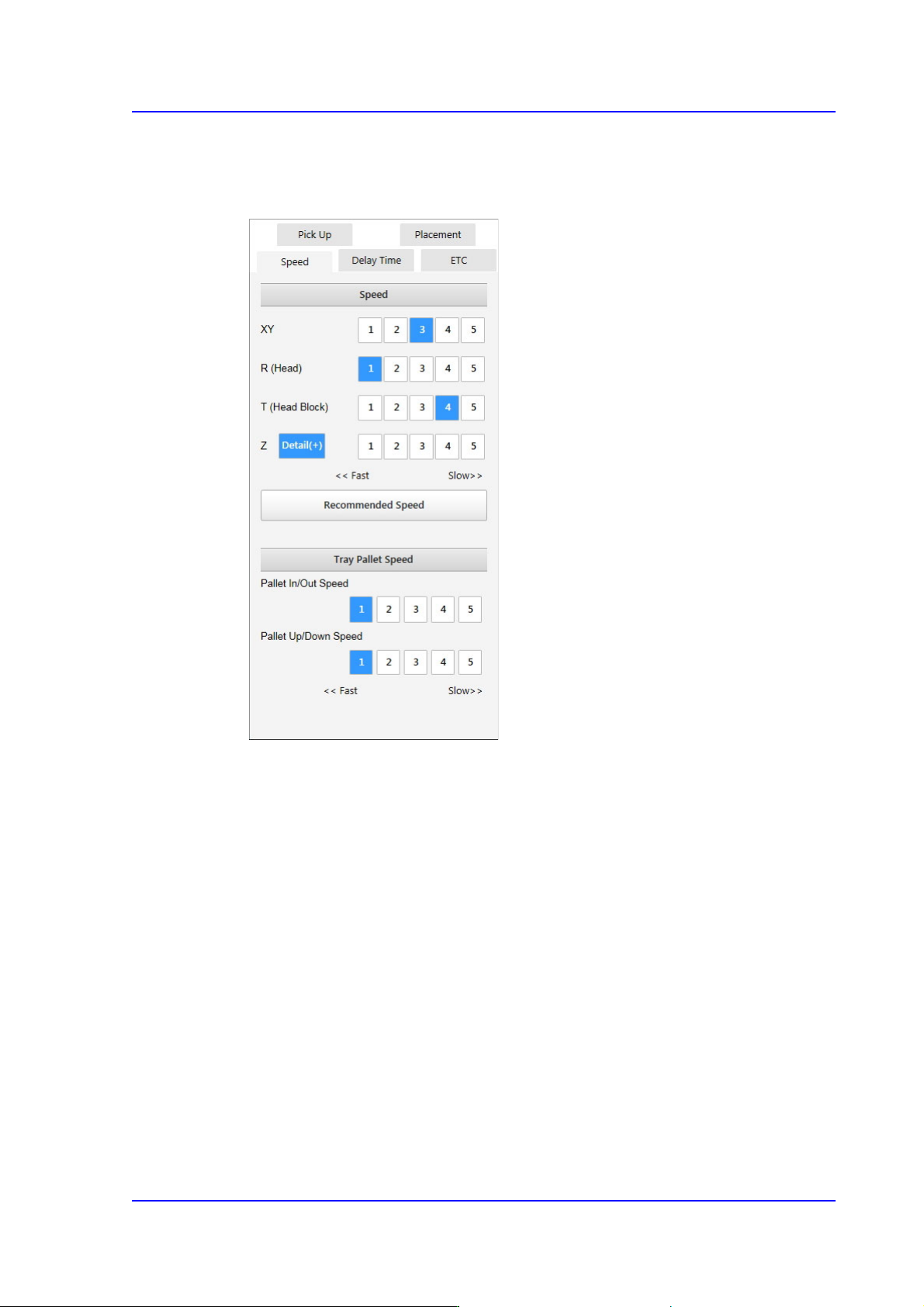
<Speed> tab
Sets the parameters related to the speed at which the head moves when it picks, places
and dumps a part.
The speed must be set appropriately according to the corresponding part by taking into
overall consideration the nozzle type, part weight, pickup area, etc.
The head moving speed is as follows. The speed profile is set in the system.
1- Fastest: Fastest speed
2- Fast: Fast speed
3- Middle: Middle speed
4- Slow: Slow speed.
5- Slowest: Slowest speed
<XY> Selection button
Selects the driving speed of the motors of the XY axes. If the speed is
inappropriate depending on parts, actual part placement may not be performed
normally.
<R (Head)> Selection button
Selects the speed of the R-axis motor driving the rotary head barrel. If the speed is
inappropriate depending on parts, the picked part may be slipped so that the angle
7-74
SM PLUS Administrator’s Guide
of the part may be distorted or it may drop off.
<T (Head Block)> Selection button
Selects the speed of the T-axis motor driving the head spindle. If the speed is
inappropriate depending on parts, the picked part may be slipped so that the angle
of the part may be distorted or it may drop off.
<Z> Option Box
Selects the driving speed of the Z-axis driving motor.
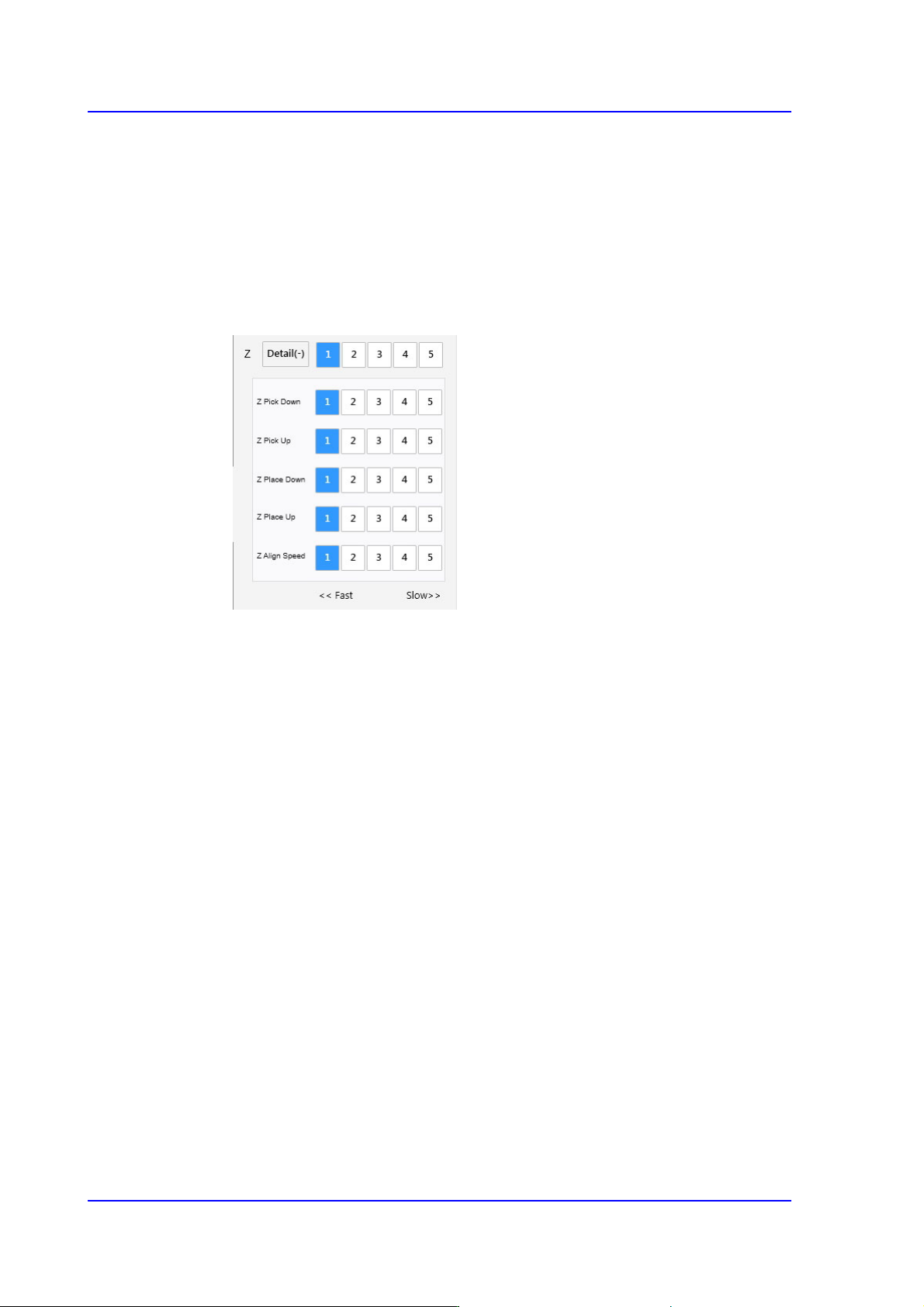
<Detail> button
Selecting this button will enable the following option boxes:
<Z Pick Down> Selection button
When moving down the head spindle for part pickup, selects the driving
speed of the Z-axis motor.
If the speed is inappropriate depending on parts, a part may jump, causing
a pickup error.
The 'Soft Touch' function may be used together if necessary. For this
function, refer to the description of the <Placement> tab.
<Z Pick Up> Selection button
When moving the head spindle up after part pickup, selects the driving
speed of the Z-axis motor.
If the speed is inappropriate depending on the parts, the picked part may
drop from the nozzle, causing a pickup error.
The 'Soft Touch' function may be used together if necessary. For this
function, refer to the description of the <Placement> tab.
<Z Place Down> Selection button
When moving down the head spindle for part placement, selects the
driving speed of the Z-axis motor.
If the speed is inappropriate depending on the parts, it will cause a crack in