Administrator’s Guide(CP45FV) Eng.pdf - 第186页
Samsung Component Placer CP45FV Series Administrator ’ s Guide 11.7. PCB D/L [F7] T ransmits the PCB data set in the <PCB Edit> command to the machine. T ransmission is possible only when the machine status is “ Fi…
Production Setup
11-7
11.6. T/F Cnt [F6]
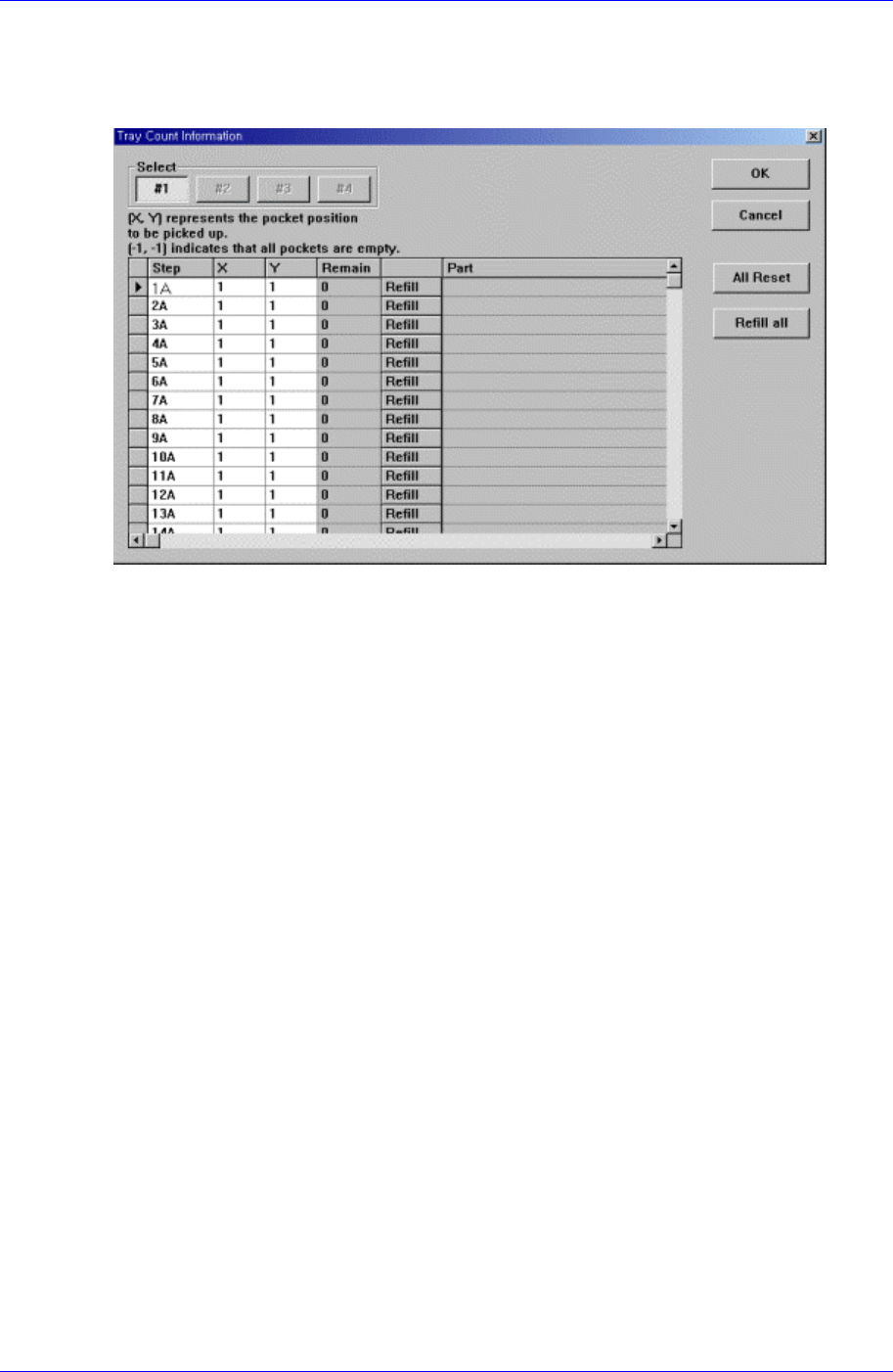
Set the start position of the pocket on the tray feeder to pick up the component. When this
button is clicked on, the following dialog box is displayed.
Figure 11-5. “Tray Count Information” dialog box
<Select> option button
Select the tray feeder unit to set.
<Grid> group
Set the position of the pocket to start.
<Step> column
Displays the number of tray step.
<X> column
Set the X position of the pocket.
<Y> column
Set the Y position of the pocket.
<Part> column
Displays the name of the component supplied the corresponding pallet.
<OK> button
Transmits the set data to the machine and closes the dialog box.
<Cancel> button
Ignores the set data and closes the dialog box.
<All Reset> button
Used to supply all pallets with components. Initializes the pocket position to start
(X=1, Y=1) on all pallets.
<Refill all> button
Used to supply empty pallets with components. After refilling components for empty
pallets, Clicking this button initializes the pocket position to start (X=1, Y=1) on each
pallet.
Samsung Component Placer CP45FV Series Administrator’s Guide
11.7. PCB D/L [F7]
Transmits the PCB data set in the <PCB Edit> command to the machine. Transmission is
possible only when the machine status is “Finish”.
11.8. Plc. Info [F8]
Displays placement operation data. When this button is clicked on, please refer to “19.1
Production Information Management” .
11.9. Sts. Info [F9]
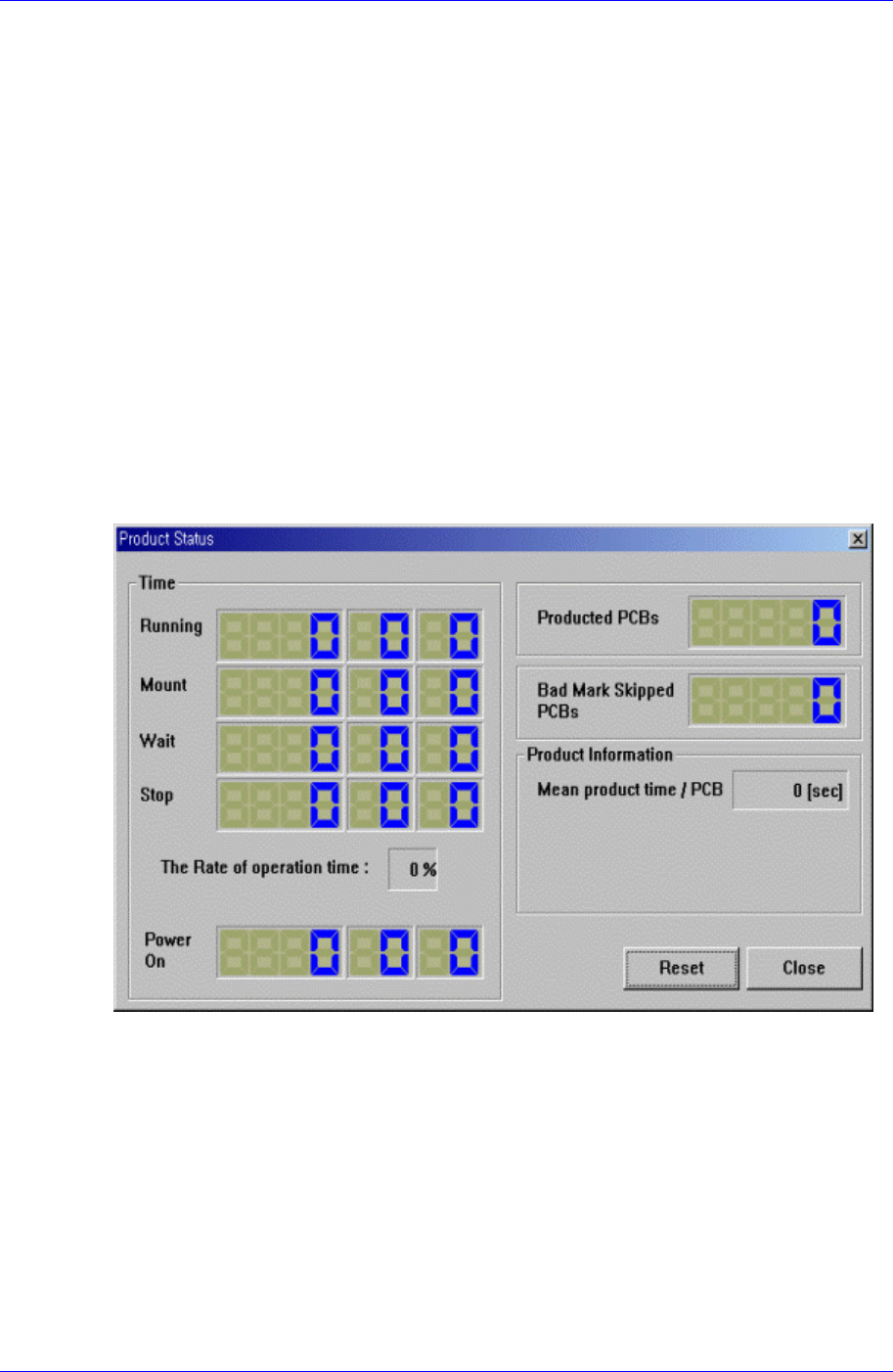
Displays the placement status. When this button is clicked on, the following dialog box is
displayed.
<Time> group
Displays the machine operation time.
<Elapse> Time
Displays the time elapsed from power supply to the present moment.
<Running> Time
Displays the sum of placement, waiting, and stopping time.
<Mount> Time
Displays the placement time from power supply to the present moment.
<Wait> Time
Displays the time in the waiting status from power supply to the present moment.
11-8

Production Setup
11-9
<Stop> Time
Displays the time in the stopping status from power supply to the present
moment.
<The Rate of Operation> percentage
Displays the placement time as a percentage of running time.
<Product Information> group
Displays the production a.
<Bad Mark Skipped PCB Count>
Displays the total number of PCBs skipped because of bad mark indication.
<PCB In Count used for In-Line>
Displays the total number of PCBs loaded on the machine.
<Fiducial Skip Count>
Displays the total number of PCBs for which the fiducial mark inspection have
been skipped.
<Part Count>
Displays the total number of components placed.