Administrator’s Guide(CP45FV) Eng.pdf - 第289页
System Setup 16-23 Changing the set up status by an unauthori zed user could damage the machine or result in personal i njury. Wa r n i n g Unauthorized user must not change the set u p status of the machine. 16.8. Devic…
Samsung Component Placer CP45FV Administrator’ Guide
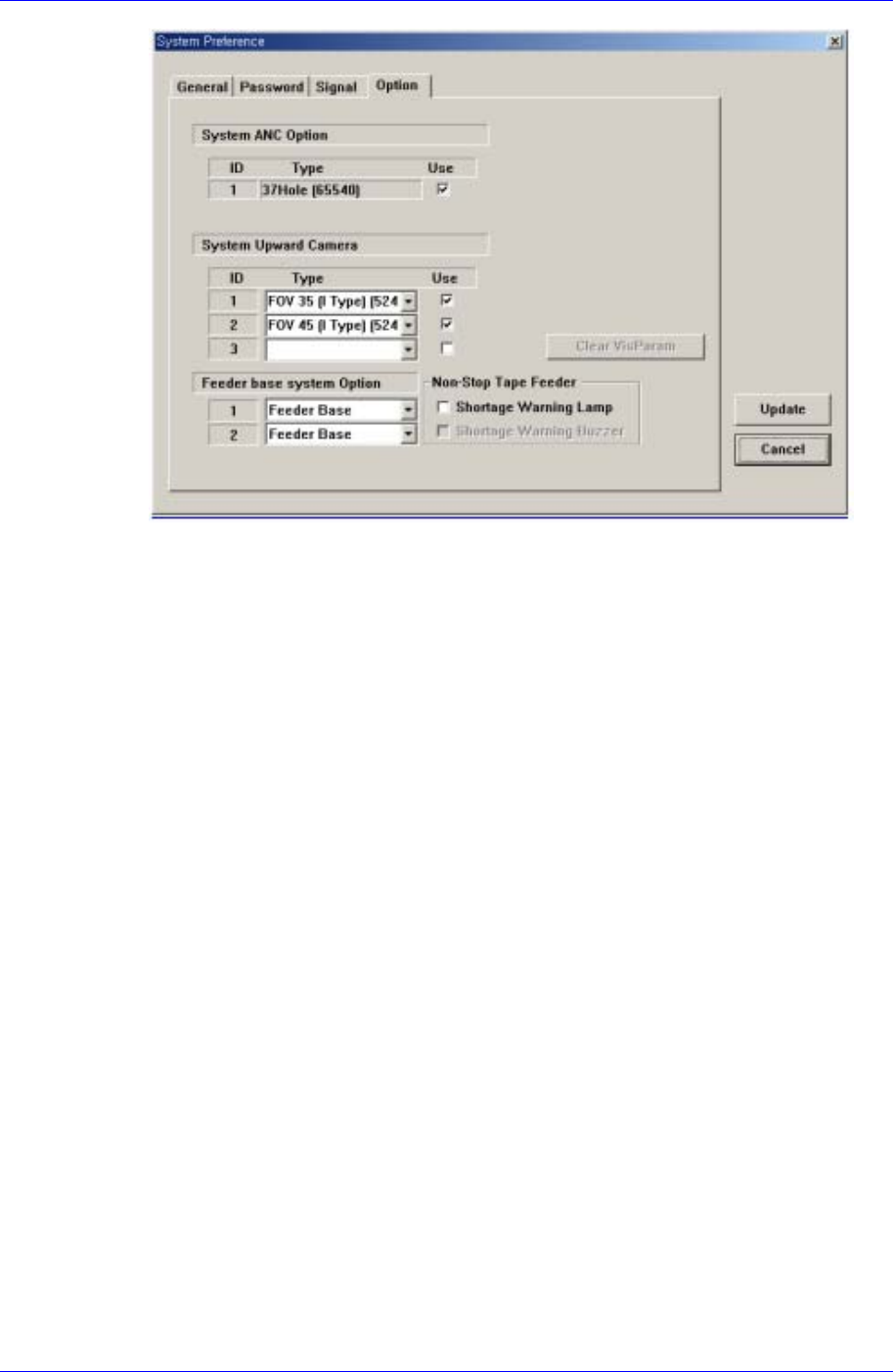
Figure 16-12. “Sys. Setup : System Preference - Option” dialog box
<System ANC Option> check box
Set whether to use or not to use the ANC type available for the machine. To use
the corresponding ANC type, check the check box.
<System Upward Camera> check box
Set whether to use or not to use the fix camera type available for the machine. To
use the corresponding camera type, check the check box.
<Vis. Option Parameter> Grid group
Set the constant parameter available for the vision system. The number of
available parameters is 20.
<Use Non Stop > check box
Check it only when the user uses the Non Stop Feeder. Classified into Feeder
Base, Feeder Base Docking, and Feeder Base Docking+IQ according to the
supply method of the feeder.
<Shortage Warning Lamp>check box
If this check box is checked, when the work is performed with the Non Stop
Feeder, the tower lamp will flicker in case that the remaining quantity of parts is
less than the basic required quantity.
<Shortage Warning Buzzer> check box
When this check box is checked, a sound signal is produced if the number of
remaining components is less than the standard value while working with the
Non Stop Feeder.
<Update> button
Transmits the set option to the machine and closes the dialog box.
<Cancel> button
Ignores the set option and closes the dialog box.
16-22
System Setup
16-23
Changing the set up status by an unauthorized user could
damage the machine or result in personal injury.
Warning
Unauthorized user must not change the set up status of the
machine.
16.8. Device [F10]
Controls the data related to the tape, stick, and nozzle. When this button is selected, the
following dialog box is displayed.
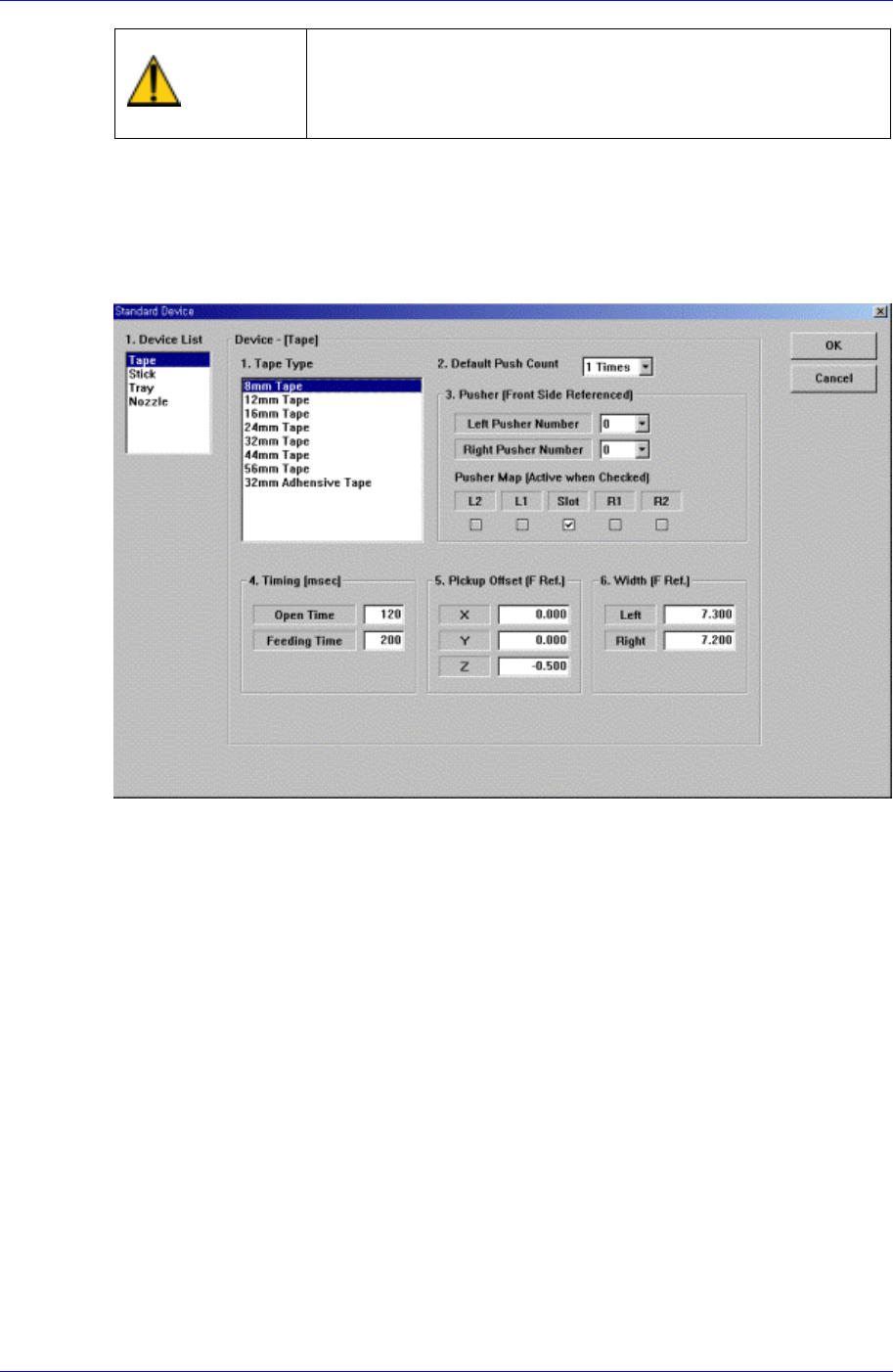
Figure 16-13. “Sys. Setup : Standard Device - Tape” dialog box
<1. Device List> list box
Select the device to set.
The above screen is the case where the “Tape” is selected in the Device list.
Set the data on the tape feeder.
<1. Tape Type> list box
Select the tape feeder type to set.
<2. Default Push Count> combo box
Select how many times the pusher should be operated to move forward the tape
feeder.
8~12mm : 1 pusher is used
16,24mm: 2 pushers (Left, Center) are used
32~56mm: 3 pushers are used
<3. Pusher [Front Side Referenced] – Left Pusher Number> combo box
Set the number of pushers to be operated to move forward the tape feeder.
Based on the slot in which the tape feeder is installed, select the number of pushers
on the left of the corresponding slot.
Samsung Component Placer CP45FV Administrator’ Guide
<3. Pusher [Front Side Referenced] – Right Pusher Number> combo box
Set the number of pushers to be operated to move forward the tape feeder.
Based on the slot in which the tape feeder is installed, select the number of pushers
on the right of the corresponding slot.
<3. Pusher [Front Side Referenced] – Pusher Map> check box
Set the pusher to be operated to move forward the tape feeder.
When the check box is checked, operates the corresponding pusher.
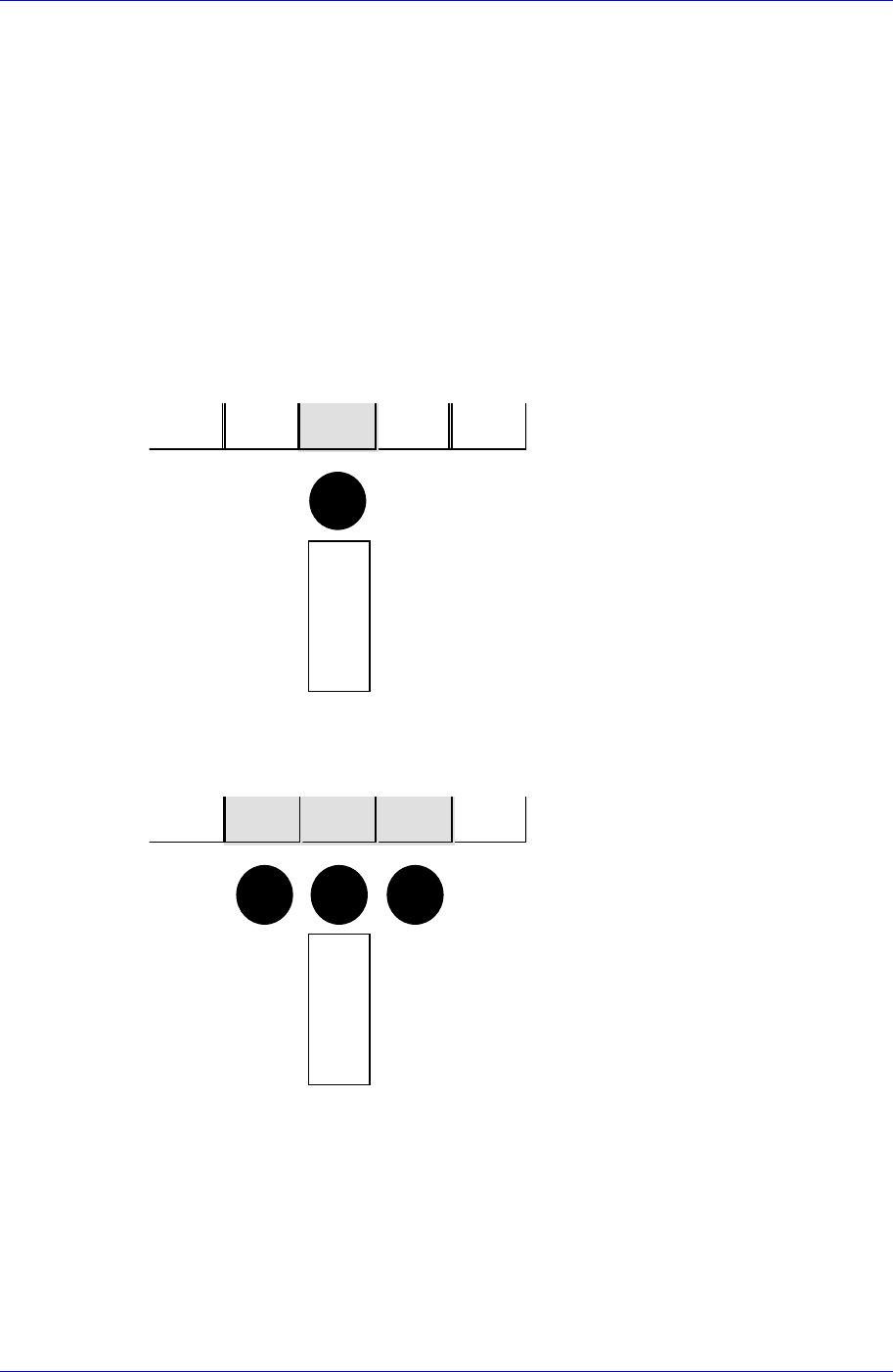
Next is a figure showing the relationship between the pusher data and the actual
pusher to operate. The solid black circles in the figure indicate the pushers to operate.
1) Left Pusher = 0, Right Pusher = 0
R2R1SlotL1L2
피
더
FEEDER
2) Left Pusher = 1, Right Pusher = 1
R2R1SlotL1L2
피
더
FE
EDER
3) Left Pusher = 2, Right Pusher = 1
16-24