Administrator’s Guide(CP45FV) Eng.pdf - 第242页
Samsung Component Placer CP45FV Administrator ’ s Guide is pressed, set the waiting position for the head assembly. n the current A v ailable devices are as follows; ching Camera. am. e edit ing to the position to mo…
Machine Calibration
15-3
shall switch to off state natually even though the nozzle is mounted.
10.
d, move up the
ge
※ S d red LEDs turn on
f the spindle of the HEAD 3 is moved down, only the green LED
D turns off or the red LED turns on, repeat the
11.
ion has been done normally. Otherwise, repeat the above
procedure.
9. Then set the Amp switch of the sensor to Run mode.
Increase the Z-axis height of the HEAD 3 by 1.0mm increments from 50mm
to 55.0mm using the teaching box. If the detection state remains unchanged
even when the Z-axis height of the HEAD 3 is increase
spindle of the HEAD 3 until Z-axis height reaches 57mm.
If the green and red LEDs turn on simultaneously between the height ran
of 57.0 ~ 58.0mm, it signifies that the calibration has been done normally.
et the Z-axis height where the green an
simultaneously as the Nozzle Check Height.
However, i
turns on.
But at this time if the green LE
above procedure from step 4.
In order to check the operation of the sensor, select any ANC hole from the
ANC dialog box using any head, and then click the <PICK> button. If the
error message “THE HEAD HAS NO NOZZLE” is displayed on the screen,
the calibrat
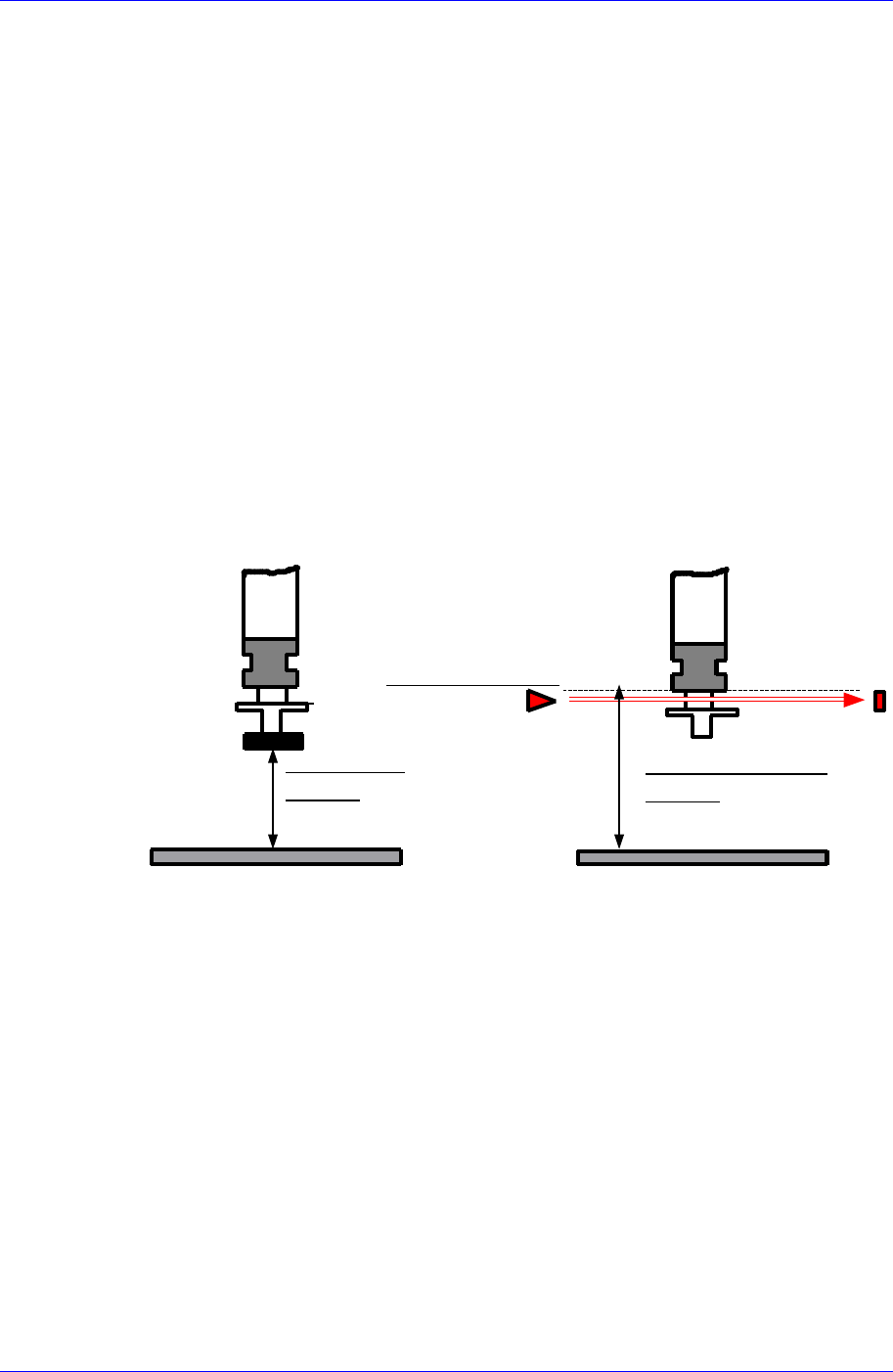
ALIGN HEIGHT
=54.5mm
PCB
NOZZLE CHECK HEIGHT
=59.0mm
NOZZLE CHECK SNESOR
PCB
Set the waiting position for the head assembly.
ystem, move the head to the coordinate set
kup position of the feeder supplying the
d assembly.
n panel of the machine
<Head Assembly wait position> group
<When PCB in> edit box
Set the waiting position for the head assembly when the PCB is being loaded.
In case the Wait Type is selected as S
here and wait when loading the PCB.
In case the Wait Type is selected as Auto, if there is a fiducial mark, the head
waits at the fiducial mark position when loading the PCB. If there is no fiducial
mark, the head waits at the pic
component to be placed first of all.
<When Front feeder change button pressed> edit box
When the “Front feeder change” button on the front operation panel of the
machine is pressed, set the waiting position for the hea
<When Rear feeder change button pressed> edit box
When the “Rear feeder change” button on the rear operatio

Samsung Component Placer CP45FV Administrator’s Guide
is pressed, set the waiting position for the head assembly.
n the current
Available devices are as follows;
ching Camera.
am.
e edit
ing to the position to move to must be clicked on with a mouse.
e edit box corresponding to the position to be read must be clicked on
ata to the machine and closes the dialog box.
nores the set data and closes the dialog box.
15.1.2.
number being 2.450 or higher or the machine
serial number being 1188 or higher.
<Device> combo box
Selects the corresponding device to move the head assembly by rotating the driving
shafts of the X, Y and Z-axes motors, move or rotate the spindle or obtai
coordinate of the device to be selected.
Move Cam: Selects Tea
Head1: Selects Head1.
Head2: Selects Head2.
Head3: Selects Head3.
Head4: Selects Head4.
Head5: Selects Head5.
Head6: Selects Head6.
Beam: Selects Be
<Move> button
Moves the head assembly by rotating the shafts of the X, Y and Z-axes driving
motors using the device selected from the <Device> combo box. At this time, th
box correspond
<Get> button
Reads in the current position of XY, and Z axes of the device selected in <Device>.
At this time, th
with a mouse.
<Update> button
Transmits the set d
<Cancel> button
Ig
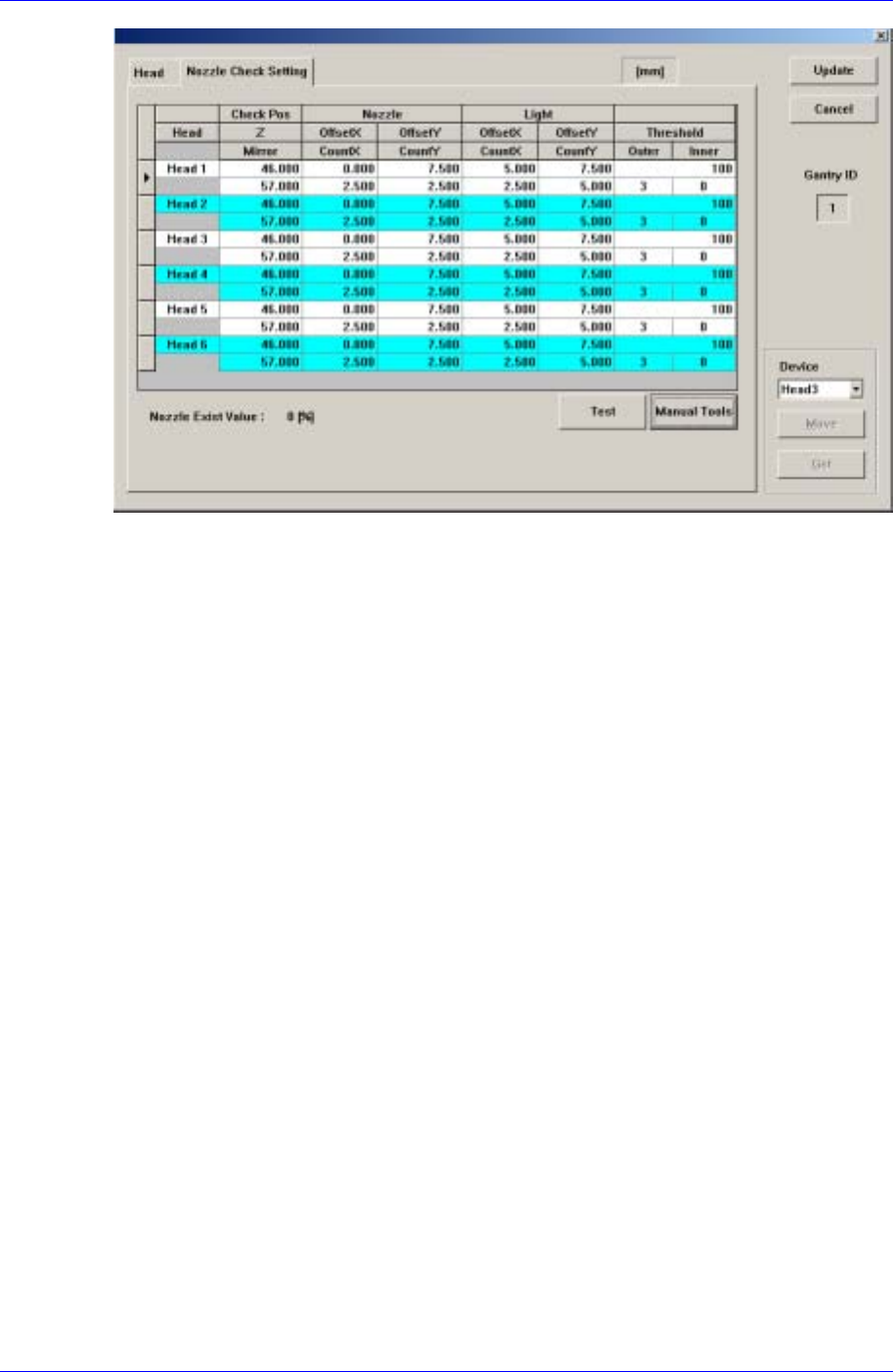
Nozzle Check Setting Tap dialog box
Uses a fly camera to check whether the nozzle is mounted on the head or not. The
following dialog box is displayed when the nozzle check method is selected as the Vision.
The method to check whether the nozzle is mounted or not using the fly camera is applied
to the machine with the MMI version
15-4
Machine Calibration
15-5
Figure 15-2. “Nozzle Check Setting” dialog box
Check Pos
Z
Refers to the Z-axis height when checking whether the nozzle is mounted or not.
This is indicated as the distance from the PCB top surface to the end of the head
spindle 다.
Mirror
Refers to the position of the mirror axis when checking whether the nozzle is
mounted or not. This is indicated as degree.
Nozzle
Checks whether the nozzle is mounted or not by comparing the binary value of the
pixel of a certain area when the nozzle is mounted with that when the nozzle is not
mounted.
The certain area mentioned above is called the test area, which is displayed in box
form on the vision screen.
Offset X / Offset Y
When indicating the distance from the cross hair center of the vision screen to the
center of this rectangular box, i.e. test box in the Right-Down Coordinate System,
the distance in the X-axis direction is called Offset X and the distance in the Y-
axis direction is called Offset Y.
Count X / Count Y
The size of the test box in the X-axis direction is called Count X, and the size of
the test box in the Y-axis direction is called Count Y.
Light
When checking whether the nozzle is mounted or not using the fly camera, lighting
becomes a crucial factor in determining the binary value of the pixel in the test box
area.
Therefore, in order to check the lighting condition when examining whether the