Administrator’s Guide(CP45FV) Eng.pdf - 第52页
Samsung Component Placer CP45FV Series Administrator ’ s Guide Select the axis to move. A vailable axes are as follows. XY : Selects XY axis. Z: Selects the Z axis of the head. R: Selects the R axis of the head. Mirror: …
View Menu
Chapter 4. View Menu
4-1
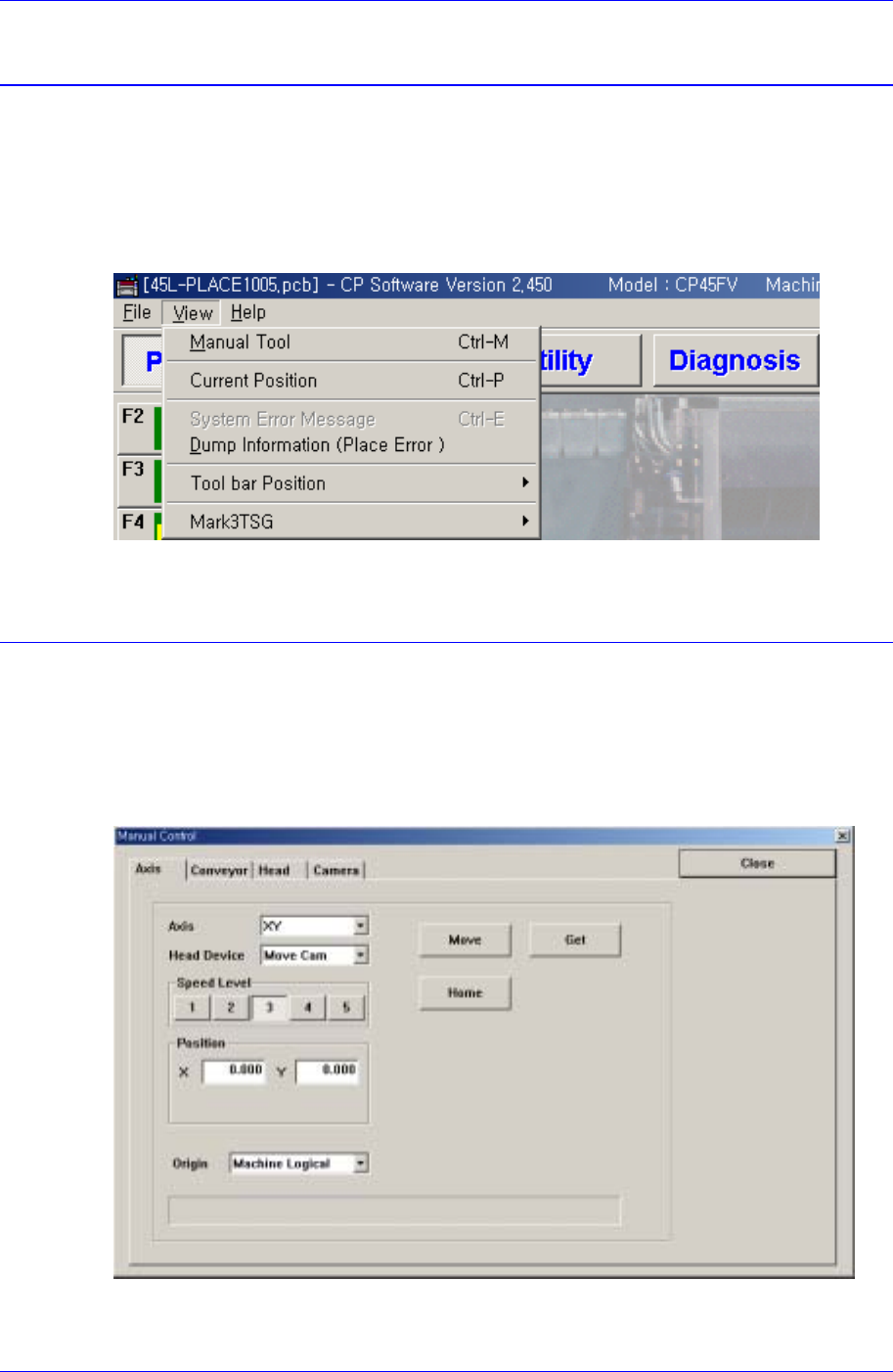
The <View> menu is composed of the six submenus: Manual Tool, Current Position,
System Error Message, Dump Information, Tool bar Position, Mark3TSG.
When a submenu of <View> menu is selected, check mark() appears in front of the
submenu (except for some commands), and the corresponding message box is displayed
on the main screen. If the menu is selected again, the check mark disappears and the
corresponding message box also closed.
Figure 4-1. View Menu and Submenus
4.1. Manual Tool
Executes a manual operation of the machine. When this command is selected, the
following dialog box is displayed.
4.1.1. Axis Moving Dialog Box
Used to move or to get the current position coordinates of each motor-axis.
Figure 4-2. “Manual Tools – Axis Moving” dialog box
Axis combo box

Samsung Component Placer CP45FV Series Administrator’s Guide
Select the axis to move. Available axes are as follows.
XY: Selects XY axis.
Z: Selects the Z axis of the head.
R: Selects the R axis of the head.
Mirror: Selects the mirror axis of the fly camera.
Width: Selects the axis of the conveyor width.
<Head Device> combo box
To move to the axis selected in the <Axis> combo box or to get the coordinates,
select the corresponding device. Available devices are as follows.
Move Cam: Selects Teaching Camera.
Head1: Selects Head1.
Head2: Selects Head2.
Head3: Selects Head3.
Head4: Selects Head 4.
Head5: Selects Head5.
Head6: Selects Head6.
<Speed Level> group
Select the speed level while driving motor-axis.
Available speed levels are as follows.
1: Selects the fastest level of speed. (Fastest)
2: Selects the fast level of speed. (Fast)
3: Selects the middle level of speed. (Middle)
4: Selects the slow level of speed. (Slow)
5: Selects the slowest level of speed. (Slowest)
<Position> group
To move the axis or to get the coordinates of the current motor-axis, display the
position value. The displayed position value differs according to the axis selected in
<Axis>.
The position values are as follows.
X: The position value of X axis.
Y: The position value of Y axis.
<Origin> combo box
To move or to get the coordinates of the current motor-axis, select the origin.
Available origins are as follows.
Machine Logical: Selects the origin of the machine as the origin.
FeederBase Front (1): Selects the origin of the front feeder base as the origin.
FeederBase Rear (2): Selects the origin of the rear feeder base as the origin.
<Message>
Displays the information generated during the manipulation of axis.
<Move> button
Moves the axis to the value specified in the <Position> group.
4-2
View Menu
4-3
<Get> button
Gets the coordinates of the current motor-axis and displays it in the <Position> group.
<Home> button
Moves the axis to the Home position
4.1.2. Conveyor Dialog Box
Operates the conveyor and the devices attached to the conveyor.
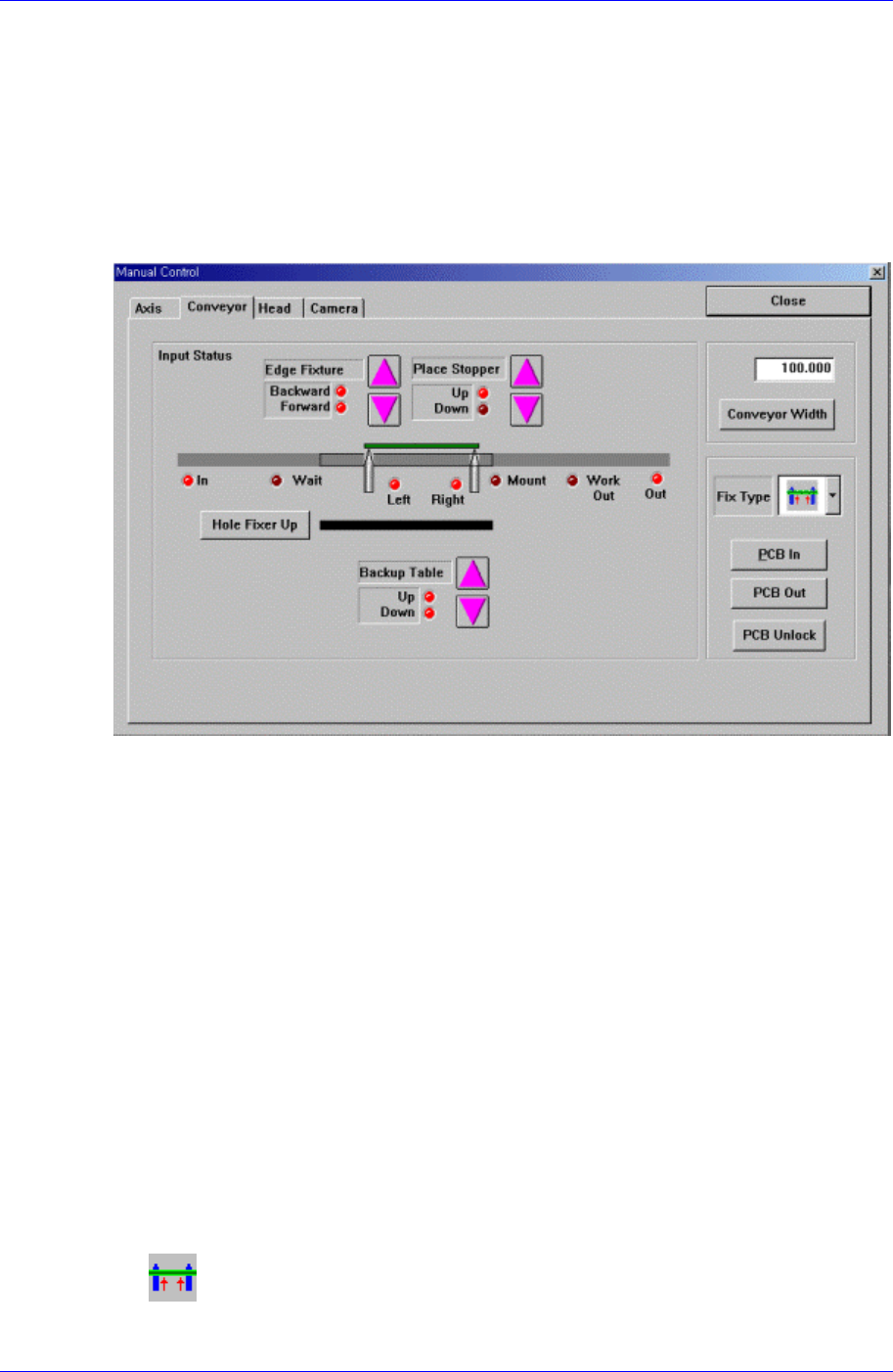
Figure 4-3. “Manual Tools – Conveyor” dialog box
<Edge Fixture> button
Moves backward or forward the edge fixer.
<Place Stopper> button
Moves up or down the place stopper.
<Backup Table> button
Moves up or down the backup table.
<Hole Fixer Up> button
Moves up the hole fixer.
<Conveyor Width> edit box
Enter the conveyor width.
<Conveyor Width> button
Automatically adjusts the conveyor width to the value entered in the <Conveyor
Width> edit box.
<Fix Type> combo box
Select the PCB arrangement method.
Hole Fixer: A method of arrangement by inserting pins in the holes of the
PCB.