Administrator’s Guide(CP45FV) Eng.pdf - 第254页
Samsung Component Placer CP45FV Administrator ’ s Guide function. <X> edit box Set the resolution of the camera in X direction. The unit is the number of pixels per mm. <Y> edit …
Machine Calibration
15-15
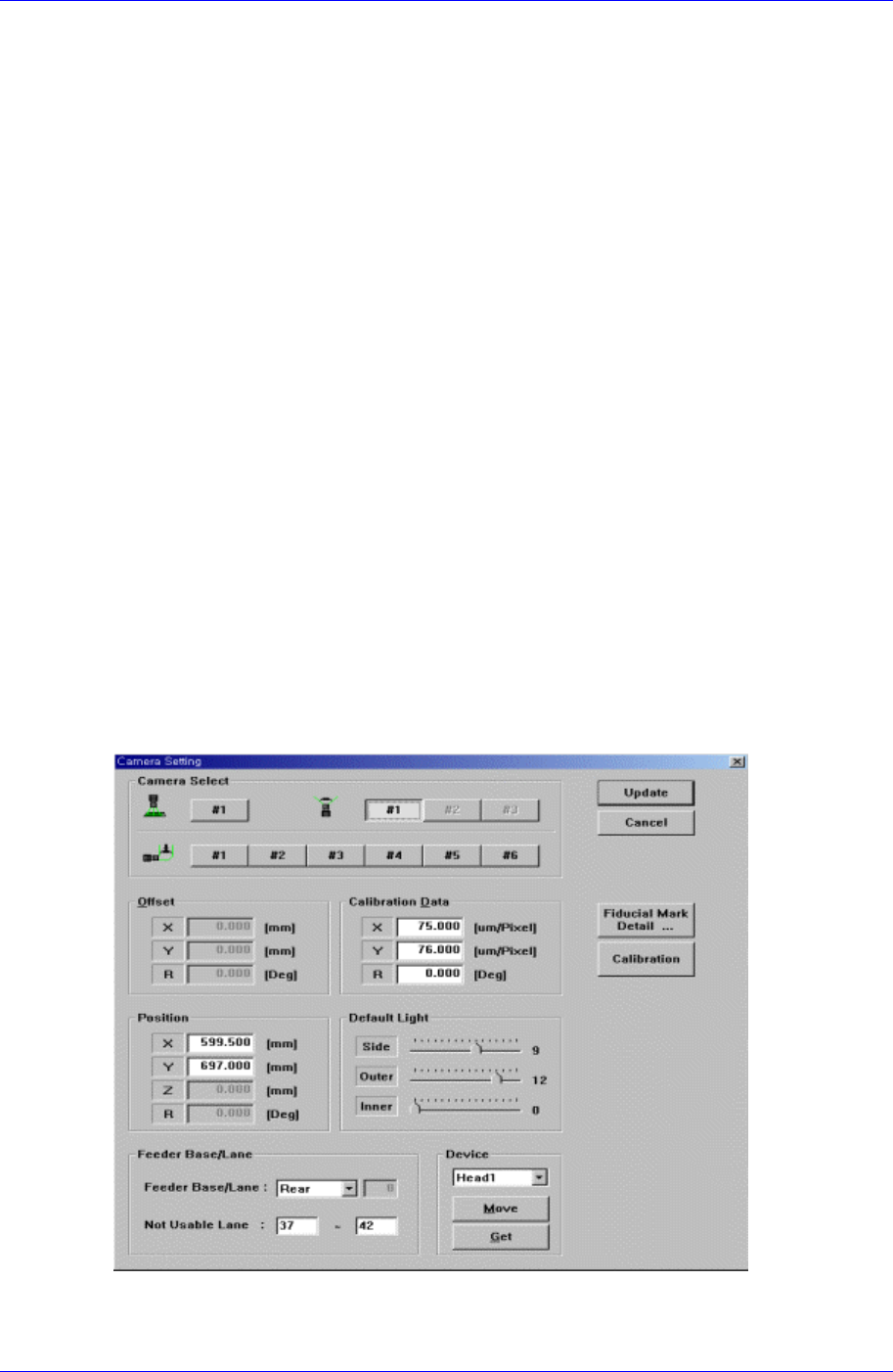
<Calibration Data> group
Sets the camera calibration data. It can either be set directly or by using the
calibration function.
<X> edit box
Set the resolution of the camera in X direction. The unit used is the number of
pixels per mm.
<Y> edit box
Set the resolution of the camera in Y direction. The unit is the number of pixels
per mm.
<R> edit box
Set the resolution of the camera in R direction. The unit is degree.
<Offset> group
Set the camera offset data.
<X> edit box
Set the offset value of the camera in X direction.
<Y> edit box
Set the offset value of the camera in Y direction.
<R> edit box
Set the offset value of the camera in R direction.
<Default Light> group
Set the default light value.
Next screen is the case where the camera type is set to “Fix Camera”.
<Calibration Data> group
Set the camera calibration data. It can be set directly or by using the calibration

Samsung Component Placer CP45FV Administrator’s Guide
function.
<X> edit box
Set the resolution of the camera in X direction. The unit is the number of pixels
per mm.
<Y> edit box
Set the resolution of the camera in Y direction. The unit is the number of pixels
per mm.
<R> edit box
Set the resolution of the camera in R direction. The unit is degree.
<Offset> group
Set the camera offset data.
<X> edit box
Set the offset value of the camera in X direction.
<Y> edit box
Set the offset value of the camera in Y direction.
<R> edit box
Set the offset value of the camera in R direction.
<Default Light> group
Set the default light value. Lights to be set are side light, outer light, and inner light.
<Position> group
Set the position of the fix camera.
<X> edit box
Set the X position value of the fix camera.
<Y> edit box
Set the Y position value of the fix camera.
<Z> edit box
Set the Z position value of the fix camera.
<R> edit box
Set the R position value of the fix camera.
<Feeder Base Lane> combo box
As the fix camera is fixed and installed on the feeder lane, set the fixed feeder lane.
It is always fixed to “Rear”.
<Not Usable Lane> edit box
Set the lane occupied by the fix camera.
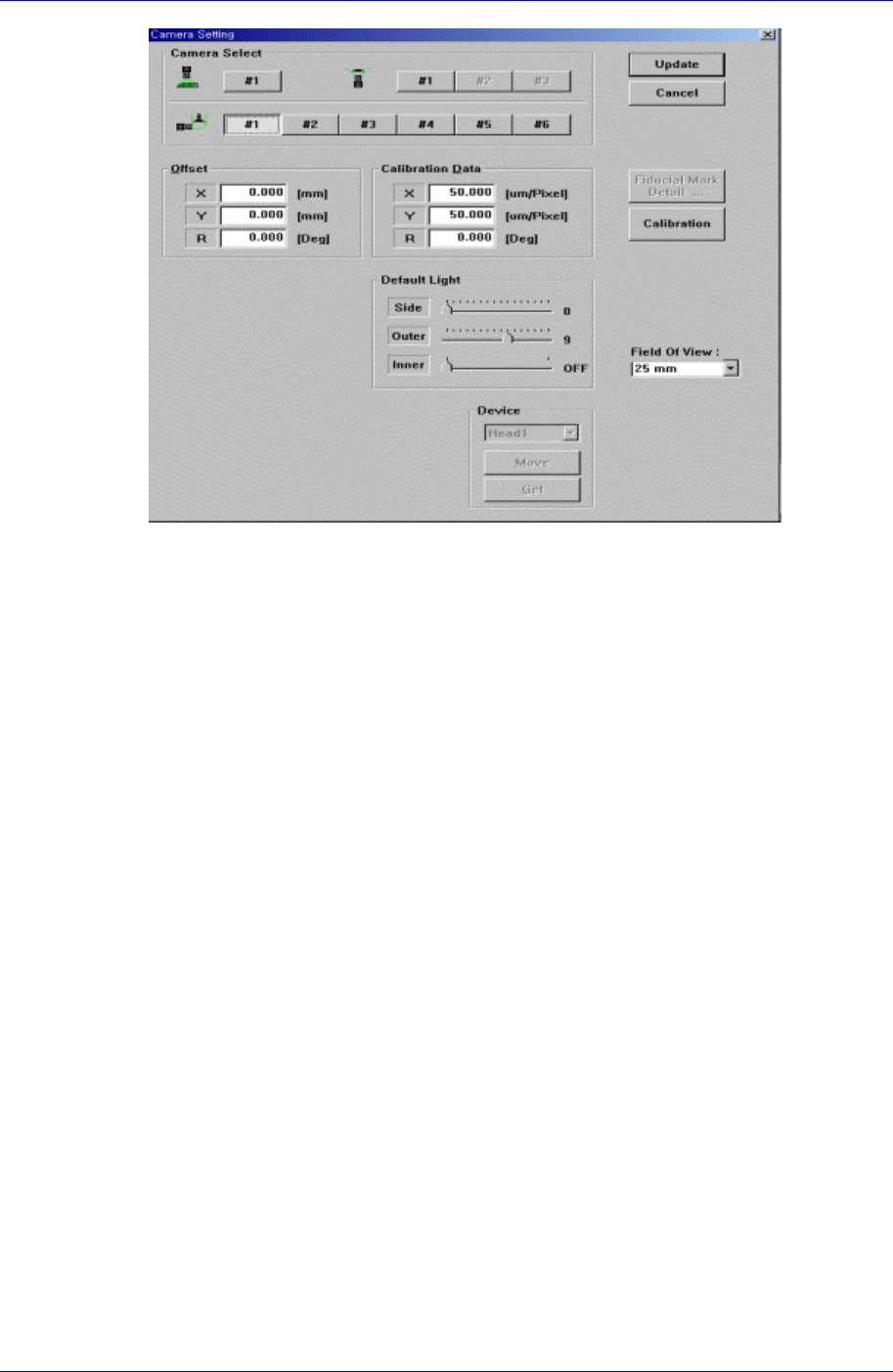
Next screen is the case where the camera type is set to “Fly Camera”.
15-16
Machine Calibration
15-17
<Calibration Data> group
Set the camera calibration data. It can be set directly or by using the calibration
function.
<X> edit box
Set the resolution of the camera in X direction. The unit is the number of pixels
per mm.
<Y> edit box
Set the resolution of the camera in Y direction. The unit is the number of pixels
per mm.
<R> edit box
Set the resolution of the camera in R direction. The unit is degree.
<Offset> group
Set the camera offset data.
<X> edit box
Set the offset value of the camera in X direction.
<Y> edit box
Set the offset value of the camera in Y direction.
<R> edit box
Set the offset value of the camera in R direction.
<Default Light> group
Set the default light value. Lights to be set are side light, outer light, and inner light.
The following items are common to all screens.
<Device> combo box
Selects the corresponding device to move the head assembly by rotating the driving
shafts of the X, Y, Z and R-axes motors, move or rotate the spindle or obtain the