N7201A618E00_0309.pdf - 第157页
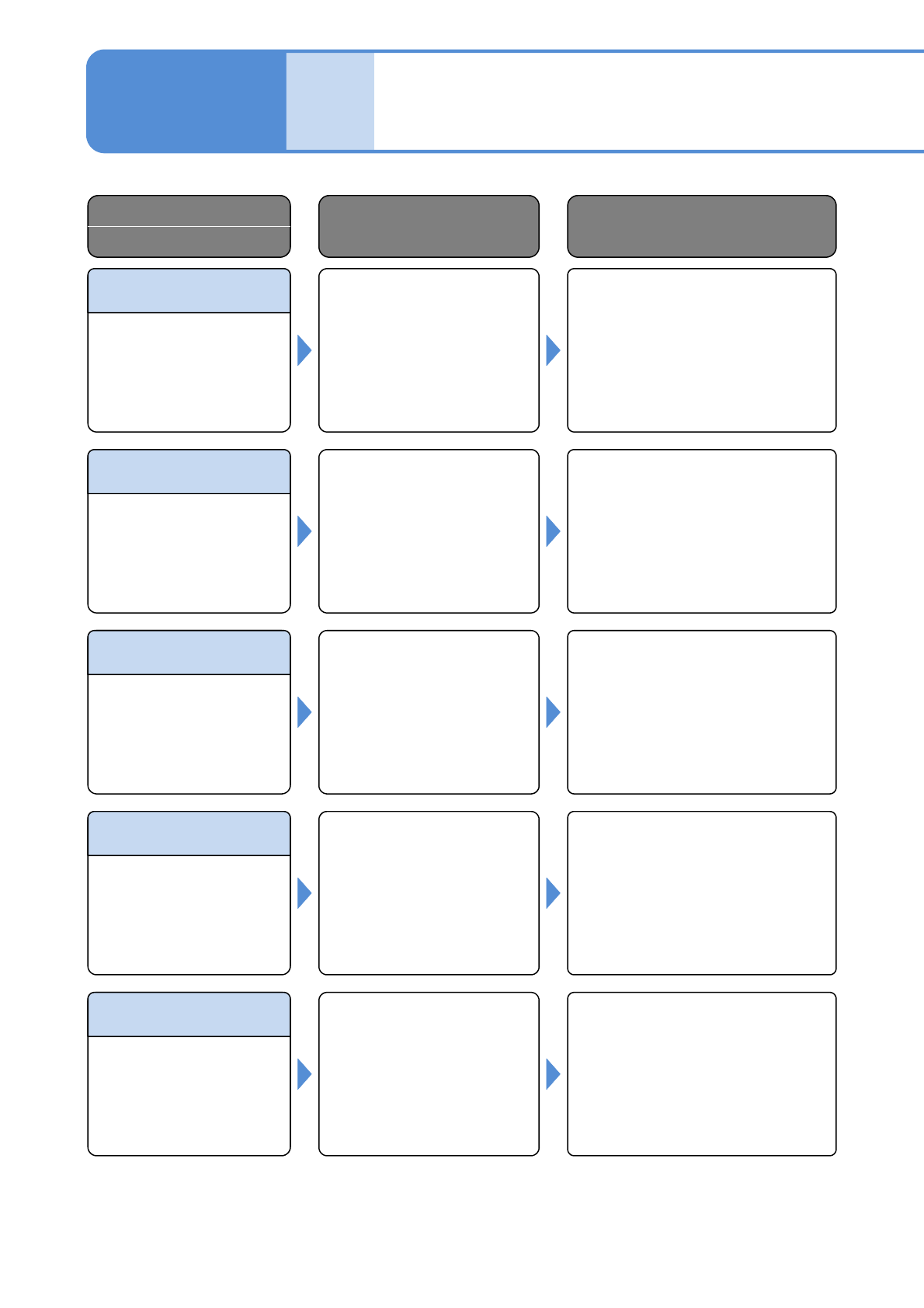
NPM–W 2 EJM7DE-MB-02 -1T-00 Recog Param Error (Recog Mode) Rcg Prm Err (NZL Sh ape Ptn) Recog Param Error (Color) Recog Param Error (Search Area) Rcg Prm Err (Ptn min Diameter) Solutions to errors Error Code Error Messag…
NPM–W2 EJM7DE-MB-02-1T-00
Rcg Prm Err
(DownLead JudgeV)
Recog Param Error
(NZL Size D)
Recog Param Error
(NZL Size W)
Recog Param Error
(NZL Size L)
Recog Param Error
(Angle)
Error
Message
Troubleshooting
2-1-3
Single stop error 44
Error Code
Error Message
Cause Inspection and Solution
Abnormal recognition angle.
(Recognition parameter error
(recognition angle) occurred.)
Check the situation of the error
occurred and error message, and
contact PFSC.
43510
Invalid nozzle shape space.
(Recognition parameter error
(nozzle size L) occurred.)
Check the situation of the error
occurred and error message, and
contact PFSC.
43511
Invalid nozzle shape space.
(Recognition parameter error
(nozzle size W) occurred.)
Check the situation of the error
occurred and error message, and
contact PFSC.
43512
Invalid nozzle space
diameter.
(Recognition parameter error
(nozzle size D) occurred.)
Check the situation of the error
occurred and error message, and
contact PFSC.
43513
Invalid judgment value of
cobwebbing in priming shot
recognition data.
(Recognition parameter error
(threading judgment value)
occurred.)
Check the judgment value of
threading. If the error persists,
contact PFSC.
43514
2-1-3-86
NPM–W2 EJM7DE-MB-02-1T-00
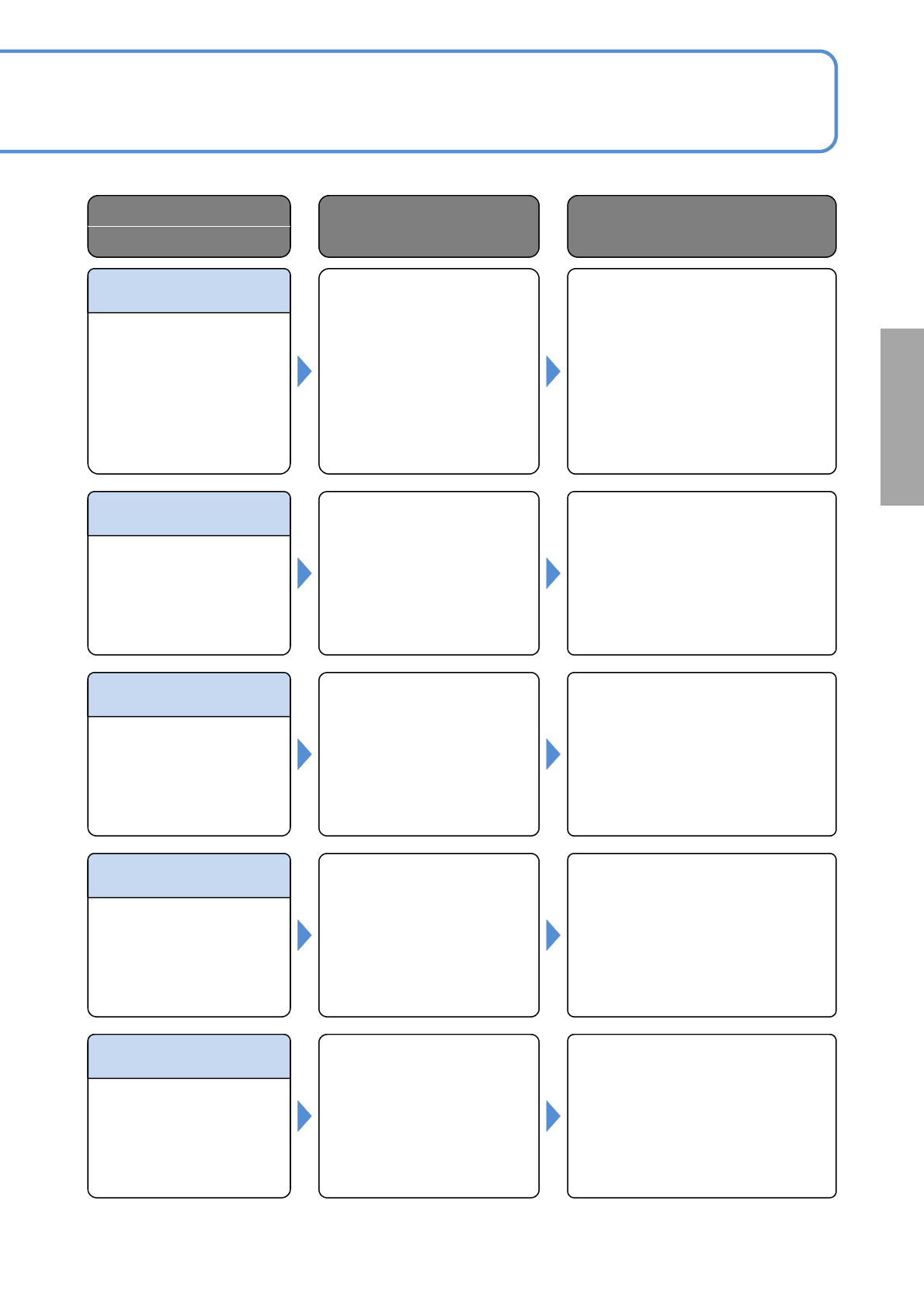
Recog Param Error
(Recog Mode)
Rcg Prm Err
(NZL Shape Ptn)
Recog Param Error
(Color)
Recog Param Error
(Search Area)
Rcg Prm Err
(Ptn min Diameter)
Solutions to errors
Error Code
Error Message
Cause Inspection and Solution
The Pattern minimum
diameter of priming shot
recognition is wrong.
(Parameter of
recognition(Pattern minimum
diameter) error happened.)
Please confirm the Pattern minimum
diameter.Please set the pattern
minimum diameter smaller than the
diameter of the used nozzle
hole.When it happens again please
inform the manufacturer.
43515
Detection window not
specified correctly.
(Recognition parameter error
(search area) occurred.)
Check the search area value for
priming shot recognition. If the error
persists, contact PFSC.
43516
Invalid adhesive color setting.
(Recognition parameter error
(color) occurred.)
Check the situation of the error
occurred and error message, and
contact PFSC.
43517
Invalid nozzle shape pattern.
(Recognition parameter error
(nozzle shape pattern)
occurred.)
Check the situation of the error
occurred and error message, and
contact PFSC.
43518
Invalid recognition mode
setting.
(Recognition parameter error
(recognition mode)
occurred.)
Check the situation of the error
occurred and error message, and
contact PFSC.
43519
2-1-3-87
NPM–W2 EJM7DE-MB-02-1T-00
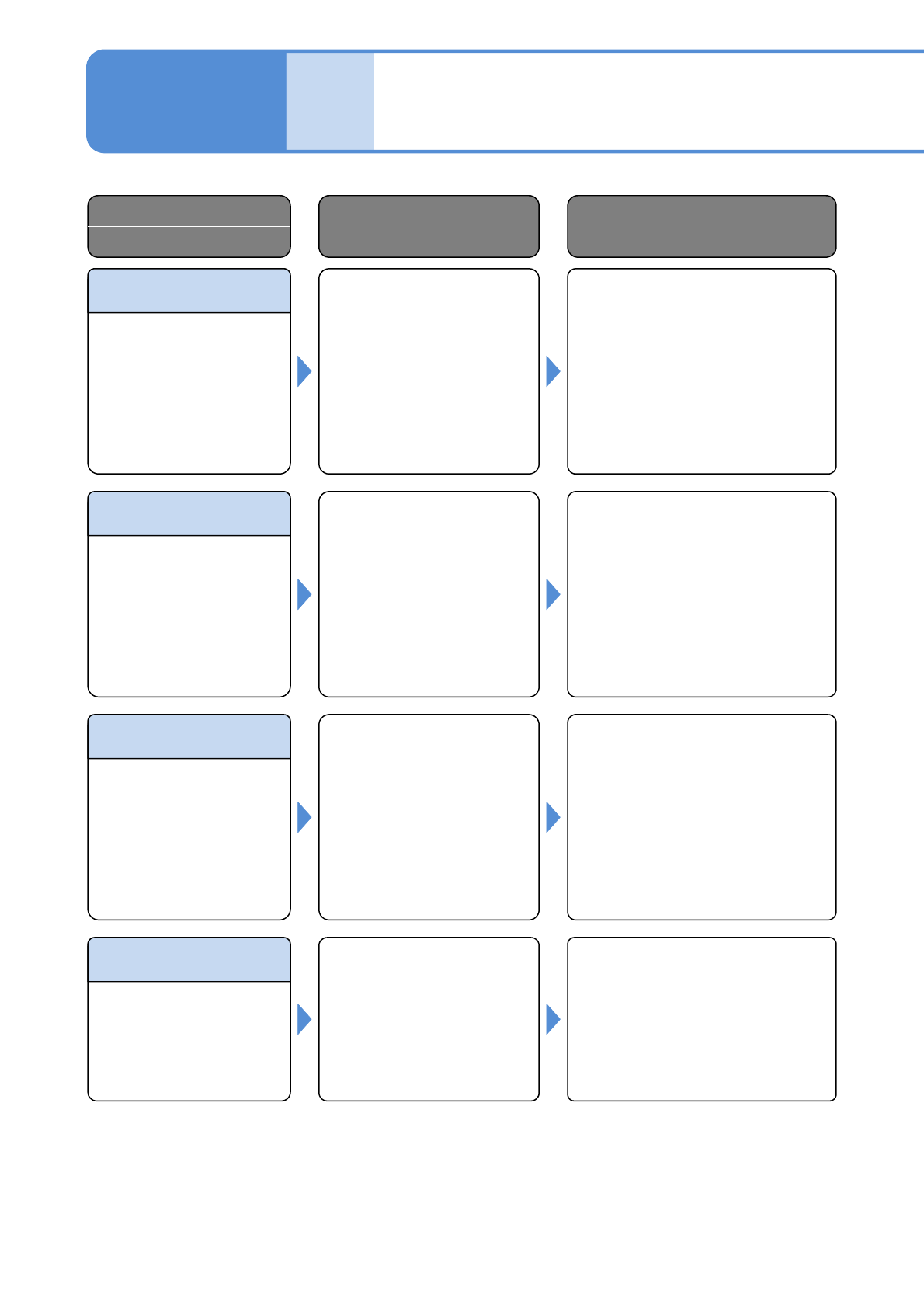
Rcg Prm Err
(Standard Area)
Recog Param Error
(Area Rate)
Rcg Prm Err
(Area Max Limit)
Rcg Prm Err
(Area Min Limit)
Error
Message
Troubleshooting
2-1-3
Single stop error 45
Error Code
Error Message
Cause Inspection and Solution
Invalid value set in allowable
lower limit of total area in
priming shot recognition data.
(Recognition parameter error
(allowable area lower limit)
occurred.)
Check the allowable lower limit
value of the total area. If the error
persists, contact PFSC.
43520
Invalid value set in allowable
upper limit of total area in
priming shot recognition data.
(Recognition parameter error
(allowable total area upper
limit occurred.)
Check the allowable upper limit
value of the total area. If the error
persists, contact PFSC.
43521
Invalid value set in allowable
large/small area ratio in
priming shot recognition data.
(Recognition parameter error
(large/small area ratio
occurred.)
Check the allowable large/small
area ratio. If the error persists,
contact PFSC.
43522
Invalid value set in reference
area in priming shot
recognition data.
(Recognition parameter error
(reference area) occurred.)
Check the value of the reference
area. If the error persists, contact
PFSC.
43523
2-1-3-88