N7201A618E00_0309.pdf - 第17页
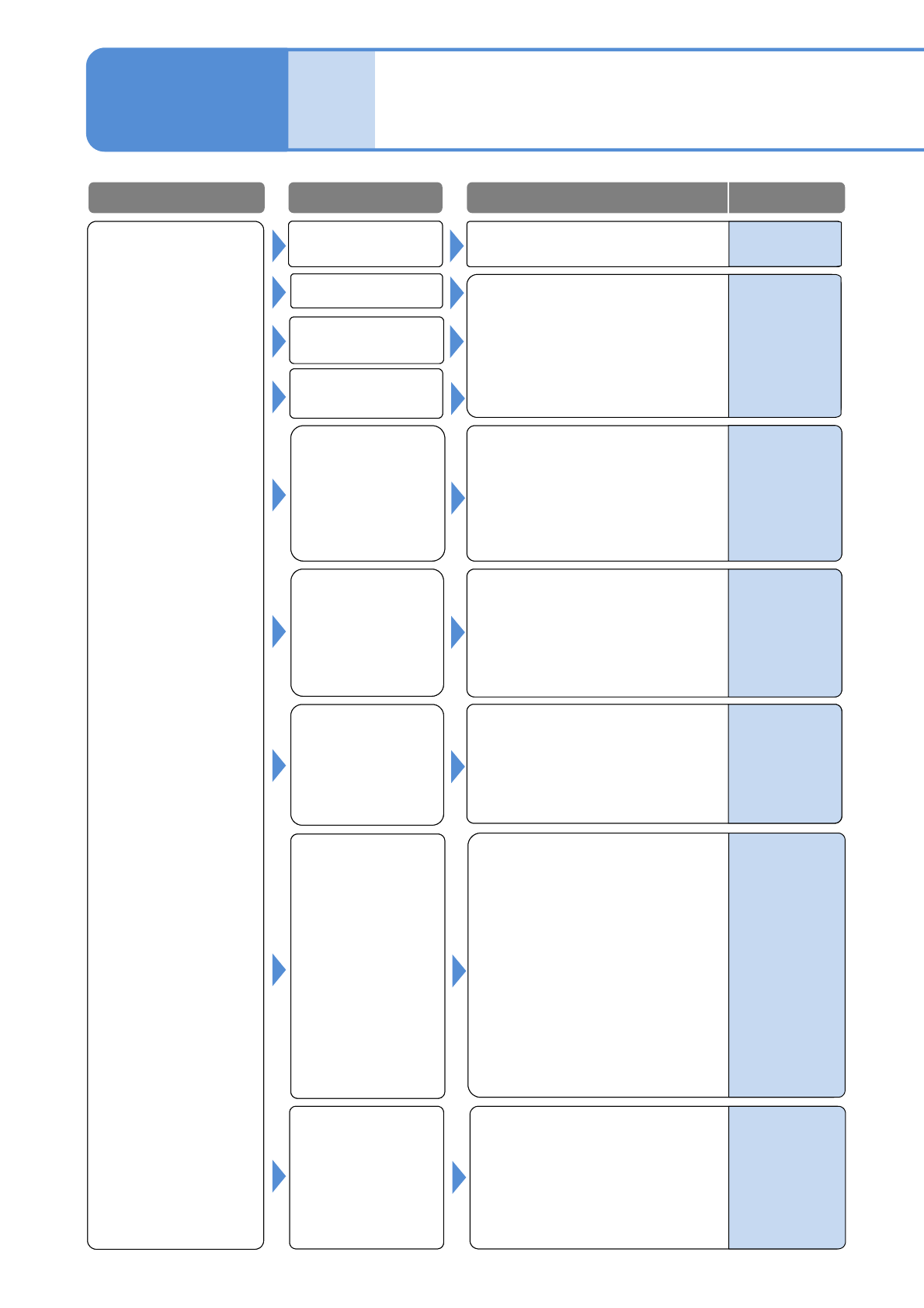
NPM-W 2 EJM7DE-MB-01T-00 Component missing Nozzle error See 1-1-1-2 [Pickup er ror , Stand pick up] Error in setting the height of the placed component (interference with the placed component) 1-1-2 -2 Pickup c ondition …
NPM-W2 EJM7DE-MB-01T-00
Misaligned
placement
Nozzle error
See 1-1-1-2
[Pickup error, Stand pickup]
Component data
error
What if
Troubleshooting
1-1-2
Placement error 1
1-1-2-1
Pickup condition
error
1-1-1-1 to 1-1-1-2
See [Cannot pickup]
Check whether the PCB support
pins are properly positioned.
Adjust if necessary.
(Check that the PCB support pin
does not interfere with the
component)
Check the PCB upper surface
warpage.
If it warps too much, do not use it.
Placement
condition error
Nozzle selection
error
Feeder error
PCB support
setting error
Poor PCB
Error in setting the
height of the placed
component
(interference with the
placed component)
Check whether the placed
component height is set up
properly.
Fix it if necessary.
Problem Cause
Check/Solution Reference
Operating
procedure
2-5-3
Operating
procedure
9-1-4
DGS
Programming
Manual
4
DGS
Programming
Manual
6
1.Check whether the placement
retainer is set up properly. Fix it
if necessary.
2.Check whether the vacuum
breaking pressure is set properly.
Adjust it as needed.
3.Check whether XY coordinates
of the production data is set up
properly. Adjust it if not correct.
4.Check for the placement timer
value.
Check whether component outline
and thickness, and dimensions of
each electrode are input correctly.
Adjust them if incorrect.
-
-
-
NPM-W2 EJM7DE-MB-01T-00
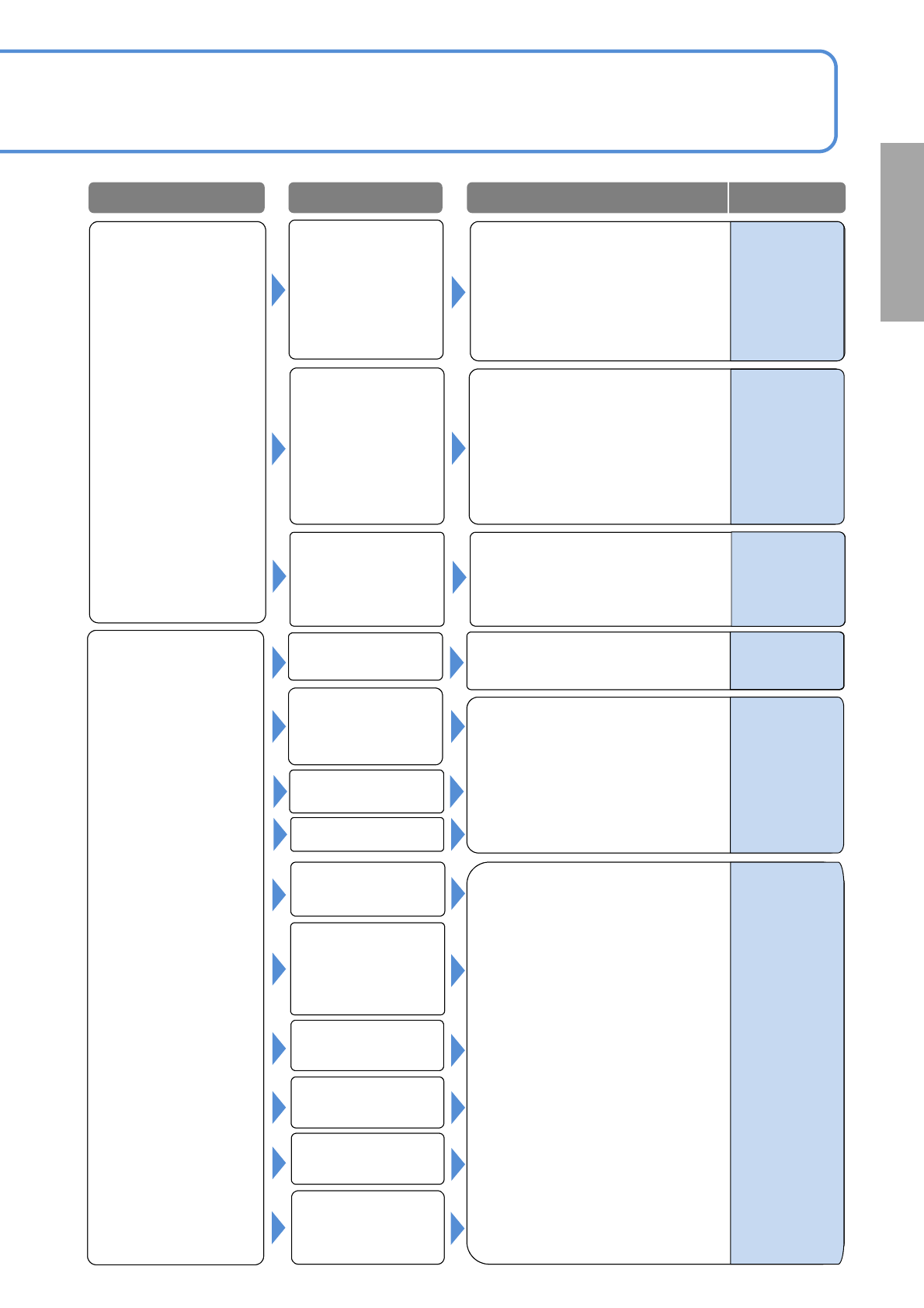
Component
missing
Nozzle error
See 1-1-1-2
[Pickup error, Stand pickup]
Error in setting the
height of the placed
component
(interference with the
placed component)
1-1-2-2
Pickup condition
error
1-1-1-1 to 1-1-1-2
See [Cannot pickup]
See 1-1-2-1 to 1-1-2-2
[Misaligned placement]
Tape splicing error
PCB support setting
error
PCB mark
recognition error
Component data
error
Placement
condition error
Solder printing
condition error
(printer)
Recognition error
(misalignment, tilt)
PCB mark
recognition error
Solder printing
condition error
(printer)
Check the printing condition and
adjust the printer.
Misaligned
placement
Problem Cause
Check/Solution Reference
DGS
Programming
Manual
5
-
1.Adjust if the PCB mark setting
(coordinate, shape and
dimensions) are incorrect.
2.Correct the PCB stop position if
is aligned.
(e.g., check the length f the
placed component extending ff
the board)
-
What if
1.Check the recognition image
(center and tilt) and an image of
an electrode. Adjust if necessary.
2.If the cover glass of the multi-
recognition camera is
contaminated, wipe it off.
-
-
-
Supply unit (feeder
or tray) setting error
or defect
NPM-W2 EJM7DE-MB-01T-00
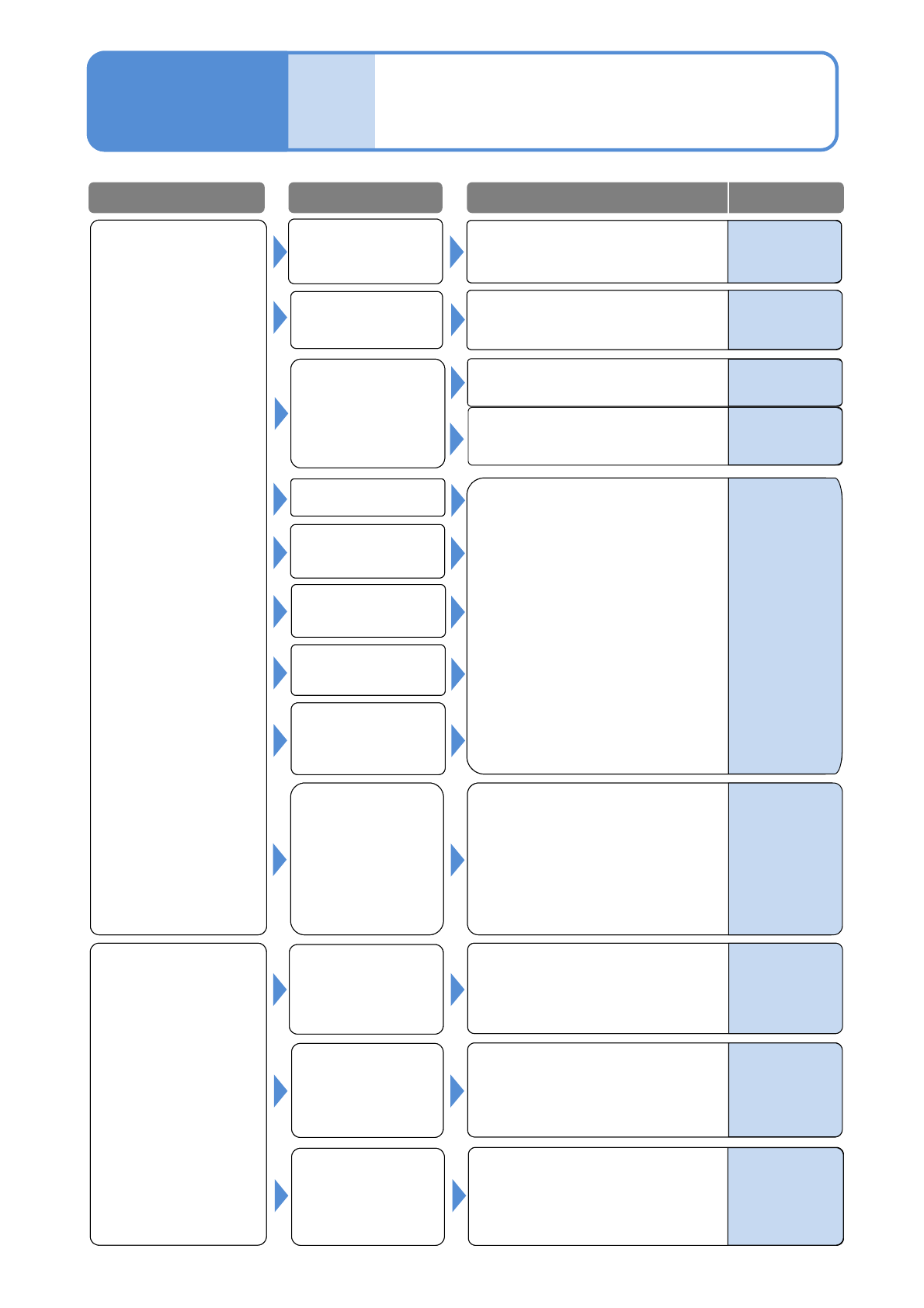
Wrong placement
Nozzle error
See 1-1-1-2
[Pickup error, Stand pickup]
What if
Troubleshooting
1-1-2
Placement error 2
1-1-2-3
1-1-1-1 to 1-1-1-2
See [Cannot pickup]
See 1-1-2-1 to 1-1-2-2
[Misaligned placement]
Pickup condition
error
PCB support
PCB mark
recognition error
Component data
error
Placement
condition error
Solder printing
condition error
(printer)
Component
ejection error
PCB recognition
mark data error
Check and adjust the PCB
recognition data (shape set) as
necessary.
Turn OFF the servo switch, remove
the PCB, and clean the recognition
mark.
Error in setting the
length of the placed
component extending
off the board
The PCB
recognition mark is
contaminated
PCB recognition
error
Problem Cause
Check/Solution Reference
DGS
Programming
Manual
5
-
1.Check the setting value
(applicable value: 0.13 to
0.14MPa) of the cleaning blow
pressure. If it is not within the
value, modify the pressure.
2.Check the nozzle contamination.
If contaminated, clean the nozzle.
Check the length of the placed
component extending off the
board.
Maintenance
4-1-1,6-5
-
-
-
Supply unit (feeder
or tray) setting
error or defect
-
Operating
procedure
6-1-2
Operating
procedure
2-4-1
Check for misfeeding of
components, and be sure to mount
correct components.
1-1-1-1 to 1-1-1-2
See [Cannot pickup]