N7201A618E00_0309.pdf - 第25页
NPM–W 2 EJM7DE-MB-0 2-1T-00 Servo Ready OFF Error Code Error Message Cause Inspection and Solution Target axis is ready OFF. (SelfC heck er ror happened.) Please reset the axis. 40002 How to read the error message lists …
NPM–W2 EJM7DE-MB-02-1T-00
Error
Message
2-1-1-3
Troubleshooting
2-1-2
Troubleshooting
2-1-1
How to read error
messages 2
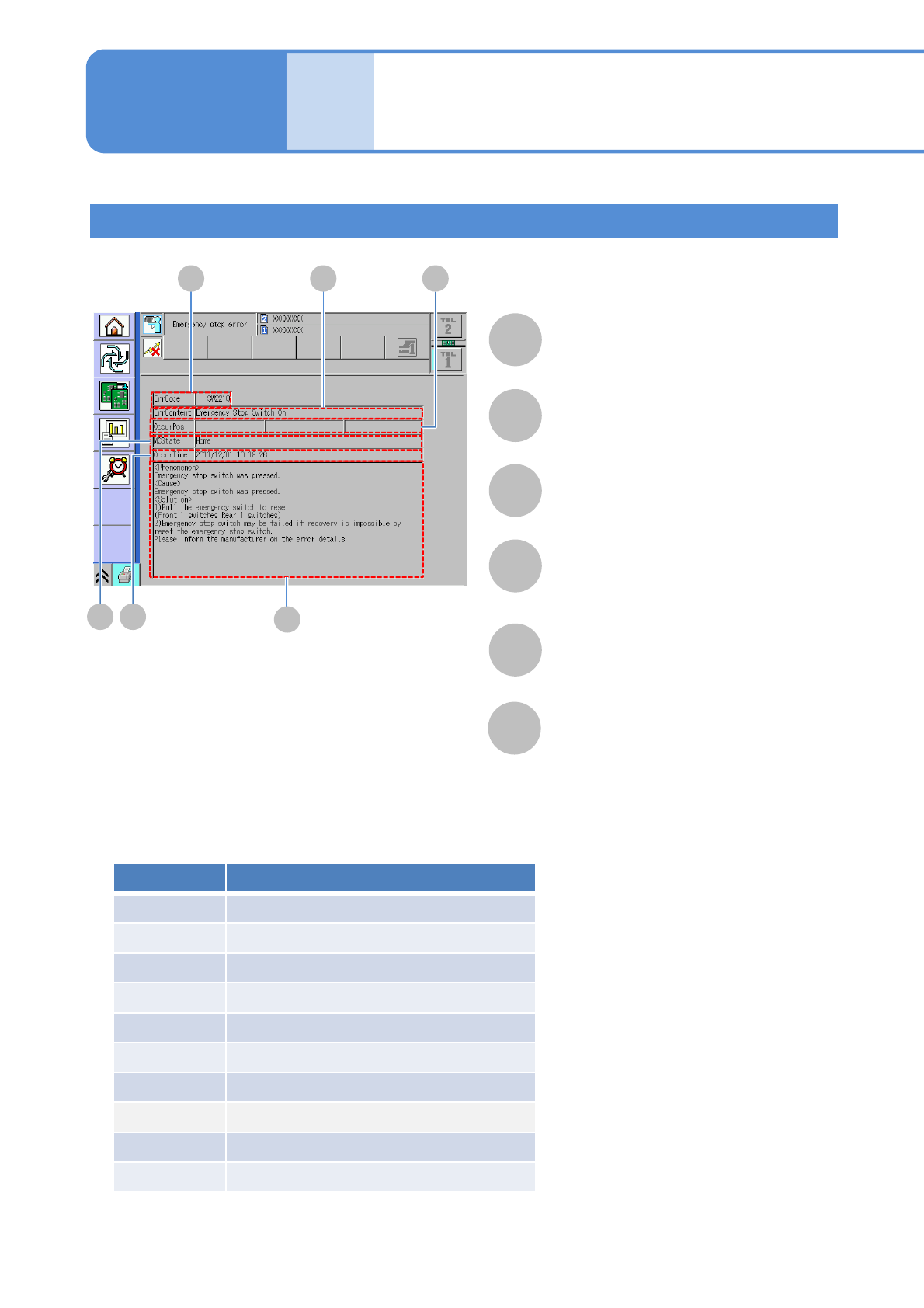
Error messages upon emergency stop error
F
A B
D
C
E
A
B
C
D
E
F
ErrContent
Displays the error information.
OccurPos
Displays where the error occurs.
ErrCode
Displays an error code.
MCState
Displays the machine status when error
occurs.
OccurTime
Displays the time when the error occurs.
Help
Displays phenomenon, cause and
solution of each error.
Category Description
SW
Software monitoring error
IL
Interlock error
XY XY unit error
HD Head unit error
FD Feeder unit error
CV Conveyor unit error
RC Recognition unit error
TR Tray unit error
AT Automatic operation error
OT Other unit errors
■ Category of emergency stop error
NPM–W2 EJM7DE-MB-02-1T-00
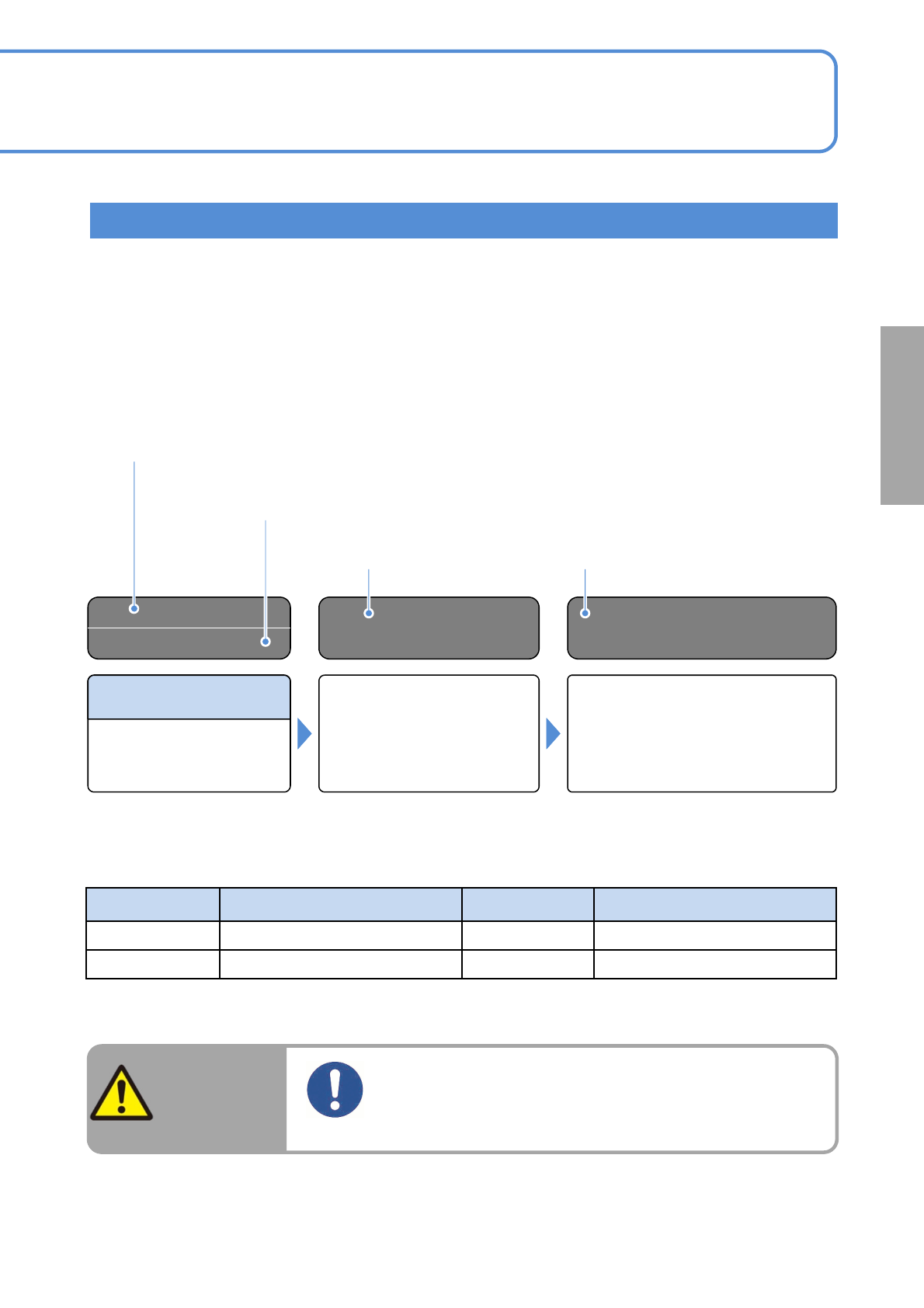
Servo Ready OFF
Error Code
Error Message
Cause Inspection and Solution
Target axis is ready OFF.
(SelfCheck error happened.)
Please reset the axis.
40002
How to read the error message lists
Error message on the touchscreen
Error code No.
Error codes of emergency stop errors consist of category signs (two letters) and numbers
(four digits).
Categorysignsarelistedinthepreviouspage.Onlynumbers(4digits)aredisplaysinthelist.
This section describes how to read the error message lists. If an error occurs while using the machine,
check the on-screen error message. See the error message lists (2-1-2 to2-1-4) to inspect and solve the error.
Before putting your hands into the machine to inspect and solve an error, be sure to turn OFF the servo
switch.
Causes of error Solutions
WARNING
Before putting your hands into the moving
parts for adjustments, turn the servo switch
OFF.
Risk of injury due to actuating the machine
2-1-1-4
Solutions to errors
abbreviation
Full name
abbreviation
Full name
IF
Interface
LNB
Line Network Box
ILK
Interlock
■Abbreviationdisplayedonthemonitor

NPM–W2 EJM7DE-MB-02-1T-00
Cover Open
(Front Security Switch)
Servo Ready OFF
Emergency Stop Switch
ON
Error
Message
Troubleshooting
2-1-2
Self-diagnosis errors 1
Error Code
Error Message
Cause Inspection and Solution
Emergency stop switch has
been pressed.
(Self-diagnosis error
occurred.)
Take measures in the following
order.
1) Turn the emergency stop switch
clockwise to reset.(One position
each at front and rear)
2) If the machine fails to be restored
even after pressing the emergency
stop switch, the switch may be
broken.Contact PFSC.
40001
Applicable axis is not ready.
(Self-diagnosis error
occurred.)
Please inquire from PFSC.
40002
Safety cover is open.
(Self-diagnosis error
occurred.)
Take measures in the following
order.
1) Close the safety cover if opened.
2)If the error persists even after the
safety cover is closed, the safety
switch may be broken.Contact
PFSC.
40003
2-1-2-1