sh030106u.pdf - 第109页
3. SIG NALS A ND WIRI NG 3 - 32 3.6.3 Vert ical ax is free fall prev ention fu nction The vertic al axis freefa ll pre vent io n func tion avo ids m ac hine d am age by pu llin g up the sh aft sligh tly lik e the followi…
3. SIGNALS AND WIRING
3 - 31
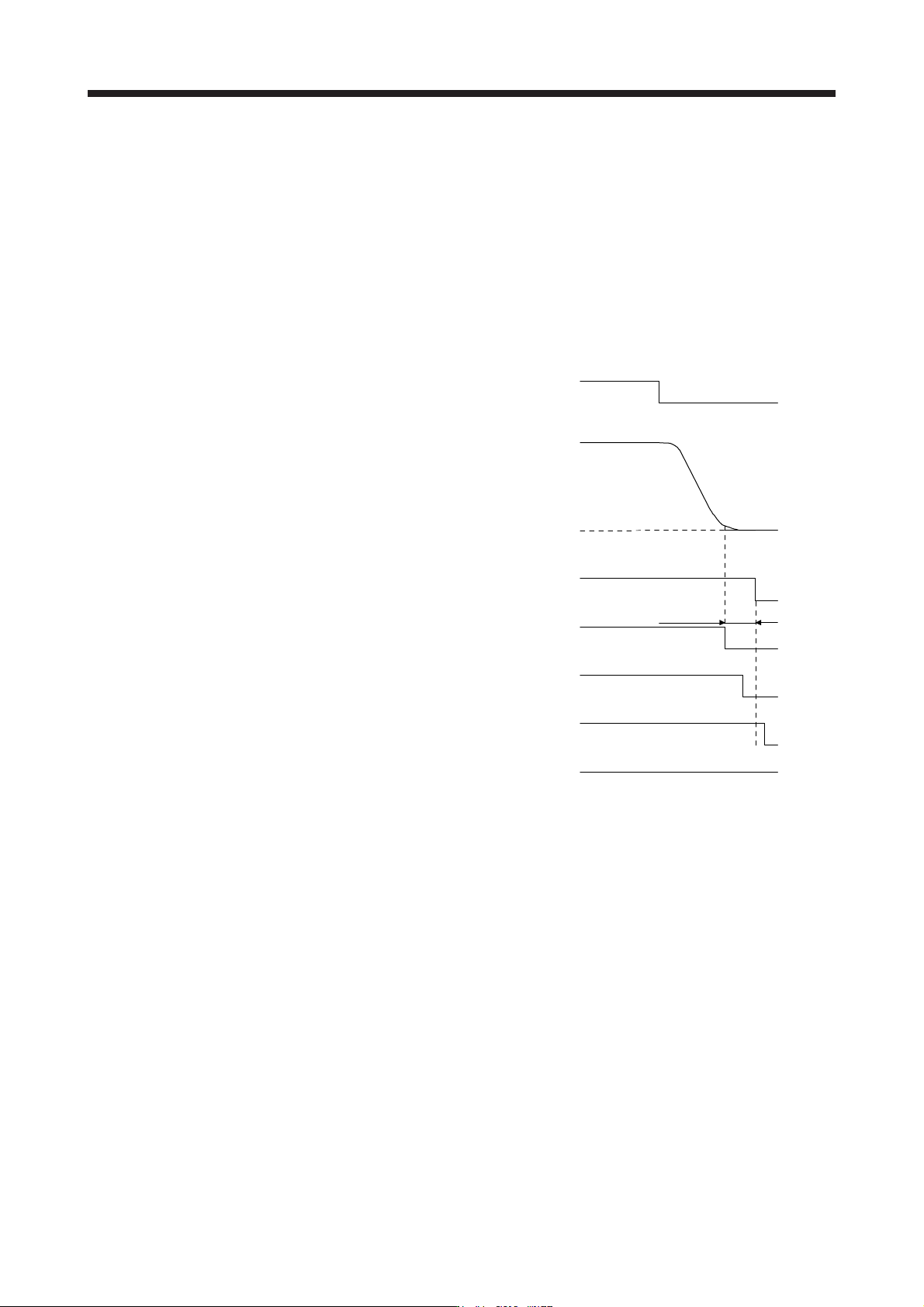
3.6.2 Base circuit shut-off delay time function
The base circuit shut-off delay time function is used to prevent vertical axis from dropping at a forced stop
(EM2 goes off), alarm occurrence, or SSCNET III/H communication shut-off due to delay time of the
electromagnetic brake. Set the time from MBR (Electromagnetic brake interlock) off to base circuit shut-off
with [Pr. PC02].
(1) Timing chart
When EM2 (Forced stop 2) turns off or an alarm occurs during driving, the servo motor will decelerate
based on the deceleration time constant. MBR (Electromagnetic brake interlock) will turn off, and then
after the delay time set in [Pr. PC02], the servo amplifier will be base circuit shut-off status.
ON
0 r/min
ON
ON
OFF
Servo-on command
(from controller)
Ready-on command
(from controller)
ON
OFF
Electromagnetic brake
ON
OFF
Release
Activate
[Pr. PC02]
MBR
(Electromagnetic
brake interlock)
Base circuit
(Energy supply to
t
he servo motor)
Servo motor speed
OFF (Enabled)
OFF (Enabled)
EM2 (Forced stop 2)
(2) Adjustment
While the servo motor is stopped, turn off EM2 (Forced stop 2), adjust the base circuit shut-off delay time
in [Pr. PC02], and set the value to approximately 1.5 times of the smallest delay time in which the servo
motor shaft does not freefall.
3. SIGNALS AND WIRING
3 - 32
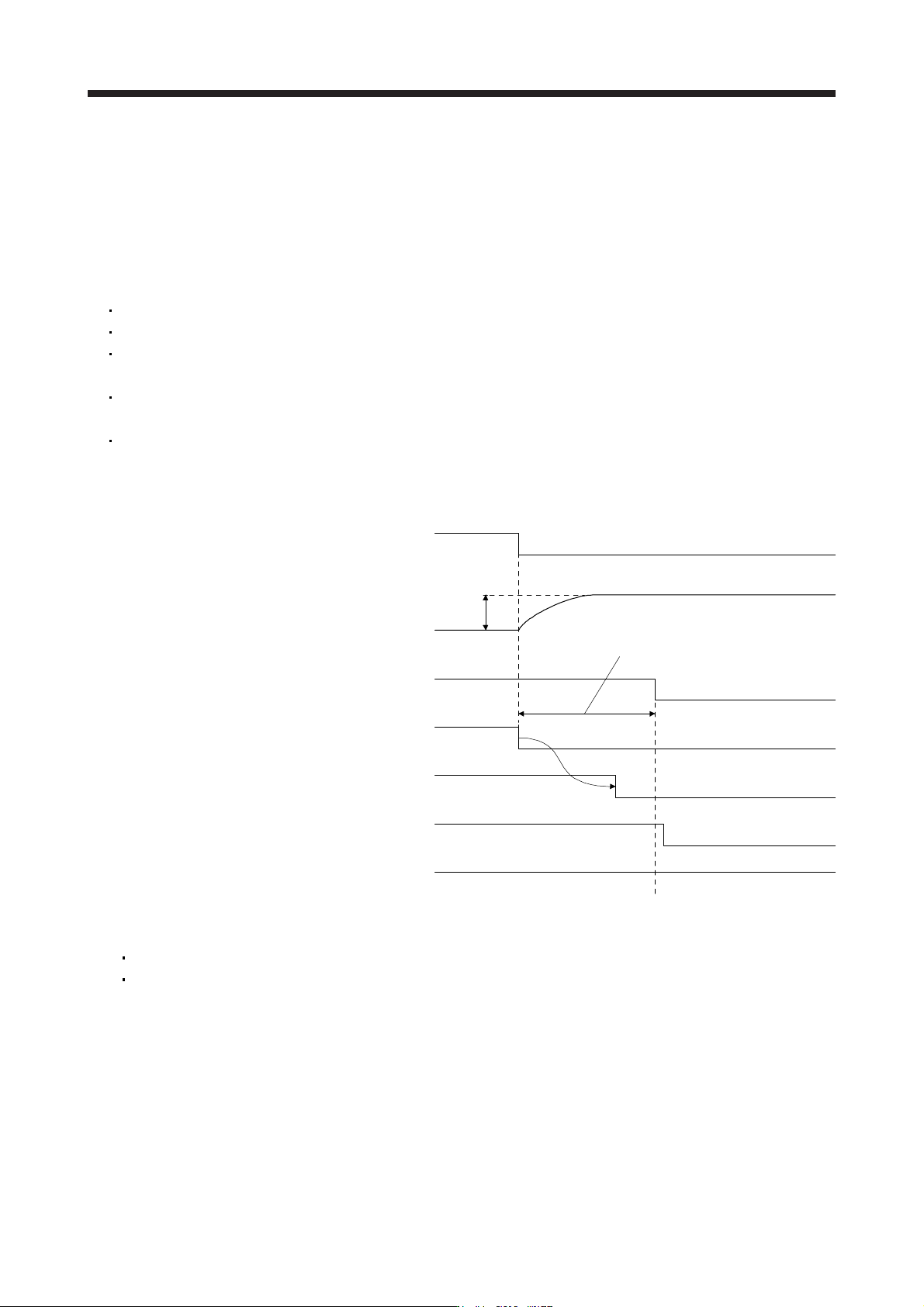
3.6.3 Vertical axis freefall prevention function
The vertical axis freefall prevention function avoids machine damage by pulling up the shaft slightly like the
following case.
When the servo motor is used for operating vertical axis, the servo motor electromagnetic brake and the
base circuit shut-off delay time function avoid dropping axis at forced stop. However, the functions may not
avoid dropping axis a few μm due to the backlash of the servo motor electromagnetic brake.
The vertical axis freefall prevention function is performed when all of the following conditions are met.
The control mode is set to the position control mode.
A value other than "0" is set in [Pr. PC31 Vertical axis freefall prevention compensation amount].
"Forced stop deceleration function selection" of [Pr. PA04] is set to "Forced stop deceleration function
enabled (2 _ _ _ )".
EM2 (Forced stop 2) turned off, an alarm occurred, or SSCNET III/H communication shut-off occurred
while the servo motor speed is zero speed or less.
MBR (Electromagnetic brake interlock) is enabled in [Pr. PD07] to [Pr. PD09] while the base circuit shut-
off delay time is set in [Pr. PC02].
(1) Timing chart
ON
ON
OFF
ON
OFF
ON
OFF
Electromagnetic brake
Release
Activate
Travel
distance
ON
Set the base circuit shut-off delay time.
([Pr. PC02])
EM2 (Forced stop 2)
Position
Base circuit
(Energy supply to
the servo motor)
MBR
(Electromagnetic
brake interlock)
OFF (Enabled)
OFF (Enabled)
Servo-on command
(from controller)
Ready-on command
(from controller)
(2) Adjustment
Set the freefall prevention compensation amount in [Pr. PC31].
While the servo motor is stopped, turn off the EM2 (Forced stop 2). Adjust the base circuit shut-off
delay time in [Pr. PC02] in accordance with the travel distance ([Pr. PC31). Adjust it considering the
freefall prevention compensation amount by checking the servo motor speed, torque ripple, etc.
3.6.4 Residual risks of the forced stop function (EM2)
(1) The forced stop function is not available for alarms that activate the dynamic brake when the alarms
occur.
(2) When an alarm that activates the dynamic brake during forced stop deceleration occurs, the braking
distance until the servo motor stops will be longer than that of normal forced stop deceleration without
the dynamic brake.
3. SIGNALS AND WIRING
3 - 33
(3) If STO is turned off during forced stop deceleration, [AL. 63 STO timing error] will occur.
3.7 Alarm occurrence timing chart
CAUTION
When an alarm has occurred, remove its cause, make sure that the operation
signal is not being input, ensure safety, and reset the alarm before restarting
operation.
POINT
In the torque control mode, the forced stop deceleration function is not available.
To deactivate the alarm, cycle the control circuit power or give the error reset or CPU reset command from
the servo system controller. However, the alarm cannot be deactivated unless its cause is removed.
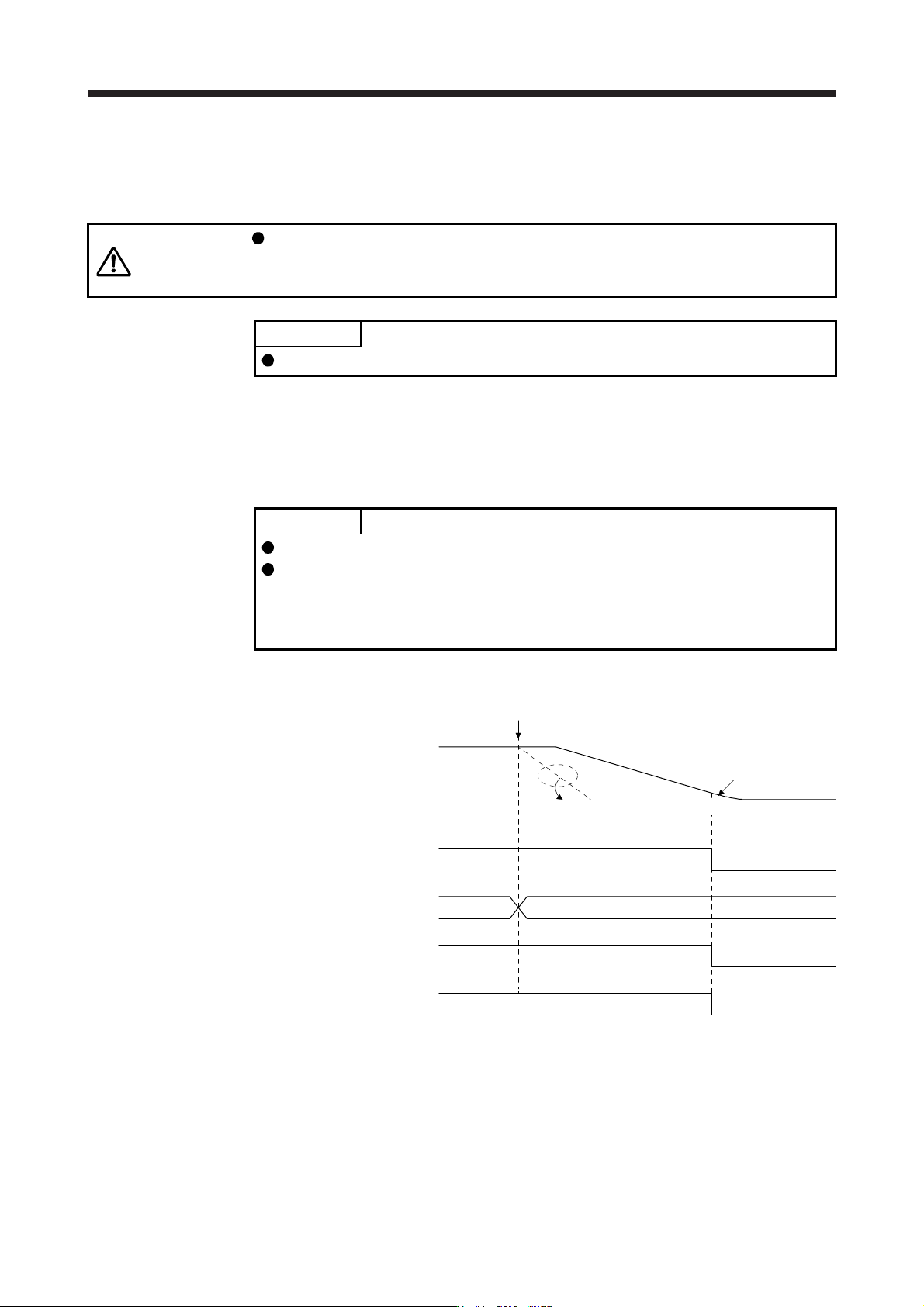
3.7.1 When you use the forced stop deceleration function
POINT
To enable the function, set "2 _ _ _ (initial value)" in [Pr. PA04].
Disable the forced stop deceleration function for a machine in which multiple
axes are connected together, such as a tandem structure. If an alarm occurs
with the forced stop deceleration function disabled, the servo motor will stop with
the dynamic brake.
(1) When the forced stop deceleration function is enabled
Alarm occurrence
Alarm No.No alarm
(Note)
Model speed command 0
and equal to or less than
zero speed
MBR
(Electromagnetic
brake interlock)
ON
OFF
ON (no alarm)
OFF (alarm)
Base circuit
(Energy supply to
the servo motor)
ON
OFF
Servo amplifier
display
0 r/min
Servo motor speed
ALM (Malfunction)
Controller command is not received.
Note. The model speed command is a speed command generated in the servo amplifier for forced stop deceleration
of the servo motor.