sh030106u.pdf - 第556页
17. APPLICATIO N OF FUNCTIONS 17 - 5 17.1.4 How to s witch J 4 mo de/J3 com patib ility mo de There are two way s to swit ch the J4 mode/J3 c ompat ibility m ode with the MR-J 4W_-_B servo a mplifier and MR-J4-_B_( -RJ) …
17. APPLICATION OF FUNCTIONS
17 - 4
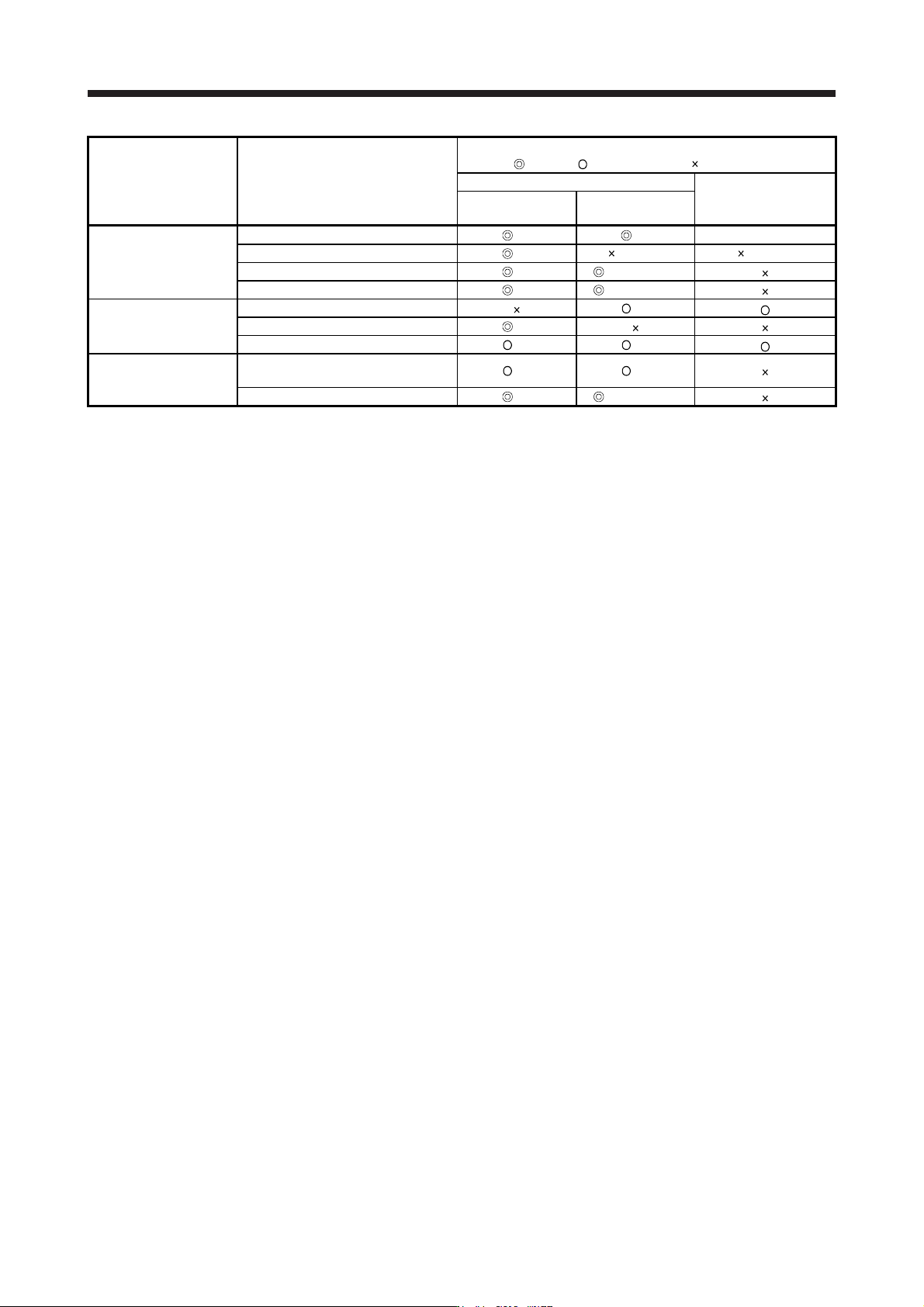
Compatibility
(
: J4 new, : Equivalent to J3, : Not available)
Function Name MR-J4 series
MR-J3/MR-J3W series
(Note 8)
J4 mode
J3 compatibility
mode
3-digit alarm display A0 A0 MR-J3W-_B
Diagnosis function
16 alarm histories supported
A0 (Note 7) (Note 7)
Drive recorder function A0 B0 (Note 15)
Machine diagnosis function A0 B0 (Note 15)
SSCNET III A0
Controller SSCNET III/H A0
Home position return function A0 A0
Others
J4 mode/J3 compatibility mode
automatic identification (Note 11)
A0 A0
Power monitoring function A0 B0 (Note 15)
Note 1. The value is at the HG series servo motor driving. The resolution of the linear encoder/direct drive motor is the same both in
the J4 mode and J3 compatibilit
y
mode. Refer to the instruction manual.
2. The motor-less operation cannot be used in the fully closed loop control mode, linear servo motor control mode, or DD motor
control mode.
3. It is not available with MR-J4W3-
_
B servo amplifiers.
4. It is not available with the MR-J3W-
_
B, MR-J4W2-
_
B, and MR-J4W3-
_
B servo amplifiers.
5. It is not available with the MR-J4W2-
_
B and MR-J4W3-
_
B servo amplifiers.
6. The minute position detection method is available instead.
7.
A
larm histor
y
will be saved up to six times.
8. The functions of the product with modified parts (GA) in the MR-J3-_B servo amplifiers are all covered by the J3 compatibility
mode of the MR-J4-
_
B servo amplifiers.
9. MR-J4W3-
_
B servo amplifiers do not support the full
y
closed loop control s
y
stem.
10. For MR-J4 series, the robust filter and vibration tou
g
h drive are available instead.
11. The operation mode will be identified automatically at the first controller communication. To switch the operation mode, use the
application "MR-J4
(
W
)
-B mode selection" or "MR Mode Chan
g
e".
12. When MR-J4 is used as a replacement of MR-J3-_S, "Servo forced stop selection" in [Pr. PA04] will be "Disabled (_ 1 _ _)" in
the initial settin
g
. Chan
g
e the settin
g
as necessar
y
.
13. This is for MR-J4-_B servo amplifier. MR-J4-_B-RJ servo amplifier is compatible with two-wire type, four-wire type, and A/B/Z-
phase differential output method.
14. It is available with onl
y
MR-J4-
_
B-RJ servo amplifiers. It is not available with MR-J4-
_
B servo amplifiers.
15. This is available when the J3 extension function is enabled. Refer to section 17.1.9 for details.
16. For servo s
y
stem controllers which are available with this, contact
y
our local sales office.
17. APPLICATION OF FUNCTIONS
17 - 5
17.1.4 How to switch J4 mode/J3 compatibility mode
There are two ways to switch the J4 mode/J3 compatibility mode with the MR-J4W_-_B servo amplifier and
MR-J4-_B_(-RJ) servo amplifier.
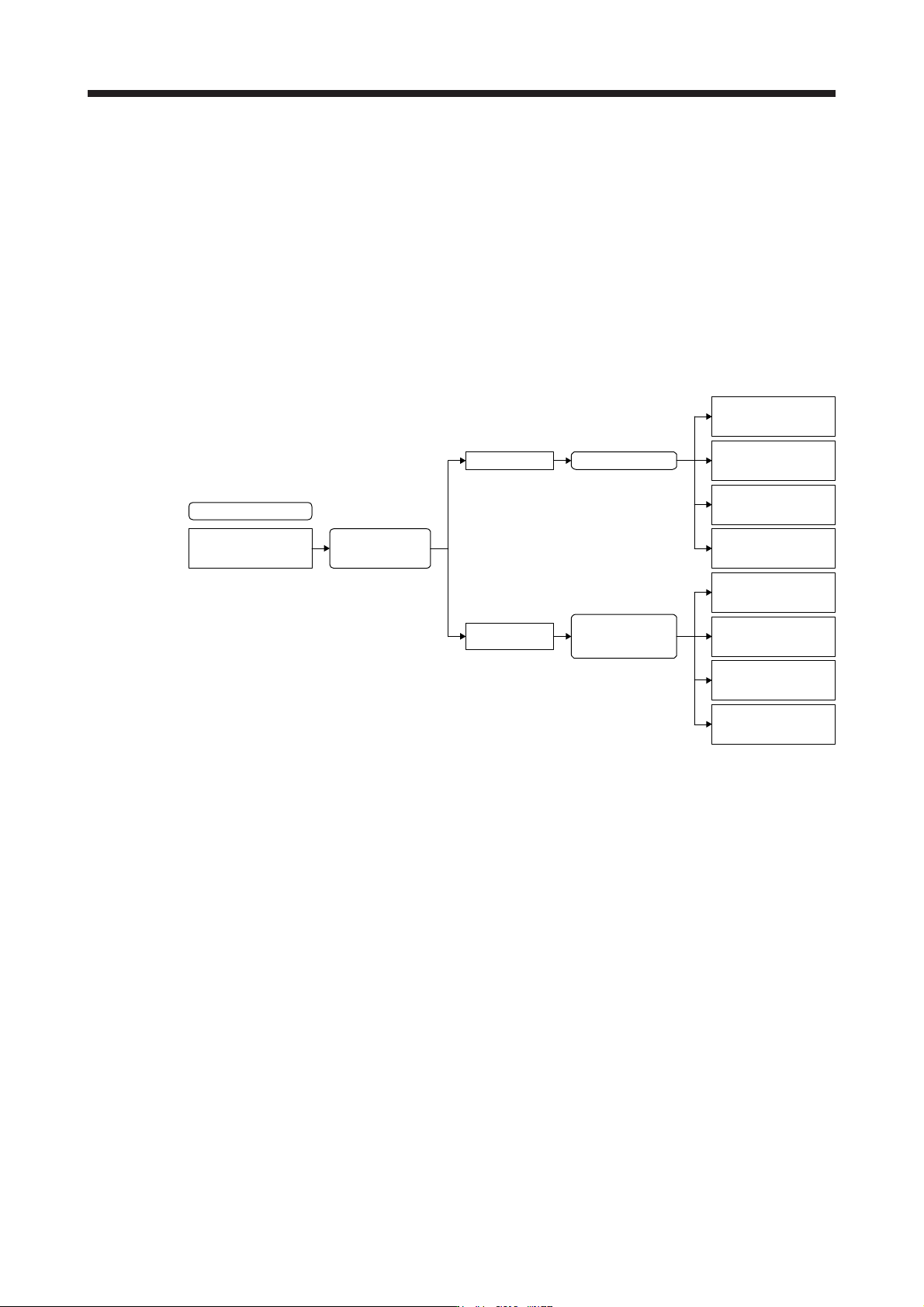
(1) Mode selection by the automatic identification of the servo amplifier
J4 mode/J3 compatibility mode is identified automatically depending on the connected controller.
When the controller makes a connection request with SSCNET III/H communication, the mode will be
"J4 mode". For SSCNET communication, it will be "J3 compatibility mode".
For the J3 compatibility mode, standard control, linear servo motor control, or direct drive motor control
will be identified automatically with a motor (encoder) connected to the servo amplifier. For the J4 mode,
the operation mode will be the setting of [Pr. PA01].
J4 mode/J3 compatibility
mode automatic
identification
Controller
connection check
J4 mode
J3 compatibility
mode
Connected encoder
check (automatic
identification)
Standard control
(rotary servo motor)
Direct drive motor
control
Factory setting
Linear servo motor
control
Fully closed
loop control
[Pr. PA01] setting
Standard control
(rotary servo motor)
Direct drive motor
control
Linear servo motor
control
Fully closed
loop control
17. APPLICATION OF FUNCTIONS
17 - 6
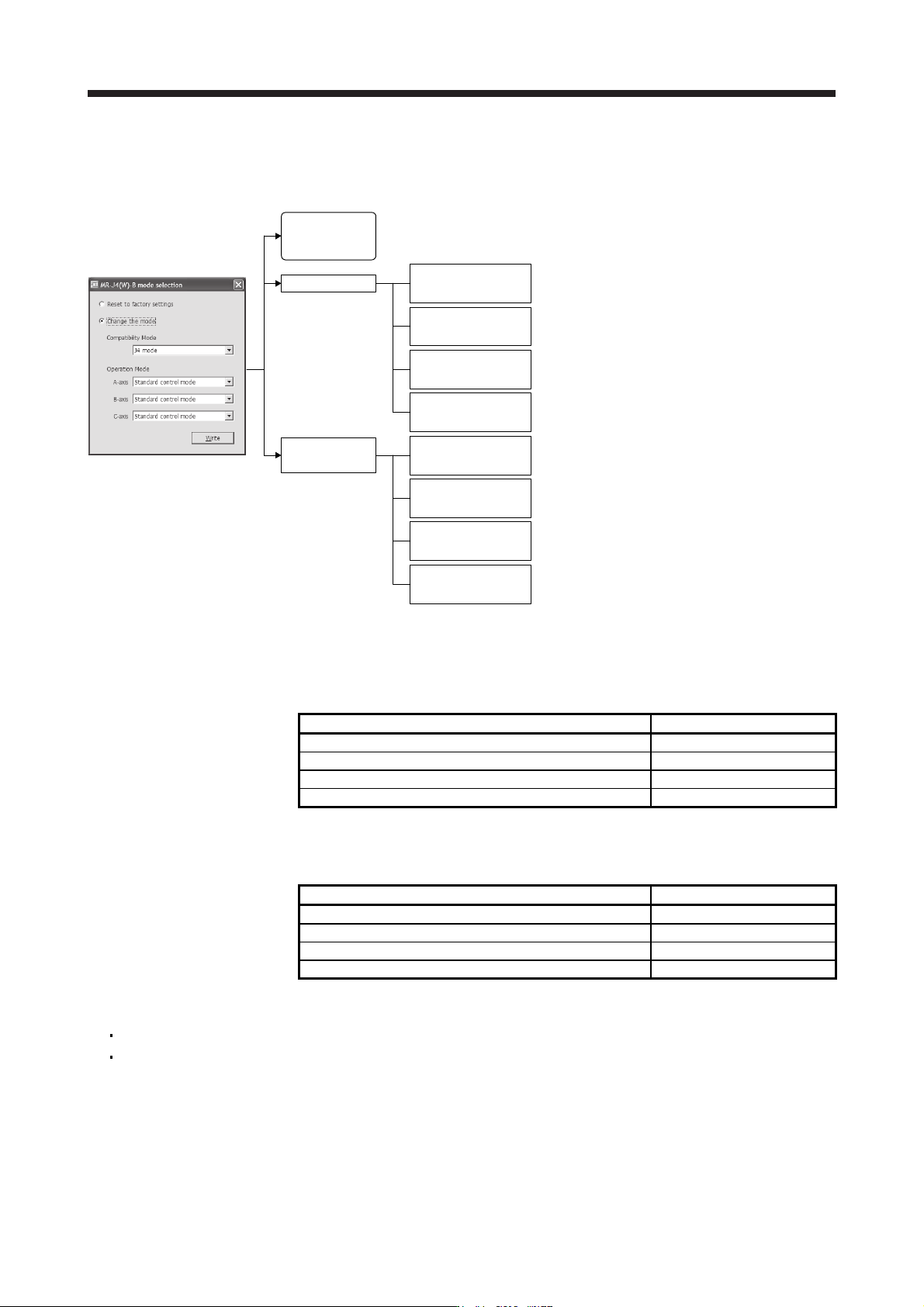
(2) Mode selection using the application "MR-J4(W)-B mode selection" or "MR Mode Change"
You can set the factory setting, J4 mode/J3 compatibility mode, and operation mode with the dedicated
application.
"MR-J4(W)-B mode selection"
or "MR Mode Change"
J4 mode
J3 compatibility
mode
J4 mode/J3
compatibility mode
automatic
identification
Standard control
(rotary servo motor)
Direct drive motor
control
Linear servo motor
control
Fully closed loop
control
Standard control
(rotary servo motor)
Direct drive motor
control
Linear servo motor
control
Fully closed loop
control
Factory setting
Fixed to the J4 mode (Standard control (rotary servo
motor))
Fixed to the J4 mode (Fully closed loop control)
Fixed to the J4 mode (Linear servo motor control)
Fixed to the J4 mode (Direct drive motor control)
Fixed to the J3 compatibility mode (Standard control
(rotary servo motor)) [Equivalent to MR-J3-B]
Fixed to the J3 compatibility mode (Fully closed loop
control) [Equivalent to MR-J3-B-RJ006]
Fixed to the J3 compatibility mode (Linear servo motor
control) [Equivalent to MR-J3-B-RJ004]
Fixed to the J3 compatibility mode (Direct drive motor
control) [Equivalent to MR-J3-B-RJ080W]
17.1.5 How to use the J3 compatibility mode
(1) Setting of the controller
To use in the J3 compatibility mode, select MR-J3 series in the system setting window.
Operation mode in J3 compatibility mode System setting
MR-J3-B standard control mode (rotary servo motor) Select MR-J3-_B.
MR-J3-B fully closed loop control mode Select MR-J3-_B fully closed.
MR-J3-B linear servo motor control mode Select MR-J3-_B linear.
MR-J3-B DD motor control mode Select MR-J3-_B DD motor.
(2) Setting of MR Configurator
To use in the J3 compatibility mode, make the system setting as follows.
Operation mode in J3 compatibility mode System setting
MR-J3-B standard control mode (rotary servo motor) Select MR-J3-_B.
MR-J3-B fully closed loop control mode Select MR-J3-_B fully closed.
MR-J3-B linear servo motor control mode Select MR-J3-_B linear.
MR-J3-B DD motor control mode Select MR-J3-_B DD motor.
Cautions for using MR Configurator
The gain search cannot be used. You can use the advanced gain search.
The C-axis of MR-J4W3-_B cannot be set with MR Configurator. Use MR Configurator2 for it.