sh030106u.pdf - 第376页
11. OPT ION S AND P ERI PHER AL EQU IPMENT 11 - 55 11.7.2 Pr ecaut ions for using US B commu nication function Note the f ollowing to prev ent an electric shock and malfunc tion of the servo a mplif ier. (1) Power co nne…
11. OPTIONS AND PERIPHERAL EQUIPMENT
11 - 54
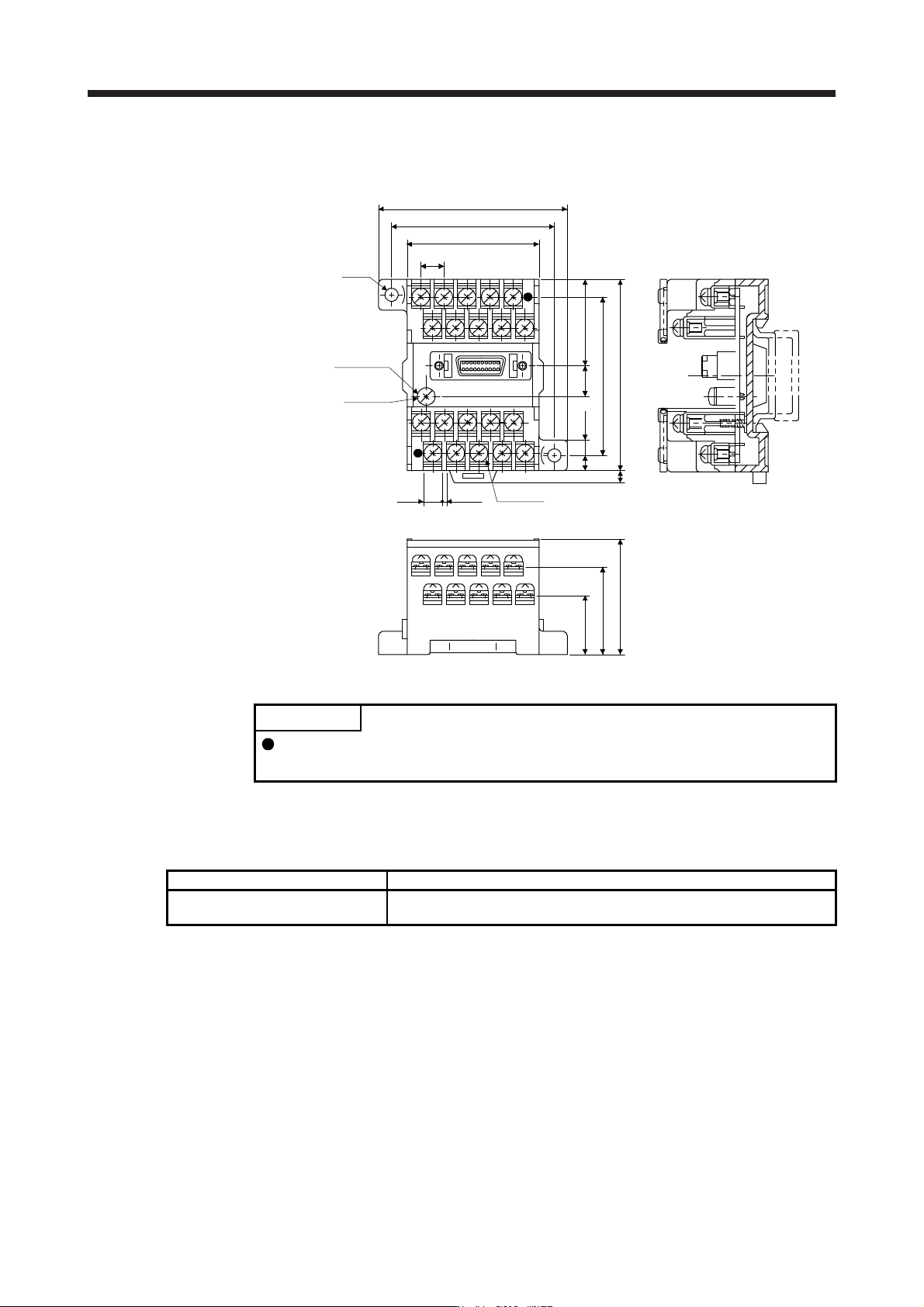
(3) Dimensions of junction terminal block
[Unit: mm]
M3 × 6L
M3 × 5L
36.5
27.8
18.8
7.62
44.11
54
63
φ4.5
4.5
5
4
60
50
9.3 27
TB.E (φ6)
1.426.2
11.7 MR Configurator2
POINT
The MR-J4-_B_-RJ servo amplifier is supported with software version 1.19V or
later.
11.7.1 Engineering software
The following engineering software is available with this servo amplifier.
Engineering software Installation guide
MR Configurator2 SW1DNC-MRC2-_
MR Configurator2 SW1DNC-MRC2-_ INSTALLATION GUIDE
(IB(NA)0300163ENG)
For the engineering software specifications and system configuration, refer to the installation guide.

11. OPTIONS AND PERIPHERAL EQUIPMENT
11 - 55
11.7.2 Precautions for using USB communication function
Note the following to prevent an electric shock and malfunction of the servo amplifier.
(1) Power connection of personal computers
Connect your personal computer with the following procedures.
(a) When you use a personal computer with AC power supply
1) When using a personal computer with a three-core power plug or power plug with grounding wire,
use a three-pin socket or ground the grounding wire.
2) When your personal computer has two-core plug and has no grounding wire, connect the
personal computer to the servo amplifier with the following procedures.
a) Disconnect the power plug of the personal computer from an AC power socket.
b) Check that the power plug was disconnected and connect the device to the servo amplifier.
c) Connect the power plug of the personal computer to the AC power socket.
(b) When you use a personal computer with battery
You can use as it is.
(2) Connection with other devices using servo amplifier communication function
When the servo amplifier is charged with electricity due to connection with a personal computer and the
charged servo amplifier is connected with other devices, the servo amplifier or the connected devices
may malfunction. Connect the servo amplifier and other devices with the following procedures.
(a) Shut off the power of the device for connecting with the servo amplifier.
(b) Shut off the power of the servo amplifier which was connected with the personal computer and check
the charge lamp is off.
(c) Connect the device with the servo amplifier.
(d) Turn on the power of the servo amplifier and the device.
11. OPTIONS AND PERIPHERAL EQUIPMENT
11 - 56
11.8 Battery
POINT
Refer to app. 2 and 3 for battery transportation and the new EU Battery
Directive.
This battery is used to construct an absolute position detection system. Refer to chapter 12 for construction
of the absolute position detection system.
11.8.1 Selection of battery
The available batteries vary depending on servo amplifiers. Select a required battery.
(1) Applications of the batteries
Model Name Application Built-in battery
MR-BAT6V1SET Battery For absolute position data backup MR-BAT6V1
MR-BAT6V1BJ Battery for junction battery cable
For transporting a servo motor and
machine apart
MR-BT6VCASE Battery case
For absolute position data backup of
multi-axis servo motor
MR-BAT6V1
(2) Combinations of batteries and the servo amplifier
Model MR-J4-_B_(-RJ)
MR-BAT6V1SET
MR-BAT6V1BJ
MR-BT6VCASE
11.8.2 MR-BAT6V1SET battery
POINT
For the specifications and year and month of manufacture of the built-in MR-
BAT6V1 battery, refer to section 11.8.5.
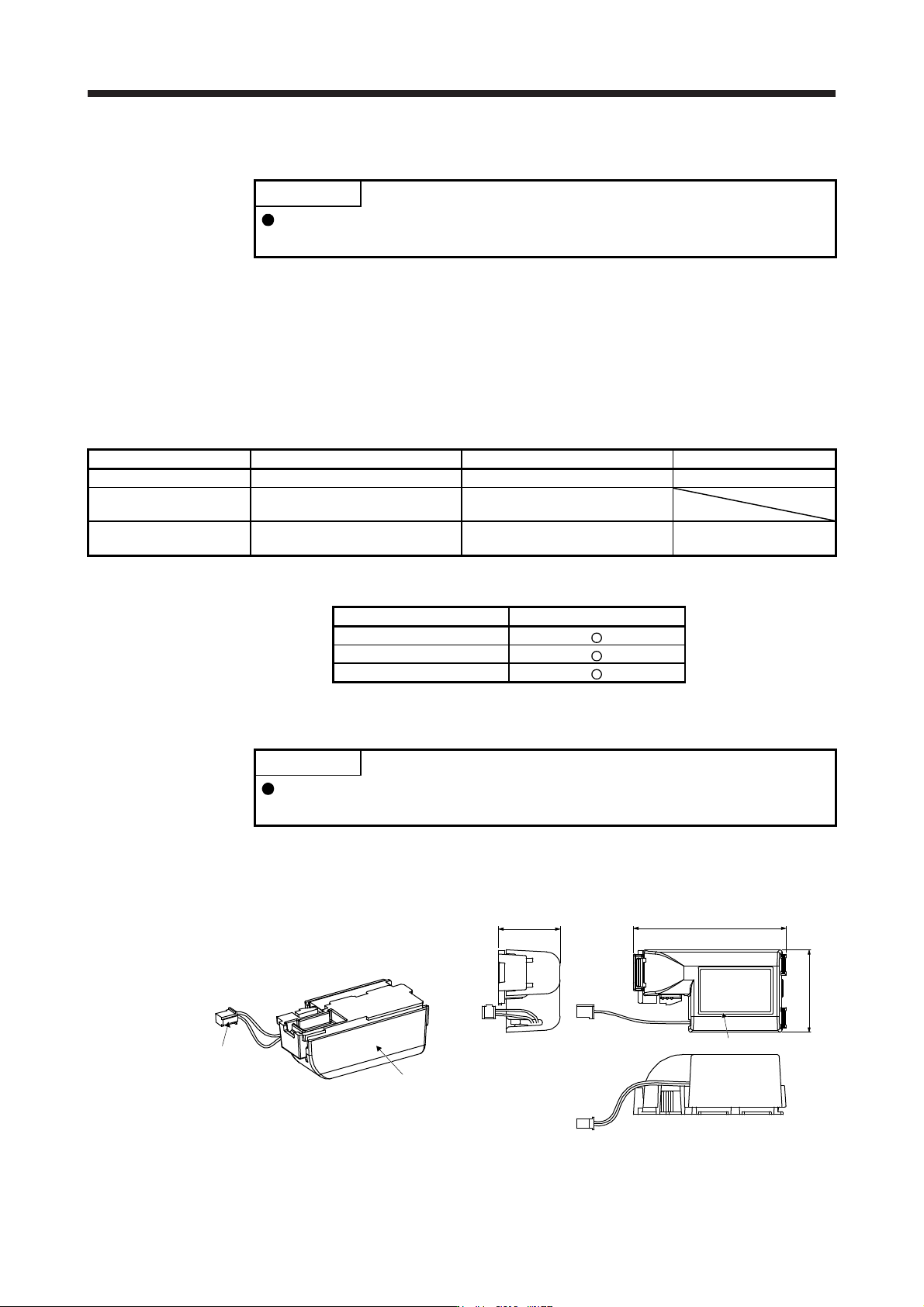
(1) Parts identification and dimensions
[Unit: mm]
Connector for servo amplifier
Case
Rating plate
28
69.3
38.5
Mass: 55 [
g
]
(
includin
g
MR-BAT6V1 batter
y)