sh030106u.pdf - 第587页
17. APPLICATIO N OF FUNCTIONS 17 - 36 5) If an err or occur s If a tuning error occurs during tu ning, one- touch tu ning wil l be stop ped. W ith that, t he foll owing error c ode will be display ed in s tatus. Ch eck t…
17. APPLICATION OF FUNCTIONS
17 - 35
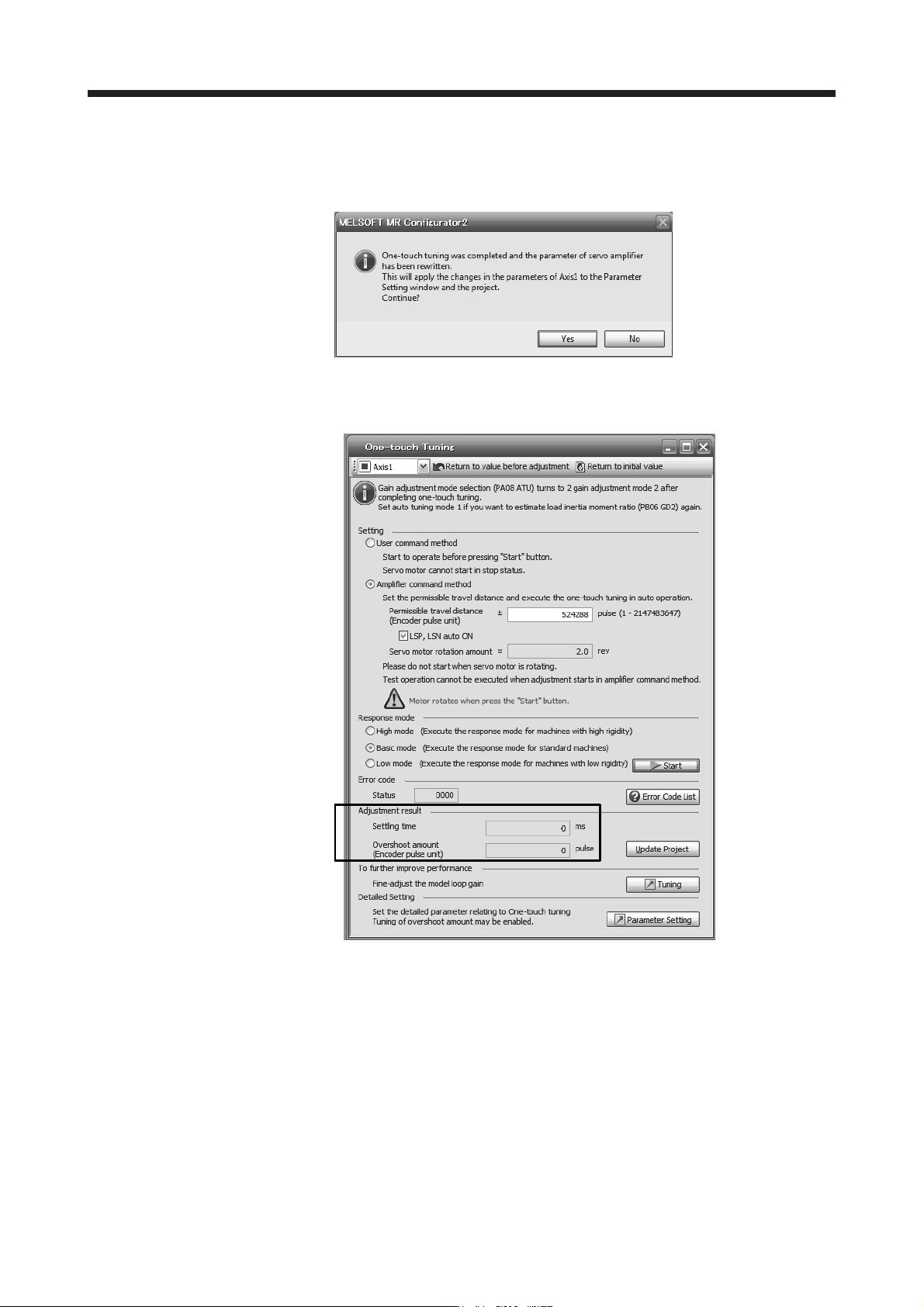
Completing the one-touch tuning will start writing tuning parameters to the servo amplifier, and
the following window will be displayed. Select whether or not to reflect the tuning result in the
project.
After the one-touch tuning is completed, "0000" will be displayed at status in error code. In
addition, settling time and overshoot amount will be displayed in "Adjustment result".
4) Stop of one-touch tuning
When "Stop" is clicked during one-touch tuning, the tuning will be stopped. At this time, "C000"
will be displayed at status in error code. When the one-touch tuning is stopped, the parameter
setting will be returned to the values at the start of the one-touch tuning. Stop the servo motor
before executing the one-touch tuning again. In addition, execute it after the moving part is
returned to the tuning start position.
17. APPLICATION OF FUNCTIONS
17 - 36
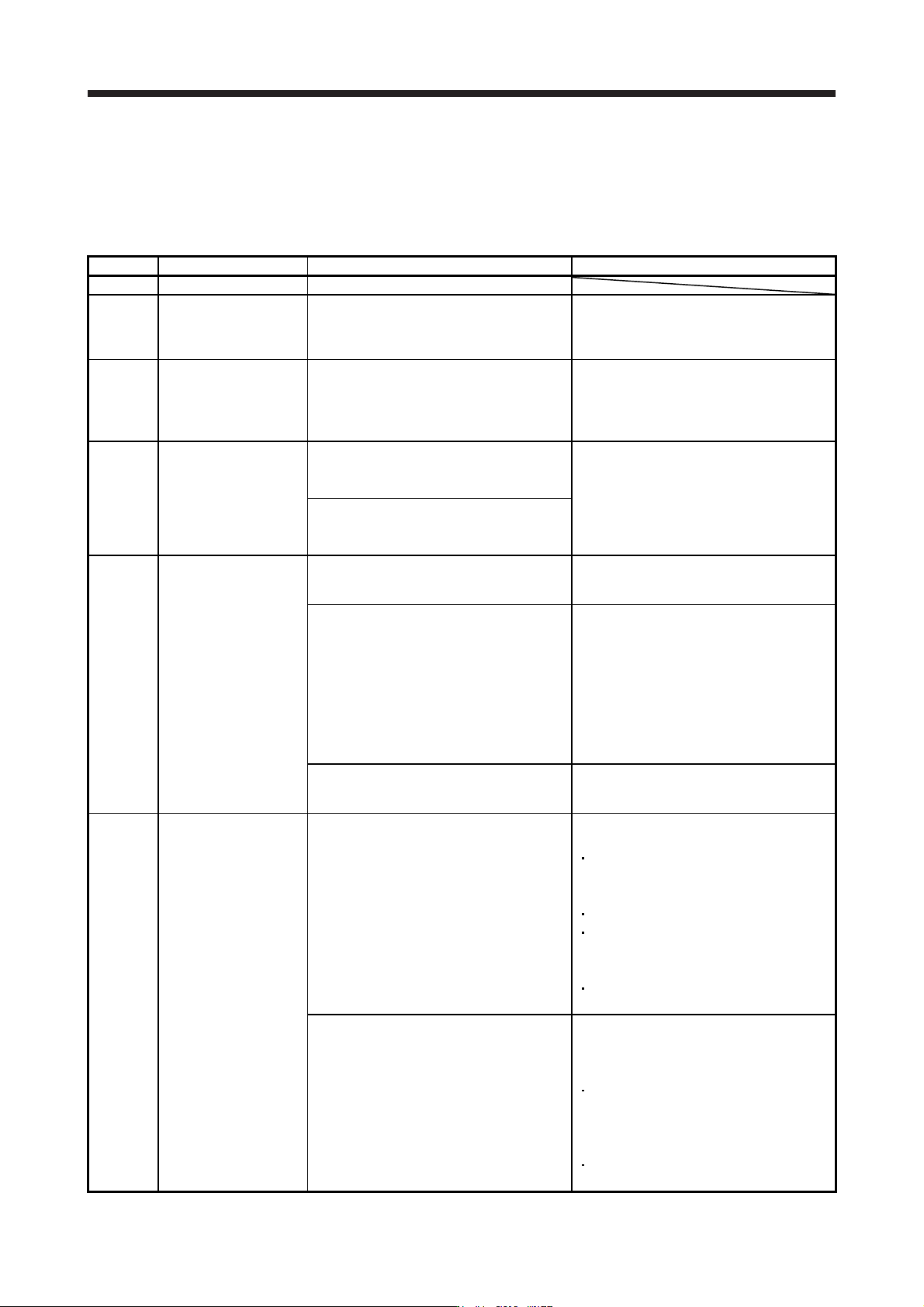
5) If an error occurs
If a tuning error occurs during tuning, one-touch tuning will be stopped. With that, the following
error code will be displayed in status. Check the cause of tuning error. When executing one-touch
tuning again, stop the servo motor once. In addition, after returning the moving part to the tuning
start position, execute it.
Display Name Error detail Corrective action example
C000 Tuning canceled "Stop" was clicked during one-touch tuning.
C001 Overshoot exceeded
Overshoot amount is a value larger than the
one set in [Pr. PA10 In-position range] and
[Pr. PX14 One-touch tuning - Overshoot
permissible level].
Increase the in-position range or overshoot
permissible level.
C002 Servo-off during tuning
The one-touch tuning was attempted in the
user command method during servo-off.
The servo amplifier will be servo-off status
during one-touch tuning.
When executing one-touch tuning in the user
command method, turn to servo-on, and then
execute it.
Prevent the servo amplifier from being the
servo-off status during one-touch tuning.
C003 Control mode error
1. The one-touch tuning was attempted while
the torque control mode was selected in
the control modes.
Select the position control mode or speed
control mode for the control mode from the
controller, and then execute one-touch tuning.
Do not change the control mode during the
one-touch tuning.
2. During one-touch tuning, the control mode
was attempted to change from the position
control mode to the speed control mode.
C004 Time-out
1. One cycle time during the operation has
been over 30 s.
Set one cycle time during the operation (time
from the command start to the next command
start) to 30 s or less.
2. The command speed is slow.
Set the servo motor speed to 100 r/min or
higher. Error is less likely to occur as the
setting speed is higher.
When one-touch tuning by the amplifier
command is used, set a permissible travel
distance so that the servo motor speed is 100
r/min or higher. Set a permissible travel
distance to two or more revolutions as a guide
value to set the servo motor speed to 100
r/min.
3. The operation interval of the continuous
operation is short.
Set the stop interval during operation to 200
ms or more. Error is less likely to occur as the
setting time is longer.
C005
Load to motor inertia
ratio misestimated
1. The estimation of the load to motor inertia
ratio at one-touch tuning was a failure.
Drive the motor with meeting conditions as
follows.
The acceleration time constant/deceleration
time constant to reach 2000 r/min (mm/s) is
5 s or less.
Speed is 150 r/min (mm/s) or higher.
The load to servo motor (mass of linear
servo motor's primary side or direct drive
motor) inertia ratio is 100 times or less.
The acceleration/deceleration torque is
10% or more of the rated torque.
2. The load to motor inertia ratio was not
estimated due to an oscillation or other
influences.
Set to the auto tuning mode that does not
estimate the load to motor inertia ratio as
follows, and then execute the one-touch
tuning.
Select "Auto tuning mode 2 (_ _ _ 2)",
"Manual mode (_ _ _ 3)", or "2 gain
adjustment mode 2 (_ _ _ 4)" of "Gain
adjustment mode selection" in [Pr. PA08].
Manually set [Pr. PB06 Load to motor inertia
ratio/load to motor mass ratio] properl
y
.
17. APPLICATION OF FUNCTIONS
17 - 37
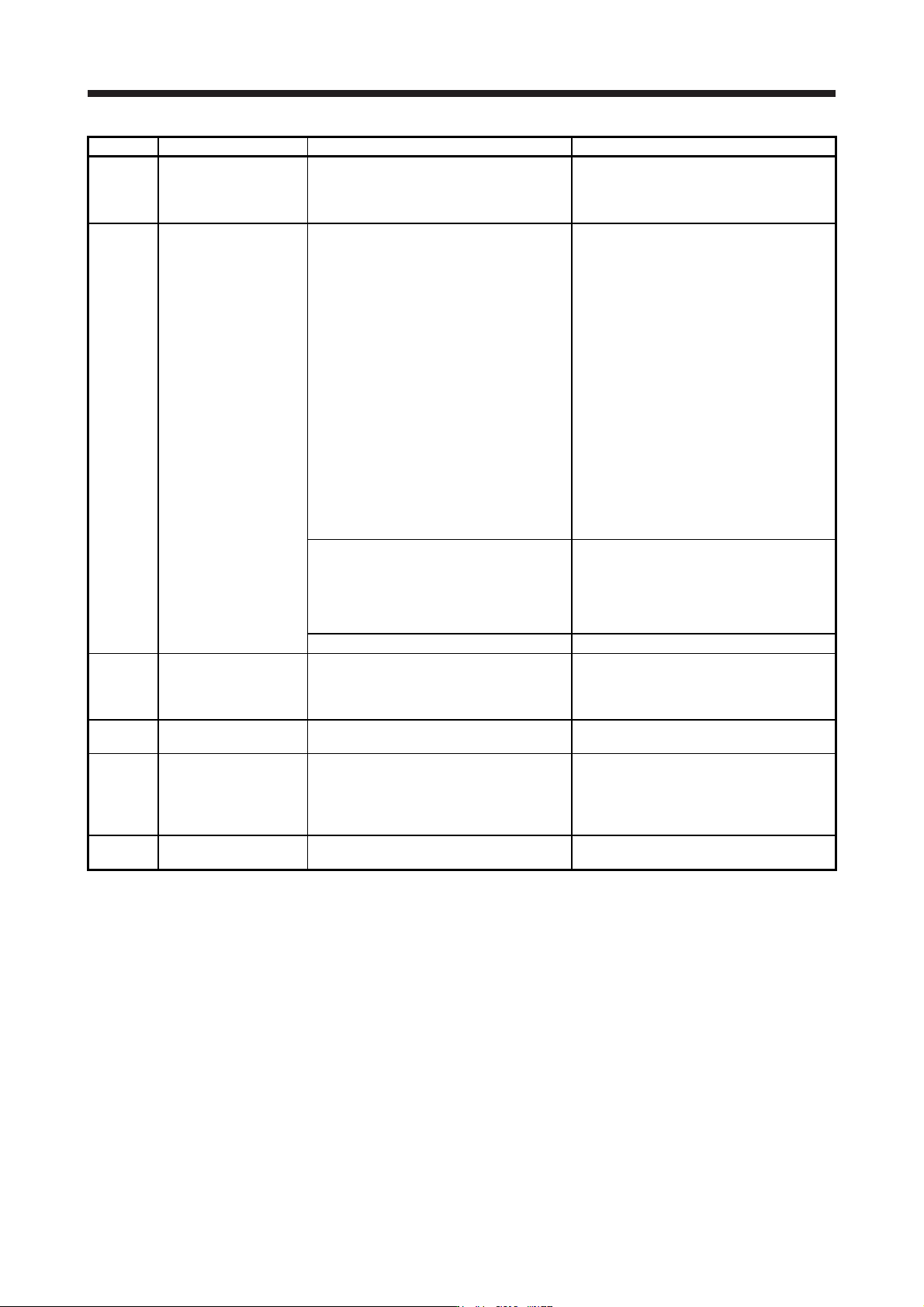
Display Name Error detail Corrective action example
C006
Amplifier command start
error
One-touch tuning was attempted to start in
the amplifier command method under the
following speed condition.
Servo motor speed: 20 r/min or higher
Execute the one-touch tuning in the amplifier
command method while the servo motor is
stopped.
C007
Amplifier command
generation error
1. One-touch tuning was executed in the
amplifier command method when the
permissible travel distance is set to 100
pulses or less in the encoder pulse unit, or
the distance is set not to increase the
servo motor speed to 150 r/min (mm/s) (50
r/min for direct drive motor) or higher at the
time of load to motor inertia ratio
estimation.
Set a permissible travel distance to 100
pulses or more in the encoder pulse unit, or a
distance so as to increase the servo motor
speed to 150 r/min (mm/s) (50 r/min for direct
drive motor) or higher at the time of load to
motor inertia ratio estimation, and then
execute the one-touch tuning. Set a
permissible travel distance to four or more
revolutions as a guide value.
Load to motor inertia ratio will be estimated
when "0000" or "0001" is set in [Pr. PA08
Auto tuning mode] at the start of one-touch
tuning.
If the permissible travel distance is short and
the servo motor speed cannot be increased to
150 r/min (mm/s) (50 r/min for direct drive
motor) or higher, select "Auto tuning mode 2
(_ _ _ 2)", "Manual mode (_ _ _ 3)", or "2 gain
adjustment mode 2 (_ _ _ 4)" of "Gain
adjustment mode selection" in [Pr. PA08].
2. An overspeed alarm detection level is set
so that the servo motor speed becomes
150 r/min (mm/s) (50 r/min for direct drive
motor) or less at the time of load to motor
inertia ratio estimation.
When estimating the load to motor inertia
ratio, set the overspeed alarm detection level
so that the speed becomes 150 r/min or
more.
3. The torque limit has been set to 0.
Set the torque limit value to greater than 0.
C008 Stop signal
EM2 was turned off during one-touch tuning in
the amplifier command method.
Review the one-touch tuning start position
and permissible travel distance for the
amplifier command method.
After ensuring safety, turn on EM2.
C009 Parameter
Parameters for manufacturer setting have
been changed.
Return the parameters for manufacturer
setting to the initial values.
C00A Alarm
One-touch tuning was attempted to start in
the amplifier command method during alarm
or warning.
Alarm or warning occurred during one-touch
tuning by the amplifier command method.
Start one-touch tuning when no alarm or
warning occurs.
Prevent alarm or warning from occurring
during one-touch tuning.
C00F
One-touch tuning
disabled
"One-touch tuning function selection" in [Pr.
PX13] is "Disabled (_ _ _ 0)".
Select "Enabled (_ _ _ 1)".
6) If an alarm occurs
If an alarm occurs during the one-touch tuning, the tuning will be forcibly terminated. Remove the
cause of the alarm and execute one-touch tuning again. When executing one-touch tuning in the
amplifier command method again, return the moving part to the tuning start position.
7) If a warning occurs
If a warning which continues the motor driving occurs during one-touch tuning by the user
command method, the tuning will be continued. If a warning which does not continue the motor
driving occurs during the tuning, one-touch tuning will be stopped.
One-touch tuning will be stopped when warning occurs during one-touch tuning by the amplifier
command method regardless of the warning type. Remove the cause of the warning, and return
the moving part to the tuning start position. Then, execute the tuning again.