sh030106u.pdf - 第572页
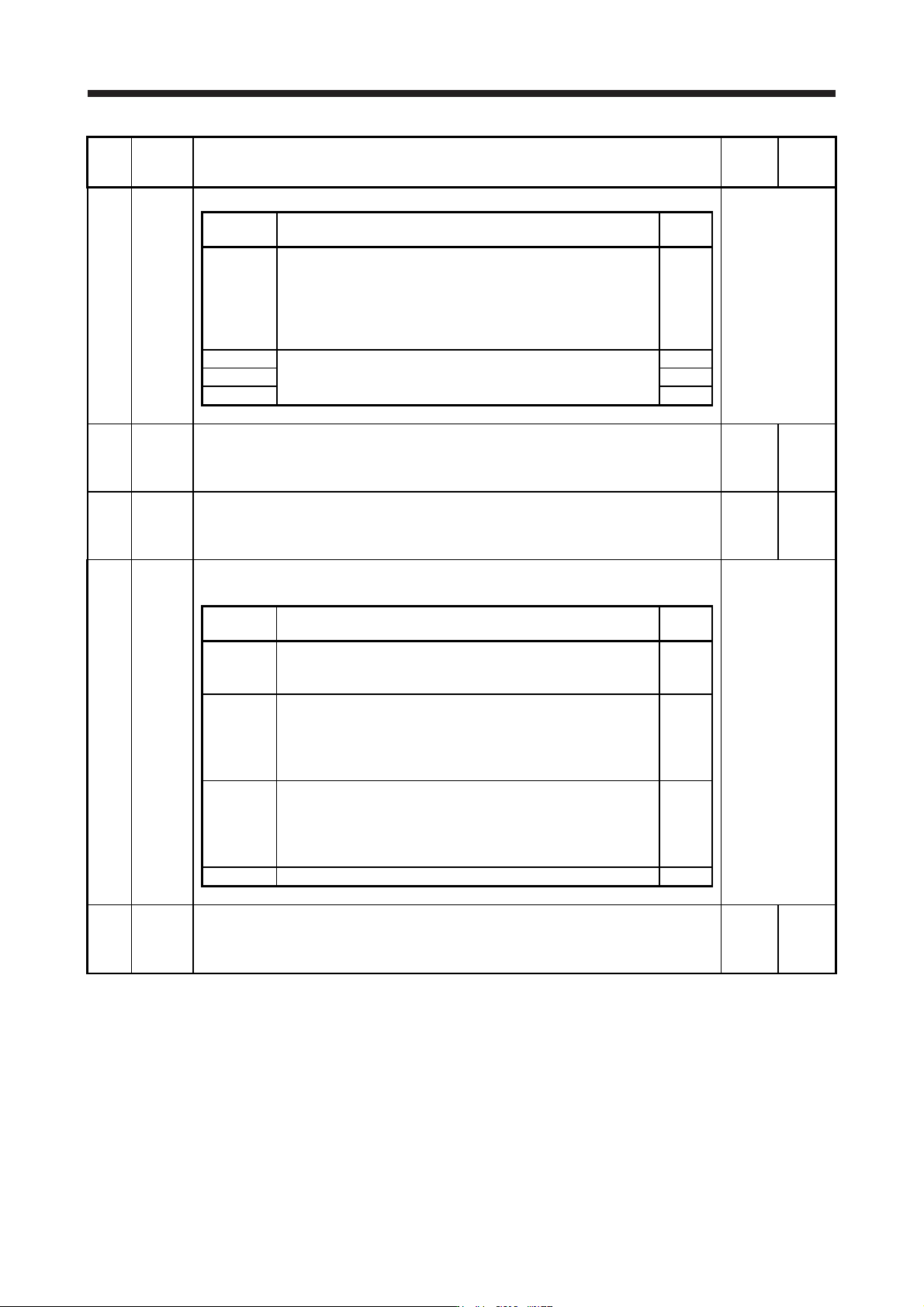
17. APPLICATIO N OF FUNCTIONS 17 - 21 No. Sym bol Name and function Initial value [unit] Setting range PX20 NHQ4 Notch s hape selection 4 Set the shape of the machine resonance suppression filter 4. Refer to the "Na…
17. APPLICATION OF FUNCTIONS
17 - 20
No. Symbol Name and function
Initial
value
[unit]
Setting
range
PX13 *XOP2 Function selection X-2
Refer to the
"Name and
function" column.
Setting
digit
Explanation
Initial
value
_ _ _ x One-touch tuning function selection
0: Disabled
1: Enabled
When the digit is "0", the one-touch tuning with MR Configurator2
will be disabled.
1h
_ _ x _ For manufacturer setting 0h
_ x _ _ 0h
x _ _ _ 0h
PX14 OTHOV One-touch tuning - Overshoot permissible level
Set a permissible value of overshoot amount for one-touch tuning as a percentage of the in-
position range.
However, setting "0" will be 50%.
0
[%]
0
to
100
PX17 NH3 Machine resonance suppression filter 3
Set the notch frequency of the machine resonance suppression filter 3.
To enable the setting value, select "Enabled (_ _ _ 1)" of "Machine resonance suppression
filter 3 selection" in [Pr. PX18].
4500
[Hz]
10
to
4500
PX18 NHQ3 Notch shape selection 3
Set the shape of the machine resonance suppression filter 3.
Refer to the
"Name and
function" column.
Setting
digit
Explanation
Initial
value
_ _ _ x Machine resonance suppression filter 3 selection
0: Disabled
1: Enabled
0h
_ _ x _ Notch depth selection
0: -40 dB
1: -14 dB
2: -8 dB
3: -4 dB
0h
_ x _ _ Notch width selection
0: α = 2
1: α = 3
2: α = 4
3: α = 5
0h
x _ _ _ For manufacturer setting 0h
PX19 NH4 Machine resonance suppression filter 4
Set the notch frequency of the machine resonance suppression filter 4.
To enable the setting value, select "Enabled (_ _ _ 1)" of "Machine resonance suppression
filter 4 selection" in [Pr. PX20].
4500
[Hz]
10
to
4500
17. APPLICATION OF FUNCTIONS
17 - 21
No. Symbol Name and function
Initial
value
[unit]
Setting
range
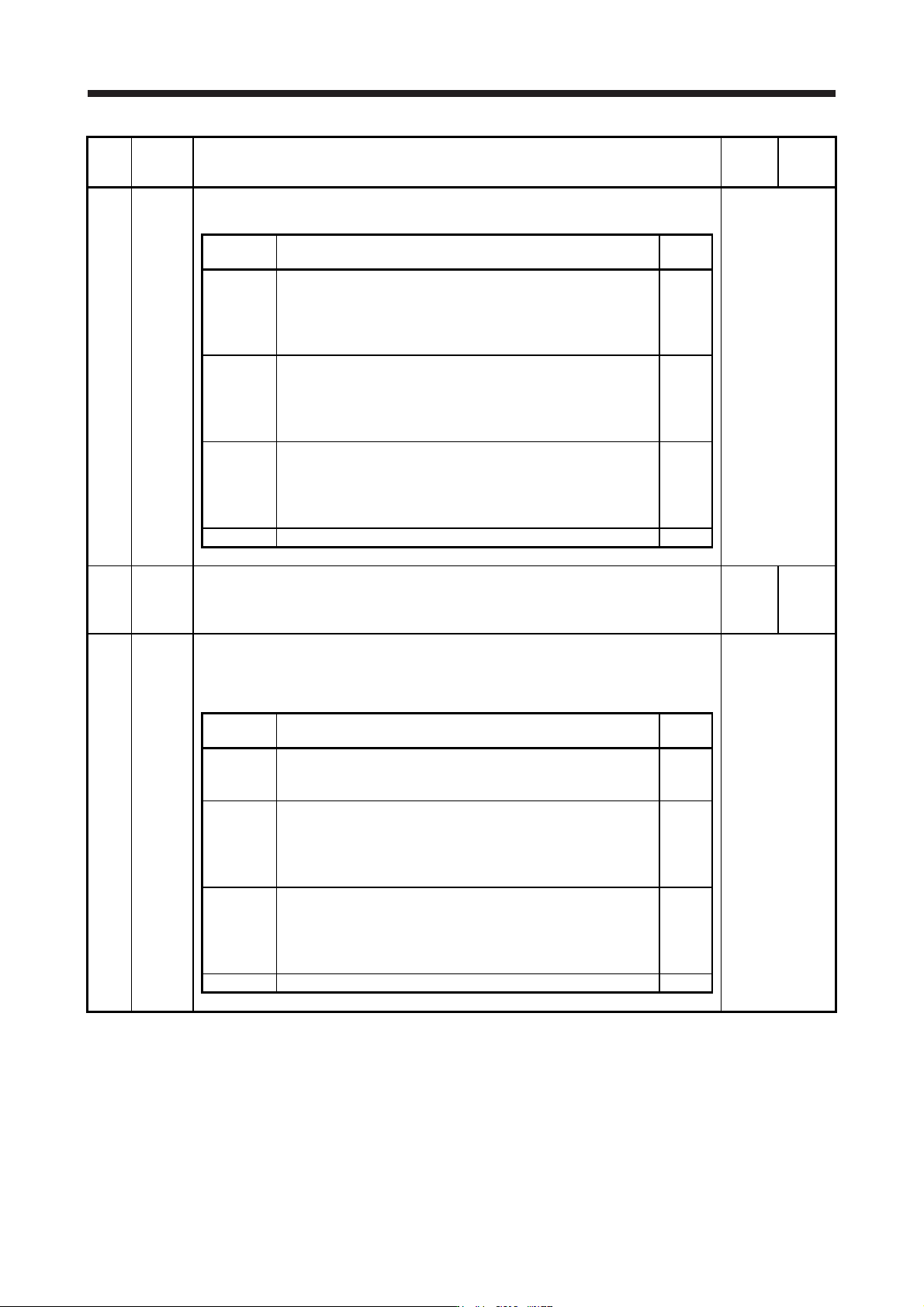
PX20 NHQ4 Notch shape selection 4
Set the shape of the machine resonance suppression filter 4.
Refer to the
"Name and
function" column.
Setting
digit
Explanation
Initial
value
_ _ _ x Machine resonance suppression filter 4 selection
0: Disabled
1: Enabled
When you select "Enabled" of this digit, [Pr. PB17 Shaft resonance
suppression filter] is not available.
0h
_ _ x _ Notch depth selection
0: -40 dB
1: -14 dB
2: -8 dB
3: -4 dB
0h
_ x _ _ Notch width selection
0: α = 2
1: α = 3
2: α = 4
3: α = 5
0h
x _ _ _ For manufacturer setting 0h
PX21 NH5 Machine resonance suppression filter 5
Set the notch frequency of the machine resonance suppression filter 5.
To enable the setting value, select "Enabled (_ _ _ 1)" of "Machine resonance suppression
filter 5 selection" in [Pr. PX22].
4500
[Hz]
10
to
4500
PX22 NHQ5 Notch shape selection 5
Set the shape of the machine resonance suppression filter 5.
When you select "Enabled (_ _ _ 1)" of "Robust filter selection" in [Pr. PX31], the machine
resonance suppression filter 5 is not available.
Refer to the
"Name and
function" column.
Setting
digit
Explanation
Initial
value
_ _ _ x Machine resonance suppression filter 5 selection
0: Disabled
1: Enabled
0h
_ _ x _ Notch depth selection
0: -40 dB
1: -14 dB
2: -8 dB
3: -4 dB
0h
_ x _ _ Notch width selection
0: α = 2
1: α = 3
2: α = 4
3: α = 5
0h
x _ _ _ For manufacturer setting 0h
17. APPLICATION OF FUNCTIONS
17 - 22
No. Symbol Name and function
Initial
value
[unit]
Setting
range
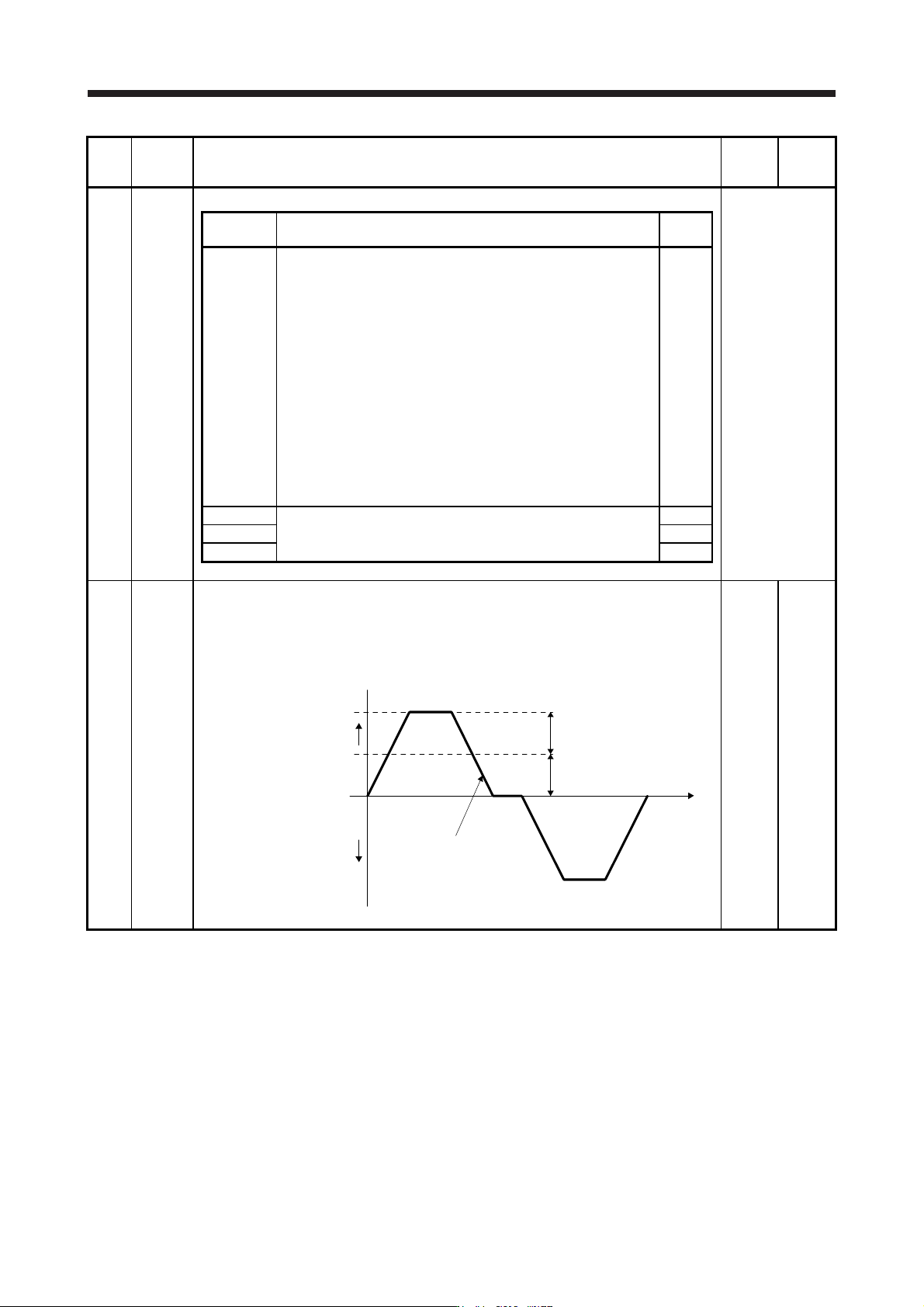
PX23 *XOP3 Function selection X-3
Refer to the
"Name and
function" column.
Setting
digit
Explanation
Initial
value
_ _ _ x
Torque limit function selection at instantaneous power failure
(instantaneous power failure tough drive selection)
0: Disabled
1: Enabled
When an instantaneous power failure occurs during operation, you
can save electric energy charged in the capacitor in the servo
amplifier by limiting torque at acceleration. You can also delay the
time until [AL. 10.2 Voltage drop in the main circuit power] occurs
with instantaneous power failure tough drive function. Doing this will
enable you to set a longer time in [Pr. PX28 SEMI-F47 function -
Instantaneous power failure detection time].
To enable the torque limit function at instantaneous power failure,
select "Enabled (_ 1 _ _)" of "SEMI-F47 function selection" in [Pr.
PX25].
This parameter setting is used with servo amplifier with software
version B0 or later.
0h
_ _ x _ For manufacturer setting 0h
_ x _ _ 0h
x _ _ _ 0h
PX24 FRIC Machine diagnosis function - Friction judgment speed
Set a (linear) servo motor speed that divides a friction estimation area into high and low during
the friction estimation process of the machine diagnosis.
Setting "0" will set a value half of the rated speed.
When your operation pattern is under the rated speed, we recommend that you set a half
value of the maximum speed.
Forward rotation
direction
0 r/min
(0 mm/s)
Operation pattern
[Pr. PX24] setting
Maximum speed in operation
Servo motor
speed
Reverse rotation
direction
0
[r/min]/
[mm/s]
0 to
permis-
sible
speed