sh030106u.pdf - 第223页
6. NORM AL GAIN ADJ USTMENT 6 - 22 6.4 Manual mode If you are not satisf ied wit h the adj ustment of auto tu ning, yo u can a djust al l gains manually . POINT If machine resonanc e occurs , filter tun ing mo de select …
6. NORMAL GAIN ADJUSTMENT
6 - 21
6.3.4 Response level setting in auto tuning mode
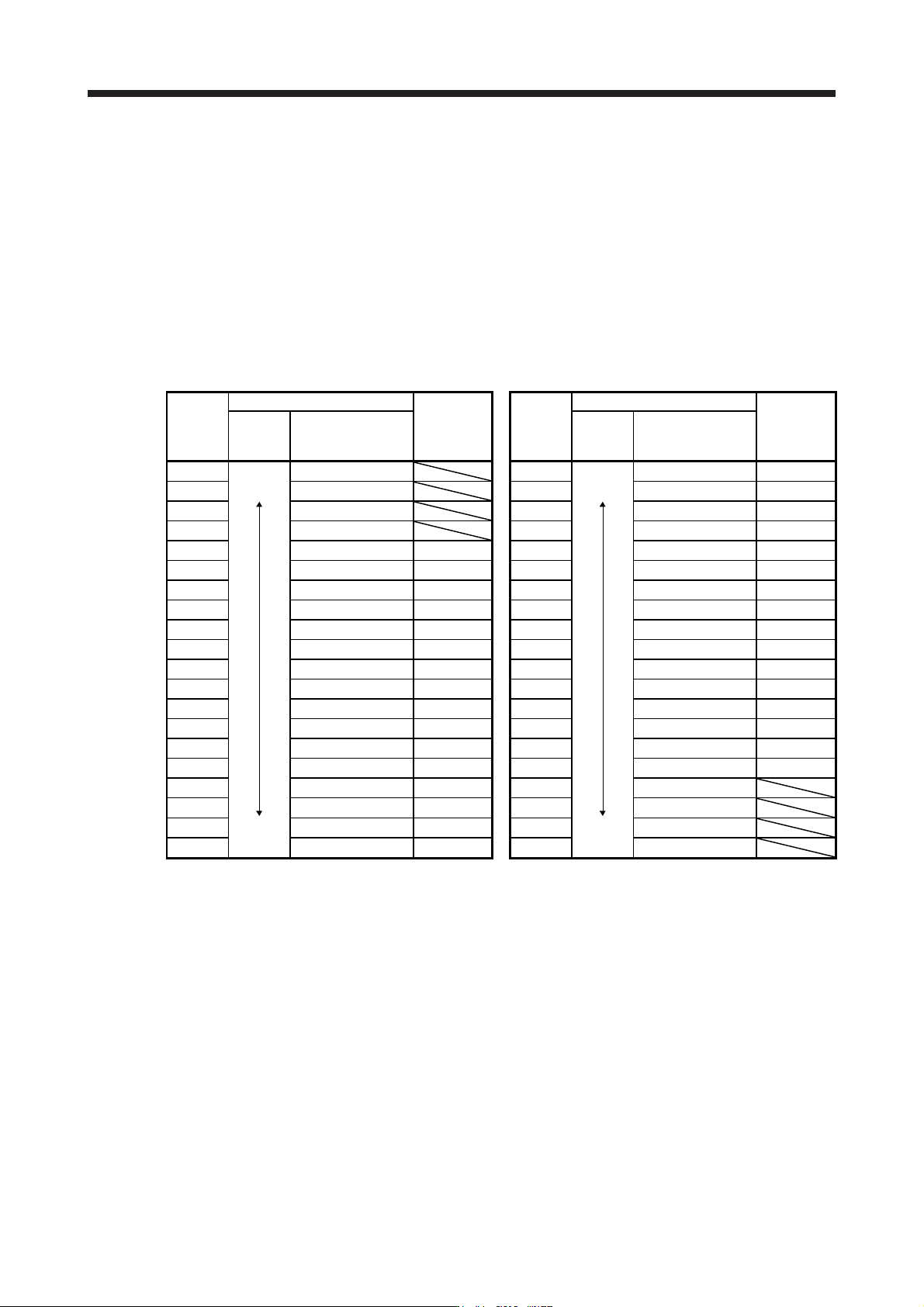
Set the response of the whole servo system by [Pr. PA09]. As the response level setting is increased, the
trackability to a command improves and settling time decreases, but setting the response level too high will
generate vibration. Set a value to obtain the desired response level within the vibration-free range.
If the response level setting cannot be increased up to the desired response because of machine resonance
beyond 100 Hz, filter tuning mode selection in [Pr. PB01] or machine resonance suppression filter in [Pr.
PB13] to [Pr. PB16], [Pr. PB46] to [Pr. PB51] may be used to suppress machine resonance. Suppressing
machine resonance may allow the response level setting to increase. Refer to section 7.2 and 7.3 for
settings of the adaptive tuning mode and machine resonance suppression filter.
[Pr. PA09]
Setting
value
Machine characteristic
Reference
(setting
value of
MR-J3)
Setting
value
Machine characteristic
Reference
(setting
value of
MR-J3)
Response
Guideline for
machine resonance
frequency [Hz]
Response
Guideline for
machine resonance
frequency [Hz]
1
Low
response
2.7 21
Middle
response
67.1
17
2 3.6 22 75.6
18
3
4.9 23
85.2
19
4 6.6 24 95.9
20
5 10.0
1
25 108.0
21
6 11.3
2
26 121.7
22
7 12.7
3
27 137.1
23
8 14.3
4
28 154.4
24
9 16.1
5
29 173.9
25
10 18.1
6
30 195.9
26
11 20.4
7
31 220.6
27
12 23.0
8
32 248.5
28
13 25.9
9
33 279.9
29
14 29.2
10
34 315.3
30
15 32.9
11
35 355.1
31
16 37.0
12
36 400.0
32
17 41.7
13
37 446.6
18 47.0
14
38 501.2
19
Middle
response
52.9
15
39
High
response
571.5
20 59.6
16
40 642.7
6. NORMAL GAIN ADJUSTMENT
6 - 22
6.4 Manual mode
If you are not satisfied with the adjustment of auto tuning, you can adjust all gains manually.
POINT
If machine resonance occurs, filter tuning mode selection in [Pr. PB01] or
machine resonance suppression filter in [Pr. PB13] to [Pr. PB16] and [Pr. PB46]
to [Pr. PB51] may be used to suppress machine resonance. (Refer to section 7.2
to 7.3.)
(1) For speed control
(a) Parameter
The following parameters are used for gain adjustment.
Parameter Symbol Name
PB06 GD2 Load to motor inertia ratio/load to motor mass ratio
PB07 PG1 Model loop gain
PB09 VG2 Speed loop gain
PB10 VIC Speed integral compensation
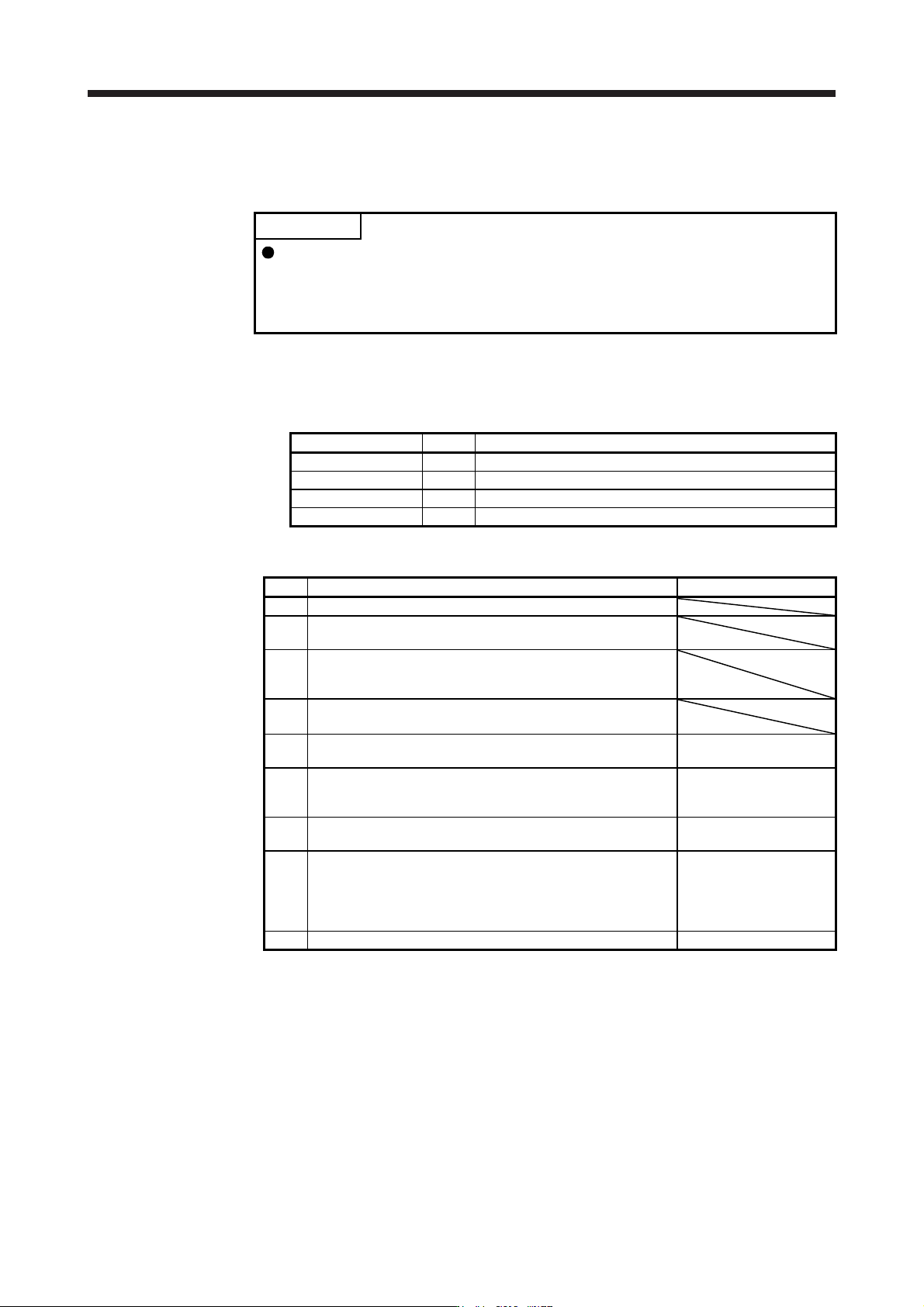
(b) Adjustment procedure
Step Operation Description
1 Brief-adjust with auto tuning. Refer to section 6.2.3.
2
Change the setting of auto tuning to the manual mode ([Pr.
PA08]: _ _ _ 3).
3
Set the estimated value to the load to motor inertia ratio/load to
motor mass ratio. (If the estimate value with auto tuning is
correct, setting change is not required.)
4
Set a small value to the model loop gain.
Set a large value to the speed integral compensation.
5
Increase the speed loop gain within the vibration- and unusual
noise-free range, and return slightly if vibration takes place.
Increase the speed loop
gain.
6
Decrease the speed integral compensation within the vibration-
free range, and return slightly if vibration takes place.
Decrease the time
constant of the speed
integral compensation.
7
Increase the model loop gain, and return slightly if overshoot
takes place.
Increase the model loop
gain.
8
If the gains cannot be increased due to mechanical system
resonance or the like and the desired response cannot be
achieved, response may be increased by suppressing resonance
with the adaptive tuning mode or machine resonance
suppression filter and then executing steps 3 to 7.
Suppression of machine
resonance
Refer to section 7.2 and
7.3.
9 While checking the motor status, fine-adjust each gain. Fine adjustment
6. NORMAL GAIN ADJUSTMENT
6 - 23
(c) Parameter adjustment
1) [Pr. PB09 Speed loop gain]
This parameter determines the response level of the speed control loop. Increasing this value will
improve responsiveness, but increasing the value excessively will cause the mechanical system
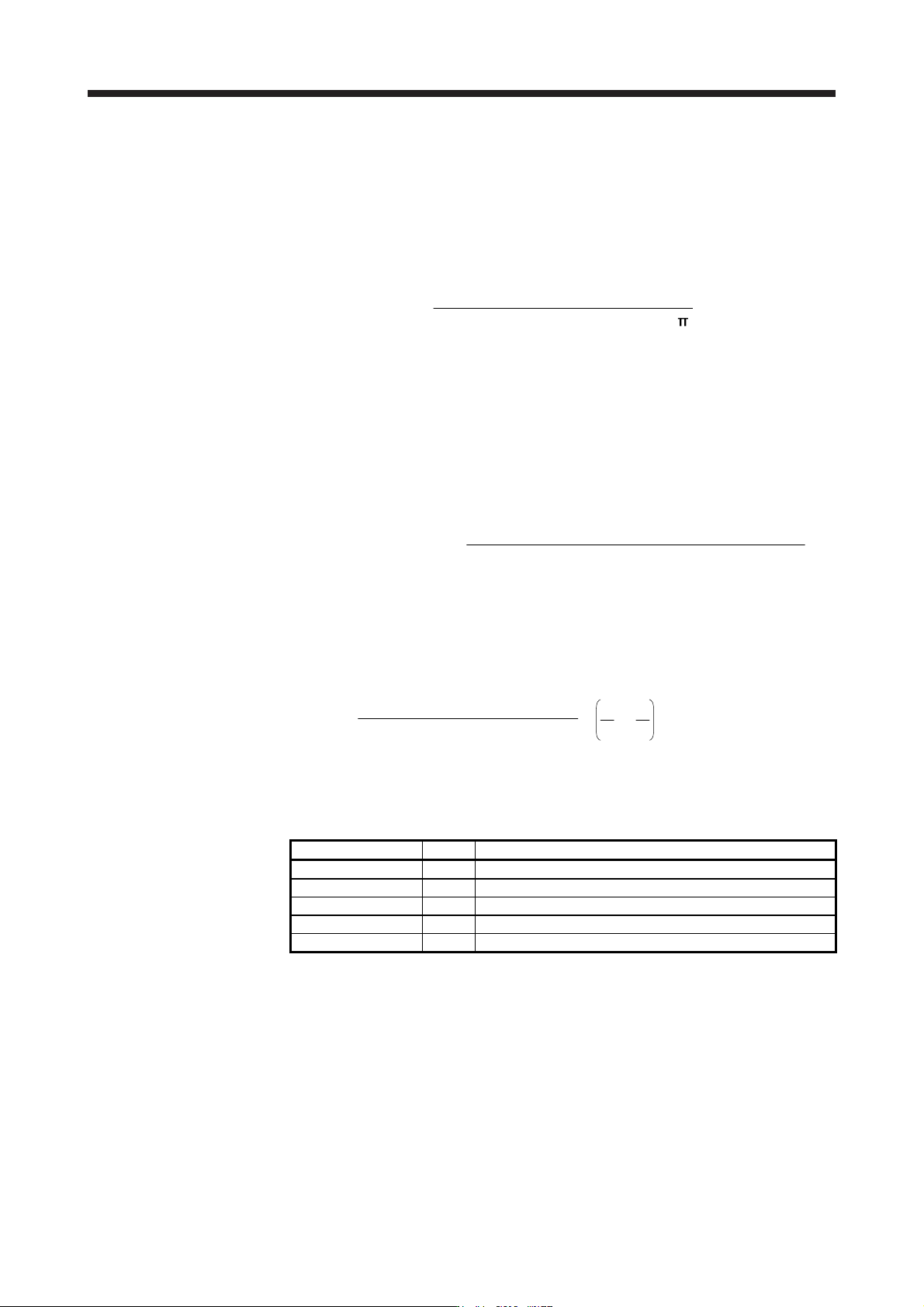
to easily vibrate. The actual response frequency of the speed loop is as indicated in the following
expression.
Speed loop response frequency [Hz] =
(1 + Load to motor inertia ratio) × 2
Speed loop gain
2) [Pr. PB10 Speed integral compensation]
To eliminate stationary deviation against a command, the speed control loop is under proportional
integral control. For the speed integral compensation, set the time constant of this integral control.
Increasing the setting lowers the response level. However, if the load to motor inertia ratio is large
or the mechanical system has any vibratory element, the mechanical system is liable to vibrate
unless the setting is increased to some degree. The guideline is as indicated in the following
expression.
Speed integral compensation setting [ms] ≥
2000 to 3000
Speed loop gain/(1 + Load to motor inertia ratio
)
3) [Pr. PB07 Model loop gain]
This parameter determines the response level to a speed command. Increasing the value
improves trackability to a speed command, but a too high value will make overshoot liable to
occur at settling.
Model loop gain guideline ≤
(1 + Load to motor inertia ratio)
Speed loop gain
×
8
1
4
1
to
(2) For position control
(a) Parameter
The following parameters are used for gain adjustment.
Parameter Symbol Name
PB06 GD2 Load to motor inertia ratio/load to motor mass ratio
PB07 PG1 Model loop gain
PB08 PG2 Position loop gain
PB09 VG2 Speed loop gain
PB10 VIC Speed integral compensation