sh030106u.pdf - 第195页
5. PARAMETE RS 5 - 50 No. Sym bol Name and function Initial value [unit] Setting range PE46 LMFLT Lost motion filt er setting Set the time constant o f the lo st motion compensation filter in increments of 0.1 ms. If the…
5. PARAMETERS
5 - 49
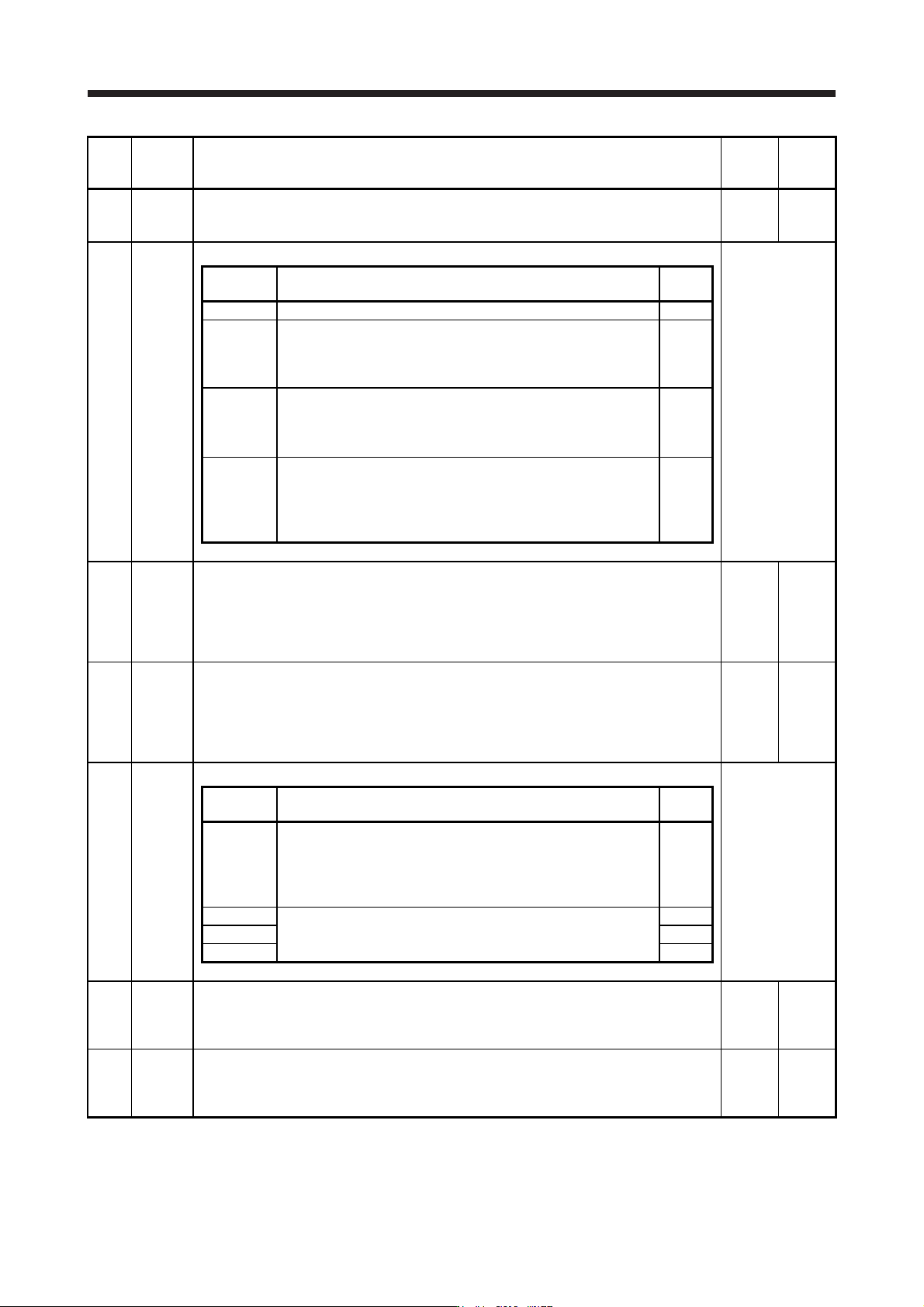
No. Symbol Name and function
Initial
value
[unit]
Setting
range
PE08 DUF Fully closed loop dual feedback filter
This is used to set a dual feedback filter band.
Refer to section 16.3.1 (7) for details.
10
[rad/s]
0 to
4500
PE10 FCT3 Fully closed loop function selection 3
Refer to the
"Name and
function" column.
Setting
digit
Explanation
Initial
value
_ _ _ x For manufacturer setting 0h
_ _ x _
Fully closed loop control - Position deviation error detection level -
Unit selection
0: 1 kpulse unit
1: 1 pulse unit
0h
_ x _ _ Droop pulse monitor selection for controller display
0: Servo motor encoder
1: Load-side encoder
2: Deviation between the servo motor and load side
0h
x _ _ _ Cumulative feedback pulses monitor selection for controller display
0: Servo motor encoder
1: Load-side encoder
The setting of this digit is used for the fully closed loop system and
scale measurement function.
0h
PE34 **FBN2 Fully closed loop control - Feedback pulse electronic gear 2 - Numerator
This is used to set a numerator of electronic gear for the servo motor encoder pulse at the
fully closed loop control.
Set the electronic gear so that the number of servo motor encoder pulses for one servo motor
revolution is converted to the resolution of the load-side encoder.
Refer to section 16.3.1 (5) for details.
1
1 to
65535
PE35 **FBD2 Fully closed loop control - Feedback pulse electronic gear 2 - Denominator
This is used to set a denominator of electronic gear for the servo motor encoder pulse at the
fully closed loop control.
Set the electronic gear so that the number of servo motor encoder pulses for one servo motor
revolution is converted to the resolution of the load-side encoder.
Refer to section 16.3.1 (5) for details.
1
1 to
65535
PE41 EOP3 Function selection E-3
Refer to the
"Name and
function" column.
Setting
digit
Explanation
Initial
value
_ _ _ x Robust filter selection
0: Disabled
1: Enabled
When you select "Enabled" of this digit, the machine resonance
suppression filter 5 set in [Pr. PB51] is not available.
0h
_ _ x _ For manufacturer setting 0h
_ x _ _ 0h
x _ _ _ 0h
PE44 LMCP Lost motion compensation positive-side compensation value selection
Set the lost motion compensation for when reverse rotation (CW) switches to forward rotation
(CCW) in increments of 0.01% assuming the rated torque as 100%.
This parameter is supported with software version B4 or later.
0
[0.01%]
0
to
30000
PE45 LMCN Lost motion compensation negative-side compensation value selection
Set the lost motion compensation for when forward rotation (CCW) switches to reverse
rotation (CW) in increments of 0.01% assuming the rated torque as 100%.
This parameter is supported with software version B4 or later.
0
[0.01%]
0
to
30000
5. PARAMETERS
5 - 50
No. Symbol Name and function
Initial
value
[unit]
Setting
range
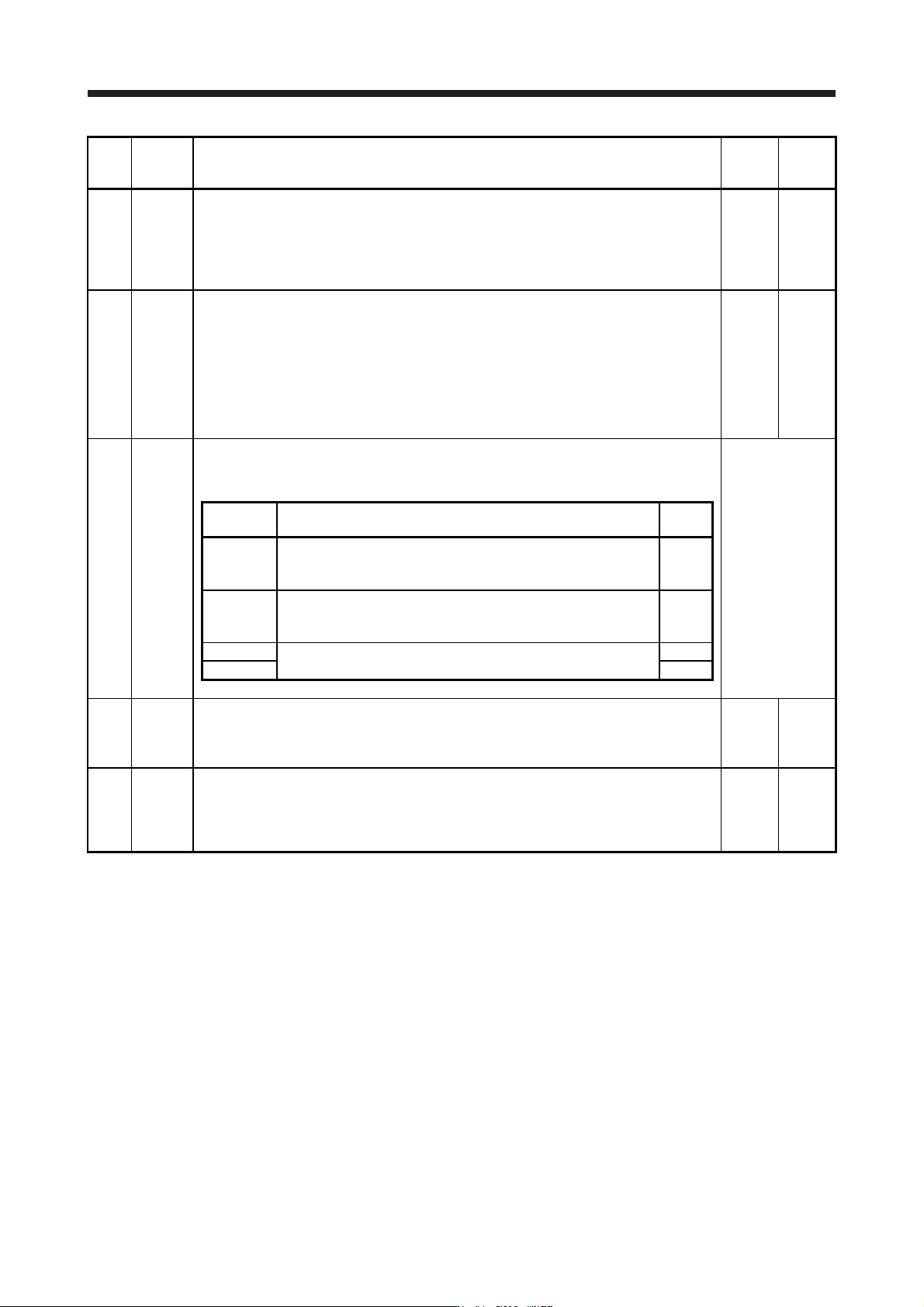
PE46 LMFLT Lost motion filter setting
Set the time constant of the lost motion compensation filter in increments of 0.1 ms.
If the time constant is "0", the torque is compensated with the value set in [Pr. PE44] and [Pr.
PE45]. If the time constant is other than "0", the torque is compensated with the high-pass
filter output value of the set time constant, and the lost motion compensation will continue.
This parameter is supported with software version B4 or later.
0
[0.1 ms]
0
to
30000
PE47 TOF Torque offset
Set this when canceling unbalanced torque of vertical axis. Set this assuming the rated torque
of the servo motor as 100%.
The torque offset does not need to be set for a machine not generating unbalanced torque.
The torque offset cannot be used for linear servo motors and direct drive motors. Set 0.00%.
The torque offset set with this parameter will be enabled in the position control mode, speed
control mode, and torque control mode. Input commands assuming torque offset for the
torque control mode.
This parameter is supported with software version B4 or later.
0
[0.01%]
-10000
to
10000
PE48 *LMOP Lost motion compensation function selection
Select the lost motion compensation function.
This parameter is supported with software version B4 or later.
Refer to the
"Name and
function" column.
Setting
value
Explanation
Initial
value
_ _ _ x Lost motion compensation selection
0: Disabled
1: Enabled
0h
_ _ x _ Unit setting of lost motion compensation non-sensitive band
0: 1 pulse unit
1: 1 kpulse unit
0h
_ x _ _ For manufacturer setting 0h
x _ _ _ 0h
PE49 LMCD Lost motion compensation timing
Set the lost motion compensation timing in increments of 0.1 ms.
You can delay the timing to perform the lost motion compensation for the set time.
This parameter is supported with software version B4 or later.
0
[0.1 ms]
0
to
30000
PE50 LMCT Lost motion compensation non-sensitive band
Set the lost motion compensation non-sensitive band. When the fluctuation of the droop pulse
is the setting value or less, the speed will be 0. Setting can be changed in [Pr. PE48]. Set the
parameter per encoder unit.
This parameter is supported with software version B4 or later.
0
[pulse]/
[kpulse]
0
to
65535
5. PARAMETERS
5 - 51
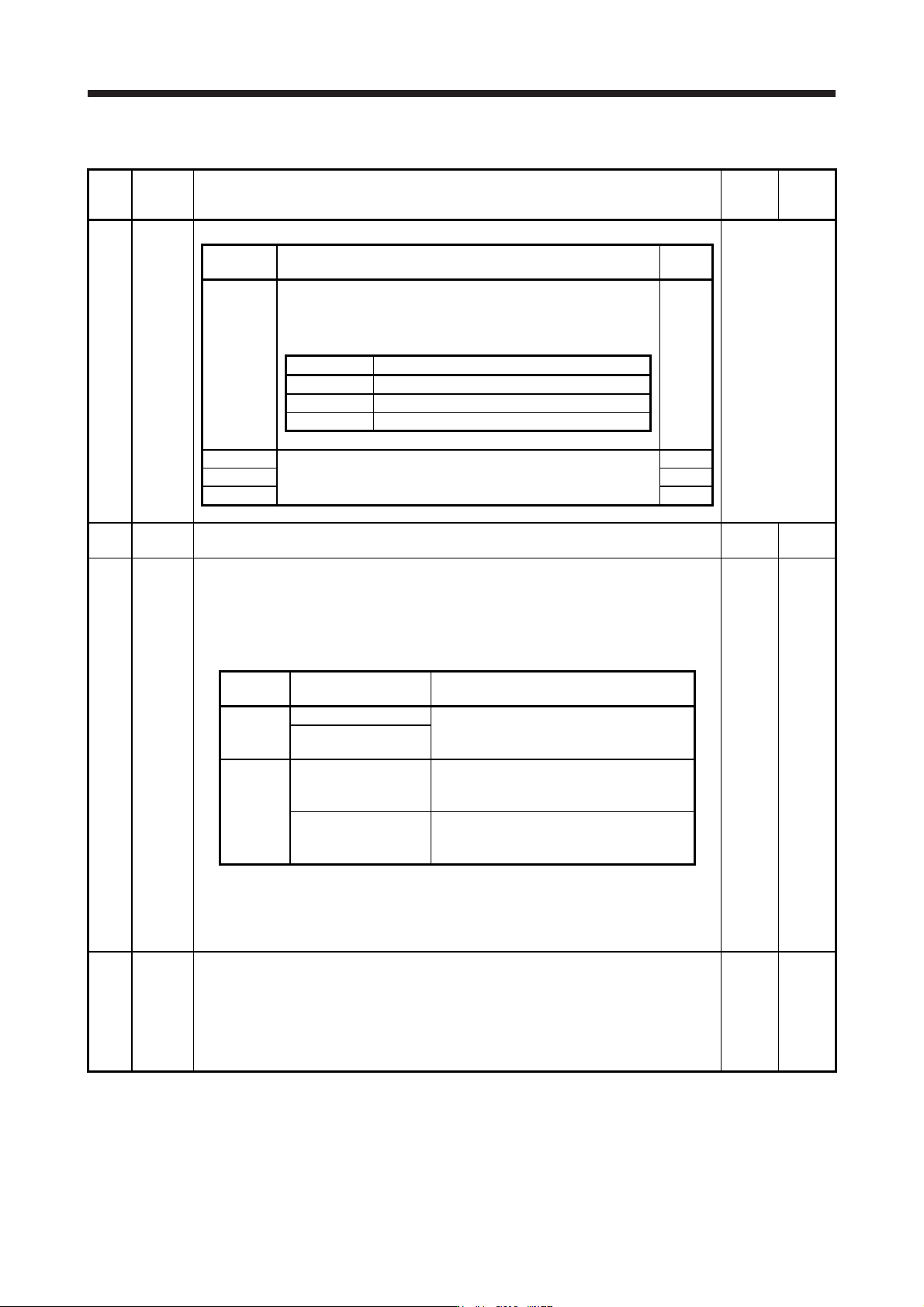
5.2.6 Extension setting 3 parameters ([Pr. PF_ _ ])
No. Symbol Name and function
Initial
value
[unit]
Setting
range
PF06 *FOP5 Function selection F-5
Refer to the
"Name and
function" column.
Setting
digit
Explanation
Initial
value
_ _ _ x Electronic dynamic brake selection
0: Automatic (enabled only for specified servo motors)
2: Disabled
Refer to the following table for the specified servo motors.
0h
Series Servo motor
HG-KR HG-KR053/HG-KR13/HG-KR23/HG-KR43
HG-MR HG-MR053/HG-MR13/HG-MR23/HG-MR43
HG-SR HG-SR51/HG-SR52
_ _ x _ For manufacturer setting 0h
_ x _ _ 0h
x _ _ _ 0h
PF12 DBT Electronic dynamic brake operating time
Set an operating time for the electronic dynamic brake.
2000
[ms]
0 to
10000
PF18 **STOD STO diagnosis error detection time
Set the time from when an error occurs in the STO input signal or STO circuit until the
detection of [AL. 68.1 Mismatched STO signal error].
When 0 s is set, the detection of [AL. 68.1 Mismatched STO signal error] is not performed.
The following shows safety levels at the time of parameter setting.
0
[s]
0
to
60
Setting
value
STO input diagnosis by
TOFB output
Safety level
0
Execute EN ISO 13849-1:2015 Category 3 PL d,
IEC 61508 SIL 2,
EN IEC 62061 maximum SIL 2
Not execute
1 to 60
Execute
EN ISO 13849-1:2015 Category 3 PL e,
IEC 61508 SIL 3,
EN IEC 62061 maximum SIL 3
Not execute
EN ISO 13849-1:2015 Category 3 PL d,
IEC 61508 SIL 2,
EN IEC 62061 maximum SIL 2
When the short-circuit connector is connected to the CN8 connector, set "0" in the parameter.
When MR-D30 functional safety unit is used, the parameter is not available.
For safety levels at the time of using MR-D30, refer to "MR-D30 Instruction Manual".
This parameter is available with servo amplifiers with software version C1 or later.
PF21 DRT Drive recorder switching time setting
This is used to set a drive recorder switching time.
When a USB communication is cut during using a graph function, the function will be changed
to the drive recorder function after the setting time of this parameter.
When a value from "1" to "32767" is set, it will switch after the setting value.
However, when "0" is set, it will switch after 600 s.
When "-1" is set, the drive recorder function is disabled.
0
[s]
-1 to
32767