sh030106u.pdf - 第188页
5. PARAMETE RS 5 - 43 No. Sym bol Name and function Initial value [unit] Setting range PD07 *DO1 Output device selection 1 You can ass ign any output dev ice to the CN3-13 pi n. MBR (Elect r omagnetic brake interlock ) i…
5. PARAMETERS
5 - 42
No. Symbol Name and function
Initial
value
[unit]
Setting
range
PC38 ERW Error excessive warning level
Set an error excessive warning level.
To enable the parameter, select "Enabled (1 _ _ _)" of "[AL. 9B Error excessive warning]
selection" in [Pr. PC05].
You can change the setting unit with "Error excessive alarm/error excessive warning level unit
selection" in [Pr. PC06].
Set this per rev. for rotary servo motors and direct drive motors. Setting "0" will be "1 rev", and
setting over 200 rev will be clamped with 200 rev. Set this per mm for linear servo motors.
Setting "0" will be 50 mm.
When an error reaches the set value, [AL. 9B Error excessive warning] will occur. When the
error decreases lower than the set value, the warning will be canceled automatically. The
minimum pulse width of the warning signal is 100 [ms].
Set as follows.: [Pr. PC38 Error excessive warning level] < [Pr. PC01 Error excessive alarm
level] When you set as follows, [AL. 52 Error excessive] will occur earlier than the warning.:
[Pr. PC38 Error excessive warning level] ≥ [Pr. PC01 Error excessive alarm level]
This parameter is used by servo amplifier with software version B4 or later.
0
[rev]/
[mm]
0
to
1000
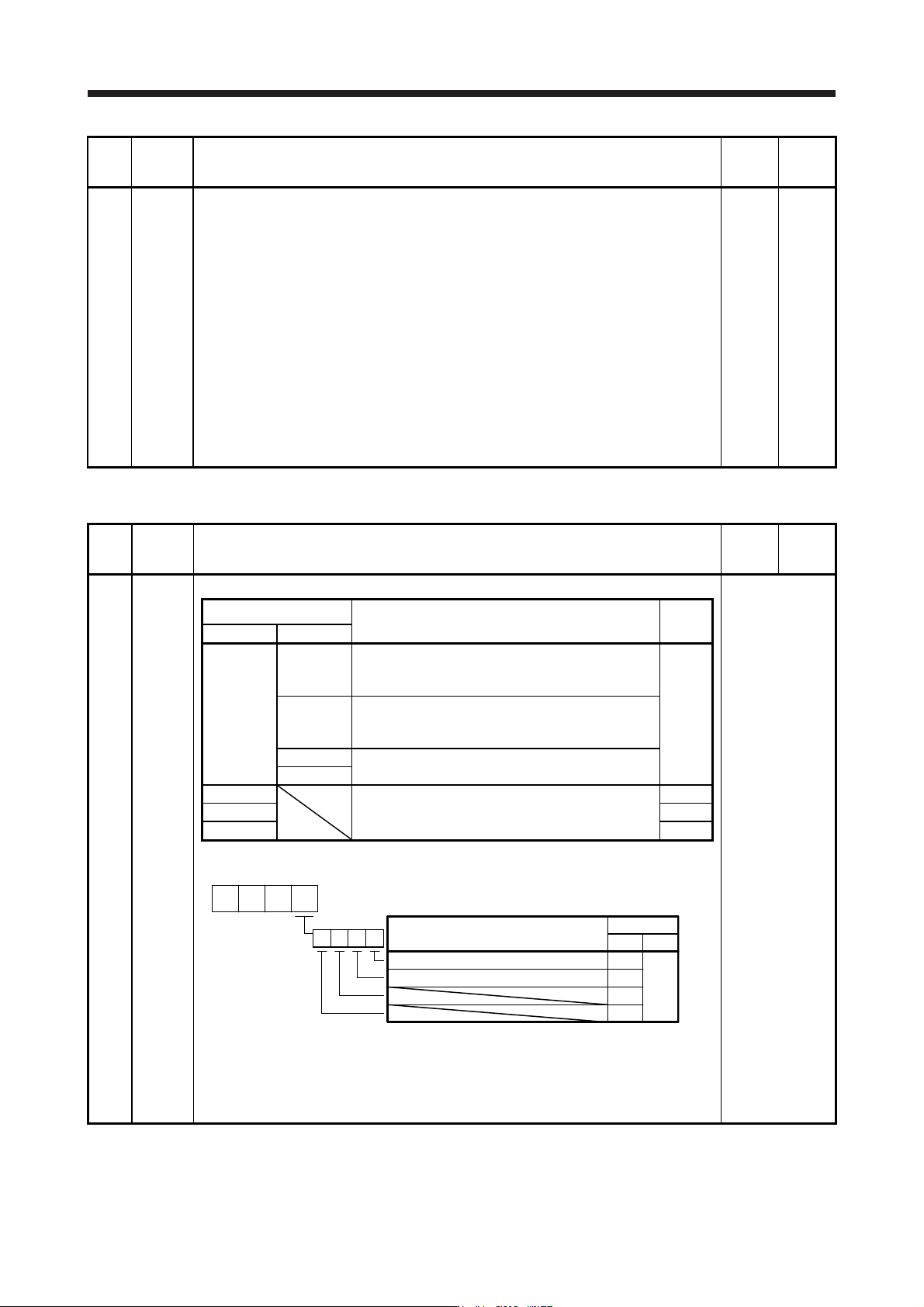
5.2.4 I/O setting parameters ([Pr. PD_ _ ])
No. Symbol Name and function
Initial
value
[unit]
Setting
range
PD02 *DIA2 Input signal automatic on selection 2
Refer to the
"Name and
function" column.
Setting digit
Explanation
Initial
value
HEX. BIN.
_ _ _ x _ _ _ x FLS (Upper stroke limit) selection
0: Disabled
1: Enabled
0h
_ _ x _ RLS (Lower stroke limit) selection
0: Disabled
1: Enabled
_ x _ _ For manufacturer setting
x _ _ _
_ _ x _ For manufacturer setting 0h
_ x _ _ 0h
x _ _ _ 0h
Convert the setting value into hexadecimal as follows.
0
BIN 0: Use for an external input signal.
BIN 1: Automatic on
Initial value
BIN HEX
Signal name
0
0
000
0
0
FLS (Upper stroke limit) selection
RLS (Lower stroke limit) selection
When performing a magnetic pole detection without using FLS (Upper stroke limit) and RLS
(Lower stroke limit), you can disable FLS and RLS by setting [Pr. PL08 Linear servo motor/DD
motor function selection 3] to "_ 1 _ _".
5. PARAMETERS
5 - 43
No. Symbol Name and function
Initial
value
[unit]
Setting
range
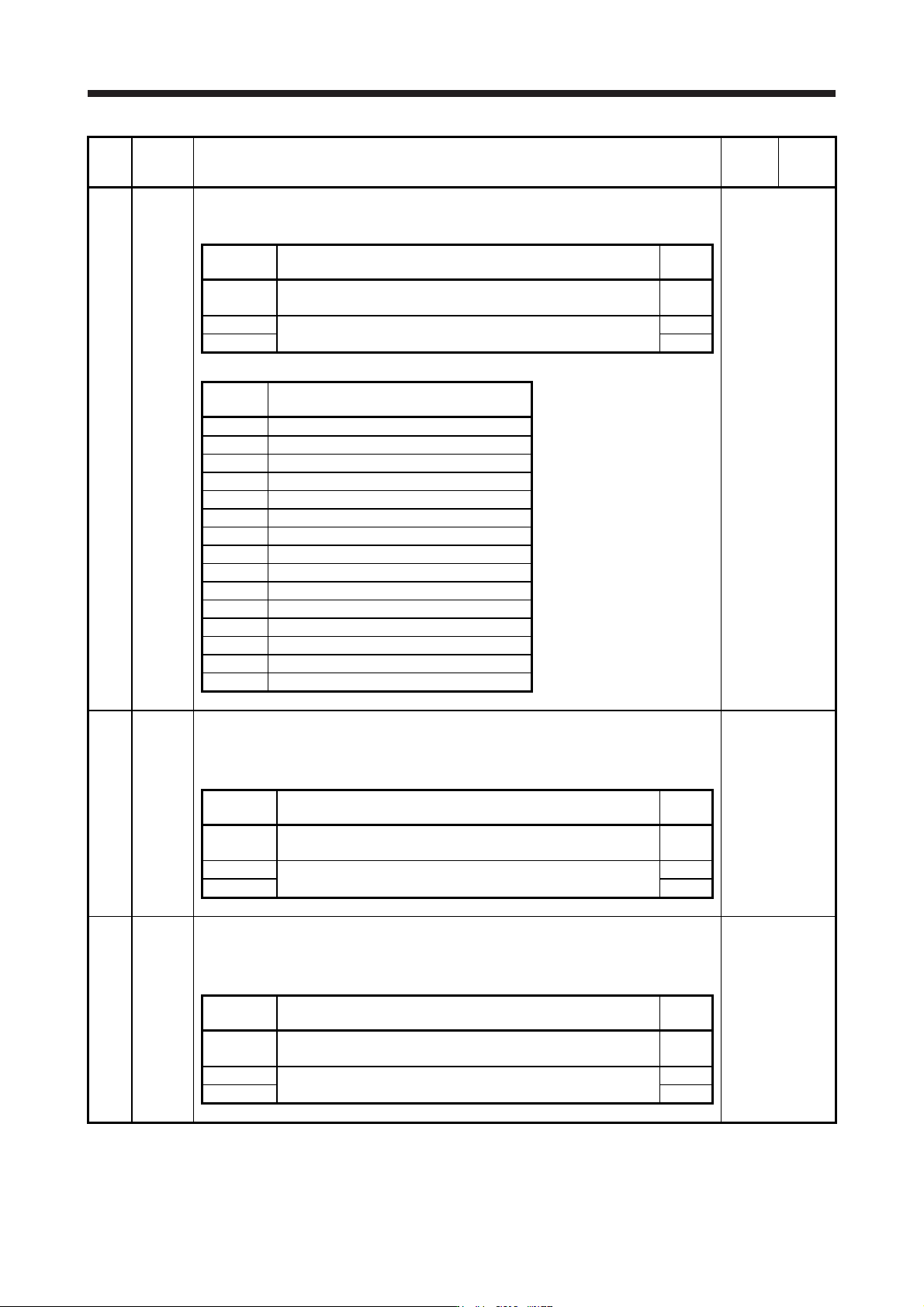
PD07 *DO1 Output device selection 1
You can assign any output device to the CN3-13 pin. MBR (Electromagnetic brake interlock)
is assigned as the initial value.
Refer to the
"Name and
function" column.
Setting
digit
Explanation
Initial
value
_ _ x x Device selection
Refer to table 5.8 for settings.
05h
_ x _ _ For manufacturer setting 0h
x _ _ _ 0h
Table 5.8 Selectable output devices
Setting
value
Output device
_ _ 0 0 Always off
_ _ 0 2 RD (Ready)
_ _ 0 3 ALM (Malfunction)
_ _ 0 4 INP (In-position)
_ _ 0 5 MBR (Electromagnetic brake interlock)
_ _ 0 6 DB (Dynamic brake interlock)
_ _ 0 7 TLC (Limiting torque)
_ _ 0 8 WNG (Warning)
_ _ 0 9 BWNG (Battery warning)
_ _ 0 A SA (Speed reached)
_ _ 0 C ZSP (Zero speed detection)
_ _ 0 F CDPS (Variable gain selection)
_ _ 1 0 CLDS (During fully closed loop control)
_ _ 1 1 ABSV (Absolute position undetermined)
_ _ 1 7 MTTR (During tough drive)
PD08 *DO2 Output device selection 2
You can assign any output device to the CN3-9 pin. INP (In-position) is assigned as the initial
value.
The devices that can be assigned and the setting method are the same as in [Pr. PD07].
Refer to the
"Name and
function" column.
Setting
digit
Explanation
Initial
value
_ _ x x Device selection
Refer to table 5.8 in [Pr. PD07] for settings.
04h
_ x _ _ For manufacturer setting 0h
x _ _ _ 0h
PD09 *DO3 Output device selection 3
You can assign any output device to the CN3-15 pin. ALM (Malfunction) is assigned as the
initial value.
The devices that can be assigned and the setting method are the same as in [Pr. PD07].
Refer to the
"Name and
function" column.
Setting
digit
Explanation
Initial
value
_ _ x x Device selection
Refer to table 5.8 in [Pr. PD07] for settings.
03h
_ x _ _ For manufacturer setting 0h
x _ _ _ 0h
5. PARAMETERS
5 - 44
No. Symbol Name and function
Initial
value
[unit]
Setting
range
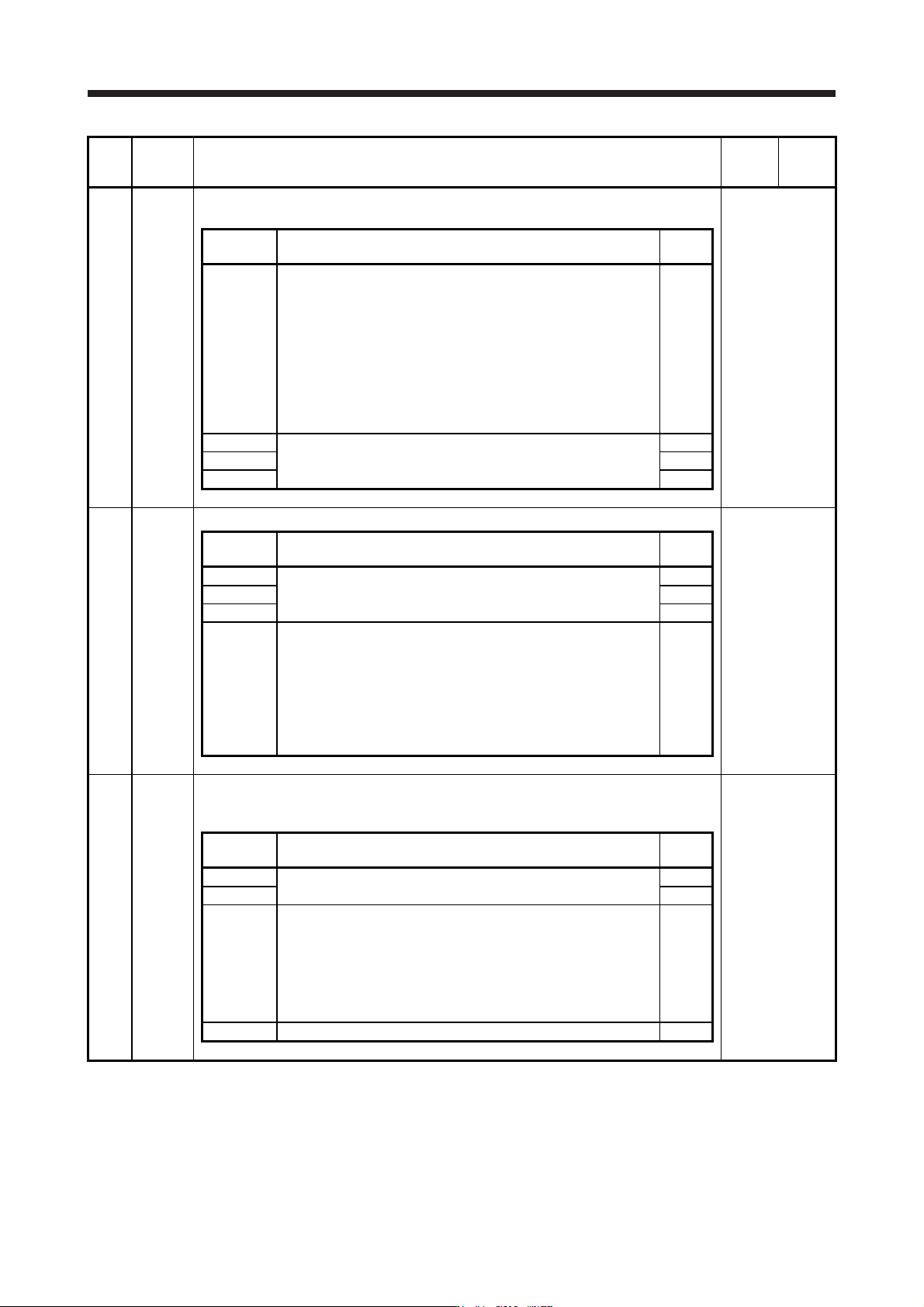
PD11 *DIF Input filter setting
Select the input filter.
Refer to the
"Name and
function" column.
Setting
digit
Explanation
Initial
value
_ _ _ x Input signal filter selection
Refer to the servo system controller instruction manual for the
setting.
If external input signal causes chattering due to noise, etc., input
filter is used to suppress it.
0: None
1: 0.888 [ms]
2: 1.777 [ms]
3: 2.666 [ms]
4: 3.555 [ms]
4h
_ _ x _ For manufacturer setting 0h
_ x _ _ 0h
x _ _ _ 0h
PD12 *DOP1 Function selection D-1
Refer to the
"Name and
function" column.
Setting
digit
Explanation
Initial
value
_ _ _ x For manufacturer setting 0h
_ _ x _ 0h
_ x _ _ 0h
x _ _ _
Servo motor or linear servo motor thermistor enabled/disabled
selection
0: Enabled
1: Disabled
For servo motors or linear servo motor without thermistor, the
setting will be disabled.
This parameter setting is used with servo amplifier with software
version A5 or later.
0h
PD13 *DOP2 Function selection D-2
Select the INP (In-position) on condition.
This parameter is supported with software version B4 or later.
Refer to the
"Name and
function" column.
Setting
digit
Explanation
Initial
value
_ _ _ x For manufacturer setting 0h
_ _ x _ 0h
_ x _ _ INP (In-position) on condition selection
Select a condition that INP (In-position) is turned on.
0: Droop pulses are within the in-position range.
1: The command pulse frequency is 0, and droop pulses are within
the in-position range.
When the position command is not inputted for about 1 ms, the
command pulse frequency is decided as 0.
0h
x _ _ _ For manufacturer setting 0h