sh030106u.pdf - 第388页
11. OPT ION S AND P ERI PHER AL EQU IPMENT 11 - 67 (a) Ass embling a batter y unit CAUTION Do not mount new and old batteries to gether. When you r eplac e a batt ery, repl ace all batteries at the same t ime. POINT Alwa…
11. OPTIONS AND PERIPHERAL EQUIPMENT
11 - 66
(4) Battery replacement procedure
WARNING
Before replacing a battery, turn off the main circuit power and wait for 15 minutes
or longer until the charge lamp turns off. Then, check the voltage between P+ and
N- with a voltage tester or others. Otherwise, an electric shock may occur. In
addition, when confirming whether the charge lamp is off or not, always confirm it
from the front of the servo amplifier.
CAUTION
The internal circuits of the servo amplifier may be damaged by static electricity.
Always take the following precautions.
Ground human body and work bench.
Do not touch the conductive areas, such as connector pins and electrical parts,
directly by hand.
POINT
Replacing battery with the control circuit power off will erase the absolute
position data.
Before replacing batteries, check that the new battery is within battery life.
Replace the battery while only control circuit power is on. Replacing battery with the control circuit power
on triggers [AL. 9F.1 Low battery]. However, the absolute position data will not be erased.
11. OPTIONS AND PERIPHERAL EQUIPMENT
11 - 67
(a) Assembling a battery unit
CAUTION
Do not mount new and old batteries together.
When you replace a battery, replace all batteries at the same time.
POINT
Always install five MR-BAT6V1 batteries to an MR-BT6VCASE battery case.
1) Required items
Product name Model
Quantity
Remark
Battery case MR-BT6VCASE 1
MR-BT6VCASE is a case used for connecting and
mounting five MR-BAT6V1 batteries.
Battery MR-BAT6V1 5 Lithium battery (primary battery, nominal + 6 V)
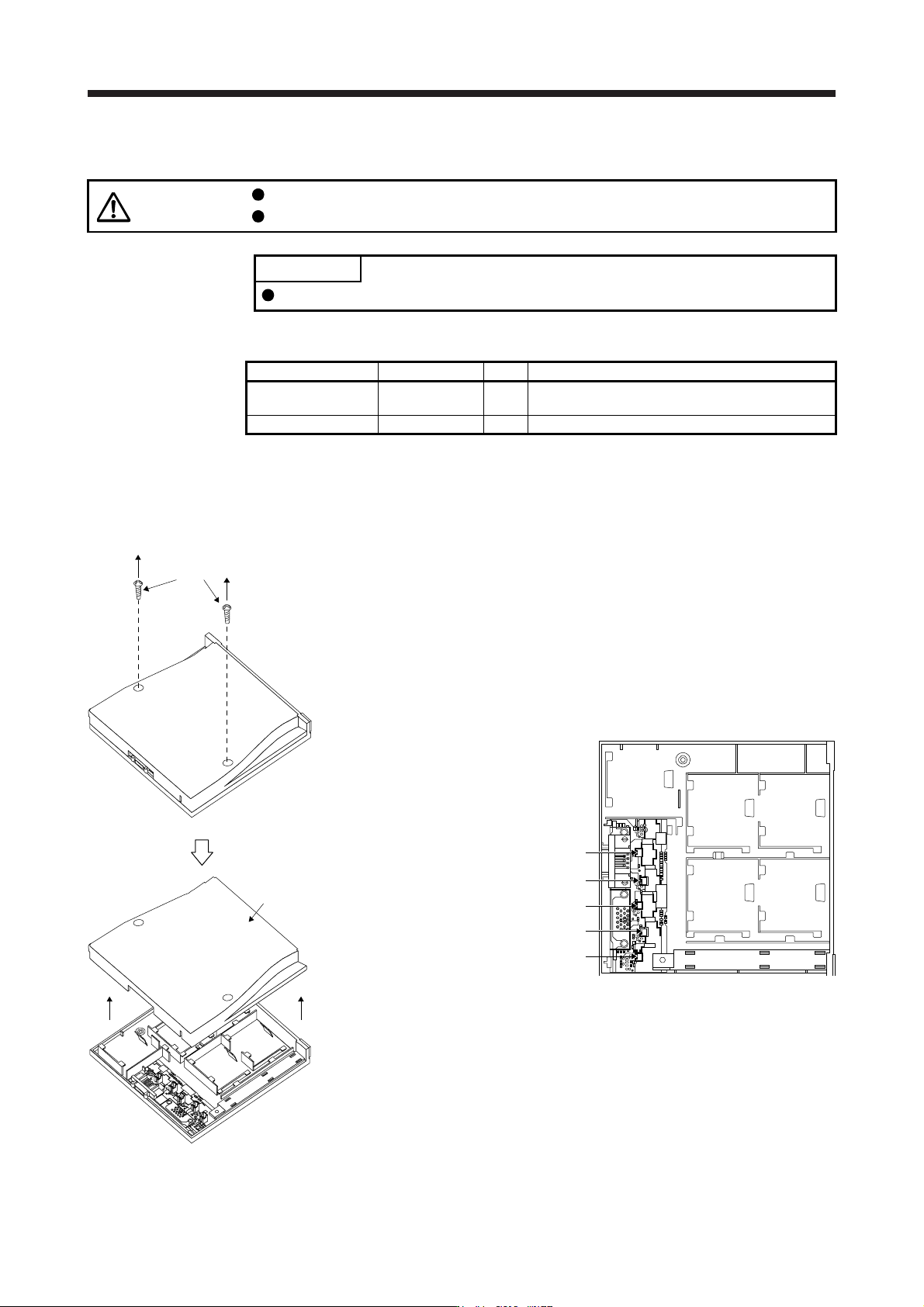
2) Disassembly and assembly of the battery case MR-BT6VCASE
a) Disassembly of the case
MR-BT6VCASE is shipped assembled. To mount MR-BAT6V1 batteries, the case needs to be
disassembled.
Threads
Remove the two screws using a
Phillips screwdriver.
CON2
CON3
CON1
CON4
CON5
Parts identification
BAT1
BAT2 BAT3
BAT4 BAT5
Cover
Remove the cover.
11. OPTIONS AND PERIPHERAL EQUIPMENT
11 - 68
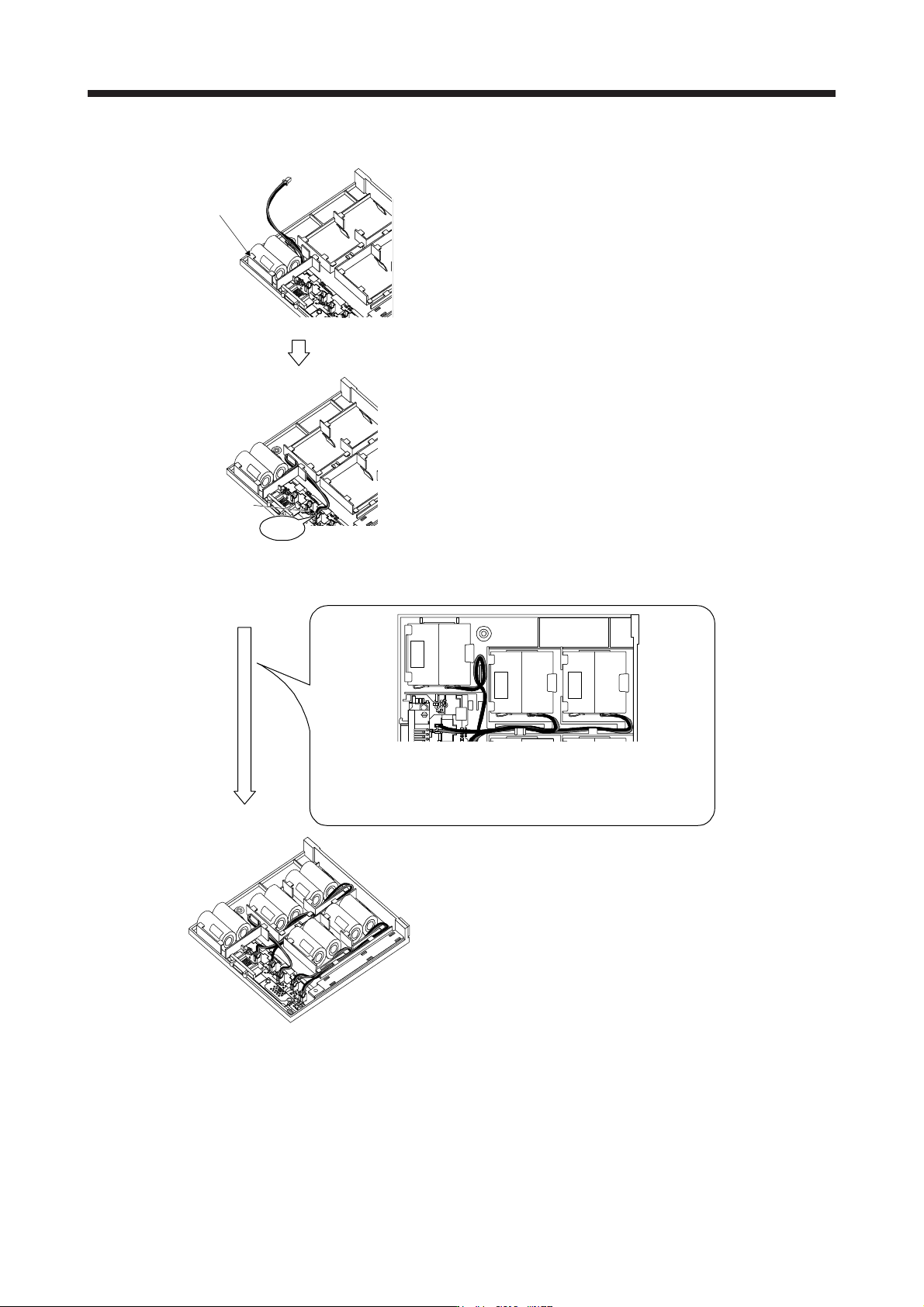
b) Mounting MR-BAT6V1
BAT1
Securely mount a MR-BAT6V1 to the BAT1 holder.
CON1
Click
Insert the MR-BAT6V1 connector mounted on BAT1
holder to CON1.
Confirm the click sound at this point.
The connector has to be connected in the right direction.
If the connector is pushed forcefully in the incorrect
direction, the connector will break.
Place the MR-BAT6V1 lead wire to the duct designed to
store lead wires.
Insert MR-BAT6V1 to the holder in the same procedure in
the order from BAT2 to BAT5.
Bring out the lead wire from the space between the ribs, and bend it as
shown above to store it in the duct. Connect the lead wire to the
connector. Be careful not to get the lead wire caught in the case or
other parts.
When the lead wire is damaged, external short circuit may occur, and
the battery can become hot.