天龙M10 M20_中文手册.pdf - 第481页
16.点胶机 16-1 16 点胶机 螺杆式点胶机

3132
%s Setup error Place %m in Pallet %d2 of Magazine Rack
Tray component setup error Set up the proper tray
3113
The PCB on the conveyor may not be reloaded. Remove the
PCB.
At the start of production, the PCB was detected at an
improper position to reload. Remove the PCB and Restart
the
p
roduction.
3114
Adjusted offset Values of Dispense Nozzle Head:%c1
An
g
le:%d2 X:%d3 Y:%d4 T:%d5
3115
Height of the Quick Clamp is not proper. Checked %v1
Set Hei
g
ht %v2
Check the Quick Clamp motion. Check that no obstacles
between the
Q
uick Clam
p
and the conve
y
or.
3116
Differences of check results of Laser1 and Laser2
exceed the tolerance. 1st:%v1 2nd:%v2 Tolerance:%v3
Check the lasers installation status.
3117
The Reject Conveyor %c2-%d3 in Pickup Data No. %d6 is
full or not installed.
Remove components and press the RESET button. Or
install the Re
j
ect Conve
y
or at the
p
ro
p
er station.
3118
The conveyor width was changed after Push up pins were
located. Located %v1mm, Current %v2mm, Tolerance +/-
%v3mm
Collect the Pushup Pins manually.
3119
Push-up pin location is the same as the last time. The
p
rocess has been ski
pp
ed.
3120
No feeder in the pickup data is not mounted. The total
feeder number is %d2.
3121
%s-%d1 Feeder is not mounted on the Station. %m
3122
%s A pallet exits in the stocker. Pallet-%d1
The stocker is for the pallet at the pickup position
now. Remove the
p
allet.
3123
%s The tray cannot move to the pickup point while trays
are in setup mode. To cancel the mode, press SETUP
switch.
Press SETUP switch to allow CTF to supply components.
3124
%s The pallet pickup position exceeds the tolerance. Move the pallet into the stocker.
3125
%c3 head is selected for %c2 row. Head%c1
Actual head configuration and HEAD/ANC Setup info in
the s
y
stem
p
arameter must be the same.
3126
Height Check OK %m %d2th row Result:%v3 Tolerance:%v4
Head%c1
3127
An error occurred while Quick Clamp is moving.
Check no components are bitten. Check the cylinder
motion.
3128
An error occurred while Push-up Plate is moving. Check the cylinder motion.
3129
Parameter has been changed. Restart the machine to
o
p
erate.
Shut down the machine once.
3131
CTF type is duplicated. %s Type-%m Use a different type of CTF.
3132
%s Setup error. Place %m in Pallet %d2 of Magazine Rack
.
%d1.
Tray component setup error. Set up the proper tray
.
com
p
onent in the ma
g
azine rack.
3133
%s Setup error. Place %m in Pallet %d2 of Magazine Rack
%d1.
Tray component setup error. Set up the proper tray
com
p
onent in the ma
g
azine rack.
3134
%s Support Bar of Magazine Rack %d1 is closed. Open the support bar of the magazine rack.
3135
%s Support Bar of Magazine Rack %d1 is closed. Open the support bar of the magazine rack.
3136
An error occurred while %s servo system was operating. Check the CTF status.
3137
An error occurred while the pallet is moving into %s. Check the CTF status.
3138
%s Error occurred during operation. (%e) Check the CTF status.
3139
%s cover lock timeout Check the CTF status.
3140
%s cover lock timeout Check the CTF status.
3141
%s cover is open. Check the CTF status.
3142
%s cover is open. Check the CTF status.
3143
%s Component shortage (Magazine Rack %d2, Pallet %d3) Replenish the components.
3144
Components are running out. %s (Magazine Rack %d2,
Pallet %d3
)
Remain count: %d4
The number of reing components reached "Shortage Alarm"
entered in the
p
icku
p
data.
3145
%s Pallet is found in the magazine. Magaine Rack %d1,
Pallet %d2
Remove the pallet. The pallet currently at the supply
area will be movin
g
back to this
p
lace.
3146
%s Pallet is found in the magazine. Magazine Rack %d2,
Pallet %d3
Check the CTF status.
3147
%s No pallet in the magazine. Magazine Rack %d2, Pallet
%d3
Check the CTF status.
3149
%s Replace the Magazine Rack %d1. 请进行供给元件。
3165
Safety protection system worked on %s.
Press CLEAR switch to stop the alarm. If the problem
cannot be cleared
,
contact us.

16.点胶机
16-1
16 点胶机
螺杆式点胶机
16.点胶机
16-2
螺杆式点胶机
下面,针对安装螺杆式点胶头(选购品)时的数据制作及操作步骤进行说明。
【注释】 只有“高精度型 4 轴贴装头”才能够安装螺杆式点胶头。
【注释】 安装螺杆式点胶头的优先顺序为贴装头 4→3→2→1。
例如,当需要安装 1 个螺杆式点胶头时,将在贴装头 4 上进行安装。
另外,当需要安装 2 个螺杆式点胶头时,则在贴装头 4 和贴装头 3 上进行安装。
数据制作
下面,针对贴装&标识符(程序)、点胶数据、胶料管数据、点胶针数据的制作方法
进行说明。
贴装&标识符(程序)
【菜单】 贴装&标识符(程序)
【操作】
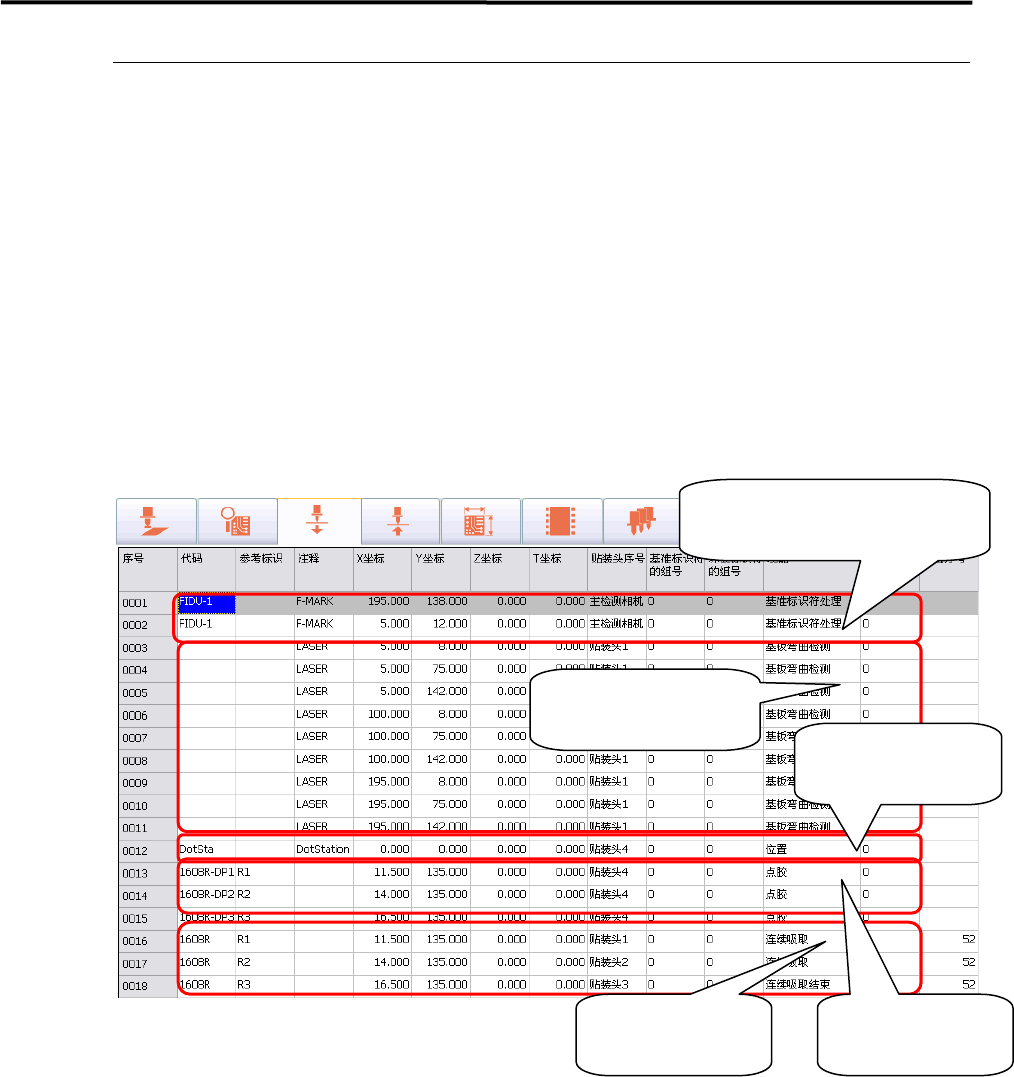
① 在制作贴装&标识符(程序)之前,先制作基准标识符处理的步骤。
② 制作完基准标识符的处理步骤之后,制作基板弯曲激光检测的步骤。
【注释】 在使用螺杆式点胶头时,在点胶之前,请务必实施基板弯曲的激光检测。
如果不实施基板弯曲的激光检测,点胶针可能会刺入基板,造成点胶针的破损。
①制作基准标识符处理
的步骤
②制作基板弯曲激光
检测的步骤
③制作测试点布站
的步骤
④制作向基板的
点胶步骤
⑤制作元件贴装
的步骤