3OM-1075-002.pdf - 第104页
*2 [Minimize] Button, [Maximize] Button, [Restore] Button, and [Close] Button [Minimize] Button ( ) Minimizing a window reduces the window to an icon. [Maximize] Button ( ) When a window is not at its maximum size, this …
: VIB STK UNIT
When pressed, this registers the vibratory stick feeder unit
to the currently selected "Fdr. No."
: HEAD1 SKIP DATA
When pressed, the current pattern program is changed to a
program for which only Head #2 can be used.
(a) The unchanged program name is used together
with _h1skip as a new program name.
Example: Unchanged Program Name_h1skip
(b) The S data is all changed to "-" and the HD data
to "2".
: HEAD2 SKIP DATA
When pressed, the current pattern program is changed to a
program for which only Head #1 can be used.
(a) The unchanged program name is used together
with _h2skip as a new program name.
Example: Unchanged Program Name_h2skip
(b) The S data is all changed to "-" and the HD data
to "1".
4.1 Basic Operations
0308-004 2-84 AHB01EDTP
*2 [Minimize] Button, [Maximize] Button, [Restore] Button, and
[Close] Button
[Minimize] Button (
)
Minimizing a window reduces the window to an icon.
[Maximize] Button (
)
When a window is not at its maximum size, this button appears in
the window’s upper-right corner.
When pressed, this enlarges the edit window to its maximum size.
[Restore] Button (
)
When a window is already at its maximum size, the [Maximize] but-
ton switches to the [Restore] button, which returns the window to its
previous size.
[Close] Button (
)
When pressed, this closes the active window.
*3 Tab Sheets
The provided tab sheets enable the operator to edit the pattern pro-
gram.
When the size and/or the position of an edit window is changed, the
size and/or the position of each tab sheet also changes.
When an item is selected and the right button of the pointing
device is pressed, a menu opens and it contains a collec-
tion of commands that will be frequently used.
*4 Drop-Down List
When you double-click a text box, the text box is changed to a combo
box that has a down arrow on the right side.
When you click the down arrow, a drop-down list box opens.
A scrollbar might appear on the right side of a drop-down list
when there are many options.
*5 Scrollbars
When the up arrow (
) is pressed, the window scrolls up.
When the down arrow (
) is pressed, the window scrolls down.
When the left arrow (
) is pressed, the window scrolls left.
When the right arrow (
) is pressed, the window scrolls right.
0206-002 2-85
AHB01EDTP
4.1 Basic Operations
4.1.3 Basic Usage of Text Boxes
••
••
• How to enter numerical values
Follow the procedure below to enter numerical values in the text boxes
that require numerical values.
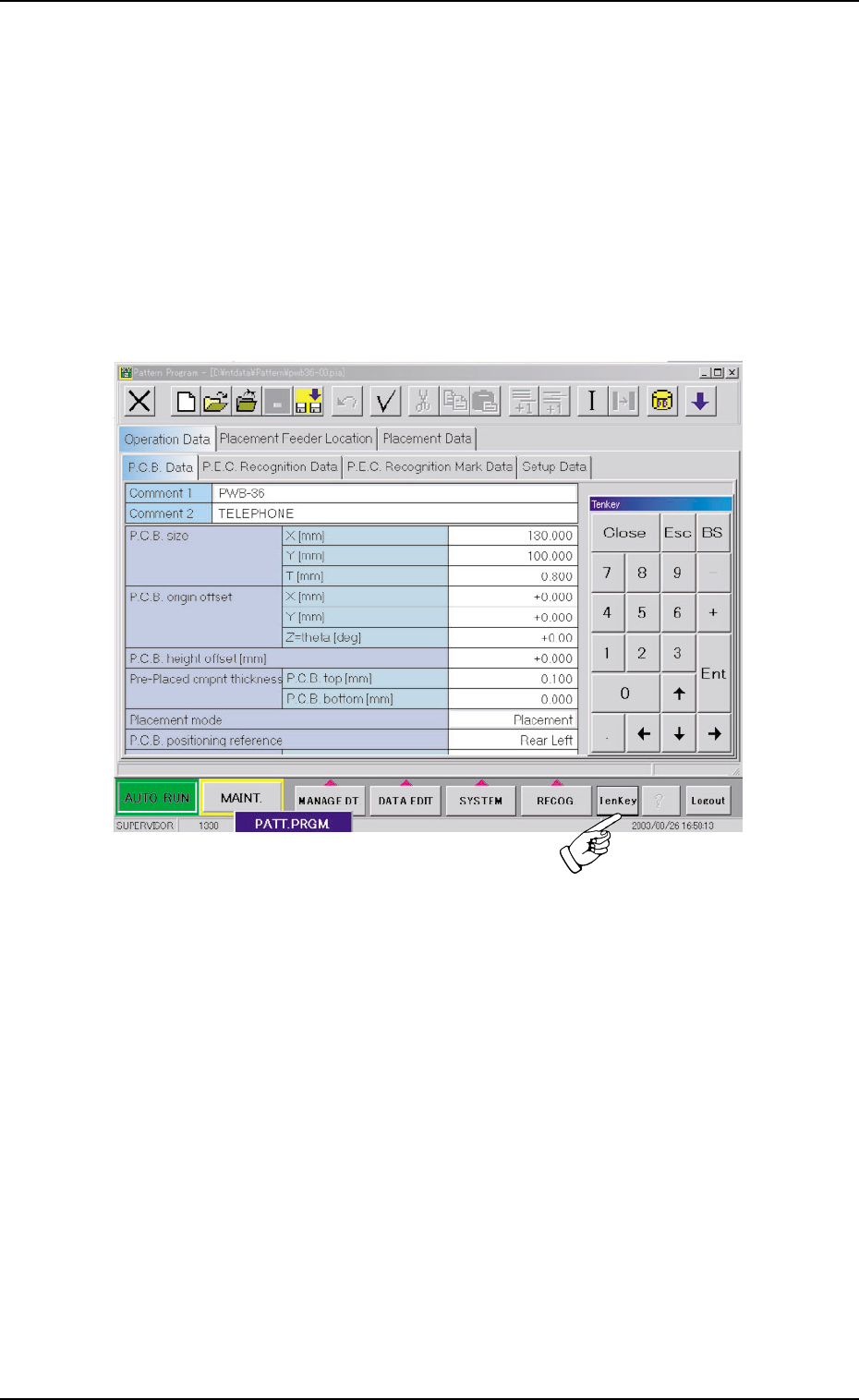
Using the "Tenkey" pad
(1) Press the [TenKey] button on the main menu bar.
The "Tenkey" window appears.
Fig. 3B143
4.1 Basic Operations
0308-004 2-86 AHB01EDTP