3OM-1075-002.pdf - 第299页
0206-002 5-67 AHB01EDTP 2.2 "Auto Operation" T ab (X) adjustment [%] Select the feedback coefficient of the mean of the X-direction deviation. Select "10", "20", "30", "40&quo…
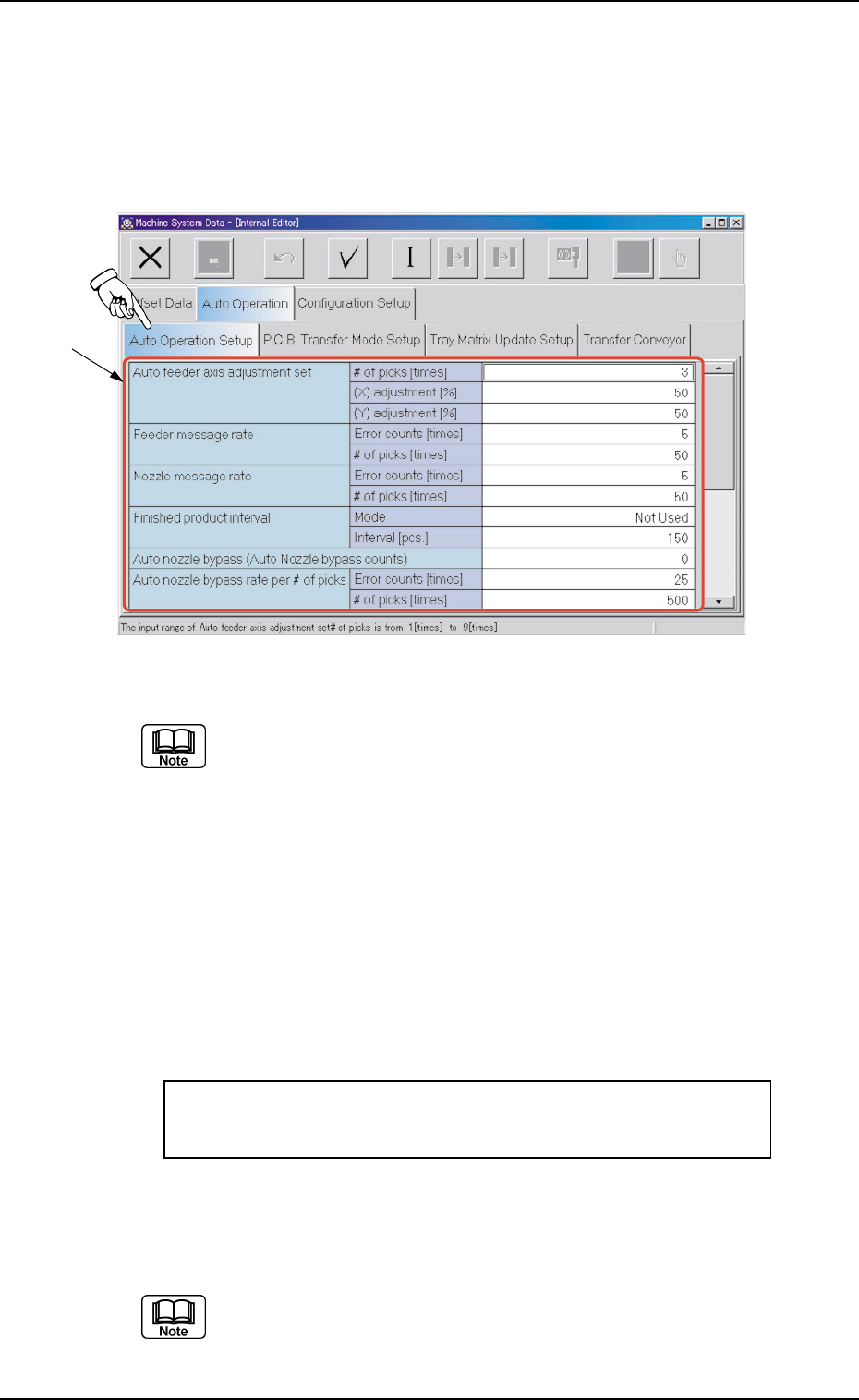
2.2.1 "Auto Operation Setup" Tab
••
••
• Sheet Layout
When the "Auto Operation Setup" tab is pressed in the "Auto Operation"
tab sheet, the following tab sheet appears.
Fig. 3E64 "Auto Operation Setup" Tab Sheet (Provided with Multi-Layer Tray Feeder 2)
The tab sheet may look different, depending on which options are
selected.
••
••
• Sheet Composition
*1 Items
The following items are displayed.
Auto feeder axis adjustment set
# of picks [times], (X) adjustment [%], (Y) adjustment [%]
Set the sensitivity parameters which follow up the data learned
by using the statistical method in the feeder (B) offset data.
New Feeder (B) Offset = Old Feeder (B) Offset +
(Mean Value of "n" Times (Deviation)) * Coefficient
# of picks [times]
Set the total number of collected samples when data is up-
dated or changed.
(a) The data input range is "1 to 9".
(b) The standard value is "3".
0308-003 5-66
AHB01EDTP
2.2 "Auto Operation" Tab
*1
0206-002 5-67 AHB01EDTP
2.2 "Auto Operation" Tab
(X) adjustment [%]
Select the feedback coefficient of the mean of the X-direction
deviation.
Select "10", "20", "30", "40", "50", "60", "70", "80", "90", or "Full".
The standard value is "50%".
(Y) adjustment [%]
Select the feedback coefficient of the mean of the Y-direction
deviation.
Select "10", "20", "30", "40", "50", "60", "70", "80", "90", or "Full".
The standard value is "50%".
Feeder message rate
Error counts [times], # of picks [times]
(Not Available)
Set the parameters to show the feeder slot No. (Fdr. No.) of the
tape feeder whose pickup rate has deteriorated during automatic
operation.
When the number of picks has reached the specified value, the
parameter in the "Error counts [times]" text box is cleared.
When the number of pickup errors has reached the specified
error counts before the number of picks reaches the specified
number of picks, a warning message is issued as machine infor-
mation.
(a) The number of picks and pick-up errors is managed for
each individual feeders but the parameters of "Error counts
[times]" and "# of picks [times]" is equally reflected on ev-
ery feeder.
(b) The data input range is "0 to 9999" (times) for both "Error
counts [times]" and "# of picks [times]"
(c) When both "Error counts [times]" and "# of picks [times]"
are set "0" (zero) or "Error counts [times]" is set to a num-
ber larger than "# of picks [times]", no warning message is
issued.

0206-002 5-68 AHB01EDTP
2.2 "Auto Operation" Tab
Nozzle message rate
Error counts [times], # of picks [times]
(Not Available)
Set the parameters to show the nozzle No. whose pickup rate
has deteriorated during automatic operation.
When the number of picks has reached the specified value, the
parameter in the "Error counts [times]" text box is cleared.
When the number of pickup errors has reached the specified
error counts before the number of picks reaches the specified
number of picks, a warning message is issued as machine infor-
mation.
(a) The number of picks and pick-up errors is managed for
each individual feeders but the parameters of "Error counts
[times]" and "# of picks [times]" is equally reflected on ev-
ery feeder.
(b) These parameters are not reflected on the automatic
nozzle bypass function. This is only for warning and guid-
ance.
(c) It is recommended that a comparatively short span be
specified.
(d) This function is provided to survey and avoid machine’s
malfunctions which may be caused during the start-up
operation of the machine.
(e) The data input range is "0 to 9999" (times) for both "Error
counts [times]" and "# of picks [times]"
(f) When both "Error counts [times]" and "# of picks [times]"
are set "0" (zero) or "Error counts [times]" is set to a num-
ber larger than "# of picks [times]", no warning message is
issued.
Finished product interval
Mode, Interval [pcs.]
(Not Available)
This is one of the progress information messages displayed as
machine information. When "Monitor" is set in the "Mode" text box,
the number of processed products can be monitored every time
the number of processed P.C.B.’s reaches the specified param-
eter in the "Interval [pcs.]" text box.
When "0" (zero) is set in the "Interval [pcs.]" text box, the num-
ber of processed products cannot be monitored.