3OM-1075-002.pdf - 第64页
2.4 Placement Feeder Location Data 0308-003 2-45 AHB01EDTP (B02_07) Position X [mm], Y [mm] Enter the distances between the reference position of the vibratory stick feeder unit and the pick-up position. Unit: mm Data In…
(B02_02) Component ID
Set component IDs in the text boxes.
(B02_03) C
Set control commands in the text boxes.
- (hyphen) : This command handles the steps as those for
the placement feeder location data.
E : This command shows the end of the placement feeder
location data.
The step where "E" is set is valid.
S:This command invalidates the steps specified as place-
ment feeder location data.
X:This command invalidates the steps specified as place-
ment feeder location data and shows the end of the data.
(B02_04) Comment
A comment can be entered for each feeder No. (Fdr. No.).
Up to 32 characters (alphanumerics and marks) can be
used.
(a) The performance of the machine is not affected by these
commands. In other words, it has nothing to do with or
without these comments.
(b) It is recommended to set helpful information on comments
related to the feeder Nos. (Fdr. Nos.).
(B02_05) Feeder Alternate
Select "Enable" or "Disable" to determine whether or not the
feeder alternate function should be used.
Disable : The feeder alternate function is not used.
Enable : The feeder alternate function is used.
(B02_06) Fdr No.
When "Enable" is selected for the feeder alternate function,
set the destination feeder No. (Fdr No.) of the feeder that will
work in place of the feeder where a component pick-up er-
ror has occurred in succession.
2.4 Placement Feeder Location Data
0308-003 2-44 AHB01EDTP
Fig. 3B81
Comment
Fig. 3B80
C
-
Fig. 3B79
Component ID.
C1005T05B0---
Fig. 3B82
Feeder Alternate
Disable
If a control command other than the following ones is
used, the step becomes invalid.
CAUTION
Fig. 3B83
Fdr No.
000 (000)
2.4 Placement Feeder Location Data
0308-003 2-45 AHB01EDTP
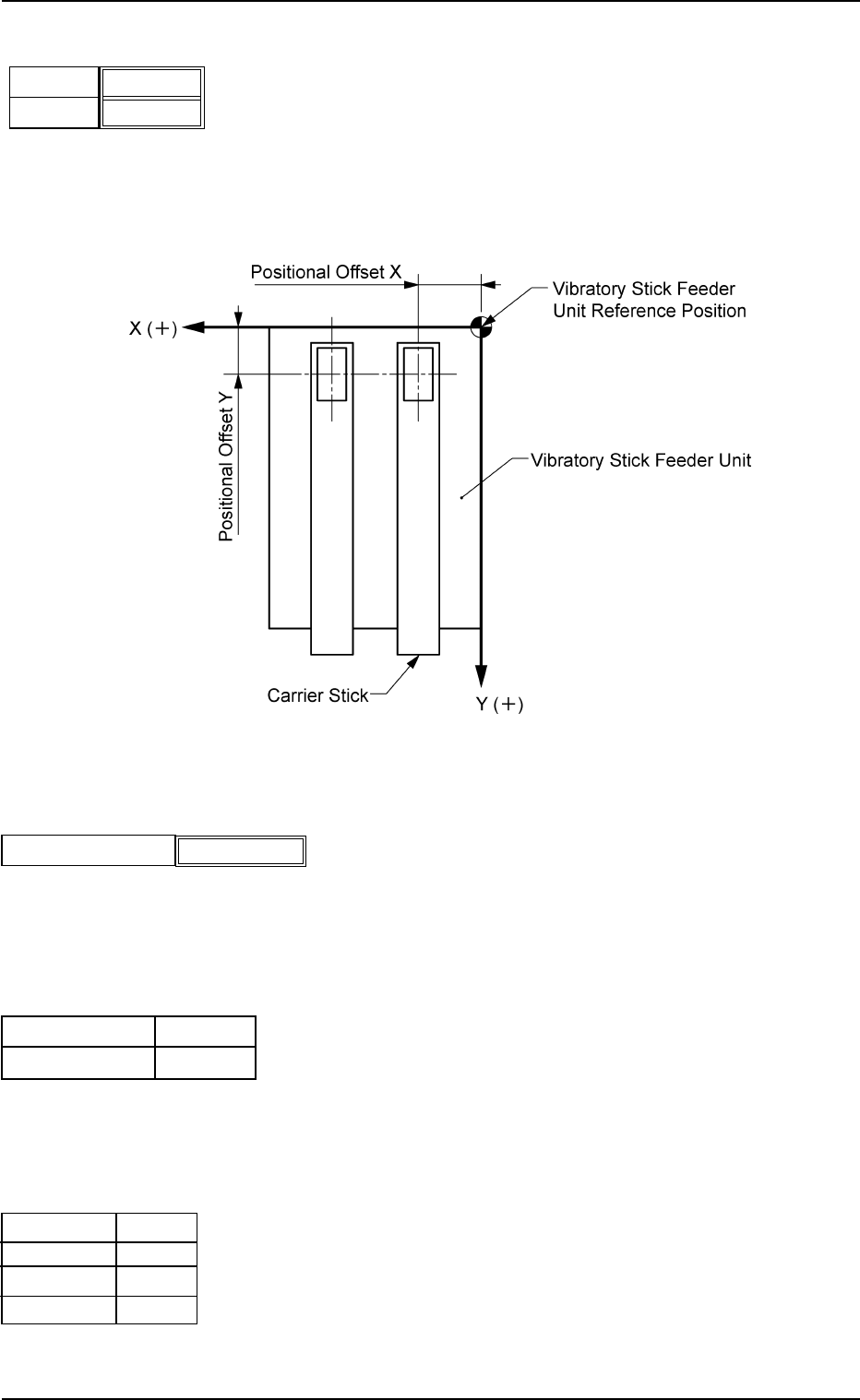
(B02_07) Position X [mm], Y [mm]
Enter the distances between the reference position of the
vibratory stick feeder unit and the pick-up position.
Unit: mm
Data Input Range
X: 0.4 to 120.0 Y: 0.4 to 50.0
Fig. 3B85
(B02_08) Library Comment
Displayed is the comment entered in the component library
data.
(B02_09) Dir [deg], Carrier Data Type
Shown are the values specified in the component library data.
(B02_10) Nozzle #1, C, Nozzle #2, C
Displayed are the nozzle IDs and control commands speci-
fied in the component library data.
X [mm]
Fig. 3B84
Y [mm]
000.00
000.00
Fig. 3B85-1
Library Comment
Fig. 3B86
Carrier Data Type
Dir [deg]
0
Vib Stick
EA06
S
EA04
-
Nozzle #1
C
Nozzle #2
C
Fig. 3B87
2.5 Placement Data
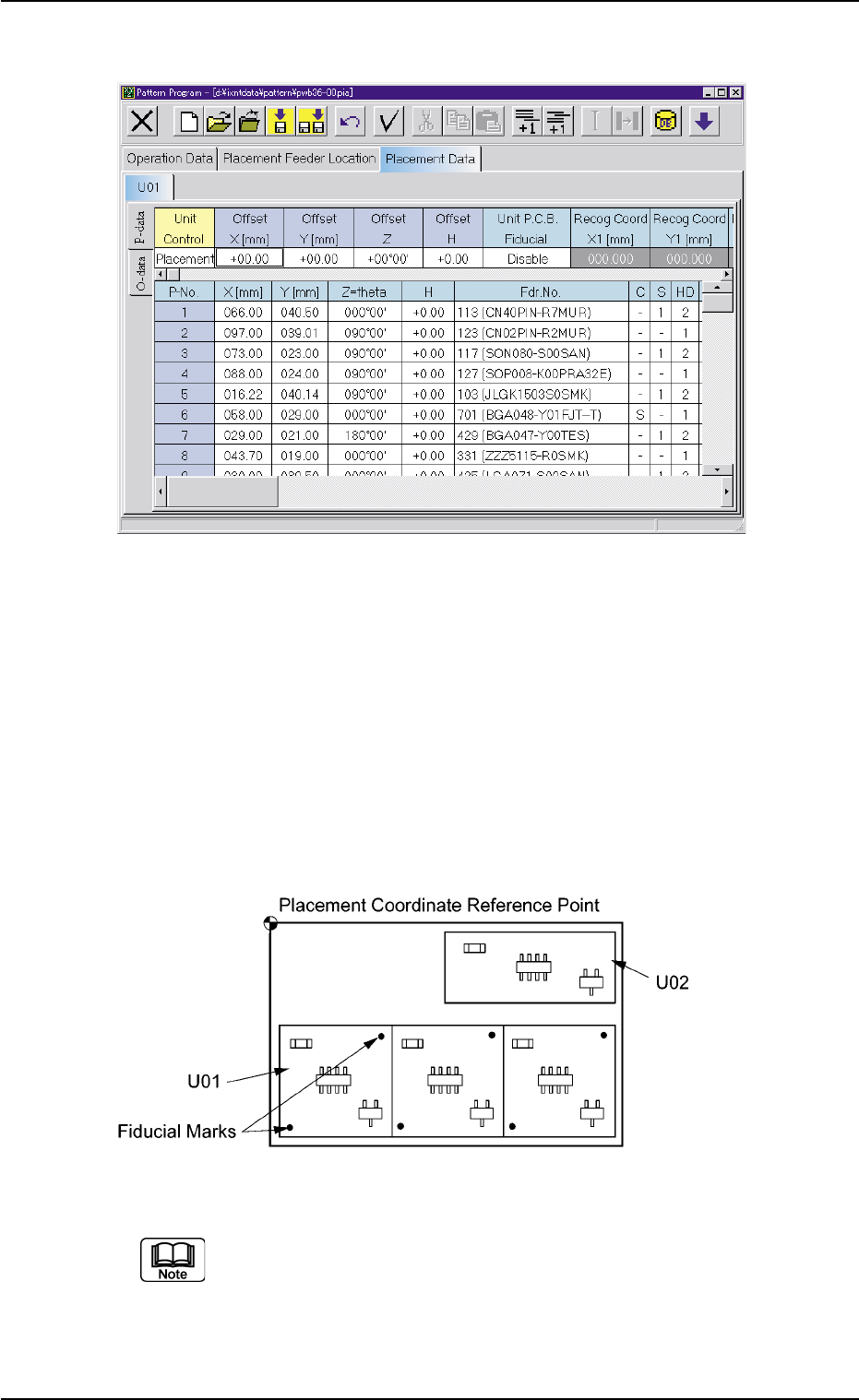
Fig. 3B88 Edit Window (Example)
(C01) Placement Data Un
(C01_01) Selection of Placement Data Group
Select one of the following tabs (placement data groups) in
one pattern program.
U01 : First Placement Data Group
U02 : Second Placement Data Group
È
Un : Up to 99 placement data groups can be specified.
Fig. 3B89 Example of Placement Data (TIM-X100R)
(a) "U01" is used in normal cases.
(b) The operation and feeder location data are used commonly.
(c) Refer to "2.1 Types of P.C.B.’s and Required Data" and "3.
Example of Pattern Program Creation" for details.
0206-002 2-46 AHB01EDTP
2.5 Placement Data