3OM-1075-002.pdf - 第322页
*2 Icons The following functions can be executed. : When pressed, this closes the "Nozzle Data" window . : When pressed, this saves the entered parameters. : When pressed, this checks the entered parameters. Wh…
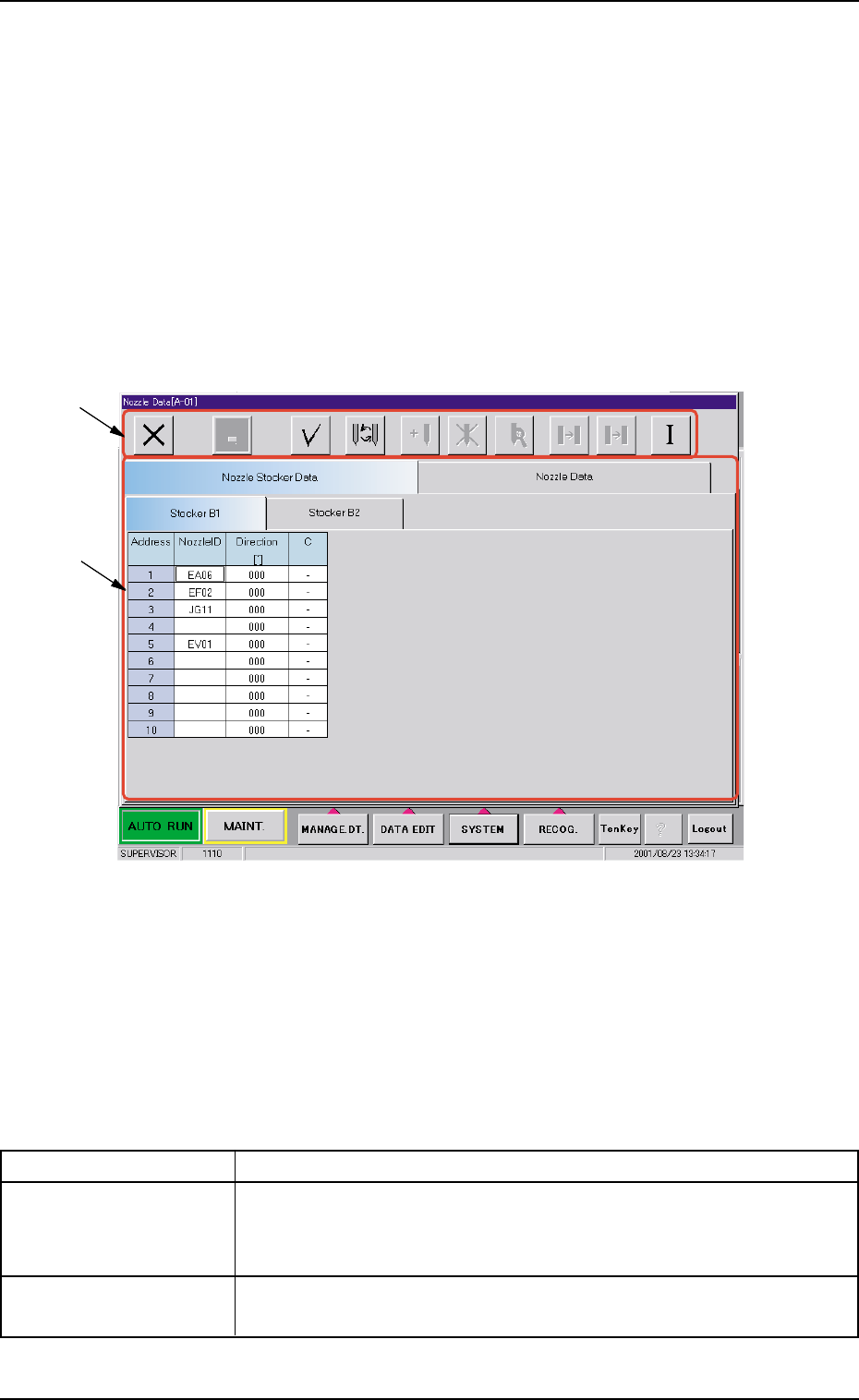
3. "Nozzle Data" Window
It can be specified which nozzle types are allocated for each address (1
through 10) of each nozzle stocker.
The nozzle data can also be set.
••
••
• Window Layout
Press the [SYSTEM] button on the main menu bar. The "SYSTEM SEL."
menu opens. When the [NOZZLE DT] button is pressed, the following
window opens.
Fig. 3E78 "Nozzle Data" Window
••
••
• Window Composition
*1 Tabs and Tab Sheets
The "Nozzle Data" window is provided with the following 2 tab
sheets. When a tab is pressed, the corresponding tab sheet ap-
pears.
Table 3E13
Tabs Description
Nozzle Stocker Data The corresponding tab sheet enables the operator to register the
nozzle types (Nozzle IDs to be allocated) for the addresses
(1 through 10) for each nozzle stocker.
Nozzle Data The corresponding tab sheet enables the operator to edit the nozzle
type data.
0206-002 5-88
AHB01EDTP
3. "Nozzle Data" Window
*1
*2
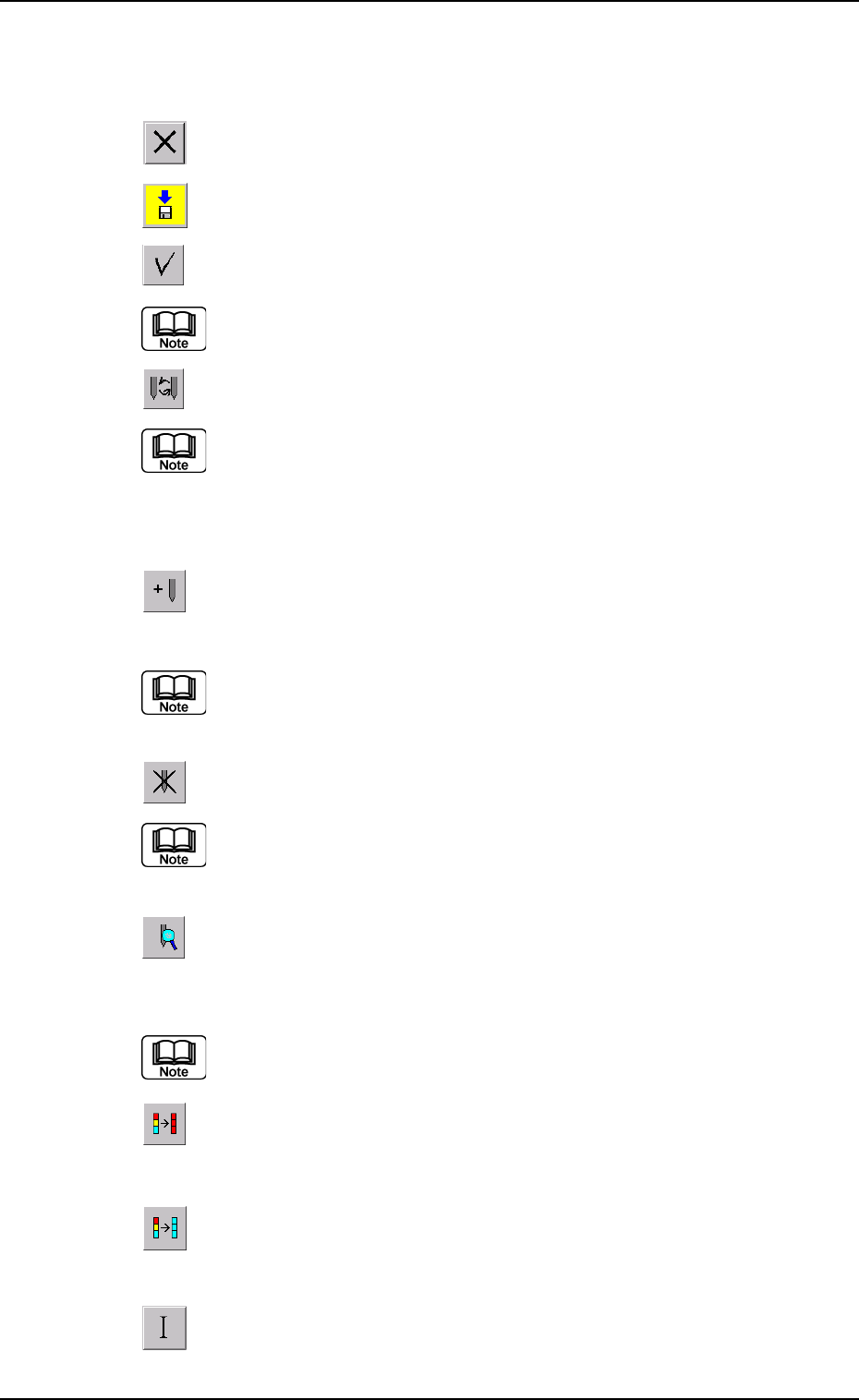
*2 Icons
The following functions can be executed.
: When pressed, this closes the "Nozzle Data" window.
: When pressed, this saves the entered parameters.
: When pressed, this checks the entered parameters.
When an error is found, an error message box opens.
: When pressed, this opens the "Nozzle Type" window,
enabling you to change the nozzle types.
(a) Double-clicking a text box also opens the "Nozzle Type"
window.
(b) Clicking the "Nozzle ID" label (title) selects the nozzle Nos.
on all heads at a time.
: When pressed, the "Nozzle Type Property" window
opens, enabling the operator to add a new nozzle type.
This function is available only in the "Nozzle Data" tab sheet.
: When pressed, this deletes the selected nozzle type.
This function is available only in the "Nozzle Data" tab sheet.
: When pressed, this opens the "Nozzle Type Property"
window for the selected nozzle type, enabling the op-
erator to change the nozzle type.
This function is available only in the "Nozzle Data" tab sheet.
: When pressed, this fills all the selected text boxes with
the parameter in the first text box.
: When pressed, this fills all the selected text boxes with
the parameter in the last text box.
: When pressed, this initializes the selection (sets the
defaults).
0206-002 5-89
AHB01EDTP
3. "Nozzle Data" Window
0308-003 5-90 AHB01EDTP
3.1 "Nozzle Stocker Data" Tab
3.1 "Nozzle Stocker Data" Tab
The machine performs the nozzle change operation during automatic
operation according to this nozzle stocker data.
Be sure to enter parameters correctly. Otherwise, the
nozzles may interfere with each other.
••
••
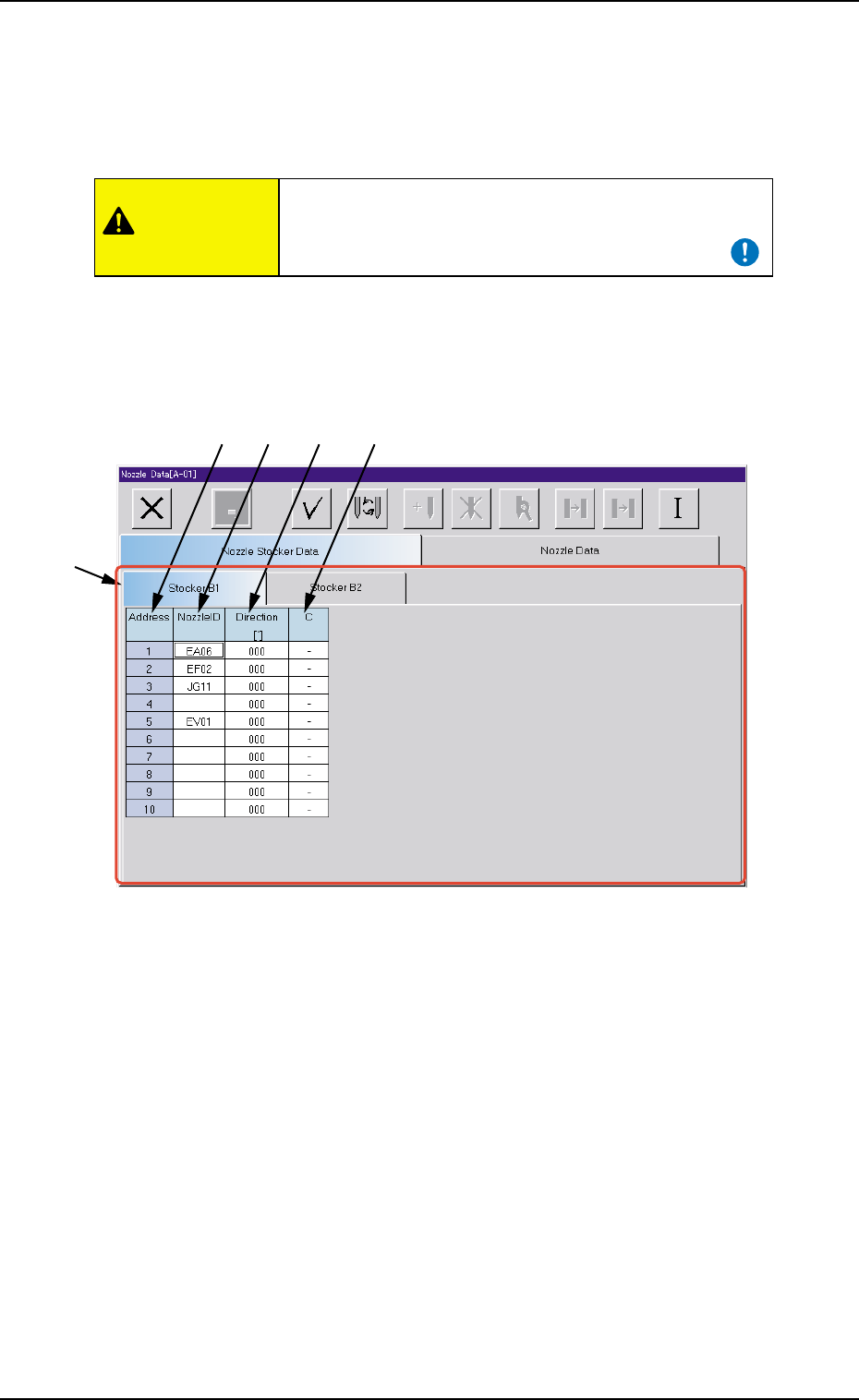
• Sheet Layout
When the "Nozzle Stocker Data" tab is pressed in the "Nozzle Data"
window, the following tab sheet appears inside the window.
Fig. 3E79 "Nozzle Stocker Data" Tab Sheet
••
••
• Sheet Composition
*1 Tabs and Tab Sheets
The "Nozzle Stocker Data" tab sheet is provided with 2 tabs -
"Stocker B1" and "Stocker B2". When a tab is pressed, the corre-
sponding tab sheet appears.
The same items appear in the "Stocker B1" and "Stocker B2" tab
sheets.
*2 Address
Shown are the addresses of the nozzle stocker.
*2
*1
*3 *4 *5
CAUTION