3OM-1075-002.pdf - 第255页
2.1.2 "Feeder A" T ab • Sheet Layout When "Feeder A" tab is pressed in the "Offset Data" tab sheet, the following tab sheet appears. Fig. 3E24 "Feeder A" T ab Sheet (Provided with …
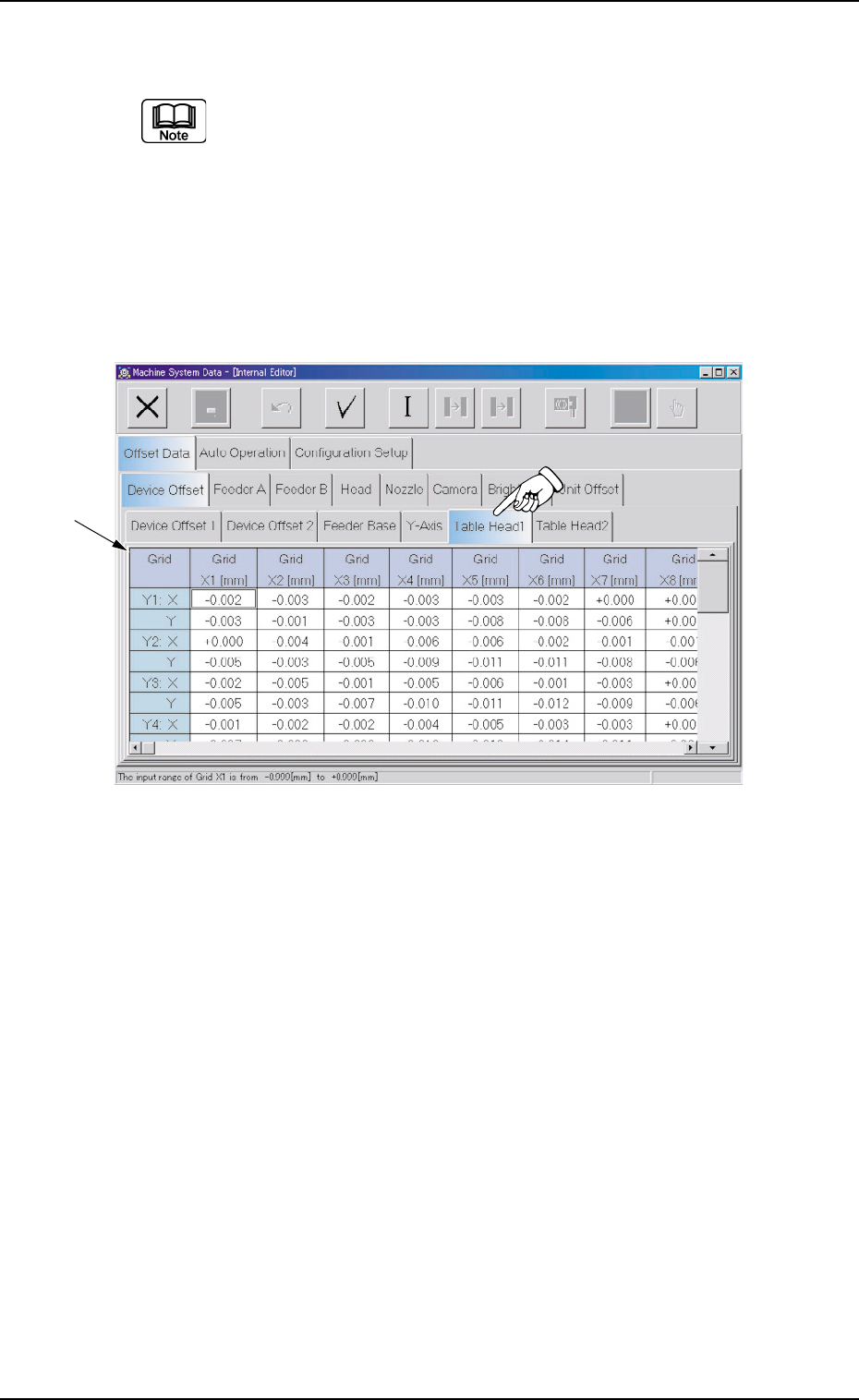
2.1.1.5 "Table Head1" and "Table Head2" Tabs
Almost the same items as "Table Head1" are displayed in the
"Table Head2" tab sheet and the navigations similar to those
through the "Table Head1" tab sheet can be followed through
the "Table Head2" tab sheet.
• Sheet Layout
When the "Table Head1" or the "Table Head2" tab is pressed in the
"Device Offset" tab sheet, the following tab sheet appears.
Fig. 3E23 "Table Head1" Tab Sheet
• Sheet Composition
*1 Offset Items
Set the following offset values.
Grid
Enter the deviations (based on the specified distance) that will be
caused when Head #1 has moved by the specified distance from
the P.C.B. positioning reference to each grid (X Direction: X1 through
X23, Y Direction: Y1 through Y15).
These values are automatically calculated through teaching opera-
tions and entered in each text box.
0308-004 5-23
AHB01EDTP
*1
2.1 "Offset Data" Tab
2.1.2 "Feeder A" Tab
• Sheet Layout
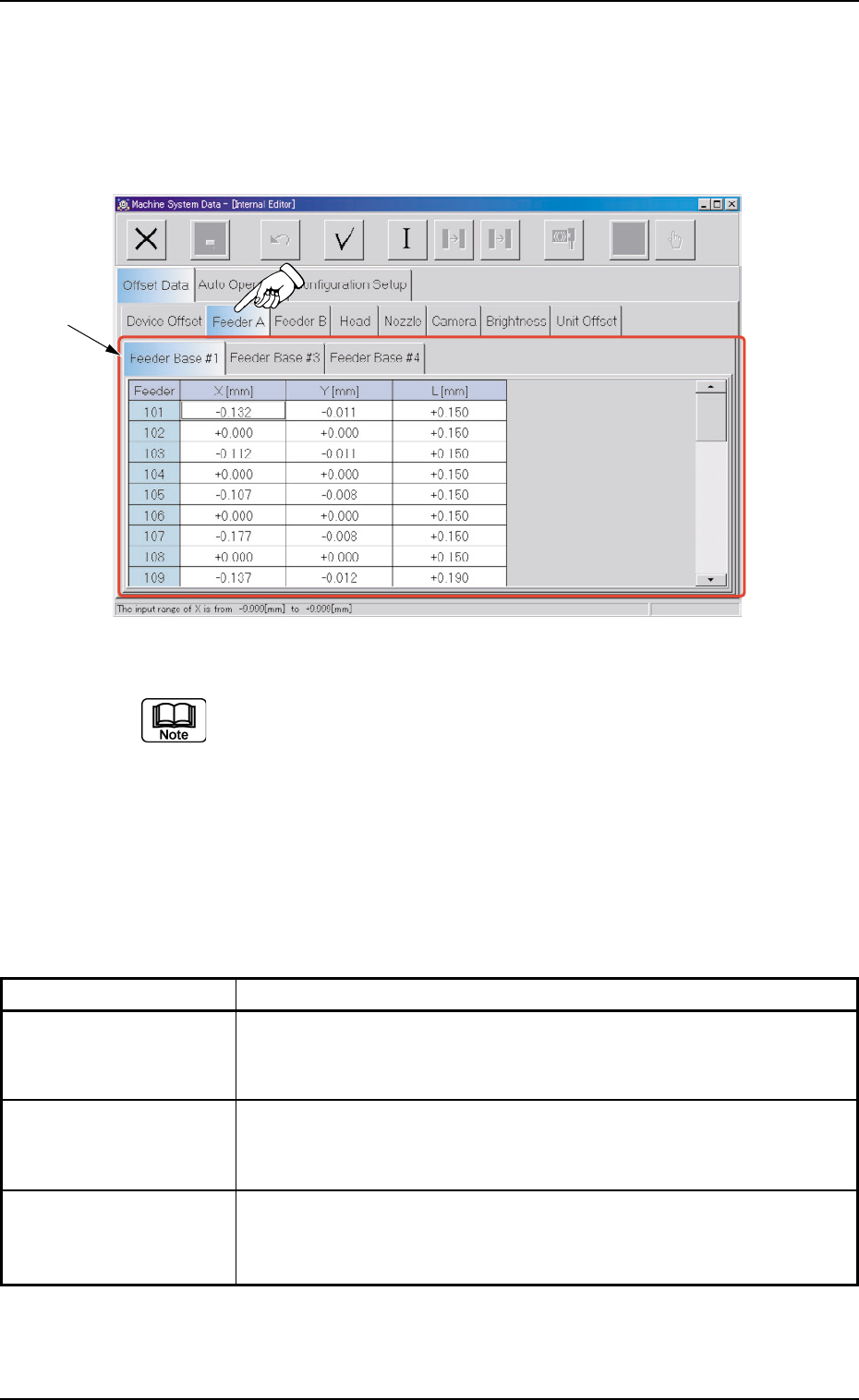
When "Feeder A" tab is pressed in the "Offset Data" tab sheet, the
following tab sheet appears.
Fig. 3E24 "Feeder A" Tab Sheet (Provided with Multi-Layer Tray Feeder 2)
The tab sheet may look different, depending on which options are
selected.
• Sheet Composition
*1 Tabs and Tab Sheets
The "Feeder A" tab sheet is provided with the following 3 tab sheets.
When each tab is pressed, the corresponding tab sheet appears.
Table 3E2-2
Tabs Description
Feeder Base #1 The corresponding tab sheet enables the operator to set the offset
data of the pick-up positions at Feeder Nos. 101 through 132 on Feeder
Base #1.
Feeder Base #3 The corresponding tab sheet enables the operator to set the offset
data of the pick-up positions at Feeder Nos. 301 through 332 on Feeder
Base #1.
Feeder Base #4 The corresponding tab sheet enables the operator to set the offset
data of the pick-up positions at Feeder Nos. 401 through 432 on Feeder
Base #1.
0308-004 5-24 AHB01EDTP
*1
2.1 "Offset Data" Tab
2.1.2.1 "Feeder Base #1", "Feeder Base #2", "Feeder Base #3",
and "Feeder Base #4" Tabs
• Sheet Layout
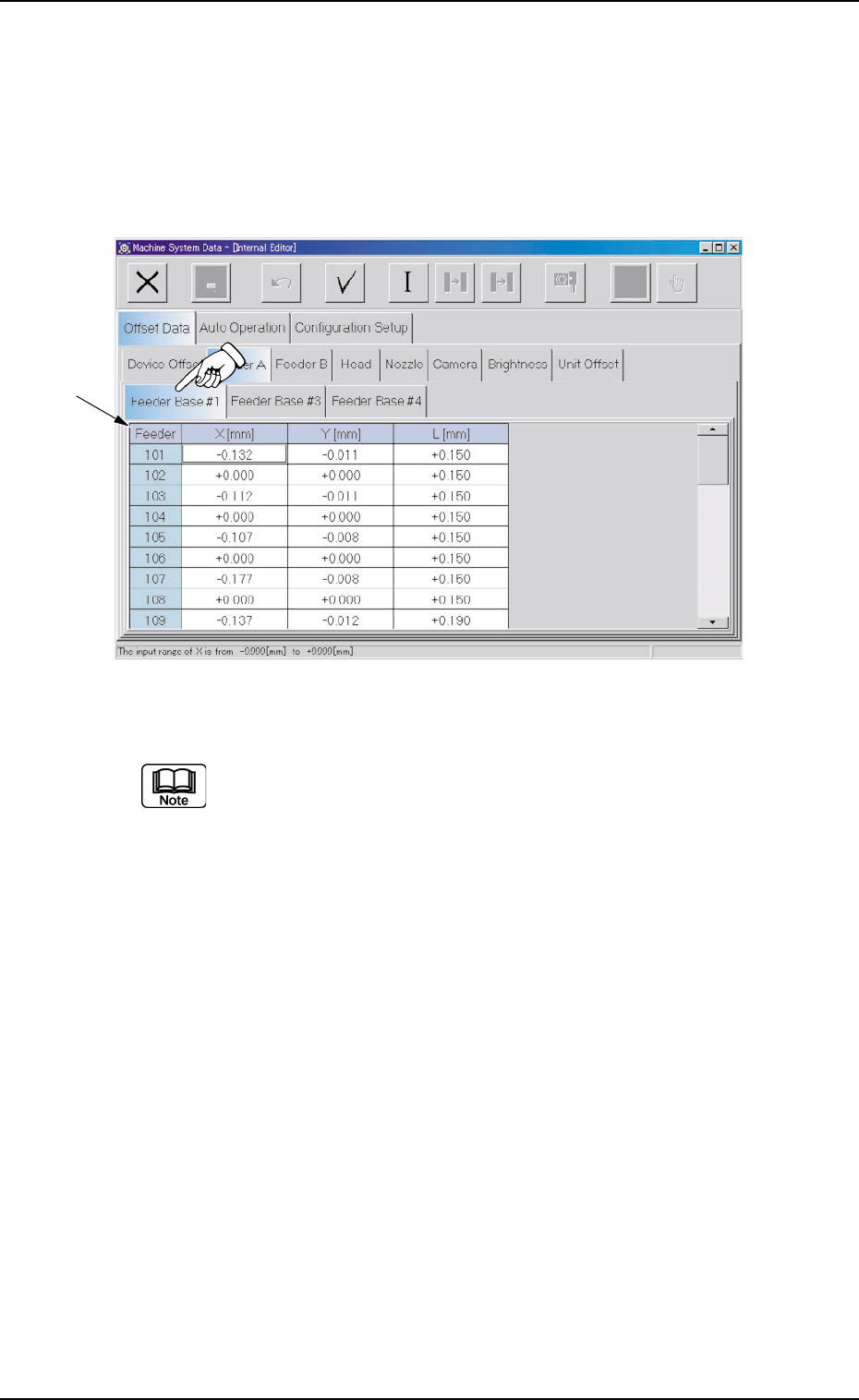
When the "Feeder Base #1" tab is pressed in the "Feeder A" tab
sheet, the following tab sheet appears.
Fig. 3E25 "Feeder Base #1" Tab Sheet (Provided with Multi-Layer Tray Feeder 2)
(a) The tab sheet may look different, depending on which options are
selected.
(b) Almost the same navigations must be followed for the feeders (101
through 132 on Feeder Base #1, 301 through 332 on Feeder Base
#3, and 401 through 432 on Feeder Base #4) installed on each
feeder base in the "Feeder Base #1", "Feeder Base #3", and
"Feeder Base #4" tab sheets.
• Sheet Composition
*1 Offset Items
Set the following offset values for each feeder (101 through 132 on
Feeder Base #1, 301 through 332 on Feeder Base #3, and 401
through 432 on Feeder Base #4).
0308-004 5-25
AHB01EDTP
*1
2.1 "Offset Data" Tab