3OM-1075-002.pdf - 第304页
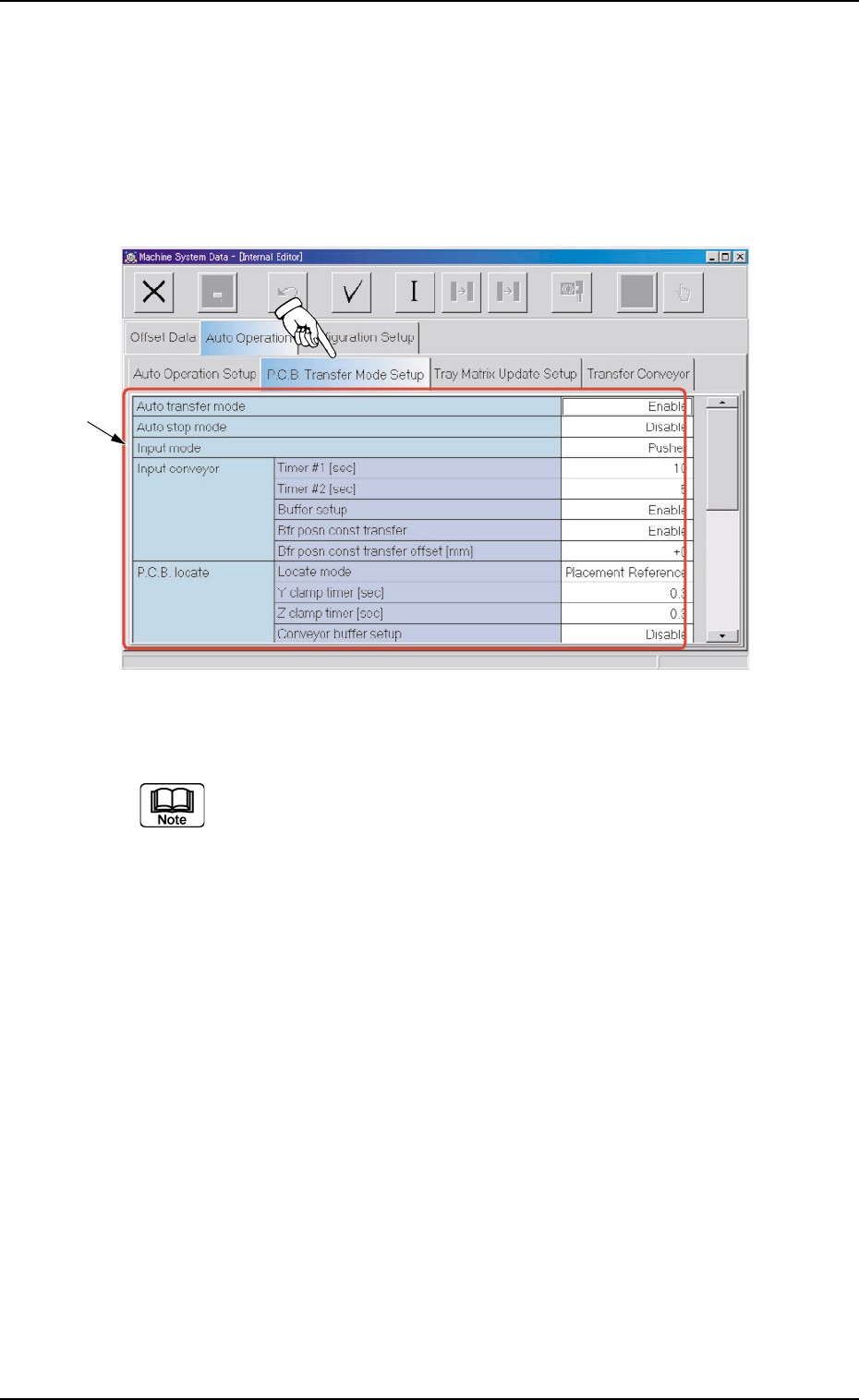
2.2.2 "P .C.B. T ransfer Mode Setup" T a b • • • • • Sheet Layout When the "P .C.B. Transfer Mode Setup" tab is pressed in the "Auto Operation" tab sheet, the following tab sheet appears. Fi…

0206-002 5-71 AHB01EDTP
2.2 "Auto Operation" Tab
Component recog camera position correct
Mode, Mount counts
Mode
"Correct" or "No Correct" can be selected to determine whether
or not the component recognition camera position should be cor-
rected periodically.
It is recommended to set "Correct" in normal cases.
Mount counts
Press the [TenKey] button on the main menu bar to open the
"TenKey" edit window and enter the following numerical value.
"0" : No automatic correction operation is performed for
each number of components to be placed.
"1" to "9999" : Correction is made according to the specified num-
ber of components to be placed.
(a) When "Correct" is set in the "Mode" text box, the correc-
tive actions take place automatically before the P.C.B. is
transferred to the P.C.B. positioning section and the com-
ponent recognition operation is performed.
(b) When the number of components (components to be
placed on a production P.C.B.) per beam is smaller than
the set number of components, the corrective actions do
not take place in the middle of placement operation.
Because the internal counter for interval monitoring is
cleared through the above-described corrective actions
(the actions which take place during P.C.B. positioning),
no corrective actions take place in compliance with the
number of components to be placed on several P.C.B.’s.
2.2.2 "P.C.B. Transfer Mode Setup" Tab
••
••
• Sheet Layout
When the "P.C.B. Transfer Mode Setup" tab is pressed in the "Auto
Operation" tab sheet, the following tab sheet appears.
Fig. 3E66 "P.C.B. Transfer Mode Setup" Tab Sheet
(Provided with Multi-Layer Tray Feeder 2)
The tab sheet may look different, depending on which options are
selected.
••
••
• Sheet Composition
*1 Items
The following items are displayed.
Auto transfer mode
Set "Enable" or "Disable" in the text box to determine whether or
not the automatic transfer function should be used.
When "Disable" (Standard) is set, P.C.B.
,
s are transferred
as follows
The finished P.C.B. (where components are already placed) on
0308-003 5-72
AHB01EDTP
2.2 "Auto Operation" Tab
*1
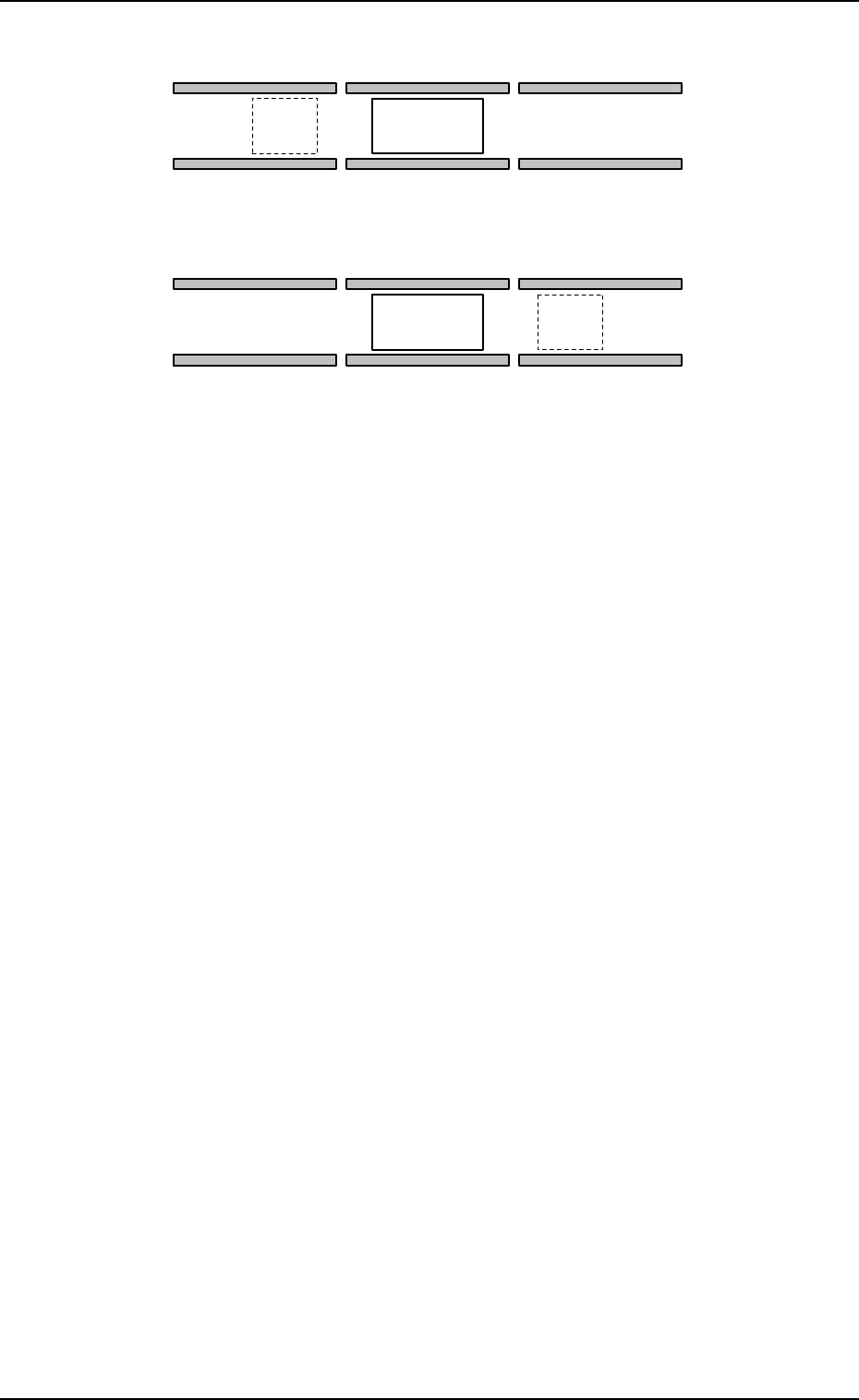
Fig. 3E67
The finished P.C.B. on the P.C.B. positioning section is set in the
standby mode until the subsequent P.C.B. comes to "Area A"
shown in the figure.
When "Enable" is set in the "Auto transfer mode" text box,
P.C.B.’s are transferred as follows.
When the components are placed completely on the P.C.B. in
the P.C.B. positioning section, no P.C.B. is located on (A), and
the conveyor transfer is not started up, the P.C.B. transfer func-
tion is activated and the finished P.C.B. is discharged to the out-
put machine.
This function works efficiently to avoid finished P.C.B. stagnation
on the P.C.B. positioning section when the line balance between
the machine and the input machine is not good.
Auto stop mode
"Enable" or "Disable" can be set in this text box to determine
whether or not the automatic stop function should be used.
When "Enable" (standard mode) is set in the text box, the
automatic stop function works in the following cases.
The machine stops when the automatic operation is started by
pressing the [START] button with the machine in the initialized
mode (no P.C.B. on the machine), the machine is waiting for a
P.C.B. to be sent from the input machine and detects that "RUN"
signal has stopped coming from the input machine, and the ma-
chine is kept in the condition for 2 seconds.
0206-002 5-73
AHB01EDTP
2.2 "Auto Operation" Tab
A
A
P.C.B. Transfer Direction [L → R]
P.C.B. Positioning Section
P.C.B. Positioning Section
P.C.B. Transfer Direction [R → L]