3OM-1075-002.pdf - 第235页
2. "Machine System Data" Window • • • • • Window Layout When the [SYS DA T A] button is selected from the "SYSTEM SEL." menu that opens after the [SYSTEM] button on the main menu bar is pressed, the f…

1.3 Outline of Each Window
0107-001 5-3 AHB01EDTP
1.3 Outline of Each Window
Each window for system setting enables the operator to set the follow-
ing items.
"Machine System Data" Window
This enables the operator to set the offset data, the automatic op-
eration data, the light tower, and the alarm system.
"Nozzle Data" Window
This enables the operator to set the placement head/nozzle data
and the nozzle data.
"MACH SETUP" Window
This enables the operator to set the screen saver function and specify
the unit of length, a language, a password, date and time, etc.
2. "Machine System Data" Window
••
••
• Window Layout
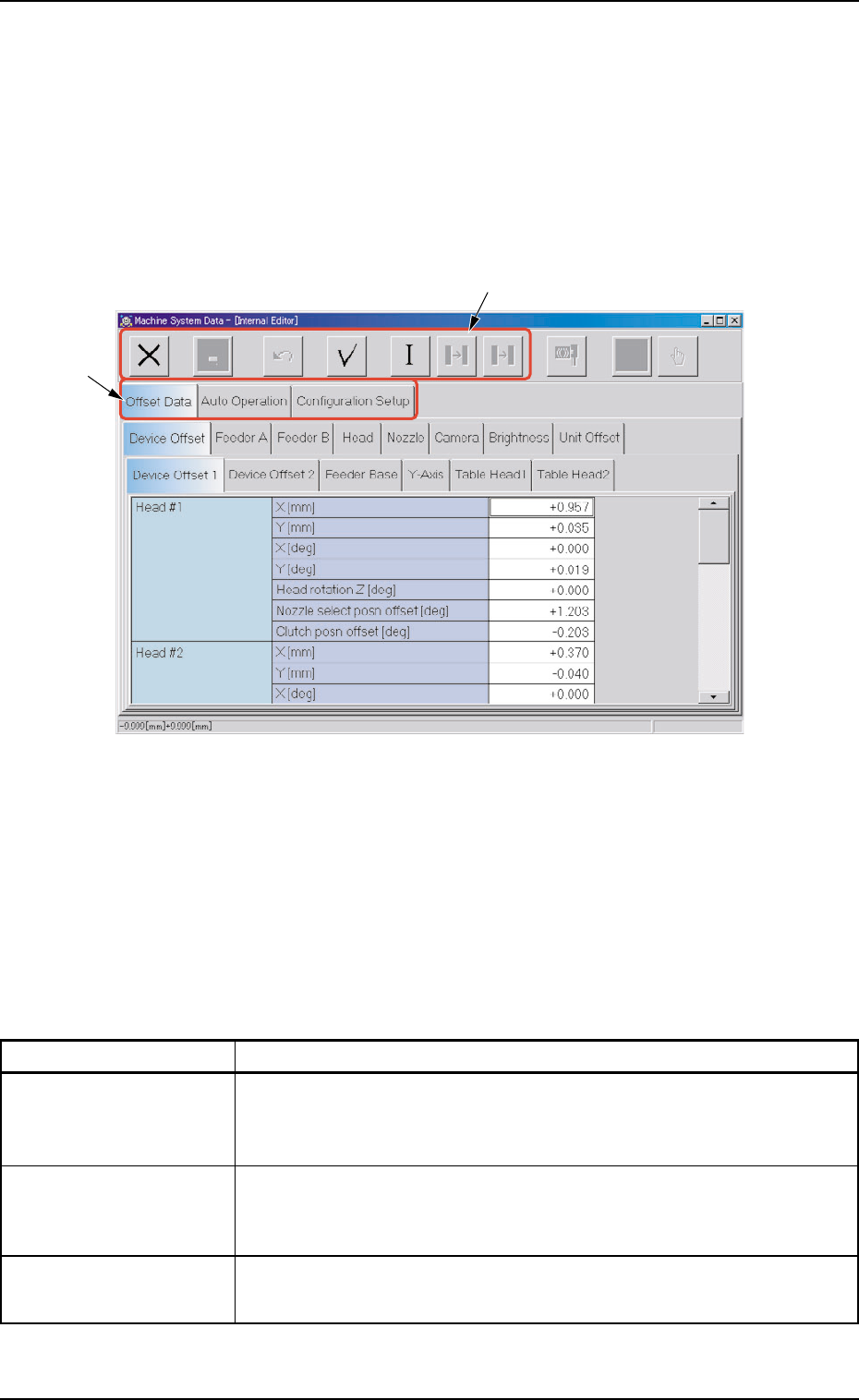
When the [SYS DATA] button is selected from the "SYSTEM SEL." menu
that opens after the [SYSTEM] button on the main menu bar is pressed,
the following window opens.
Fig. 3E3 "Machine System Data" Window
••
••
• Window Composition
*1 Tabs and Tab Sheets
The "Machine System Data" window is provided with the follow-
ing three tab sheets. When a tab is pressed, the corresponding
tab sheet appears inside the window.
Table 3E1
Tabs Description
Offset Data The corresponding tab sheet enables the operator to set various kinds
of offset data for positional adjustment and accuracy of each device
section related to machine operation.
Auto Operation The corresponding tab sheet enables the operator to set various pa-
rameters related to automatic operation of the machine and check
the machine performance, production rate, production guidance, etc.
Configuration Setup The corresponding tab sheet enables the operator to set up param-
eters related to the light tower and the buzzer.
0308-004 5-4
AHB01EDTP
2. "Machine System Data" Window
*2
*1
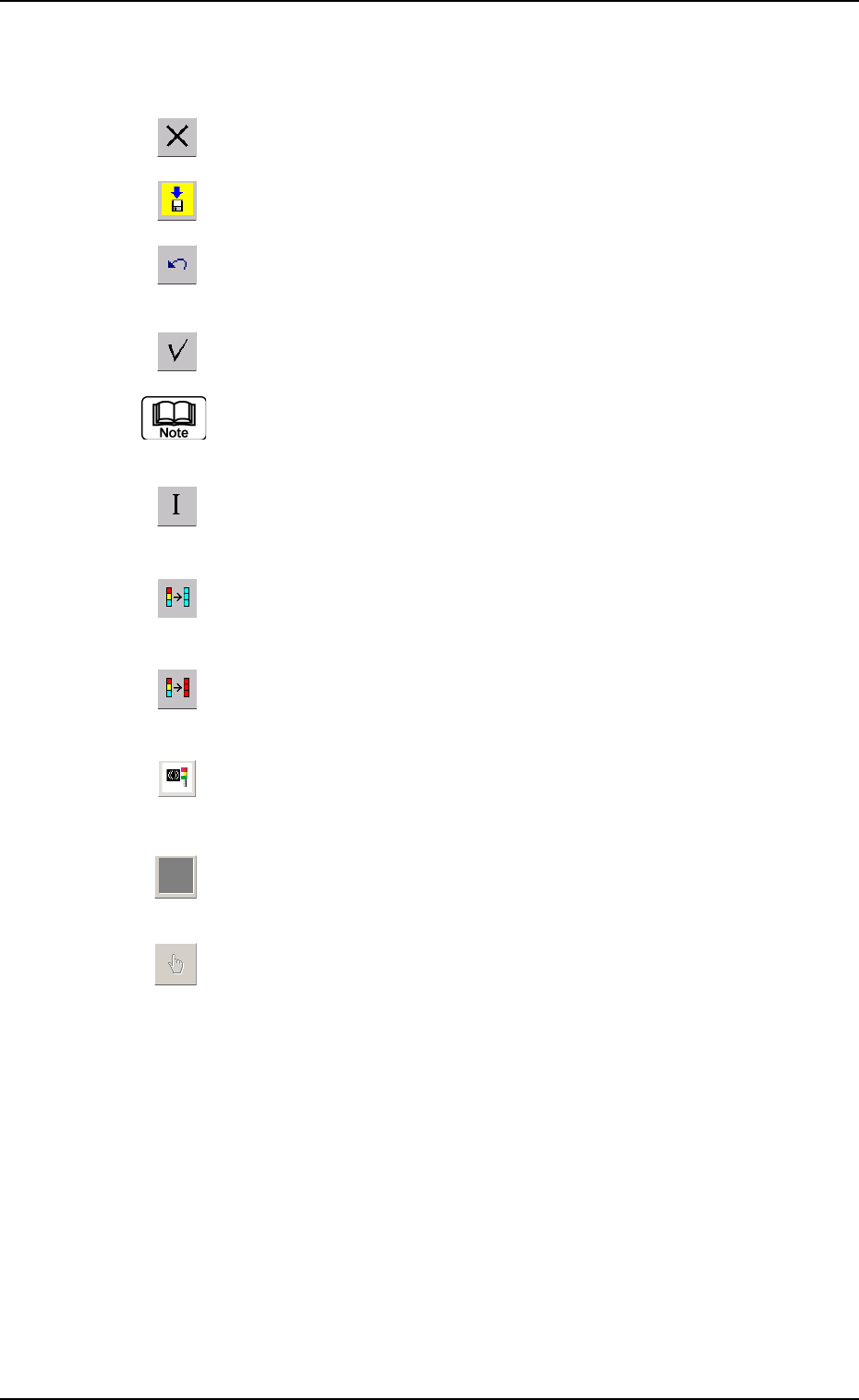
*2 Icons
The following functions can be executed.
: When pressed, this closes the "System" window.
: When pressed, this saves the edited contents.
: When pressed, this reverses the effect of your previous
action.
: When pressed, this checks the entered parameters.
When an error is found, an error message box opens.
: When pressed, this resumes the defaults in the selected
range.
: When pressed, this fills all the selected text boxes with
the parameter in the first text box.
: When pressed, this fills all the selected text boxes with
the parameter in the last text box.
: When pressed, this changes the parameters in the "Con-
figuration Setup" tab sheet to the standard ones.
: When the "Feeder B" tab sheet is active and this button
is pressed, all offset data is cleared.
: When pressed, this displays a list of component IDs,
making it possible to select a component ID.
0308-003 5-5
AHB01EDTP
2. "Machine System Data" Window